Why don't all browsers work with Windows 7?

keimanzero

Banned
Local time
8:15 PM
Messages
9
:devil: OK can anyone explain to me why I can only get IE8 to work with Windows 7 all of a sudden? I have tried all of these browsers but none seem to work with Win 7 yet aren't all browsers supposedly compatible with Win 7?

Firefox 3.6.13 (usually my default browser)
Opera 11.01
Google Chrome (only browser to reasonably accept Flash/Shockwave from Adobe)
Orca (Worked great until last week)
Avant
Safari
SeaMonkey
Lunascape
Cometbird
Pale Moon from Mozilla
Rocket (For kids mostly but I was desperate)
Maxthon

I asked at EONS CT&IS and at ask/answer.com to no avail. The only thing they suggest is a complete recovery of factory settings but Hell man I have 25 years of stuff on here! Does anyone there have any intelligent solutions I can try? Thanks a lot and have a nice weekend or what's left of it anyway- Jack McElwee/keimanzero:banghead:
 

My Computer My Computer

Computer Manufacturer/Model Number
HP Pavilion
OS
Windows 7 Home Premium 64 bit
:devil: OK can anyone explain to me why I can only get IE8 to work with Windows 7 all of a sudden? I have tried all of these browsers but none seem to work with Win 7 yet aren't all browsers supposedly compatible with Win 7?

Firefox 3.6.13 (usually my default browser)
Opera 11.01
Google Chrome (only browser to reasonably accept Flash/Shockwave from Adobe)
Orca (Worked great until last week)
Avant
Safari
SeaMonkey
Lunascape
Cometbird
Pale Moon from Mozilla
Rocket (For kids mostly but I was desperate)
Maxthon

I asked at EONS CT&IS and at ask/answer.com to no avail. The only thing they suggest is a complete recovery of factory settings but Hell man I have 25 years of stuff on here! Does anyone there have any intelligent solutions I can try? Thanks a lot and have a nice weekend or what's left of it anyway- Jack McElwee/keimanzero:banghead:

If one or two of those browsers failed, you can look at a corrupted install, but all of them? Thats too much of a coincidence to be a random failure.

Have you checked your computer for any virus and/or malware that may be killing those browsers?
 

My Computer My Computer

Computer type
PC/Desktop
Computer Manufacturer/Model Number
Virtual Machine
OS
Windows 7 Professional 32-bit SP1
CPU
AMD A4/A6
Motherboard
Intel Corporation 440BX Desktop Reference Platform
Memory
3.00GB EDO
Graphics Card(s)
VMware SVGA 3D
Sound Card
High Definition Audio Device
Monitor(s) Displays
Generic Non-PnP Monitor on VMware SVGA 3D
Screen Resolution
1440x900
Hard Drives
1 x 60GB VMware Virtual SATA Hard Drive ATA Device
Antivirus
Kaspersky Total Security
What do you think my first actions were? Of course I checked and I'm clean. I did ask for intelligent meaning not the obvious suggestions. If browsers work so damned great then why are they always having to 'patch' security holes in them? All I want and need is a plain browser that allows Adobe products- all of them w/o crashing!! Is there such an animal? If not (hint to MS and Adobe and Yahoo and Google) then why not build a new one? Just start over again! Hire me and I can help out. I need a job anyhow and I'm sure I'd be better than whoever the monkeys are you are using at the moment dammit! Thanks anyway Szom. Love your avatar. Is that Skeletor from Masters of the Universe or Emporer Palpatine from Star Wars maybe? Looks familiar- JKMc/K&K
 

My Computer My Computer

Computer Manufacturer/Model Number
HP Pavilion
OS
Windows 7 Home Premium 64 bit
What do you think my first actions were? Of course I checked and I'm clean. I did ask for intelligent meaning not the obvious suggestions. If browsers work so damned great then why are they always having to 'patch' security holes in them? All I want and need is a plain browser that allows Adobe products- all of them w/o crashing!! Is there such an animal? If not (hint to MS and Adobe and Yahoo and Google) then why not build a new one? Just start over again! Hire me and I can help out. I need a job anyhow and I'm sure I'd be better than whoever the monkeys are you are using at the moment dammit! Thanks anyway Szom. Love your avatar. Is that Skeletor from Masters of the Universe or Emporer Palpatine from Star Wars maybe? Looks familiar- JKMc/K&K

Ok, so you're malware free. Next step - check your Adobe plugins. It would seem as though your browsers are crashing with Adobe products, so that would be the most logical thing to check.

But as for browsers being perfect - there is no such thing. With ANY kind of software. Fixing one security hole usually exposes another, ad infinitum.

My Avatar: Skeletor from M.O.T.U.
 

My Computer My Computer

Computer type
PC/Desktop
Computer Manufacturer/Model Number
Virtual Machine
OS
Windows 7 Professional 32-bit SP1
CPU
AMD A4/A6
Motherboard
Intel Corporation 440BX Desktop Reference Platform
Memory
3.00GB EDO
Graphics Card(s)
VMware SVGA 3D
Sound Card
High Definition Audio Device
Monitor(s) Displays
Generic Non-PnP Monitor on VMware SVGA 3D
Screen Resolution
1440x900
Hard Drives
1 x 60GB VMware Virtual SATA Hard Drive ATA Device
Antivirus
Kaspersky Total Security
Is it the 64 bit version of IE8 that is working, or the 32 bit? If only the 64 bit is working, and all 32 bit browsers are not. Try this:

1. Go to start
2. In search box, type cmd , right click cmd.exe, and then click "Run as administrator"
3. Then type:

netsh winsock reset

4. Press enter
5. Restart PC

Hopefully that will fix it

A Guy
 

My Computer My Computer

Computer type
PC/Desktop
OS
Windows 10 Home x64
CPU
INTEL Core i5-750 Quad-Core 3.37GHz
Motherboard
ASUS P7P55D
Memory
HyperX Fury Black Series 8GB (2 x 4GB) 1866Mhz
Graphics Card(s)
EVGA GeForce GTX 750 Superclocked 1GB 128-Bit GDDR5
Monitor(s) Displays
LG 32MA68HY 32" IPS
Screen Resolution
1920 x 1080
Hard Drives
Samsung 840 Evo 120GB, SEAGATE 500GB Barracuda® 7200.12, SATA 3 Gb/s, 7200 RPM, 16MB cache
PSU
ANTEC TruePower New TP-550, 80 PLUS, 550W
Case
ANTEC Three Hundred Illusion
Cooling
COOLER MASTER Hyper 212 Plus, 4 x 120mm 1 x 140mm Noctua's
Internet Speed
85 + Mbps
Antivirus
Avast
Browser
Vivaldi
I have done that over and over Dzom but the only browser that works now is IE8 and that will not repeat NOT support Adobe Flash or Shockwave and there are no non-Adobe alternatives for Flash or SW. Maybe I'll email Adobe for some advice on which browser they recommend. Thanks again Dzom and who is that avatar of yours? Mine are the Flash Angels (Dirty Pair Flash) Kei and Yuri- tro cons or trouble consultants for the 3WA on Shimougou- intergalactic cops. Well thanks again and have a great day Dzom- Jack/K&K
 

My Computer My Computer

Computer Manufacturer/Model Number
HP Pavilion
OS
Windows 7 Home Premium 64 bit
Is it the 64 bit version of IE8 that is working, or the 32 bit? If only the 64 bit is working, and all 32 bit browsers are not. Try this:

1. Go to start
2. In search box, type cmd , right click cmd.exe, and then click "Run as administrator"
3. Then type:

netsh winsock reset

4. Press enter
5. Restart PC

Hopefully that will fix it

A Guy


Not that simple Guy. Both IE8 64 and 32 bit function. Neither seems compatible with Adobe Flash or Adobe Shockwave Players. A friend suggested disabling IE8 and going back to IE7 but disabling IE8 takes out the whole IE browser both 32 and 64 bits. Then it was suggested going back to IE5 but Windows 7 is not compatible with anything below IE8. IE9 Beta's loaded with glitches and I got rid of it. Maybe when the new IE9 comes out or the new Firefox 14, Opera 12, Chrome 10 or Orca Build 7 or something else they will be compatible with all Adobe products. Until then I just sit and wait and hope my friend- Jack/K&K
 

My Computer My Computer

Computer Manufacturer/Model Number
HP Pavilion
OS
Windows 7 Home Premium 64 bit
This is very weird .... don't think Wds 7 bug ...but rather there is some corrupted file in the system ....
Reinstall or do a wds repair ...see if it help ......?
 

My Computer My Computer

Computer type
Laptop
Computer Manufacturer/Model Number
Sony Vaio VPC-SE23FXS
OS
WDS 7 Home Pre.x64
CPU
Intel Core i5 2450M @ 2.50GHz
Memory
8GB Kingston[2x4] Dual-Channel DDR3 @ 1333MHz
Graphics Card(s)
AMD Radeon(TM) HD 6470M + Intel(R) HD Graph 3000
Hard Drives
TOSHIBA MK6459GSXP 600GB x 5400RPM (SATA)

My Computer My Computer

Computer type
PC/Desktop
Computer Manufacturer/Model Number
self build
OS
Windows 7 Ultimate 64 bit
CPU
Intel Core i7 4770K overclocked to 4.7GHz Quad Core Haswell
Motherboard
Asus Z87 Pro (Socket 1150) ATX Motherboard
Memory
16GB Team Group Vulcan Gold 2133MHz
Graphics Card(s)
ATI Radeon HD 7880 Series Display adapter
Monitor(s) Displays
NEC LCD2690WUXi2
Screen Resolution
26" 1920 x 1200
Hard Drives
Samsung 500GB SSD 840 EVO SATA 6Gb/s
Samsung 250GB SSD 840 EVO SATA 6Gb/s
PSU
Corsair AX760 Platinum
Case
Cooler Master HAF X Gaming Tower
Cooling
XSPC RayStorm 750 RS360 Water cooling
Mouse
Razer Death Adder left handed
Internet Speed
126Mb download 11.5Mb up
Antivirus
Avast free
Browser
Opera
Other Info
Main Browser is Opera
Favorite software Adobe Lightroom & Photoshop
best plugins Nik software
Firewall : Private firewall 7
Is it the 64 bit version of IE8 that is working, or the 32 bit? If only the 64 bit is working, and all 32 bit browsers are not. Try this:

1. Go to start
2. In search box, type cmd , right click cmd.exe, and then click "Run as administrator"
3. Then type:

netsh winsock reset

4. Press enter
5. Restart PC

Hopefully that will fix it

A Guy


Not that simple Guy. Both IE8 64 and 32 bit function. Neither seems compatible with Adobe Flash or Adobe Shockwave Players. A friend suggested disabling IE8 and going back to IE7 but disabling IE8 takes out the whole IE browser both 32 and 64 bits. Then it was suggested going back to IE5 but Windows 7 is not compatible with anything below IE8. IE9 Beta's loaded with glitches and I got rid of it. Maybe when the new IE9 comes out or the new Firefox 14, Opera 12, Chrome 10 or Orca Build 7 or something else they will be compatible with all Adobe products. Until then I just sit and wait and hope my friend- Jack/K&K


Then might I suggest you contact Adobe support to attempt to resolve this issue? If Adobe is not working with any of your browsers, then as I said before: Adobe is the problem.

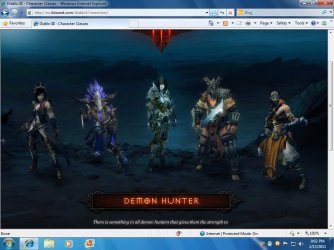
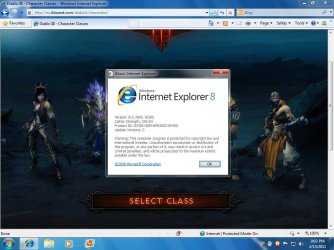
Case in point, following are two screenshots I took showing the Diablo 3 website working perfectly in Internet Explorer 8:

Image1.jpg Image2.jpg
The Diablo3 websites makes almost exclusive use of Adobe Flash...
 

My Computer My Computer

Computer type
PC/Desktop
Computer Manufacturer/Model Number
Virtual Machine
OS
Windows 7 Professional 32-bit SP1
CPU
AMD A4/A6
Motherboard
Intel Corporation 440BX Desktop Reference Platform
Memory
3.00GB EDO
Graphics Card(s)
VMware SVGA 3D
Sound Card
High Definition Audio Device
Monitor(s) Displays
Generic Non-PnP Monitor on VMware SVGA 3D
Screen Resolution
1440x900
Hard Drives
1 x 60GB VMware Virtual SATA Hard Drive ATA Device
Antivirus
Kaspersky Total Security
Finally! I did the netsh windsock reset, reinstalled java, reinstalled Flash (which runs in both 32 and 64 bit versions of IE8) in both and Shockwave (which only runs in 32bit version) in 32 bit IE8 and now so long as I use the 32 bit IE8 both work. So far that is. Hope this has solved it. Thanks to everyone here at Windows 7 Forums for all your help. Sayonara for now my friends- Jack McElwee/K&K
 

My Computer My Computer

Computer Manufacturer/Model Number
HP Pavilion
OS
Windows 7 Home Premium 64 bit
Back
Top