
Why Has Font Size Changed When Viewing A Certain Forum Website?

woodbine

New member
Member
VIP
Local time
7:44 AM
Messages
178
Location
Bristol, UK
Something strange has happened when viewing a forum that I regularly visit (www.diynot.com). For some reason, it has started viewing it differently, ie. the font size is smaller. The font size on the normal threads of this site are a little smaller, but on the search function and search results, it's miniscule. The font size could be smaller on other sites, it's just that I use DIYnot a lot, so quite noticeable. The browser is IE8.

I've tried changing the text size in 'Appearance And Personalisation', but then everything looks odd going from the normal 100% setting up to 125%.

Why would my pc suddenly start viewing this site differently? I have asked other users on the site, but they haven't seen any changes. I have noticed other small detail changes - non important stuff, like detailing on the site that wasn't there the day before, eg. dark framing suddenly appeared around post title and message on the post a reply page - see arrows on image below -
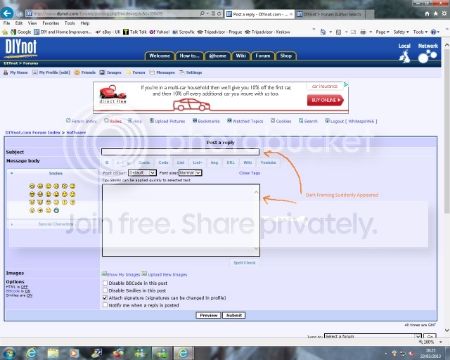
DIYnotPostPage.jpg


It's like my pc is suddenly interpreting the site differently. One thing that may be responsible, is the same day all this happened, my pc had a lot of application updates that I had to restart the pc after they were received. I wonder if this has changed something.

With this in mind, I wonder if it is worth doing a system restore to a couple of days before the application updates and the problems started? Is it a good idea, or will it cause other problems?

It's only a small thing, but annoying and strains the eyes. Any advice gratefully received.
 
Last edited:

My Computer My Computer

Computer type
PC/Desktop
Computer Manufacturer/Model Number
Acer Aspire Desktop M3910
OS
Windows 7 Home Premium 64 bit SP1
CPU
Intel i3 540
Memory
3GB DDR3SD
Monitor(s) Displays
LG Flatron L1960TR
Screen Resolution
1280x1024
Keyboard
Acer
Mouse
Genius
Antivirus
Avast (Free)
Browser
I E 11
I think this may have been caused by accidentally zooming out. So I recommend that, while you are on www.diynot.com, press Ctrl+0. This is the keyboard shortcut to reset the zoom level back to 100%.

You see, zooming can be done accidentally by scrolling with your mouse wheel while holding down the Ctrl key. Worse yet, it might be remembering the zoom level for that site only while using 100% for the rest.
 

My Computer My Computer

Computer type
PC/Desktop
Thanks for your reply Twocables. I have tried changing between 100% and 125%. Using the site at 100% (the setting that I have always been set at) gives the problem I am experiencing, ie. text smaller than before and strains eyes. Don't know why it has reduced in size on 100% overnight.

Changing to 125% makes the text bigger than it was originally, but you get a reduction in graphic quality - things are a little blurred. Can't understand the sudden change.

Would I be doing any harm in using a restore point a day or two before the problem, in case something has happened with my pc? Will it do any harm to try?
 

My Computer My Computer

Computer type
PC/Desktop
Computer Manufacturer/Model Number
Acer Aspire Desktop M3910
OS
Windows 7 Home Premium 64 bit SP1
CPU
Intel i3 540
Memory
3GB DDR3SD
Monitor(s) Displays
LG Flatron L1960TR
Screen Resolution
1280x1024
Keyboard
Acer
Mouse
Genius
Antivirus
Avast (Free)
Browser
I E 11
No it won't harm anything.
 

My Computer My Computer

Computer type
PC/Desktop
Computer Manufacturer/Model Number
Custom Build
OS
Win 10 Pro 64
CPU
Intel Core i7 960 @3.20 GHz
Motherboard
MSI MS7522
Memory
24.0 GB DDR3
Graphics Card(s)
EVGA GTX 750Ti
Monitor(s) Displays
LG E2341 23 Inch
Screen Resolution
1920x1080
Hard Drives
1TB Western Dgital 1002FAEX-00Y9A0
1TB Hitachi HDS721010CLA322
PSU
700 Watt
Case
Haf 912
Cooling
Fans
Keyboard
Logitech MK710
Mouse
Logitech M705
Internet Speed
Cable
Antivirus
AIS 2015 .10.0.2225
Browser
Firefox 49
Other Info
MalwareBytes Anti-Rootkit utility
Thanks for your reply Twocables. I have tried changing between 100% and 125%. Using the site at 100% (the setting that I have always been set at) gives the problem I am experiencing, ie. text smaller than before and strains eyes. Don't know why it has reduced in size on 100% overnight.

Changing to 125% makes the text bigger than it was originally, but you get a reduction in graphic quality - things are a little blurred. Can't understand the sudden change.

Would I be doing any harm in using a restore point a day or two before the problem, in case something has happened with my pc? Will it do any harm to try?

Did you press Ctrl+0 while looking at the site?
 

My Computer My Computer

Computer type
PC/Desktop
Thanks for your reply Twocables. I have tried changing between 100% and 125%. Using the site at 100% (the setting that I have always been set at) gives the problem I am experiencing, ie. text smaller than before and strains eyes. Don't know why it has reduced in size on 100% overnight.

Changing to 125% makes the text bigger than it was originally, but you get a reduction in graphic quality - things are a little blurred. Can't understand the sudden change.

Would I be doing any harm in using a restore point a day or two before the problem, in case something has happened with my pc? Will it do any harm to try?

Did you press Ctrl+0 while looking at the site?

Thanks for your reply.

Yes. If there is 100% in bottom right of screen, nothing happens. If I change it to 125% (Ctrl and +), then pressing Ctrl and 0 just reduces zoom from 125% to 100%.

Thanks to Gary too.
 

My Computer My Computer

Computer type
PC/Desktop
Computer Manufacturer/Model Number
Acer Aspire Desktop M3910
OS
Windows 7 Home Premium 64 bit SP1
CPU
Intel i3 540
Memory
3GB DDR3SD
Monitor(s) Displays
LG Flatron L1960TR
Screen Resolution
1280x1024
Keyboard
Acer
Mouse
Genius
Antivirus
Avast (Free)
Browser
I E 11
Fixed it. :cool:

Did a system restore to 5 days ago. Think it may have had something to do with a load of application updates on Saturday. After, it asked me if I wanted to restart now, or in x mins time. I set it for 60 mins time, but when it reminded me in an hour's time I was still busy.

So I told it to remind me in another hour, but either it didn't, or I missed it - so the application update restart might never have happened. Wonder if this was the reason?
 

My Computer My Computer

Computer type
PC/Desktop
Computer Manufacturer/Model Number
Acer Aspire Desktop M3910
OS
Windows 7 Home Premium 64 bit SP1
CPU
Intel i3 540
Memory
3GB DDR3SD
Monitor(s) Displays
LG Flatron L1960TR
Screen Resolution
1280x1024
Keyboard
Acer
Mouse
Genius
Antivirus
Avast (Free)
Browser
I E 11
Fixed it. :cool:

Did a system restore to 5 days ago. Think it may have had something to do with a load of application updates on Saturday. After, it asked me if I wanted to restart now, or in x mins time. I set it for 60 mins time, but when it reminded me in an hour's time I was still busy.

So I told it to remind me in another hour, but either it didn't, or I missed it - so the application update restart might never have happened. Wonder if this was the reason?

Maybe, maybe not. Did you ever perform a proper Shut Down in between the time of the installation of the updates on Saturday and the time you performed a system restore just now? Performing a proper Shut Down and then turning the computer back on is the same as restarting, only it's slower because the computer is off in between.
 

My Computer My Computer

Computer type
PC/Desktop
Yes, I probably shut down after using my pc a couple of times. Probably not the reason.

Just clutching at straws to find some explaination. We'll probably never know the reason, but everything is now normal. There were other small changes to graphic details on other programmes, etc. It's as if my pc started making minor detail changes to graphics and fonts when interpreting websites and some programmes.

Computers are sometimes weird, and I don't really, fully understand them. :o

Thanks for your help.
 

My Computer My Computer

Computer type
PC/Desktop
Computer Manufacturer/Model Number
Acer Aspire Desktop M3910
OS
Windows 7 Home Premium 64 bit SP1
CPU
Intel i3 540
Memory
3GB DDR3SD
Monitor(s) Displays
LG Flatron L1960TR
Screen Resolution
1280x1024
Keyboard
Acer
Mouse
Genius
Antivirus
Avast (Free)
Browser
I E 11
Yes, I probably shut down after using my pc a couple of times. Probably not the reason.

Just clutching at straws to find some explaination. We'll probably never know the reason, but everything is now normal. There were other small changes to graphic details on other programmes, etc. It's as if my pc started making minor detail changes to graphics and fonts when interpreting websites and some programmes.

Computers are sometimes weird, and I don't really, fully understand them. :o

Thanks for your help.

You're welcome. Post again in this thread if you have new issues that are similar!
 

My Computer My Computer

Computer type
PC/Desktop
Back
Top