Marco Gandolfo
New member
- Local time
- 10:58 AM
- Messages
- 2
Hello everyone.
I have a 1.5 year old, fairly reliable Dell PC on W7.
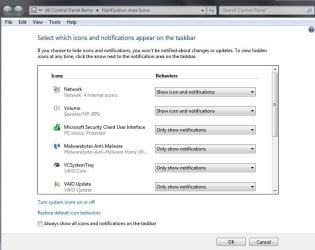
All of a sudden, the symbol in the taskbar with the five "Reception bars", which, when hovered over shows available networks, has vanished. It has been replaced by a sort of white box with a little red symbol in.
I have tried all the troubleshooting and help suggestions, but to no avail!!
Stranger, my laptop, ipad, WiFi printer etc etc all still have five full bars of signal with no problem, on the same network!
Someone, please explain to me what has happened as I use this PC for work. It insists there is no internet access. This happened out of the blue, without me doing anything!!!
Any help would be sooo appreciated.
Thank you.
I have a 1.5 year old, fairly reliable Dell PC on W7.
All of a sudden, the symbol in the taskbar with the five "Reception bars", which, when hovered over shows available networks, has vanished. It has been replaced by a sort of white box with a little red symbol in.
I have tried all the troubleshooting and help suggestions, but to no avail!!
Stranger, my laptop, ipad, WiFi printer etc etc all still have five full bars of signal with no problem, on the same network!
Someone, please explain to me what has happened as I use this PC for work. It insists there is no internet access. This happened out of the blue, without me doing anything!!!
Any help would be sooo appreciated.
Thank you.
My Computer
At a glance
Windows 7 Professional x32
- Computer type
- PC/Desktop
- Computer Manufacturer/Model Number
- Dell
- OS
- Windows 7 Professional x32
- Browser
- Google Chrome