Why I may switch to IE

Jonathan_King

New member
Guru
Gold Member
SF Team
Local time
8:24 AM
Messages
13,322
Location
Rednecksville
I have loved Chrome, on account of it being by Google, wicked fast, and lightweight. However, I have started to see some nasty features.

Note that I am on the Dev branch.

Chrome is simply not fully compatible with many sites. Many times if a page does not display correctly, it loads fine in FF and IE. The WYSIWYG editor of vBulletin is not supported in Chrome. That means to create bold text, I cannot use Ctrl-B.

If I want to show a username in the correct font (for example, the gold color), I need to manually set the colors. In FF and probably IE, you can just copy/paste the name.

The spell checker in Chrome is a joke. Not only the lack of suggestions, which you all know about, but in the past few weeks it no longer allows me to add words to the dictionary. That means that every time I type DVD, it marks it as wrong, and there's nothing I can do about it.

It seems other users are having the same issues. Hopefully it will be fixed in the next Dev release.

A major concern is the lack of a master password like FF has. That means that anyone that has access to my browsers could see all my passwords, provided they knew where to look. I am taking my chances saving my passwords on any shared machines. I feel safe only because I am the only one that uses Chrome, and the others don't know how to access the options.

Also relating to passwords, you cannot undo it if you select Never For This Site for saving passwords.

Unlike every other browser, it is impossible to remove individual sites from the browsing history, or delete individual saved urls from the omnibar.

Chrome has less options to tweak. Tabs open up the same; there is no setting for switching to a new tab when opened.

Hopefully some of these features will be added or fixed int he future, but in the mean time, I will use FF.
 
Last edited:

My Computer My Computer

Computer Manufacturer/Model Number
Custom
OS
Windows 7 Professional x64
CPU
Intel i7 2600K OC'd @ 4620 MHz
Motherboard
Asus P8Z68-V Pro
Memory
16GB GSkill Sniper 2133 Mhz (4x4GB)
Graphics Card(s)
EVGA GeForce GTX 480 SuperClocked+
Sound Card
Realtek High Definition Audio
Monitor(s) Displays
2x Acer S273HLbmii 27"
Screen Resolution
2 x 1920x1080
Hard Drives
64GB Crucial M4 SSD

Storage: Hitachi 1TB 5400RPM, Samsung 1.5TB 5400RPM
PSU
Corsair HW Series 750w (modular)
Case
Cooler Master HAF 932 Advanced Blue Edition
Cooling
CM Hyper 212+ CPU cooler, 3x 230mm + 1x 140mm case fans
Keyboard
Logitech MK320 (wireless)
Mouse
Logitech MK320 (wireless)
Internet Speed
30 Mb/s : 2 Mb/s
JK

Nice thorough post. Kudos
 

My Computer My Computer

Computer Manufacturer/Model Number
HP Pavillion dv-7 1005 Tx
OS
Win 8 Release candidate 8400
CPU
[email protected]
Memory
4 gigs
Graphics Card(s)
Nvidia 9600M
Sound Card
HD built-in
Monitor(s) Displays
17" Wxga
Screen Resolution
1440x900
Cooling
none
Internet Speed
45Mb down 5Mb up
very nice in depth and informative post. personally i never really found chrome all that impressive and i love google, maybe it was just a bit to minimal for my taste. i'll continue to stick to FF until it no longer works for me.
 

My Computer My Computer

Computer Manufacturer/Model Number
Custom
OS
Windows 7 Ultimate Signature Edition
CPU
Intel Core i7 Extreme 3.33GHz
Motherboard
EVGA X-58 SLI Classified
Memory
12GB DDR3
Graphics Card(s)
2x EVGA 285 2GB in SLI
Sound Card
Creative Labs X-Fi ExtremeGamer
Monitor(s) Displays
30" Viewsonic
Hard Drives
2x1TB Western Digital 7200RPM in RAID 0/1TB WD My Book External HDD
PSU
Thermaltake 1000w supporting quad SLI
Case
Thermaltake Armor Full Tower
Cooling
Thermaltake V1 CPU+DIY Liquid cooling
Continue using Chrome for the time being and jump to IE9 as soon as the first technical preview is available. At least I'm following this strategy.
 

My Computer My Computer

OS
Windows 7 RTM x86
A very objective post Jonathan_King:)

Individuals tend to use, or stick with a specific browser for many reasons, not least amongst them, familiarity and ease of use. If, however, your choice of browser is prohibitive to your working/leisure use of it, I see no reason not to swap loyalties, albeit temporarily;)

A question on you OP, if I may.Could you please expand on what you mean by,"Tabs open up the same; there is no setting for switching to a new tab when opened."

.
 

My Computer My Computer

Computer Manufacturer/Model Number
Samsung R60 Plus
OS
Operating System Microsoft Windows 7 Ultimate Build 7600
CPU
Mobile DualCore Intel Core 2 Duo T5550, 1833 MHz (1
Motherboard
ATI Radeon Xpress 1100/1250
Memory
2GB (DDR2-667 DDR2 SDRAM)
Graphics Card(s)
ATI Radeon Xpress 1200 Series (256 MB)
Sound Card
Realtek ALC262 @ ATI SB600 - High Definition
Monitor(s) Displays
Samsung LTN154X3-L01 [15.4" LCD]
Screen Resolution
1280x800
PSU
na
Case
na
Cooling
na
Keyboard
na
A very objective post Jonathan_King:)

Individuals tend to use, or stick with a specific browser for many reasons, not least amongst them, familiarity and ease of use. If, however, your choice of browser is prohibitive to your working/leisure use of it, I see no reason not to swap loyalties, albeit temporarily;)

A question on you OP, if I may.Could you please expand on what you mean by,"Tabs open up the same; there is no setting for switching to a new tab when opened."
.
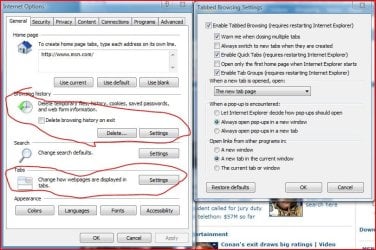
Sure, I'd be happy to. That was just an example of what you can tweak in IE that you can't in Chrome. See the snip. Those are 2 things that just cannot be configured in Chrome.

ie options.JPG

Apologies for the bad marking; I just cannot control trackpads like I can a mouse.
 

My Computer My Computer

Computer Manufacturer/Model Number
Custom
OS
Windows 7 Professional x64
CPU
Intel i7 2600K OC'd @ 4620 MHz
Motherboard
Asus P8Z68-V Pro
Memory
16GB GSkill Sniper 2133 Mhz (4x4GB)
Graphics Card(s)
EVGA GeForce GTX 480 SuperClocked+
Sound Card
Realtek High Definition Audio
Monitor(s) Displays
2x Acer S273HLbmii 27"
Screen Resolution
2 x 1920x1080
Hard Drives
64GB Crucial M4 SSD

Storage: Hitachi 1TB 5400RPM, Samsung 1.5TB 5400RPM
PSU
Corsair HW Series 750w (modular)
Case
Cooler Master HAF 932 Advanced Blue Edition
Cooling
CM Hyper 212+ CPU cooler, 3x 230mm + 1x 140mm case fans
Keyboard
Logitech MK320 (wireless)
Mouse
Logitech MK320 (wireless)
Internet Speed
30 Mb/s : 2 Mb/s
why not try FF before using IE. With the recent security scare with IE, Im reluctant to use that for main stream surfing again. Even though it has been patched quickly, you can always be sure something else will arise.
 

My Computer My Computer

Computer Manufacturer/Model Number
self built
OS
Windows 7 Professional 64-bit
CPU
Intel E8400 3GHz
Motherboard
Intel DX48BT2
Memory
Kingston PC3-10700H 4Gb
Graphics Card(s)
XFX Radeon HD 5850 BlackEd.
Sound Card
Asus Xonar DG
Monitor(s) Displays
2x Samsung SM-T220HD 22"
Screen Resolution
1680x1050 on two monitors
Hard Drives
OCZ Vertex 2 120gb 3.5" (OS)
Seagate Momentus XT 500gb
Samsung F3 1Tb (games)
2x Samsung F1 1Tb
PSU
Thermaltake ToughPower 850w
Case
Thermaltake Armor
Cooling
Scythe Mugen II
Keyboard
Microsoft Comfort Curve USB
Mouse
Razer Diamondback 3G
Internet Speed
8128/443
Excellent, well thought out post. Kudos
 

My Computer My Computer

Computer Manufacturer/Model Number
Home built
OS
Windows 7 Ultimate 32 bit
CPU
Intel(R) Pentium(R) 4 CPU 3.00GHz
Motherboard
ASUS P4P800-VM Motherboard Chipset: Intel 865G + ICH5
Memory
2.50 GB RAM
Graphics Card(s)
NVIDIA GeForce 7600 GS
Sound Card
SoundMax Integrated Digital Audio (Chip)
Monitor(s) Displays
ViewSonic VX 1962 wm
Screen Resolution
1680 X 1050
Hard Drives
Seagate Barracuda 7200.10 80 GB
ST380215A ATA Device 18.6 GB
Western Digital "My Book" external hard drive 750 GB
Cooling
Fan based
Keyboard
Microsoft Comfort Curve Keyboard 2000 v10 USB
Mouse
Logitec optic USB
Internet Speed
3.01 Mb/s download 0.64 Mb/s upload
why not try FF before using IE. With the recent security scare with IE, Im reluctant to use that for main stream surfing again. Even though it has been patched quickly, you can always be sure something else will arise.

just because Firefox hasnt been in the news doesnt mean it doesnt have exploitable vulnerabilities.... and i say this as a firefox fan
 

My Computer My Computer

Computer type
PC/Desktop
Computer Manufacturer/Model Number
Medion Erazer (note to self: insert model number) - with custom additions
OS
Windows 10 Pro x64
CPU
Intel Core i5 7400 @ 3.00GHz
Motherboard
OEM supllied with PC
Memory
8GB 2133Mhz DDR4 (OEM supplied)
Graphics Card(s)
Gygabyte Windforce GTX 1050Ti (Factory Overclocked)
Sound Card
Realtek
Monitor(s) Displays
Acer Al1980 + HKC
Screen Resolution
1360*768(HKC) / 1280*1024(Acer)
Hard Drives
1TB Toshiba
1TB WD Caviar Green
120GB Samsung Evo 840
PSU
OEM supplied (no power rating on case)
Case
OEM Supplied
Cooling
Stock
Keyboard
Logitech Wireless
Mouse
Logitect Wireless
Internet Speed
40Mb/s Down 10Mb/s Up
Antivirus
Defender
Browser
Firefox
Jonathan

I am on similar situation to yours.
Chrome is my mail browser and it was like this for a long time.

But like you I hated it for some aspects. I didn't gave what I wanted.
haven't displayed some pages correctly, in some sites which I use often there were plugin crashes, It was incompatible with my implemention of Applocker, didn't gave me enough configurations to change and so on.

That was time when I was thinking about switch.
I downloaded and tried for some time all famous browsers: IE, Firefox, Safari, Opera.
All of them were great and worth becoming one's main browser, but soon I realised that I am too used to Chrome.
I was feeling a bit uneasy and uncomfortable using them as it wasn't like Chrome (although Opera was my main browser before Chrome)
As I said all those browsers were very good, but non of them gave me personal comfortability like Chrome. Non of them had Chrome's ease of use, speed and just simple and open interface.

That's why I was unable to switch to another browser and I stayed with google Chrome.
Like you I was very curios and was using Google Chrome's beta version to get new things faster.
So when I decided to stay with Chrome, I uninstalled all plugins related to it and uninstalled google Chrome. reverted back Google Chrome to Stable channel. (it fixed some issues with plugin crashes)
Had to build my security on different core and forget about AppLocker atleast for time being.
And basically I had to change some things even thought it make it a bit more uncomfortable but at the end it was less uncomfortable for me then changing to another browser.

Now after waiting some time, I got great news AppLocker was working with Beta version of Chrome, so I switched to Beta version and I found out that plugin crashes were fixed aswell.
And Today I read that stabe version of Google Chrome was updated to version 4 and that AppLocker was working with it aswell.


So, at the end my recommendation to you. Just give try to other browsers. (I think we all should be open to new ideas and try new things. Just think about it if you haven't tried google Chrome at the beginning you wouldn't be using it now)
So, give a try to all major browser. Use it as long as it takes you judge it with your own preferences.

And if at the end you find that you can't change and like me used to Chrome.
Try changing some things, try givingaway some things for greater good :p ( Downgrade it to Stable or atleast Beta channels)
So maybe you will find them less buggy even though they lack some features.
Just choose what is more important to you.

Anyway, Good Luck! ;)
 

My Computer My Computer

OS
Windows 7 Ultimate x86 SP1
So, should I make the switch? Or should I continue to use Chrome, and hope that some of these will be changed in future releases?

If Chrome was failing to meet your really important needs then I think you would have already switched instead of making this thread. Maybe you're looking for reasons to continue with Chrome so let's go over your points so far:

  • Lack of website compatibility.
    • Annoying but temporary. It's only getting better as a browser so these issues will go away with time.
  • Bad spellchecker.
    • Minor annoyance at best. It might be valuable on some level to move away from dependency on a spellchecker.
  • Security with passwords.
    • This one is fairly big but the simplest solution is just to remember your passwords to areas with sensitive information. Email? Remember it yourself. Website forum? Let the browser have it.
  • "Never save password" not undo-able.
    • Fix is coming. Be patient.
  • Removing history entries.
    • This will probably come eventually. In the meantime you may just have to use incognito browsing for those websites.
  • Instant switching tabs.
    • Have you seen this?

You like Chrome and it will only get better so stick with it.

Otherwise, u should use ff cuz its the best. :p
 

My Computer My Computer

Computer Manufacturer/Model Number
N/A
OS
Windows 7 Professional x64
CPU
Intel Core i7 860 @ 2.80GHz
Motherboard
Gigabyte P55-UD6
Memory
4.0GB OCZ Dual-Channel DDR3
Graphics Card(s)
GeForce GTS 250
Sound Card
HT Omega Striker 7.1
Monitor(s) Displays
Samsung Syncmaster P2570
Screen Resolution
1920x1080
Hard Drives
1000GB Western Digital
Keyboard
Saitek Eclipse (Red)
I can understand your reluctance to part from Chrome - seeing as it is one of the most minimalist browsers, with low system footprint and very good page-loading speeds. But its lack of options - combined with less compatibility - make it a six-of-the-one, half-dozen-of-the-other choice. Personally, I prefer FireFox because it doesn't drag my system performance down with it, and I especially like the vast numbers of plugins/extensions, as well as the security side of FF. I wouldn't switch to IE for that reason - at least, not until IE 9 comes out.
 

My Computer My Computer

Computer type
Laptop
Computer Manufacturer/Model Number
Toshiba A500-ST6621
OS
7 Ultimate x64, Vista Ultimate x64, 7 Pro x64, XP Pro x86, Linux Mint Nadia Cinnamon
CPU
Intel Core 2 Duo T9600 2.80GHz x64
Motherboard
Intel GM45 chipset
Memory
8GB
Graphics Card(s)
ATI Mobility Radeon HD 4650
Sound Card
N/A
Monitor(s) Displays
single 16:9 widescreen (1366x768)
Hard Drives
Hitachi Travelstar 7K750 5400RPM 750GB
Keyboard
standard Toshiba backlit keyboard w/ numberpad
Internet Speed
N/A
So, should I make the switch? Or should I continue to use Chrome, and hope that some of these will be changed in future releases?

If Chrome was failing to meet your really important needs then I think you would have already switched instead of making this thread. Maybe you're looking for reasons to continue with Chrome so let's go over your points so far:

  • Lack of website compatibility.
    • Annoying but temporary. It's only getting better as a browser so these issues will go away with time.
  • Bad spellchecker.
    • Minor annoyance at best. It might be valuable on some level to move away from dependency on a spellchecker.
  • Security with passwords.
    • This one is fairly big but the simplest solution is just to remember your passwords to areas with sensitive information. Email? Remember it yourself. Website forum? Let the browser have it.
  • "Never save password" not undo-able.
    • Fix is coming. Be patient.
  • Removing history entries.
    • This will probably come eventually. In the meantime you may just have to use incognito browsing for those websites.
  • Instant switching tabs.
    • Have you seen this?

You like Chrome and it will only get better so stick with it.

Otherwise, u should use ff cuz its the best. :p
Jonathan seems like a pretty bright fellow..... it's possible the spell check for him is more for catching typos than actually correcting his spelling. I know that why I like the FF spell check, because I'm a sloppy typist.:geek:
 

My Computer My Computer

Computer type
PC/Desktop
Computer Manufacturer/Model Number
Gigabyte Technology Co., Ltd.
OS
Win 7 Ultimate 64-bit SP1 (desktop)
CPU
Intel Core 2 Duo E8400
Motherboard
Gigabyte GA-EP35-DS3R
Memory
2x 2GB OCZ DDR II SDRAM PC2-6400
Graphics Card(s)
NVIDIA GeForce 9400GT
Monitor(s) Displays
HP 2009m(primary), Acer P191W
Screen Resolution
1600x900, 1440x900
Hard Drives
Internal:WD Caviar Black 640GB 32MB cache 7200RPM
External:Samsung Story Station 1TB HDD desktop drive
500GB Toshiba portable drive
PSU
Antec Earthwatts EA500D
Case
Antec Sonata III
Cooling
4 fans
Keyboard
Logitech Wave
Mouse
Logitech M-SBF90
Internet Speed
Slow due to home Wireless-G router
Antivirus
MSE, Hitman Pro, Malwarebytes
Browser
Chrome and Palemoon
Other Info
Laptop....Acer 5750Z-4835
15.6" HD Widescreen CineCrystal™ LED-backlit LCD Display: (1366x768 resolution, 16:9 aspect ratio)
Intel® Pentium® Processor B940 (2.0GHz, 2MB L3 cache)
Windows® 7 Home Premium,500GB Hard Drive,4GB DDR3 RAM, Intel® HD Graphics,8X DVD-Super Multi Double-Layer Drive
Multi-in-1 Digital Media Card Reader,802.11b/g/n Wi-Fi
Chrome and Palemoon, MSE, Hitman Pro
So, should I make the switch? Or should I continue to use Chrome, and hope that some of these will be changed in future releases?

If Chrome was failing to meet your really important needs then I think you would have already switched instead of making this thread. Maybe you're looking for reasons to continue with Chrome so let's go over your points so far:

  • Lack of website compatibility.
    • Annoying but temporary. It's only getting better as a browser so these issues will go away with time.
  • Bad spellchecker.
    • Minor annoyance at best. It might be valuable on some level to move away from dependency on a spellchecker.
  • Security with passwords.
    • This one is fairly big but the simplest solution is just to remember your passwords to areas with sensitive information. Email? Remember it yourself. Website forum? Let the browser have it.
  • "Never save password" not undo-able.
    • Fix is coming. Be patient.
  • Removing history entries.
    • This will probably come eventually. In the meantime you may just have to use incognito browsing for those websites.
  • Instant switching tabs.
    • Have you seen this?

You like Chrome and it will only get better so stick with it.

Otherwise, u should use ff cuz its the best. :p
:thumbsup:

Understood, but in the meantime, is it worth it? The above poster is right, I make typos. Spelling and grammar are almost as important to me as my tech support; what quicker way to make posts sound like an uneducated teenager is typing them?

As for the passwords, I use them just to save myself time. I have a long password, and I hate typing it in.

I doubt Google will make it more configurable. At least not for a long time. I'm sure they know the extra features that FF and IE have; they are making a conscience decision to make it fast and lightweight.

All these little annoyances add up. Is the extra speed worth it?

Course, this means I will have to change my avatar. ;)

Thanks for the input, everyone.
 

My Computer My Computer

Computer Manufacturer/Model Number
Custom
OS
Windows 7 Professional x64
CPU
Intel i7 2600K OC'd @ 4620 MHz
Motherboard
Asus P8Z68-V Pro
Memory
16GB GSkill Sniper 2133 Mhz (4x4GB)
Graphics Card(s)
EVGA GeForce GTX 480 SuperClocked+
Sound Card
Realtek High Definition Audio
Monitor(s) Displays
2x Acer S273HLbmii 27"
Screen Resolution
2 x 1920x1080
Hard Drives
64GB Crucial M4 SSD

Storage: Hitachi 1TB 5400RPM, Samsung 1.5TB 5400RPM
PSU
Corsair HW Series 750w (modular)
Case
Cooler Master HAF 932 Advanced Blue Edition
Cooling
CM Hyper 212+ CPU cooler, 3x 230mm + 1x 140mm case fans
Keyboard
Logitech MK320 (wireless)
Mouse
Logitech MK320 (wireless)
Internet Speed
30 Mb/s : 2 Mb/s
So, should I make the switch? Or should I continue to use Chrome, and hope that some of these will be changed in future releases?

If Chrome was failing to meet your really important needs then I think you would have already switched instead of making this thread. Maybe you're looking for reasons to continue with Chrome so let's go over your points so far:

  • Lack of website compatibility.
    • Annoying but temporary. It's only getting better as a browser so these issues will go away with time.
  • Bad spellchecker.
    • Minor annoyance at best. It might be valuable on some level to move away from dependency on a spellchecker.
  • Security with passwords.
    • This one is fairly big but the simplest solution is just to remember your passwords to areas with sensitive information. Email? Remember it yourself. Website forum? Let the browser have it.
  • "Never save password" not undo-able.
    • Fix is coming. Be patient.
  • Removing history entries.
    • This will probably come eventually. In the meantime you may just have to use incognito browsing for those websites.
  • Instant switching tabs.
    • Have you seen this?

You like Chrome and it will only get better so stick with it.

Otherwise, u should use ff cuz its the best. :p
:thumbsup:

Understood, but in the meantime, is it worth it? The above poster is right, I make typos. Spelling and grammar are almost as important to me as my tech support; what quicker way to make posts sound like an uneducated teenager is typing them?

As for the passwords, I use them just to save myself time. I have a long password, and I hate typing it in.

I doubt Google will make it more configurable. At least not for a long time. I'm sure they know the extra features that FF and IE have; they are making a conscience decision to make it fast and lightweight.

All these little annoyances add up. Is the extra speed worth it?

Course, this means I will have to change my avatar. ;)

Thanks for the input, everyone.

Hey Jonathan. I realize i am a little late, but since your avatar remains, im sure you havent switched yet. I have posted to give you another option. No, im not gonna suggest you switch to Opera (even tho i run the Opera Users Group around here) but, there is another way. Use FF, and get it look just like your chrome. This page has the skin of chrome for FF. I realize this doesnt make it as fast, but hey, you said it: is it really worth it after all these flaws?

Thanks for reading,
Hope this helps,
Coolness ;)
 

My Computer My Computer

Computer Manufacturer/Model Number
Acer Veriton m261 (modded)
OS
Win 7 pro 64-bit, Ubuntu 9.10 64-bit
CPU
Intel Core 2 Duo 2.60 Ghz
Motherboard
Whatever came with the system
Memory
4 gb ddr2 667 Mhz
Graphics Card(s)
NVidia Geforce 9400 GS 1 gb ddr2 550 mhz GPU
Sound Card
Intergrated
Monitor(s) Displays
samsung SyncMaster 2494 24"
Screen Resolution
1080p
Hard Drives
80gb - IDE
750gb - SATA II
PSU
whatever came with the system
Case
whatever came with the system
Cooling
whatever came with the system
Keyboard
Apple Aluminium (Awesome)
Mouse
Some awesome Dell mouse, really good.
Internet Speed
100mbps
Hey Jonathan. I realize i am a little late, but since your avatar remains, im sure you havent switched yet. I have posted to give you another option. No, im not gonna suggest you switch to Opera (even tho i run the Opera Users Group around here) but, there is another way. Use FF, and get it look just like your chrome. This page has the skin of chrome for FF. I realize this doesnt make it as fast, but hey, you said it: is it really worth it after all these flaws?

Thanks for reading,
Hope this helps,
Coolness ;)
Thanks Coolness. I actually did switch to Firefox already, but I like this avatar so much I decided to keep it after all. I am missing some features of Chrome, though. Especially noticeable these past couple of weeks is the bookmark sync. I had to make a backup file of my bookmarks, and upload them to my SkyDrive. As you can imagine, this can get tedious it you are working with multiple computers.

I also miss Chrome's Incognito windows, as opposed to FF's Private Browsing. It bugs me that I have to give up my other tabs until I am done.

I also feel that FF is less snappy than Chrome. The difference is less than 0.5 seconds per page, or opening, but I am used to the instantaneous reaction of Chrome, especially when combined with a good ISP.
 

My Computer My Computer

Computer Manufacturer/Model Number
Custom
OS
Windows 7 Professional x64
CPU
Intel i7 2600K OC'd @ 4620 MHz
Motherboard
Asus P8Z68-V Pro
Memory
16GB GSkill Sniper 2133 Mhz (4x4GB)
Graphics Card(s)
EVGA GeForce GTX 480 SuperClocked+
Sound Card
Realtek High Definition Audio
Monitor(s) Displays
2x Acer S273HLbmii 27"
Screen Resolution
2 x 1920x1080
Hard Drives
64GB Crucial M4 SSD

Storage: Hitachi 1TB 5400RPM, Samsung 1.5TB 5400RPM
PSU
Corsair HW Series 750w (modular)
Case
Cooler Master HAF 932 Advanced Blue Edition
Cooling
CM Hyper 212+ CPU cooler, 3x 230mm + 1x 140mm case fans
Keyboard
Logitech MK320 (wireless)
Mouse
Logitech MK320 (wireless)
Internet Speed
30 Mb/s : 2 Mb/s
Hi there
I think ALL of these browsers are just evolving to a common amorphous point.
FF used to be OK, IE used to crash had bad security etc etc.

IE8 these days is fine -- doesn't need zillions of plugins either. FF used to be OK but is more bloated than IE now and gets ever more complex in setting up all the options etc.

Google Chrome is probably the one to watch - especially when its LONG AWAITED OS appears.

Otherwise there isn't a lot of difference between any of them now -- especially for typical casual browsing which is what most users do. I don't think your average joe really cares if a page loads 2 m/s quicker with browser A rather than browser B anyway. If it takes 30 secs then that's a problem - but this won't be due to the browser.

As to security - Phishing, drive by code on the visited site and "Social Engineering" exploits are the real problem and these are not only Browser but also PLATFORM agnostic - doesn't matter whether its Linux, OS-X or Windows as these security holes can't readily be solved by technical means currently on the USERS machines.

Like Macs vs PC's your choice will probably be dictated by the browsers appearance, font rendering and ease of use. Technically there's not a lot of difference in any of them that is really noticeable to a casual user. Chose the one with the UI you prefer.

Cheers
jimbo.
 

My Computer My Computer

Computer type
PC/Desktop
Computer Manufacturer/Model Number
Custom built, several laptops HP/ASUS
OS
Linux CENTOS 7 / various Windows OS'es and servers
CPU
Intel i7 Intel i5
Memory
8GB, 16GB
Graphics Card(s)
On Motherboard
Sound Card
Realtek HD audio
Monitor(s) Displays
Apple Cinema display, Samsung LCD
Screen Resolution
1920 X 1080
Hard Drives
4 X 1TB SATA
Mouse
Toshiba wireless laser
Internet Speed
> 20MB up
Hey Jonathan. I realize i am a little late, but since your avatar remains, im sure you havent switched yet. I have posted to give you another option. No, im not gonna suggest you switch to Opera (even tho i run the Opera Users Group around here) but, there is another way. Use FF, and get it look just like your chrome. This page has the skin of chrome for FF. I realize this doesnt make it as fast, but hey, you said it: is it really worth it after all these flaws?

Thanks for reading,
Hope this helps,
Coolness ;)
Thanks Coolness. I actually did switch to Firefox already, but I like this avatar so much I decided to keep it after all. I am missing some features of Chrome, though. Especially noticeable these past couple of weeks is the bookmark sync. I had to make a backup file of my bookmarks, and upload them to my SkyDrive. As you can imagine, this can get tedious it you are working with multiple computers.

I also miss Chrome's Incognito windows, as opposed to FF's Private Browsing. It bugs me that I have to give up my other tabs until I am done.

I also feel that FF is less snappy than Chrome. The difference is less than 0.5 seconds per page, or opening, but I am used to the instantaneous reaction of Chrome, especially when combined with a good ISP.

I feel ya brother! All the best with your new browser

Coolness
 

My Computer My Computer

Computer Manufacturer/Model Number
Acer Veriton m261 (modded)
OS
Win 7 pro 64-bit, Ubuntu 9.10 64-bit
CPU
Intel Core 2 Duo 2.60 Ghz
Motherboard
Whatever came with the system
Memory
4 gb ddr2 667 Mhz
Graphics Card(s)
NVidia Geforce 9400 GS 1 gb ddr2 550 mhz GPU
Sound Card
Intergrated
Monitor(s) Displays
samsung SyncMaster 2494 24"
Screen Resolution
1080p
Hard Drives
80gb - IDE
750gb - SATA II
PSU
whatever came with the system
Case
whatever came with the system
Cooling
whatever came with the system
Keyboard
Apple Aluminium (Awesome)
Mouse
Some awesome Dell mouse, really good.
Internet Speed
100mbps
I am missing some features of Chrome, though. Especially noticeable these past couple of weeks is the bookmark sync. I had to make a backup file of my bookmarks, and upload them to my SkyDrive. As you can imagine, this can get tedious it you are working with multiple computers.

Apologies for bumping this old(er) topic. I followed the link from another thread. Just wondering if you or anyone else has tried either Xmarks Bookmark and Password Sync or Weave Browser Sync
 

My Computer My Computer

OS
Windows 7 & Windows Vista Ultimate
Thank you for bumping the thread, Corrine. :D

I have tried Xmarks. I don't remember exactly, but I recall it didn't work the way I wanted it to, or maybe it was too much of a hassle.
 

My Computer My Computer

Computer Manufacturer/Model Number
Custom
OS
Windows 7 Professional x64
CPU
Intel i7 2600K OC'd @ 4620 MHz
Motherboard
Asus P8Z68-V Pro
Memory
16GB GSkill Sniper 2133 Mhz (4x4GB)
Graphics Card(s)
EVGA GeForce GTX 480 SuperClocked+
Sound Card
Realtek High Definition Audio
Monitor(s) Displays
2x Acer S273HLbmii 27"
Screen Resolution
2 x 1920x1080
Hard Drives
64GB Crucial M4 SSD

Storage: Hitachi 1TB 5400RPM, Samsung 1.5TB 5400RPM
PSU
Corsair HW Series 750w (modular)
Case
Cooler Master HAF 932 Advanced Blue Edition
Cooling
CM Hyper 212+ CPU cooler, 3x 230mm + 1x 140mm case fans
Keyboard
Logitech MK320 (wireless)
Mouse
Logitech MK320 (wireless)
Internet Speed
30 Mb/s : 2 Mb/s
Back
Top