Why is firefox launching 2 instances on startup?

Etihtsarom

New member
Power User
Local time
10:44 AM
Messages
246
So did any one have to deal with this previously?

I put firefox shortcut into the startup folder, and when windows start, firefox runs 2 separate windows. What's up with that? My google-fu didn't really help in this. Help me Sevenforums you're my only hope.

Also, taskmanager is Not running minimized to the tray even though the shortcut to it specifies that. Woahumwat?
 

My Computer My Computer

At a glance

7 ProfQ95502x2 Mushkin Ascent 85004870X2
Computer Manufacturer/Model Number
SevenForums
OS
7 Prof
CPU
Q9550
Motherboard
Maximus II Formula
Memory
2x2 Mushkin Ascent 8500
Graphics Card(s)
4870X2
Sound Card
X-Fi Xtreme Gamer
Monitor(s) Displays
LN32A550
Screen Resolution
1920x1080
Hard Drives
Intel G2 80GB
5x1TB
PSU
Corsair 1000
Case
Cosmos
Cooling
Yates^13
Keyboard
G15v1
Mouse
MX518
Internet Speed
6Mbps
Take the one out of the Startup folder and see if it still starts up on reboot. I suspect that it set itself to start itself, and you duplicated that.
 

My Computer My Computer

At a glance

W7x64 Pro, SuSe 12.1/** W7 x64 Pro, XP MCEPhenom II 1090T w/Noctua NH-D14 /**4400+ X2 w...2 x 2GB Patriot PGS34g1600LLKA/**4x1GB Corsai...EVGA GTX460 SC/**EVGA 8800GTS
Computer Manufacturer/Model Number
DIY
OS
W7x64 Pro, SuSe 12.1/** W7 x64 Pro, XP MCE
CPU
Phenom II 1090T w/Noctua NH-D14 /**4400+ X2 w/CM Hyper TX 3
Motherboard
ASRock 890FX Deluxe 4/**A8N-SLI
Memory
2 x 2GB Patriot PGS34g1600LLKA/**4x1GB Corsair VS
Graphics Card(s)
EVGA GTX460 SC/**EVGA 8800GTS
Sound Card
Asus Xonar D2X/**Xonar D1
Monitor(s) Displays
Acer X233H, Dell E152FPc /**LG M237-WD
Screen Resolution
1920x1080 & 1024x768/**1980x1080
Hard Drives
WDC 2TB, 1.5TB, 1TB, 500GB,Seagate 500GB , Maxtor 80GB /**500GB Seagate & WDC 1TB Black
PSU
CM RS600 w/ APC BX1000G/**Antec 500 TP w/ APC BX1000
Case
HAF922/**Antec 1040IIB
Cooling
3x200mm, 1x140 and 1x120mm/**5x80mm fans
Keyboard
Logitech Media USB/**Saitek Eclipse
Mouse
Cordless Trackman Wheel/**Ditto
Internet Speed
3.3Mbps
Other Info
SB 560 5.1 w/ Sennheiser RS140/**Creative T20 speakers, Dvico FusionHDTV7 Gold RT, Cisco E3000, HP 5510V AIO, Linksys E3000, Belkin F5U237 hub and **F5D8055 adapter
(** = 2nd rig)
Did that, it didn't start on reboot.

C:\ProgramData\Microsoft\Windows\Start Menu\Programs\_Programs_\Startup

This is where the startup folder is located. If the shortcut is removed from there, the program will not run on startup.
Is there another folder in which startup programs can be placed?
 
Last edited by a moderator:

My Computer My Computer

At a glance

7 ProfQ95502x2 Mushkin Ascent 85004870X2
Computer Manufacturer/Model Number
SevenForums
OS
7 Prof
CPU
Q9550
Motherboard
Maximus II Formula
Memory
2x2 Mushkin Ascent 8500
Graphics Card(s)
4870X2
Sound Card
X-Fi Xtreme Gamer
Monitor(s) Displays
LN32A550
Screen Resolution
1920x1080
Hard Drives
Intel G2 80GB
5x1TB
PSU
Corsair 1000
Case
Cosmos
Cooling
Yates^13
Keyboard
G15v1
Mouse
MX518
Internet Speed
6Mbps
Download and install Autoruns:

Autoruns for Windows

With it you can locate all startup locations. You may also be able to use the Startup tab in msconfig, but it is not as complete. Normally, when I want to manually add a startup item, I right click Startup folder in the Start Menu to open it is a window and drop the shortcut there.

EDIT: One question...why do you even want Firefox to start with the OS?
 

My Computer My Computer

At a glance

W7x64 Pro, SuSe 12.1/** W7 x64 Pro, XP MCEPhenom II 1090T w/Noctua NH-D14 /**4400+ X2 w...2 x 2GB Patriot PGS34g1600LLKA/**4x1GB Corsai...EVGA GTX460 SC/**EVGA 8800GTS
Computer Manufacturer/Model Number
DIY
OS
W7x64 Pro, SuSe 12.1/** W7 x64 Pro, XP MCE
CPU
Phenom II 1090T w/Noctua NH-D14 /**4400+ X2 w/CM Hyper TX 3
Motherboard
ASRock 890FX Deluxe 4/**A8N-SLI
Memory
2 x 2GB Patriot PGS34g1600LLKA/**4x1GB Corsair VS
Graphics Card(s)
EVGA GTX460 SC/**EVGA 8800GTS
Sound Card
Asus Xonar D2X/**Xonar D1
Monitor(s) Displays
Acer X233H, Dell E152FPc /**LG M237-WD
Screen Resolution
1920x1080 & 1024x768/**1980x1080
Hard Drives
WDC 2TB, 1.5TB, 1TB, 500GB,Seagate 500GB , Maxtor 80GB /**500GB Seagate & WDC 1TB Black
PSU
CM RS600 w/ APC BX1000G/**Antec 500 TP w/ APC BX1000
Case
HAF922/**Antec 1040IIB
Cooling
3x200mm, 1x140 and 1x120mm/**5x80mm fans
Keyboard
Logitech Media USB/**Saitek Eclipse
Mouse
Cordless Trackman Wheel/**Ditto
Internet Speed
3.3Mbps
Other Info
SB 560 5.1 w/ Sennheiser RS140/**Creative T20 speakers, Dvico FusionHDTV7 Gold RT, Cisco E3000, HP 5510V AIO, Linksys E3000, Belkin F5U237 hub and **F5D8055 adapter
(** = 2nd rig)
That's what I do, drop shortcuts in that Startup folder.
I want firefox to autostart so I don't have to launch it. lol. I do use it every session.
 

My Computer My Computer

At a glance

7 ProfQ95502x2 Mushkin Ascent 85004870X2
Computer Manufacturer/Model Number
SevenForums
OS
7 Prof
CPU
Q9550
Motherboard
Maximus II Formula
Memory
2x2 Mushkin Ascent 8500
Graphics Card(s)
4870X2
Sound Card
X-Fi Xtreme Gamer
Monitor(s) Displays
LN32A550
Screen Resolution
1920x1080
Hard Drives
Intel G2 80GB
5x1TB
PSU
Corsair 1000
Case
Cosmos
Cooling
Yates^13
Keyboard
G15v1
Mouse
MX518
Internet Speed
6Mbps
As I use Opera every session, but I don't want it to autostart, because that would be just one more item to slow rebooting. A little patience to wait for it to start wouldn't hurt.

EDIT:With Firefox in the Startup folder, did you run Autoruns, and check for duplicate entries?

EDIT: Another program that you can use is StartupCPL:

http://www.mlin.net/StartupCPL.shtml

It is not as complete as Autoruns either, but easier to use.
 

My Computer My Computer

At a glance

W7x64 Pro, SuSe 12.1/** W7 x64 Pro, XP MCEPhenom II 1090T w/Noctua NH-D14 /**4400+ X2 w...2 x 2GB Patriot PGS34g1600LLKA/**4x1GB Corsai...EVGA GTX460 SC/**EVGA 8800GTS
Computer Manufacturer/Model Number
DIY
OS
W7x64 Pro, SuSe 12.1/** W7 x64 Pro, XP MCE
CPU
Phenom II 1090T w/Noctua NH-D14 /**4400+ X2 w/CM Hyper TX 3
Motherboard
ASRock 890FX Deluxe 4/**A8N-SLI
Memory
2 x 2GB Patriot PGS34g1600LLKA/**4x1GB Corsair VS
Graphics Card(s)
EVGA GTX460 SC/**EVGA 8800GTS
Sound Card
Asus Xonar D2X/**Xonar D1
Monitor(s) Displays
Acer X233H, Dell E152FPc /**LG M237-WD
Screen Resolution
1920x1080 & 1024x768/**1980x1080
Hard Drives
WDC 2TB, 1.5TB, 1TB, 500GB,Seagate 500GB , Maxtor 80GB /**500GB Seagate & WDC 1TB Black
PSU
CM RS600 w/ APC BX1000G/**Antec 500 TP w/ APC BX1000
Case
HAF922/**Antec 1040IIB
Cooling
3x200mm, 1x140 and 1x120mm/**5x80mm fans
Keyboard
Logitech Media USB/**Saitek Eclipse
Mouse
Cordless Trackman Wheel/**Ditto
Internet Speed
3.3Mbps
Other Info
SB 560 5.1 w/ Sennheiser RS140/**Creative T20 speakers, Dvico FusionHDTV7 Gold RT, Cisco E3000, HP 5510V AIO, Linksys E3000, Belkin F5U237 hub and **F5D8055 adapter
(** = 2nd rig)
Lemme reboot and see.

This is totally weird.

This is what's shown with Autorun. Notice that everything in there is duplicate: taskmanager, mycomputer, libraries, and winamp. But only firefox runs 2 instances.

And if I untick One of those 2 instances of firefox in autorun as shown on that attachment....No firefox on startup. :confused:
 

Attachments

  • Capture.PNG
    Capture.PNG
    18.8 KB · Views: 54
Last edited by a moderator:

My Computer My Computer

At a glance

7 ProfQ95502x2 Mushkin Ascent 85004870X2
Computer Manufacturer/Model Number
SevenForums
OS
7 Prof
CPU
Q9550
Motherboard
Maximus II Formula
Memory
2x2 Mushkin Ascent 8500
Graphics Card(s)
4870X2
Sound Card
X-Fi Xtreme Gamer
Monitor(s) Displays
LN32A550
Screen Resolution
1920x1080
Hard Drives
Intel G2 80GB
5x1TB
PSU
Corsair 1000
Case
Cosmos
Cooling
Yates^13
Keyboard
G15v1
Mouse
MX518
Internet Speed
6Mbps
I think that I see the problem, there should not be a second folder called "_PROGRAMS_" in the file path. I'm not sure of the best way to solve that, but if it were me, I would copy/paste all of the files in _PROGRAMS_ to the Programs folder and delete the other.
 

My Computer My Computer

At a glance

W7x64 Pro, SuSe 12.1/** W7 x64 Pro, XP MCEPhenom II 1090T w/Noctua NH-D14 /**4400+ X2 w...2 x 2GB Patriot PGS34g1600LLKA/**4x1GB Corsai...EVGA GTX460 SC/**EVGA 8800GTS
Computer Manufacturer/Model Number
DIY
OS
W7x64 Pro, SuSe 12.1/** W7 x64 Pro, XP MCE
CPU
Phenom II 1090T w/Noctua NH-D14 /**4400+ X2 w/CM Hyper TX 3
Motherboard
ASRock 890FX Deluxe 4/**A8N-SLI
Memory
2 x 2GB Patriot PGS34g1600LLKA/**4x1GB Corsair VS
Graphics Card(s)
EVGA GTX460 SC/**EVGA 8800GTS
Sound Card
Asus Xonar D2X/**Xonar D1
Monitor(s) Displays
Acer X233H, Dell E152FPc /**LG M237-WD
Screen Resolution
1920x1080 & 1024x768/**1980x1080
Hard Drives
WDC 2TB, 1.5TB, 1TB, 500GB,Seagate 500GB , Maxtor 80GB /**500GB Seagate & WDC 1TB Black
PSU
CM RS600 w/ APC BX1000G/**Antec 500 TP w/ APC BX1000
Case
HAF922/**Antec 1040IIB
Cooling
3x200mm, 1x140 and 1x120mm/**5x80mm fans
Keyboard
Logitech Media USB/**Saitek Eclipse
Mouse
Cordless Trackman Wheel/**Ditto
Internet Speed
3.3Mbps
Other Info
SB 560 5.1 w/ Sennheiser RS140/**Creative T20 speakers, Dvico FusionHDTV7 Gold RT, Cisco E3000, HP 5510V AIO, Linksys E3000, Belkin F5U237 hub and **F5D8055 adapter
(** = 2nd rig)
Yeah that wasn't the problem. I think mucking around with the registry might be in order.
 

My Computer My Computer

At a glance

7 ProfQ95502x2 Mushkin Ascent 85004870X2
Computer Manufacturer/Model Number
SevenForums
OS
7 Prof
CPU
Q9550
Motherboard
Maximus II Formula
Memory
2x2 Mushkin Ascent 8500
Graphics Card(s)
4870X2
Sound Card
X-Fi Xtreme Gamer
Monitor(s) Displays
LN32A550
Screen Resolution
1920x1080
Hard Drives
Intel G2 80GB
5x1TB
PSU
Corsair 1000
Case
Cosmos
Cooling
Yates^13
Keyboard
G15v1
Mouse
MX518
Internet Speed
6Mbps

My Computer My Computer

At a glance

64-bit Windows 11 Pro for WorkstationsIntel i7-8700K OC'd to 5 GHz64 GB (4x16GB) G.SKILL TridentZ RGB DDR4 3600...ASUS ROG-STRIX-GTX1080TI-O11G-GAMING
Computer type
PC/Desktop
Computer Manufacturer/Model Number
Self built custom
OS
64-bit Windows 11 Pro for Workstations
CPU
Intel i7-8700K OC'd to 5 GHz
Motherboard
ASUS ROG Maximus XI Formula Z390
Memory
64 GB (4x16GB) G.SKILL TridentZ RGB DDR4 3600 MHz
Graphics Card(s)
ASUS ROG-STRIX-GTX1080TI-O11G-GAMING
Sound Card
Integrated
Monitor(s) Displays
2 x Samsung Odyssey G7 27"
Screen Resolution
2560x1440
Hard Drives
1TB Samsung 990 PRO M.2,
4TB Samsung 990 PRO PRO M.2,
TerraMaster F8 SSD Plus NAS
PSU
Seasonic Prime Titanium 850W
Case
Thermaltake Core P3
Cooling
Corsair Hydro H115i
Keyboard
Logitech wireless K800
Mouse
Logitech MX Master 4
Internet Speed
2 Gb/s Download and 100 Mb/s Upload
Antivirus
Malwarebyte Anti-Malware Premium
Browser
Google Chrome
Other Info
Logitech Z625 speaker system,
Logitech BRIO 4K Pro webcam,
HP Color LaserJet Pro MFP M477fdn,
APC SMART-UPS RT 1000 XL - SURT1000XLI,
Galaxy S23 Plus phone
Yeah, I deleted the shortcut and used those registry entries in that tutorial and that fixed it. Thnx Shawn. Any idea on the taskmanager thing? I've tried the same thing with shortcut and registry entry for task manager, but it still would not minimize to tray upon launch.
 

My Computer My Computer

At a glance

7 ProfQ95502x2 Mushkin Ascent 85004870X2
Computer Manufacturer/Model Number
SevenForums
OS
7 Prof
CPU
Q9550
Motherboard
Maximus II Formula
Memory
2x2 Mushkin Ascent 8500
Graphics Card(s)
4870X2
Sound Card
X-Fi Xtreme Gamer
Monitor(s) Displays
LN32A550
Screen Resolution
1920x1080
Hard Drives
Intel G2 80GB
5x1TB
PSU
Corsair 1000
Case
Cosmos
Cooling
Yates^13
Keyboard
G15v1
Mouse
MX518
Internet Speed
6Mbps
You're welcome.

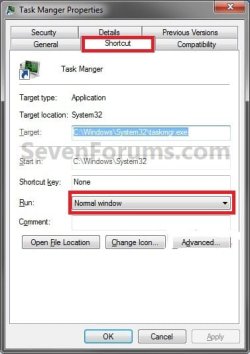
You might see if you can set the Task Manager shortcut to Minimized in the Shortcut tab in Properties, and have that shortcut run at startup to see if that may work.
 

Attachments

  • Step1.jpg
    Step1.jpg
    27.5 KB · Views: 0

My Computer My Computer

At a glance

64-bit Windows 11 Pro for WorkstationsIntel i7-8700K OC'd to 5 GHz64 GB (4x16GB) G.SKILL TridentZ RGB DDR4 3600...ASUS ROG-STRIX-GTX1080TI-O11G-GAMING
Computer type
PC/Desktop
Computer Manufacturer/Model Number
Self built custom
OS
64-bit Windows 11 Pro for Workstations
CPU
Intel i7-8700K OC'd to 5 GHz
Motherboard
ASUS ROG Maximus XI Formula Z390
Memory
64 GB (4x16GB) G.SKILL TridentZ RGB DDR4 3600 MHz
Graphics Card(s)
ASUS ROG-STRIX-GTX1080TI-O11G-GAMING
Sound Card
Integrated
Monitor(s) Displays
2 x Samsung Odyssey G7 27"
Screen Resolution
2560x1440
Hard Drives
1TB Samsung 990 PRO M.2,
4TB Samsung 990 PRO PRO M.2,
TerraMaster F8 SSD Plus NAS
PSU
Seasonic Prime Titanium 850W
Case
Thermaltake Core P3
Cooling
Corsair Hydro H115i
Keyboard
Logitech wireless K800
Mouse
Logitech MX Master 4
Internet Speed
2 Gb/s Download and 100 Mb/s Upload
Antivirus
Malwarebyte Anti-Malware Premium
Browser
Google Chrome
Other Info
Logitech Z625 speaker system,
Logitech BRIO 4K Pro webcam,
HP Color LaserJet Pro MFP M477fdn,
APC SMART-UPS RT 1000 XL - SURT1000XLI,
Galaxy S23 Plus phone
Thanks, I've already made sure of that, also checked the options: minimize on use, and hide when minimized. Those three things are originally the way to make task manager tuck away in the tray, but for some reason mine isn't doing that. It is a minor thing to just click "minimize" and send it to the tray on startup. Just curious if people have run into it. Let's leave this as it is, it's not important enough to pour our time into.
 

My Computer My Computer

At a glance

7 ProfQ95502x2 Mushkin Ascent 85004870X2
Computer Manufacturer/Model Number
SevenForums
OS
7 Prof
CPU
Q9550
Motherboard
Maximus II Formula
Memory
2x2 Mushkin Ascent 8500
Graphics Card(s)
4870X2
Sound Card
X-Fi Xtreme Gamer
Monitor(s) Displays
LN32A550
Screen Resolution
1920x1080
Hard Drives
Intel G2 80GB
5x1TB
PSU
Corsair 1000
Case
Cosmos
Cooling
Yates^13
Keyboard
G15v1
Mouse
MX518
Internet Speed
6Mbps

My Computer My Computer

At a glance

W7x64 Pro, SuSe 12.1/** W7 x64 Pro, XP MCEPhenom II 1090T w/Noctua NH-D14 /**4400+ X2 w...2 x 2GB Patriot PGS34g1600LLKA/**4x1GB Corsai...EVGA GTX460 SC/**EVGA 8800GTS
Computer Manufacturer/Model Number
DIY
OS
W7x64 Pro, SuSe 12.1/** W7 x64 Pro, XP MCE
CPU
Phenom II 1090T w/Noctua NH-D14 /**4400+ X2 w/CM Hyper TX 3
Motherboard
ASRock 890FX Deluxe 4/**A8N-SLI
Memory
2 x 2GB Patriot PGS34g1600LLKA/**4x1GB Corsair VS
Graphics Card(s)
EVGA GTX460 SC/**EVGA 8800GTS
Sound Card
Asus Xonar D2X/**Xonar D1
Monitor(s) Displays
Acer X233H, Dell E152FPc /**LG M237-WD
Screen Resolution
1920x1080 & 1024x768/**1980x1080
Hard Drives
WDC 2TB, 1.5TB, 1TB, 500GB,Seagate 500GB , Maxtor 80GB /**500GB Seagate & WDC 1TB Black
PSU
CM RS600 w/ APC BX1000G/**Antec 500 TP w/ APC BX1000
Case
HAF922/**Antec 1040IIB
Cooling
3x200mm, 1x140 and 1x120mm/**5x80mm fans
Keyboard
Logitech Media USB/**Saitek Eclipse
Mouse
Cordless Trackman Wheel/**Ditto
Internet Speed
3.3Mbps
Other Info
SB 560 5.1 w/ Sennheiser RS140/**Creative T20 speakers, Dvico FusionHDTV7 Gold RT, Cisco E3000, HP 5510V AIO, Linksys E3000, Belkin F5U237 hub and **F5D8055 adapter
(** = 2nd rig)
Back
Top