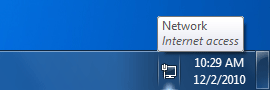
Why Is My Windows 7 Internet Acess Icon Different Now? Please explain.

montecarlo1987

New member
Member
VIP
Local time
6:25 PM
Messages
145
Hello.

I have a question to ask you. I am using Windows 7 Professional 64-bit operating system. In my system tray/notification area the "Internet Access" icon is now different (the last couple of days) than what it was for a long as I have used this Windows 7 system. I was getting the typical white pitch fork or antenna tower with the monitor or white box to the right of it. Now, the same icon except over the monitor/white box I am getting a blue circle with a small black arrow pointing upwards inside in.

Obviously, there is something DIFFERENT going on now than I had before, but I cannot figure this out??? Can you tell me in detail what is going on now as to why the icon has changed?

You may ask what have I done that is different from a few days ago with my computer? Answer: Nothing I am aware of with the computer. I have a new Smartphone that has Wi-Fi capability that is accessing my home router I have been using the past week. That is all I am aware of in terms of Internet connection changes.

I have attached an image of the NEW Internet Access icon I now receive. I also attached a sample image I found on the web of the Internet Access icon I previously had.

Background: I am using a 2008 ASUS P5Q desktop motherboard prior to Wi-Fi capability to my understanding. I have no Wi-Fi adapters attached to the motherboard. I have cable broadband internet connection with cable modem (Motorola Surfboard SB5101) and a wireless router (Linksys E3200) hardwired inline to my motherboard.

Please reply.

Thank you!
 

Attachments

  • Windows 7 Notification Area Internet Access Icon Pic. - 5-3-13 AM.JPG
    Windows 7 Notification Area Internet Access Icon Pic. - 5-3-13 AM.JPG
    7.7 KB · Views: 26
  • Sample Found On The Web - Win7 Internet Acess Icon What I Orig. Had Pic. - 5-3-13 PM.gif
    Sample Found On The Web - Win7 Internet Acess Icon What I Orig. Had Pic. - 5-3-13 PM.gif
    10 KB · Views: 26

My Computer My Computer

At a glance

Windows 7 Pro x64 SP1 & Windows 8 & 8.1 Pro x64
Computer type
PC/Desktop
OS
Windows 7 Pro x64 SP1 & Windows 8 & 8.1 Pro x64
montecarlo1987

That Icon is an ethernet cable letting you know you are connected to the internet using an ethernet cable. If you have bars then you're using WIFI .
 

My Computer My Computer

At a glance

Windows 7 Ultimate 32-Bit & Windows 7 Ultimat...Intel Core i7 CPU 950 @ 3.07GHzOCZ 6GB (3 x 2GB) 240-Pin DDR3 SDRAM DDR3 160...ATI Radeon HD 5700 Series
Computer Manufacturer/Model Number
Custom Built
OS
Windows 7 Ultimate 32-Bit & Windows 7 Ultimate 64-Bit
CPU
Intel Core i7 CPU 950 @ 3.07GHz
Motherboard
ASUS P6T DELUXE V2
Memory
OCZ 6GB (3 x 2GB) 240-Pin DDR3 SDRAM DDR3 1600 OCZ3X1600R2
Graphics Card(s)
ATI Radeon HD 5700 Series
Sound Card
OnBoard
Hard Drives
WD6400AACS-00M3B0 (640GB SATA )
PSU
CORSAIR 850w
Case
NZXT LEXA
Cooling
Intel Stock Heatsink Fan
Keyboard
Microsoft Wireless Laser Keyboard 7000
Mouse
Microsoft Wireless Laser Mouse 7000
@ VistaKing:

Hello. Nice to meet you.

Your comment, "That Icon is an ethernet cable letting you know you are connected to the internet using an ethernet cable.", okay... ...but I have had this same ethernet cable setup for a long time now, right along; so now why has my Internet Access icon NOW DIFFERENT (technically, "slightly" different) than from before??? Windows 7 is telling me there is something new or different now, obviously. I am trying to figure it out??? Any ideas why???

Thanks!
 

My Computer My Computer

At a glance

Windows 7 Pro x64 SP1 & Windows 8 & 8.1 Pro x64

Computer type
PC/Desktop
OS
Windows 7 Pro x64 SP1 & Windows 8 & 8.1 Pro x64
Please run the program below

Click here DDS

:ar: Click on Download Now button

:ar: Right-click the DDS icon choose Run as administrator to run the tool.

:ar: Place a check next to attact.txt and click Start . When done, DDS will open two logs
DDS.txt
Attach.txt


:ar: Save two logs onto your desktop and upload them with your reply
 

My Computer My Computer

At a glance

Windows 7 Ultimate 32-Bit & Windows 7 Ultimat...Intel Core i7 CPU 950 @ 3.07GHzOCZ 6GB (3 x 2GB) 240-Pin DDR3 SDRAM DDR3 160...ATI Radeon HD 5700 Series
Computer Manufacturer/Model Number
Custom Built
OS
Windows 7 Ultimate 32-Bit & Windows 7 Ultimate 64-Bit
CPU
Intel Core i7 CPU 950 @ 3.07GHz
Motherboard
ASUS P6T DELUXE V2
Memory
OCZ 6GB (3 x 2GB) 240-Pin DDR3 SDRAM DDR3 1600 OCZ3X1600R2
Graphics Card(s)
ATI Radeon HD 5700 Series
Sound Card
OnBoard
Hard Drives
WD6400AACS-00M3B0 (640GB SATA )
PSU
CORSAIR 850w
Case
NZXT LEXA
Cooling
Intel Stock Heatsink Fan
Keyboard
Microsoft Wireless Laser Keyboard 7000
Mouse
Microsoft Wireless Laser Mouse 7000
The blue circle means the connection is starting but not yet complete. I can't say why if it always appears though. Maybe you router, cable, or network adapter is bad.
 

My Computer My Computer

At a glance

Windows 7 Ultimate X64 SP1Intel i5-2550K, Differing ~4.4-4.8GHz No buil...16GB G.Skill Sniper 1866MHz @ 2133MHz 2x8GBASUS GTX650TIB-DC2OC-2GD5, (650TI Boost)
Computer type
PC/Desktop
Computer Manufacturer/Model Number
Home Built Desktop By DataTech
OS
Windows 7 Ultimate X64 SP1
CPU
Intel i5-2550K, Differing ~4.4-4.8GHz No built in GPU
Motherboard
ASUS P8Z68-V PRO/GEN3
Memory
16GB G.Skill Sniper 1866MHz @ 2133MHz 2x8GB
Graphics Card(s)
ASUS GTX650TIB-DC2OC-2GD5, (650TI Boost)
Sound Card
Onboard Realtek 5-1
Monitor(s) Displays
Samsung P2570HD
Screen Resolution
1920x1080
Hard Drives
Samsung 840 Pro 256GB SSD for OS, 500GB Seagate Constellation (Enterprise drive) for Data
PSU
Corsair HX650W
Case
Inwin Dragon Rider
Cooling
Hyper 212 EVO w/two Noctua fans, push-pull, @1300 RPM
Keyboard
E-Z Eyes, bright yellow keys with large characters
Mouse
steelseries SENSEI Laser Pro Gaming
Internet Speed
48-51Mbs Mbs down, 11 Mbs up Xfinity Cable
Antivirus
Norton Internet Security 2013
Browser
IE 10, Opera, Pale Moon if needed
Other Info
4 case fans, LG BluRay-RE, ASUS DVD-RW, Mr. Fusion power supply, 1.21 gigawatts.
@ VistaKing & Britton30:
Hello.
Update. I have tested an idea I had. Idea: Maybe it has something to do with the Wi-Fi as part of my router. If I turn off the Wi-Fi feature of the router, would this show as the original/old Internet Access icon? So, I disabled the Wi-Fi on my router through the Linksys advanced settings (168.192.1.1), and I disabled the routers Wi-Fi capability. I did NOT see an immediate change in the Internet Access icon. I then rebooted Windows 7 and after it loaded, I received the ORIGINAL/OLD Internet Access icon. Hurray!!!
So I wanted the router's Wi-Fi back on again. I did the same thing in Linksys's Advanced Settings, but this time turning ON the Wi-Fi features. Again, I did not immediately see any changes to the Internet Access icon in that it still showed my ORIGINAL/OLD Internet Access icon. I then rebooted, and after Windows 7 loading, I STILL RECEIVED my ORIGINAL/OLD Internet Access icon back. Yes, my router's Wi-Fi is indeed ON like before. So, for the past few days, "some glitch" occurring??? Maybe?
I thought I would share that with you. I will drop the idea of VistaKing's submission since the issue seems to have corrected itself with my idea, but it gets me thinking about the router now as the changes I made to the router changed Windows 7's Internet Access icon!?!?!?!?!?!?!? ...and Britton30's comment I may head that warning!!!
If you have any further ideas now that I told you that fixed it, please share with me. Really, it is solved; but it is not either since we really do not the root cause. I think Britton30 may be onto something.
Thanks again.
 

My Computer My Computer

At a glance

Windows 7 Pro x64 SP1 & Windows 8 & 8.1 Pro x64
Computer type
PC/Desktop
OS
Windows 7 Pro x64 SP1 & Windows 8 & 8.1 Pro x64
If I understand, your PC in a wired connection, yes? The only wireless device you have is a phone?

When you turned the wireless off then on I suspect you had to reboot the router. That may be what corrected the icon and my next thought would have been to power off the router then power on. Here's my icon when I stick in the wireless adapter.

Capture.JPG
 

My Computer My Computer

At a glance

Windows 7 Ultimate X64 SP1Intel i5-2550K, Differing ~4.4-4.8GHz No buil...16GB G.Skill Sniper 1866MHz @ 2133MHz 2x8GBASUS GTX650TIB-DC2OC-2GD5, (650TI Boost)
Computer type
PC/Desktop
Computer Manufacturer/Model Number
Home Built Desktop By DataTech
OS
Windows 7 Ultimate X64 SP1
CPU
Intel i5-2550K, Differing ~4.4-4.8GHz No built in GPU
Motherboard
ASUS P8Z68-V PRO/GEN3
Memory
16GB G.Skill Sniper 1866MHz @ 2133MHz 2x8GB
Graphics Card(s)
ASUS GTX650TIB-DC2OC-2GD5, (650TI Boost)
Sound Card
Onboard Realtek 5-1
Monitor(s) Displays
Samsung P2570HD
Screen Resolution
1920x1080
Hard Drives
Samsung 840 Pro 256GB SSD for OS, 500GB Seagate Constellation (Enterprise drive) for Data
PSU
Corsair HX650W
Case
Inwin Dragon Rider
Cooling
Hyper 212 EVO w/two Noctua fans, push-pull, @1300 RPM
Keyboard
E-Z Eyes, bright yellow keys with large characters
Mouse
steelseries SENSEI Laser Pro Gaming
Internet Speed
48-51Mbs Mbs down, 11 Mbs up Xfinity Cable
Antivirus
Norton Internet Security 2013
Browser
IE 10, Opera, Pale Moon if needed
Other Info
4 case fans, LG BluRay-RE, ASUS DVD-RW, Mr. Fusion power supply, 1.21 gigawatts.
@ Britton30:

Hello again.

Yes, that very well may be the case -- rebooting the computer fixed it.

I think I will do what you said about power down the router too. It doesn't hurt; but as I previously said, the issue is corrected now. Yes, some quirky thing that lasted a couple of days that now went away... ...for now anyways.

Again, thanks for your help!!!
 

My Computer My Computer

At a glance

Windows 7 Pro x64 SP1 & Windows 8 & 8.1 Pro x64
Computer type
PC/Desktop
OS
Windows 7 Pro x64 SP1 & Windows 8 & 8.1 Pro x64
You're welcome. w7 sometimes "remembers wrong icons so I suspect XP can too.
 

My Computer My Computer

At a glance

Windows 7 Ultimate X64 SP1Intel i5-2550K, Differing ~4.4-4.8GHz No buil...16GB G.Skill Sniper 1866MHz @ 2133MHz 2x8GBASUS GTX650TIB-DC2OC-2GD5, (650TI Boost)
Computer type
PC/Desktop
Computer Manufacturer/Model Number
Home Built Desktop By DataTech
OS
Windows 7 Ultimate X64 SP1
CPU
Intel i5-2550K, Differing ~4.4-4.8GHz No built in GPU
Motherboard
ASUS P8Z68-V PRO/GEN3
Memory
16GB G.Skill Sniper 1866MHz @ 2133MHz 2x8GB
Graphics Card(s)
ASUS GTX650TIB-DC2OC-2GD5, (650TI Boost)
Sound Card
Onboard Realtek 5-1
Monitor(s) Displays
Samsung P2570HD
Screen Resolution
1920x1080
Hard Drives
Samsung 840 Pro 256GB SSD for OS, 500GB Seagate Constellation (Enterprise drive) for Data
PSU
Corsair HX650W
Case
Inwin Dragon Rider
Cooling
Hyper 212 EVO w/two Noctua fans, push-pull, @1300 RPM
Keyboard
E-Z Eyes, bright yellow keys with large characters
Mouse
steelseries SENSEI Laser Pro Gaming
Internet Speed
48-51Mbs Mbs down, 11 Mbs up Xfinity Cable
Antivirus
Norton Internet Security 2013
Browser
IE 10, Opera, Pale Moon if needed
Other Info
4 case fans, LG BluRay-RE, ASUS DVD-RW, Mr. Fusion power supply, 1.21 gigawatts.
Back
Top