Solved Why is Nero Burning Rom rated so low on TopTenRevies ?

StefaNafetS

New member
Local time
12:17 PM
Messages
21
I tought nero is better than that. It got dissapointing results on both CD and DVD burning category.
I want to know if the results shown on Top Ten reviews are really reliable or the criteria there are is to look for a burning software. Im especially interested in the File format category which Nero is almost mising as you can see at Cd burning category but I want to know what do they mean by File formats in relation with the software?

CD Burning Software Review 2013 | Best Disc Burning Software | Burn CD - TopTenREVIEWS
DVD Burning Software Review 2013 | Best Burning Software | DVD Burner Software - TopTenREVIEWS
 
Last edited:

My Computer My Computer

At a glance

windows 7 32 bitsIntel(R) Core(TM)2 Duo CPU E7200 @ 2.53GHz (2...Asus 3650 512MB 725MHz EAH3650 SILENT MAGIC/H...
OS
windows 7 32 bits
CPU
Intel(R) Core(TM)2 Duo CPU E7200 @ 2.53GHz (2 CPUs), ~2
Motherboard
ASUS P5GC-MX/1333
Graphics Card(s)
Asus 3650 512MB 725MHz EAH3650 SILENT MAGIC/HTDP/512M ATi P
Screen Resolution
1680x1050
First of all, why do you care? [that looks suspiciously like spam]

File formats wise, maybe they are just referring to it lacking in handling MANY file types that have probably come around long after NERO was the go to app for CD/DVD burn backing up [several years ago].

and/or

Nero was producing proprietary files, so you had to have Nero on all PC's expected to deal with them, unlike plain old fun .ISO files that almost all programs in that category can handle, as an example.
 
Last edited:

My Computer My Computer

At a glance

Windows 7 Ultimate Retail Box (64-bit install...AMD FX-8350 CPU v1.15 (or 1.0F) BIOS was requ...8G CAS-7 G-Skill DDR3 @1333 (2 fours) [mobo n...Radeon HD 7950 [3 gigs of GDDR5] MSI Twin Fro...
Computer type
PC/Desktop
Computer Manufacturer/Model Number
Self Built Custom
OS
Windows 7 Ultimate Retail Box (64-bit installed) + Service Pack 1
CPU
AMD FX-8350 CPU v1.15 (or 1.0F) BIOS was required!
Motherboard
MSI 890FXA-GD70
Memory
8G CAS-7 G-Skill DDR3 @1333 (2 fours) [mobo nonOC max rec'd]
Graphics Card(s)
Radeon HD 7950 [3 gigs of GDDR5] MSI Twin Frozr model
Sound Card
Realtek High Definition Audio (onboard mobo, ALC-889 chip)
Monitor(s) Displays
2 WS LED Monitors: One LG One Viewsonic
Screen Resolution
1920 by 1080
Hard Drives
SSD for OS: Samsung 840 Pro
SSD for VM and utilities: Adata SX900
7200 RPM SATA HDs for the rest: Hitachi and Seagate
PSU
Corsair TX850 - 850W max, in service since August 2010.
Case
Thermaltake Armor A90
Cooling
Thermaltake Spin Q CPU Cooler, in service since August 2010
Keyboard
Logitech G11
Mouse
Logitech M310 Wireless
Internet Speed
100 Megabit broadband supposedly upgraded from 50 (Cable)
Antivirus
Bitdefender Internet Security 2014 suite
Browser
Pale Moon 64-bit main, also IceDragon, Opera, and Maxthon.
Other Info
CompTIA A+ certified (220-800 series) in July 2013.
hmm but they are releasing new version of Nero almost any year.Strange they did not bother to keep up and they have prety expensive top multimedia suites on top 3 with Corel, Cyberlink and Roxio

well what exactly means it cannot handle WMV, DivX Xvid, MP4, PAL, NTSC files from a burning software view?

Sorry my real question was if Nero is still among the best burnign sotware and if its not which are the best?
 

My Computer My Computer

At a glance

windows 7 32 bitsIntel(R) Core(TM)2 Duo CPU E7200 @ 2.53GHz (2...Asus 3650 512MB 725MHz EAH3650 SILENT MAGIC/H...
OS
windows 7 32 bits
CPU
Intel(R) Core(TM)2 Duo CPU E7200 @ 2.53GHz (2 CPUs), ~2
Motherboard
ASUS P5GC-MX/1333
Graphics Card(s)
Asus 3650 512MB 725MHz EAH3650 SILENT MAGIC/HTDP/512M ATi P
Screen Resolution
1680x1050
It's referring to Nero not being able to convert those compressed file types to write them out to usable discs, is all, it can't handle those file types.

I suggest videohelp.com if looking for a ton of info on video files and software for that purpose.

As I am typing this I was burning a Linux Mint 14 image to eventually load on another PC for testing, that's about how deep I run on image file usage.

My needs are meager for burning software, I don't want to plug the cheapo one I use. muhaha [Maybe if they paid me and not vice versa]

Top programs is an outdated concept for that I think, just too many things available for specific tasks, just buy or find freeware for what you actually need.

Of course if you are talking about product for a business and need 100 copies, yeah I'd definitely be looking to do the minimalist approach and probably save a lot of $ that way.
 

My Computer My Computer

At a glance

Windows 7 Ultimate Retail Box (64-bit install...AMD FX-8350 CPU v1.15 (or 1.0F) BIOS was requ...8G CAS-7 G-Skill DDR3 @1333 (2 fours) [mobo n...Radeon HD 7950 [3 gigs of GDDR5] MSI Twin Fro...
Computer type
PC/Desktop
Computer Manufacturer/Model Number
Self Built Custom
OS
Windows 7 Ultimate Retail Box (64-bit installed) + Service Pack 1
CPU
AMD FX-8350 CPU v1.15 (or 1.0F) BIOS was required!
Motherboard
MSI 890FXA-GD70
Memory
8G CAS-7 G-Skill DDR3 @1333 (2 fours) [mobo nonOC max rec'd]
Graphics Card(s)
Radeon HD 7950 [3 gigs of GDDR5] MSI Twin Frozr model
Sound Card
Realtek High Definition Audio (onboard mobo, ALC-889 chip)
Monitor(s) Displays
2 WS LED Monitors: One LG One Viewsonic
Screen Resolution
1920 by 1080
Hard Drives
SSD for OS: Samsung 840 Pro
SSD for VM and utilities: Adata SX900
7200 RPM SATA HDs for the rest: Hitachi and Seagate
PSU
Corsair TX850 - 850W max, in service since August 2010.
Case
Thermaltake Armor A90
Cooling
Thermaltake Spin Q CPU Cooler, in service since August 2010
Keyboard
Logitech G11
Mouse
Logitech M310 Wireless
Internet Speed
100 Megabit broadband supposedly upgraded from 50 (Cable)
Antivirus
Bitdefender Internet Security 2014 suite
Browser
Pale Moon 64-bit main, also IceDragon, Opera, and Maxthon.
Other Info
CompTIA A+ certified (220-800 series) in July 2013.
I think some may be confusing what the product actually does. Burning Rom and Nero Express are both a burning software. And its a fine one.
But, that's all its capable of, is burning discs. That and it can Copy discs and create images.

For burning DVD, AVCHD or BluRay disc, it does support these if you have a file structure already setup. Just add and burn.

DATA, it will burn anything.

Music, it will support MP3, WMA, AAC/MP4 and convert to CD. Those are the only formats Ive tried though. Not sure about others.

For image files it support nrg,iso,cue,img formats


However, It is NOT a converter. So it will NOT take a MP4,MKV,AVI, DIVX video and convert it into DVD, Bluray etc. If that's what you need, then you are looking in the wrong place, or you need to buy the whole Nero suite.

In the suite you can use Nero recode or Nero Vision to creates DVD/BluRays from a file. For example, take a MKV file and convert to DVD and burn to disc.

OR you can save to the HD after converting. Which results in a Video_Ts folder and Audio_TS folder.
Now as I mentioned earlier, Burning ROM can burn DVDs, BluRays AVCHD if you have a folder structure. So in this case, open burning ROM, make DVD, and add the Video_TS and Audio_TS folder and it makes a DVD. But you need the other products in the suite to make those folders.


Personally, I like Nero. I have 12 Platinum currently and very happy with it.
But, at full price .... Its a bit much.
I do find some aspects of it a bit lacking and better software out there. And I still think for example Nero 9s Showtime was the better video player over the KwikMedia.
Overall its a decent suite of tools and encoders. It can pretty much do everything, but it isn't top of the line at anything either. Still good though.
 

My Computer My Computer

At a glance

Windows 7 Home Premium 64bitIntel Core i7 2700k8GB Mushkin Redline Ridgebacks @1866EVGA GTX570 SC
Computer Manufacturer/Model Number
Custom (Self Build)
OS
Windows 7 Home Premium 64bit
CPU
Intel Core i7 2700k
Motherboard
eVGA P67 SLI
Memory
8GB Mushkin Redline Ridgebacks @1866
Graphics Card(s)
EVGA GTX570 SC
Sound Card
XiFi Titanium HD
Monitor(s) Displays
LG W2453V
Screen Resolution
1920x1080
Hard Drives
Intel 320 80GB -- Intel X25-V 40GB --WD Black 1TB x2 -- WD Blue 640GB
PSU
Seasonic x750
Case
Corsair 600T SE White
Cooling
eVGA Superclocked CPU Cooler
Keyboard
Saitek Cyborg
Antivirus
Kaspersky
Browser
IE
Other Info
LG BD/DVD
Hi Wishmaster, I'm not, I passed on Nero and their lower cost product after trying demos, all I wanted at the time was ease of use selecting files and only the higher tier product offered that, didn't need the extras or any of that.

I am a file manager user, started back with Norton Commander I think it was in DOS, I don't use Windows Explorer ever if I can help it, so anyway my burning software now works fine with my file manager, so I probably can stop buying their 'yearly' upgrade until an OS incompatibility forces me. [grrrrr 8)]

Reversing compressed video to run on DVD/Blu-Ray players is generally UGLY, better off if the Blu-Ray player itself can handle the compressed file via burned disc or USB device or the HDTV's own USB connection, if the format is high enough quality, any way.

I'd recommend my burning suite, but it's one of those SPAMMING you with offers companies that people tend to hate and I prefer to not condone that activity when I can, but I use a lot of their software and can deal with the spam. :zip:
 

My Computer My Computer

At a glance

Windows 7 Ultimate Retail Box (64-bit install...AMD FX-8350 CPU v1.15 (or 1.0F) BIOS was requ...8G CAS-7 G-Skill DDR3 @1333 (2 fours) [mobo n...Radeon HD 7950 [3 gigs of GDDR5] MSI Twin Fro...
Computer type
PC/Desktop
Computer Manufacturer/Model Number
Self Built Custom
OS
Windows 7 Ultimate Retail Box (64-bit installed) + Service Pack 1
CPU
AMD FX-8350 CPU v1.15 (or 1.0F) BIOS was required!
Motherboard
MSI 890FXA-GD70
Memory
8G CAS-7 G-Skill DDR3 @1333 (2 fours) [mobo nonOC max rec'd]
Graphics Card(s)
Radeon HD 7950 [3 gigs of GDDR5] MSI Twin Frozr model
Sound Card
Realtek High Definition Audio (onboard mobo, ALC-889 chip)
Monitor(s) Displays
2 WS LED Monitors: One LG One Viewsonic
Screen Resolution
1920 by 1080
Hard Drives
SSD for OS: Samsung 840 Pro
SSD for VM and utilities: Adata SX900
7200 RPM SATA HDs for the rest: Hitachi and Seagate
PSU
Corsair TX850 - 850W max, in service since August 2010.
Case
Thermaltake Armor A90
Cooling
Thermaltake Spin Q CPU Cooler, in service since August 2010
Keyboard
Logitech G11
Mouse
Logitech M310 Wireless
Internet Speed
100 Megabit broadband supposedly upgraded from 50 (Cable)
Antivirus
Bitdefender Internet Security 2014 suite
Browser
Pale Moon 64-bit main, also IceDragon, Opera, and Maxthon.
Other Info
CompTIA A+ certified (220-800 series) in July 2013.
Well I try to stay away from this kind of suites comprising countless tools that are not even by far among the best at what they are doing. I have Adobe CS6 master colection whihc has 2 pieces of software I havent really tried yet : Adobe Encore and Adobe media Encoder. Can these 2 help me in creation of DVDs and Blurays in those places Nero Burning rom lacks ?
 

My Computer My Computer

At a glance

windows 7 32 bitsIntel(R) Core(TM)2 Duo CPU E7200 @ 2.53GHz (2...Asus 3650 512MB 725MHz EAH3650 SILENT MAGIC/H...
OS
windows 7 32 bits
CPU
Intel(R) Core(TM)2 Duo CPU E7200 @ 2.53GHz (2 CPUs), ~2
Motherboard
ASUS P5GC-MX/1333
Graphics Card(s)
Asus 3650 512MB 725MHz EAH3650 SILENT MAGIC/HTDP/512M ATi P
Screen Resolution
1680x1050
Stef, what's the specifics of what you want to accomplish with DVD/Blu-Rays?

For example:

"I'm trying to take my homemade videos and make a video tutorial on making cupcakes that can be viewed on a DVD/Blu_Ray player."

If that was the case, I'd say:

There are fairly easy to use programs that will place files with an editable menu and have templates to assist, and assuming at least 720p quality video for HDTV once you have it ready, just burn it. [and maybe recommend one or two I know about] :D

As I said earlier videohelp.com has all info overload on the subject though.
 

My Computer My Computer

At a glance

Windows 7 Ultimate Retail Box (64-bit install...AMD FX-8350 CPU v1.15 (or 1.0F) BIOS was requ...8G CAS-7 G-Skill DDR3 @1333 (2 fours) [mobo n...Radeon HD 7950 [3 gigs of GDDR5] MSI Twin Fro...
Computer type
PC/Desktop
Computer Manufacturer/Model Number
Self Built Custom
OS
Windows 7 Ultimate Retail Box (64-bit installed) + Service Pack 1
CPU
AMD FX-8350 CPU v1.15 (or 1.0F) BIOS was required!
Motherboard
MSI 890FXA-GD70
Memory
8G CAS-7 G-Skill DDR3 @1333 (2 fours) [mobo nonOC max rec'd]
Graphics Card(s)
Radeon HD 7950 [3 gigs of GDDR5] MSI Twin Frozr model
Sound Card
Realtek High Definition Audio (onboard mobo, ALC-889 chip)
Monitor(s) Displays
2 WS LED Monitors: One LG One Viewsonic
Screen Resolution
1920 by 1080
Hard Drives
SSD for OS: Samsung 840 Pro
SSD for VM and utilities: Adata SX900
7200 RPM SATA HDs for the rest: Hitachi and Seagate
PSU
Corsair TX850 - 850W max, in service since August 2010.
Case
Thermaltake Armor A90
Cooling
Thermaltake Spin Q CPU Cooler, in service since August 2010
Keyboard
Logitech G11
Mouse
Logitech M310 Wireless
Internet Speed
100 Megabit broadband supposedly upgraded from 50 (Cable)
Antivirus
Bitdefender Internet Security 2014 suite
Browser
Pale Moon 64-bit main, also IceDragon, Opera, and Maxthon.
Other Info
CompTIA A+ certified (220-800 series) in July 2013.
yeah I think this stuff is called DVD authoring

So Adobe Encore doesnt have a built in burner to burn DVDs HD DVDs and Blurays?
 

My Computer My Computer

At a glance

windows 7 32 bitsIntel(R) Core(TM)2 Duo CPU E7200 @ 2.53GHz (2...Asus 3650 512MB 725MHz EAH3650 SILENT MAGIC/H...
OS
windows 7 32 bits
CPU
Intel(R) Core(TM)2 Duo CPU E7200 @ 2.53GHz (2 CPUs), ~2
Motherboard
ASUS P5GC-MX/1333
Graphics Card(s)
Asus 3650 512MB 725MHz EAH3650 SILENT MAGIC/HTDP/512M ATi P
Screen Resolution
1680x1050
If their web presence doesn't list it as a feature, then that is probably correct.

Videohelp.com will surely point you in right direction and give tips on what to use depending on your specific needs, seriously.... GO THERE! :cool:

This is a program that probably would work for authoring for newbs and those with not complex needs:

https://www.ashampoo.com/en/usd/pin/0071/Multimedia_Software/Ashampoo-Movie-Menu

...and yes it burns within or you can send it to a fold to burn with something else later.
 
Last edited:

My Computer My Computer

At a glance

Windows 7 Ultimate Retail Box (64-bit install...AMD FX-8350 CPU v1.15 (or 1.0F) BIOS was requ...8G CAS-7 G-Skill DDR3 @1333 (2 fours) [mobo n...Radeon HD 7950 [3 gigs of GDDR5] MSI Twin Fro...
Computer type
PC/Desktop
Computer Manufacturer/Model Number
Self Built Custom
OS
Windows 7 Ultimate Retail Box (64-bit installed) + Service Pack 1
CPU
AMD FX-8350 CPU v1.15 (or 1.0F) BIOS was required!
Motherboard
MSI 890FXA-GD70
Memory
8G CAS-7 G-Skill DDR3 @1333 (2 fours) [mobo nonOC max rec'd]
Graphics Card(s)
Radeon HD 7950 [3 gigs of GDDR5] MSI Twin Frozr model
Sound Card
Realtek High Definition Audio (onboard mobo, ALC-889 chip)
Monitor(s) Displays
2 WS LED Monitors: One LG One Viewsonic
Screen Resolution
1920 by 1080
Hard Drives
SSD for OS: Samsung 840 Pro
SSD for VM and utilities: Adata SX900
7200 RPM SATA HDs for the rest: Hitachi and Seagate
PSU
Corsair TX850 - 850W max, in service since August 2010.
Case
Thermaltake Armor A90
Cooling
Thermaltake Spin Q CPU Cooler, in service since August 2010
Keyboard
Logitech G11
Mouse
Logitech M310 Wireless
Internet Speed
100 Megabit broadband supposedly upgraded from 50 (Cable)
Antivirus
Bitdefender Internet Security 2014 suite
Browser
Pale Moon 64-bit main, also IceDragon, Opera, and Maxthon.
Other Info
CompTIA A+ certified (220-800 series) in July 2013.
Adobe Premiere is what you need.
Then import into Encore.

This is mean for professionals though. Its far more complex than needed for the typical home use situation.

Nero Suite or Premiere Elements would be more suited to making your own DVDs.
 

My Computer My Computer

At a glance

Windows 7 Home Premium 64bitIntel Core i7 2700k8GB Mushkin Redline Ridgebacks @1866EVGA GTX570 SC
Computer Manufacturer/Model Number
Custom (Self Build)
OS
Windows 7 Home Premium 64bit
CPU
Intel Core i7 2700k
Motherboard
eVGA P67 SLI
Memory
8GB Mushkin Redline Ridgebacks @1866
Graphics Card(s)
EVGA GTX570 SC
Sound Card
XiFi Titanium HD
Monitor(s) Displays
LG W2453V
Screen Resolution
1920x1080
Hard Drives
Intel 320 80GB -- Intel X25-V 40GB --WD Black 1TB x2 -- WD Blue 640GB
PSU
Seasonic x750
Case
Corsair 600T SE White
Cooling
eVGA Superclocked CPU Cooler
Keyboard
Saitek Cyborg
Antivirus
Kaspersky
Browser
IE
Other Info
LG BD/DVD
It looks Enocre has a built in burner- it was a terms confussion- they use the term of "building" a DVD instead of burning.

BTW which tool from the Nero suite is design for authoring DVDs ?
 

My Computer My Computer

At a glance

windows 7 32 bitsIntel(R) Core(TM)2 Duo CPU E7200 @ 2.53GHz (2...Asus 3650 512MB 725MHz EAH3650 SILENT MAGIC/H...
OS
windows 7 32 bits
CPU
Intel(R) Core(TM)2 Duo CPU E7200 @ 2.53GHz (2 CPUs), ~2
Motherboard
ASUS P5GC-MX/1333
Graphics Card(s)
Asus 3650 512MB 725MHz EAH3650 SILENT MAGIC/HTDP/512M ATi P
Screen Resolution
1680x1050
Hi there
in addition to all the other posts

1) NERO used to be fine for what it was originally designed to do -- Burn CD's / DVD/s or make images of them.

2) Now it's FULL of Bloatware most of which you don't really need -

3) Overtly complex.

Now these days who really needs CD's / DVD's any more --and if you are running W8 the OS will natively mount .ISO's so provided you can make a software ISO your system should be able to handle it without needing physical media. Most modern machines don't even HAVE DVD drives any more.

If you are on W7 there's plenty of Virtual ISO image mounters around to do this too -- Alcohol 51% is a good free one for example.

Plenty of good software exists for capturing / creating multi-media -- Nero isn't really worth it any more I any case.

For CD ripping if you still have those Winamp and loads of others out there do that just fine.

With smart TV's if you want to play multi-media content from your computer on a TV just connect the TV to your Network. If the TV isn't quite that smart just connect via HDMI cable. You don't need to play DVD's via a physical DVD player any more - just create a virtual / software iso and mount it --simply then use VLC to play it.

If you still have a DVD device - us something like AnyDVD to create a copy (an iso) --it will remove region restrictions too and then mount and play the virtual iso created.


Cheers
jimbo
 

My Computer My Computer

At a glance

Linux CENTOS 7 / various Windows OS'es and se...Intel i7 Intel i58GB, 16GBOn Motherboard
Computer type
PC/Desktop
Computer Manufacturer/Model Number
Custom built, several laptops HP/ASUS
OS
Linux CENTOS 7 / various Windows OS'es and servers
CPU
Intel i7 Intel i5
Memory
8GB, 16GB
Graphics Card(s)
On Motherboard
Sound Card
Realtek HD audio
Monitor(s) Displays
Apple Cinema display, Samsung LCD
Screen Resolution
1920 X 1080
Hard Drives
4 X 1TB SATA
Mouse
Toshiba wireless laser
Internet Speed
> 20MB up
Well my smart Tv its not at reach so I cannot conect via HDMI neither via wireless since I dont have that "i digital media receiver " to intermediate. Anyway Ill play a bit with Encore which seems to have quite a complex interface for a dvd authoring software but that adds to the fun

thanks for all of your inputs
 

My Computer My Computer

At a glance

windows 7 32 bitsIntel(R) Core(TM)2 Duo CPU E7200 @ 2.53GHz (2...Asus 3650 512MB 725MHz EAH3650 SILENT MAGIC/H...
OS
windows 7 32 bits
CPU
Intel(R) Core(TM)2 Duo CPU E7200 @ 2.53GHz (2 CPUs), ~2
Motherboard
ASUS P5GC-MX/1333
Graphics Card(s)
Asus 3650 512MB 725MHz EAH3650 SILENT MAGIC/HTDP/512M ATi P
Screen Resolution
1680x1050
Well my smart Tv its not at reach so I cannot conect via HDMI neither via wireless since I dont have that "i digital media receiver " to intermediate. Anyway Ill play a bit with Encore which seems to have quite a complex interface for a dvd authoring software but that adds to the fun

thanks for all of your inputs

Hi there
don't give up on the wireless so easily
You can actually get an HDMI Wireless transmitter -- however what the quality is I've no idea.

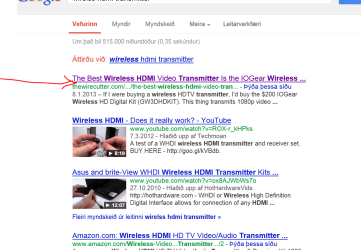
Here's a picture of some google links -- just go through some of those and see -- the BEST one costs around 180 USD - but that might be overkill for what you want to do --you can get cheaper ones --depends on range and video quality though.

Cheers
jimbo
 

Attachments

  • whdmi.png
    whdmi.png
    52.1 KB · Views: 2

My Computer My Computer

At a glance

Linux CENTOS 7 / various Windows OS'es and se...Intel i7 Intel i58GB, 16GBOn Motherboard
Computer type
PC/Desktop
Computer Manufacturer/Model Number
Custom built, several laptops HP/ASUS
OS
Linux CENTOS 7 / various Windows OS'es and servers
CPU
Intel i7 Intel i5
Memory
8GB, 16GB
Graphics Card(s)
On Motherboard
Sound Card
Realtek HD audio
Monitor(s) Displays
Apple Cinema display, Samsung LCD
Screen Resolution
1920 X 1080
Hard Drives
4 X 1TB SATA
Mouse
Toshiba wireless laser
Internet Speed
> 20MB up
Probably because Nero is nothing short of bloatware and a resource hog.

There is much better burning software these days that are either cheaper or free.

Nero used to be great in the day, but has been progressively getting worse. I have a dual core system with tons of ram and I STILL would not consider Nero.
 

My Computer My Computer

At a glance

Windows 8 Pro / Windows 7 Home Premium x64 du...6 gigsNvidia GEForce 9400 GT
Computer type
PC/Desktop
Computer Manufacturer/Model Number
HP
OS
Windows 8 Pro / Windows 7 Home Premium x64 dual boot
Memory
6 gigs
Graphics Card(s)
Nvidia GEForce 9400 GT
Screen Resolution
1600 x 900
Hard Drives
Internal - Western Digital 600 gb HDD
Internal - Western Digital 250 gb HDD
External - Western Digital 1 TB HDD
Antivirus
Avast!
Browser
Pale Moon
Back
Top