
Solved Why Massive Difference ...

MourningStar

(_x_)
Power User
VIP
Local time
2:31 PM
Messages
1,308
... in size of these two image files?!!??!!!!

They are almost identical in pixel (2850x2850) & dpi(600) & bit depth (24). I frequently encounter this phenomenon and I finally want to know how to make the larger file to be similar in size to the smaller one.
(could it possibly the 'information' in the image itself?)

Note : On my system CD.jpg is 4.25 MB and CD_Back.jpg is 762 KB.
 

Attachments
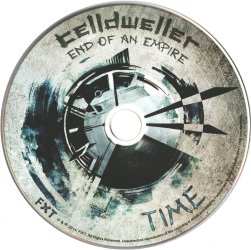
  • CD.jpg
    CD.jpg
    1.6 MB · Views: 2
  • CD_Back.jpg
    CD_Back.jpg
    762.2 KB · Views: 2

My Computer

Computer type
PC/Desktop
Computer Manufacturer/Model Number
HP (HP-P6212F)
OS
Microsoft Windows 7 Home Premium 64-bit 7601 Multiprocessor Free Service Pack 1
CPU
Pentium(R) Dual-Core CPU E5300 @ 2.60GHz
Motherboard
PEGATRON CORPORATION Benicia
Memory
6.00 GB
Graphics Card(s)
Intel(R) G33/G31 Express Chipset Family
Sound Card
Realtek High Definition Audio
Monitor(s) Displays
24'' HP WS LCD
Screen Resolution
1920 x 1080 x 32 bits (4294967296 colors) @ 60 Hz
Hard Drives
(1) ATA Hitachi HDT72106 SCSI Disk Device (2) Generic- Compact Flash USB Device (3) Generic- MS/MS-Pro USB Device (4) Generic- SD/MMC USB Device (5) Generic- SM/xD-Picture USB Device (6) Verbatim STORE N GO USB Device
Keyboard
Logitech G510s
Mouse
Logitech Trackball M570
Antivirus
Microsoft Security Essentials / Malwarebytes
Browser
IE / Firefox / Chrome
Simply because the two images are massively different (in terms of content) and you're using a compressed image format (jpg).

Jpg, as well as any other compressed formats, store images not pixel-by-pixel, but by compressing it so that they occupy as little as possible, but compression algorithms have better results when the source has a lot of repetitions and is as uniform as possible. The top image has lots of small details, texts, prints and small variations all over the place, while the bottom one is pretty simplistic in that aspect, hence the file size difference.

On the other hand, if they were saved as .bmp (an uncompressed file format), they would have exactly the same file size, down to the byte (provided they're the same resolution and bit-depth).

This is exactly the same reason why standard compression programs (likie WinZip, WinRar and the like) obtain far better compression ratios on text files rather than on binary files. Text files use few characters, with certain repeating patterns, while binary files use the full byte range with some unpredictable contents, resulting in higher final file sizes.
 

My Computer

Computer type
Laptop
Computer Manufacturer/Model Number
Toshiba Sattelite A665-S6092
OS
Windows 7 Ultimate x64
CPU
Intel Core i7-740QM
Memory
8 GB DDR3
Graphics Card(s)
NVIDIA GeForce 330GT
Screen Resolution
1366x768
Hard Drives
Samsung 840 SSD 500GB
1TB USB3 external HD
Cooling
Coolermaster Notepal U3 notebook cooling pad
Internet Speed
3mbps ASDL
Antivirus
ClamWin 0.98.7
Browser
Opera 12.17 x86 (main), Firefox 38 (sec), IE11 (last resort)
thank you Alejandro85 for confirming my suspicion.
 

My Computer

Computer type
PC/Desktop
Computer Manufacturer/Model Number
HP (HP-P6212F)
OS
Microsoft Windows 7 Home Premium 64-bit 7601 Multiprocessor Free Service Pack 1
CPU
Pentium(R) Dual-Core CPU E5300 @ 2.60GHz
Motherboard
PEGATRON CORPORATION Benicia
Memory
6.00 GB
Graphics Card(s)
Intel(R) G33/G31 Express Chipset Family
Sound Card
Realtek High Definition Audio
Monitor(s) Displays
24'' HP WS LCD
Screen Resolution
1920 x 1080 x 32 bits (4294967296 colors) @ 60 Hz
Hard Drives
(1) ATA Hitachi HDT72106 SCSI Disk Device (2) Generic- Compact Flash USB Device (3) Generic- MS/MS-Pro USB Device (4) Generic- SD/MMC USB Device (5) Generic- SM/xD-Picture USB Device (6) Verbatim STORE N GO USB Device
Keyboard
Logitech G510s
Mouse
Logitech Trackball M570
Antivirus
Microsoft Security Essentials / Malwarebytes
Browser
IE / Firefox / Chrome
Alejandro85 explained it. We usually open and save as .jpg any photos to reduce the bytes capacity.
 

My Computer

Computer type
Laptop
Computer Manufacturer/Model Number
Dell
OS
Windows 10 64
Back
Top