
You are using an out of date browser. It may not display this or other websites correctly.
You should upgrade or use an alternative browser.
You should upgrade or use an alternative browser.
Why my computer games doesn't work
- Thread starter Gentrit
- Start date


Well, looking at the bottom of that screen cap, I'd say you can start by running the WEI. Right click Computer in the start menu, and press properties. Click Windows Experience Index and then click Run the Assessment. Also, i must admit I have never seen that particular folder. How did you get to it?
My Computer
- Computer type
- Laptop
- Computer Manufacturer/Model Number
- Toshiba P775-S7100
- OS
- Windows 7 Professional SP1 64-bit
- CPU
- Intel Core i5-2450M @2.5 GHz
- Memory
- 6 GB DDR3 1333MHz
- Graphics Card(s)
- Intel HD 3000
- Monitor(s) Displays
- Built-in 17.3" LED; 22" Insignia NS-L22Q-10A
- Screen Resolution
- 1600x900; 1360x768
- Hard Drives
- 750 GB Hitachi
1TB Seagate FreeAgent External
- Internet Speed
- Verizon DSL Speed(Down/Up): 3360 Kbps / 800 Kbps
- Antivirus
- MSE and MBAM Pro
- Browser
- IE10

i must admit I have never seen that particular folder. How did you get to it?
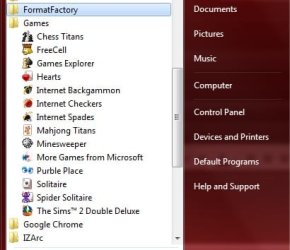
Are you referring to the picture? This is the Games folder found on the Start menu.
If you don't have it and wish it, you need to enable it (Control Panel/Programs and Features/Turn Windows Features On or Off).
My Computer
- Computer Manufacturer/Model Number
- Personal build
- OS
- Windows 7 Ultimate x64 (Retail)
- CPU
- Intel I7-860
- Motherboard
- Asus Maximus III Formula
- Memory
- G.Skill RipJaw DDR3-1333 16GB (4x4GB)
- Graphics Card(s)
- Nvidia GTS-250 1GB
- Sound Card
- SupremeFX X-Fi 7.1 HD sound system.
- Monitor(s) Displays
- VisionQuest VQL-22WSHD LCD Monitor
- Screen Resolution
- 1680x1050
- Hard Drives
- 1x Seagate ST3500418AS 500G SATA2 HDD
1x Western Digital Caviar SE16 500G SATA2 HDD
1x Western Digital Caviar SE16 750G SATA2 HDD
2x Western Digital Caviar Green 2TB SATA2 HDD, configured RAID1
- PSU
- OCZ EliteXtream OCZ1000EXS 1000W ATX12V 20/24 Pin Active PFC
- Case
- Antec 1200
- Cooling
- Swifteck H2O-220 Ultima XT Liquid Cooling w/ 320 Radiator
- Keyboard
- Logitech G11 Keyboard
- Mouse
- Logitech MX518 Optical Mouse
- Internet Speed
- Cable Modem
- Other Info
- Visiontek TV Wonder 650 Theater PCI-E TV Tuner Card
Logitech 9000 Pro Web Camera
Logitech Cordless RumblePad 2 game controller
LG 18x SuperMulti SATA2 DVD Writer
NmediaPC CR98 Multi Card reader
Nmedia Pro-LCD
Corsair Dominator Memory Fan
Coolermaster R4-L2R-20ac 120mm Case Fan x2
I have a games folder in the start menu but it doesn't look like that.
My Computer
- Computer type
- Laptop
- Computer Manufacturer/Model Number
- Toshiba P775-S7100
- OS
- Windows 7 Professional SP1 64-bit
- CPU
- Intel Core i5-2450M @2.5 GHz
- Memory
- 6 GB DDR3 1333MHz
- Graphics Card(s)
- Intel HD 3000
- Monitor(s) Displays
- Built-in 17.3" LED; 22" Insignia NS-L22Q-10A
- Screen Resolution
- 1600x900; 1360x768
- Hard Drives
- 750 GB Hitachi
1TB Seagate FreeAgent External
- Internet Speed
- Verizon DSL Speed(Down/Up): 3360 Kbps / 800 Kbps
- Antivirus
- MSE and MBAM Pro
- Browser
- IE10
I agree with the running WEI index.
And you can enable that games folder shortcut by r-clicking the taskbar>properties>Start Menu>Customize and select "display as Link" on the games Option
Then it appears in the right hand pane:

And you can enable that games folder shortcut by r-clicking the taskbar>properties>Start Menu>Customize and select "display as Link" on the games Option
Then it appears in the right hand pane:
My Computer
- Computer type
- PC/Desktop
- Computer Manufacturer/Model Number
- Systems by SmartEyeball
- OS
- 8 Pro x64
- CPU
- i7 3770K 4.6GHz
- Motherboard
- ASUS P8Z77 WS
- Memory
- 16GB G.Skill Trident X 2666mhz
- Graphics Card(s)
- x2 EVGA 780 Ti Superclocked SLI
- Sound Card
- SB X-FI Surround 5.1 PRO USB / ATH-AD900 Headphones
- Monitor(s) Displays
- x3 Dell U2410 / 58" Samsung
- Screen Resolution
- 5760*1200/ 1920*1200
- Hard Drives
- 2x Intel 520 240GB (RAID 0) * 2x WD Caviar Blacks 2TB (RAID 0) * 2TB WD Caviar Black * Sony Optirac DVD
- PSU
- Silverstone Strider Evolution 1200W
- Case
- Thermaltake Level 10 GT Snow Edition
- Cooling
- Noctua NH-D14
- Keyboard
- Topre Realforce // Ducky Shine MX Black // Filco Ninja TKL
- Mouse
- Thermaltake Theron (Highly Recommended) + Razer Imperator
- Antivirus
- MSE
- Browser
- IE, FF, WaterFox
- Other Info
- GT Extreme V2 Sim Racing Cockpit + 40" LCD and K/B Mouse stand ▼
Fanatec CSR Elite Wheel + Clubsport V1 Pedals + CSR shifter/7G-H ▼Saitek X52 Pro ▼ TrackIR 5 Pro
Buttkicker v2 Seat Rumbler with Dedicated 5.1 and Sub Woofer attached to frame ▼
=
Bloody Big Grin
I looked in Programs and Features>turn Features On and Off. You can turn certain games on and off. Look in there and make sure all games are enabled. You will likely have to restart after turning the games on.
My Computer
- Computer type
- Laptop
- Computer Manufacturer/Model Number
- Toshiba P775-S7100
- OS
- Windows 7 Professional SP1 64-bit
- CPU
- Intel Core i5-2450M @2.5 GHz
- Memory
- 6 GB DDR3 1333MHz
- Graphics Card(s)
- Intel HD 3000
- Monitor(s) Displays
- Built-in 17.3" LED; 22" Insignia NS-L22Q-10A
- Screen Resolution
- 1600x900; 1360x768
- Hard Drives
- 750 GB Hitachi
1TB Seagate FreeAgent External
- Internet Speed
- Verizon DSL Speed(Down/Up): 3360 Kbps / 800 Kbps
- Antivirus
- MSE and MBAM Pro
- Browser
- IE10
i must admit I have never seen that particular folder. How did you get to it?
Are you referring to the picture? This is the Games folder found on the Start menu.
If you don't have it and wish it, you need to enable it (Control Panel/Programs and Features/Turn Windows Features On or Off).
i fix it , thank you very much !
My Computer
- OS
- Windows 7 Ultimate x32

letsdoamazing
New member
- Local time
- 10:04 PM
- Messages
- 226
Well, looking at the bottom of that screen cap, I'd say you can start by running the WEI. Right click Computer in the start menu, and press properties. Click Windows Experience Index and then click Run the Assessment. Also, i must admit I have never seen that particular folder. How did you get to it?
Isn't that just the games explorer window?
My Computer
- Computer Manufacturer/Model Number
- HP
- OS
- Windows 7 Ultimate 64-bit
- CPU
- Intel(R) Core(TM) i5-540M @ 2.53GHz
- Motherboard
- Hewlett-Packard 1522
- Memory
- 4GB DDR3 System Memory
- Graphics Card(s)
- 1GB ATI Mobility Radeon HD 5830 Graphics
- Monitor(s) Displays
- 15.6" diagonal Full High Definition LED
- Screen Resolution
- 1920x1080
- Hard Drives
- 500GB 7200RPM SATA Hard Drive
- PSU
- 6 Cell Lithium Ion Polymer Battery
- Cooling
- NZXT Aluminum Notebook Cooler With 3 120mm Adjustable Fans
- Other Info
- Envy 15
Well, looking at the bottom of that screen cap, I'd say you can start by running the WEI. Right click Computer in the start menu, and press properties. Click Windows Experience Index and then click Run the Assessment. Also, i must admit I have never seen that particular folder. How did you get to it?
Isn't that just the games explorer window?
It still shows the WEI score there. Without running it, certain components of the OS won't run right.
My Computer
- Computer type
- Laptop
- Computer Manufacturer/Model Number
- Toshiba P775-S7100
- OS
- Windows 7 Professional SP1 64-bit
- CPU
- Intel Core i5-2450M @2.5 GHz
- Memory
- 6 GB DDR3 1333MHz
- Graphics Card(s)
- Intel HD 3000
- Monitor(s) Displays
- Built-in 17.3" LED; 22" Insignia NS-L22Q-10A
- Screen Resolution
- 1600x900; 1360x768
- Hard Drives
- 750 GB Hitachi
1TB Seagate FreeAgent External
- Internet Speed
- Verizon DSL Speed(Down/Up): 3360 Kbps / 800 Kbps
- Antivirus
- MSE and MBAM Pro
- Browser
- IE10