

- Local time
- 12:29 AM
- Messages
- 759
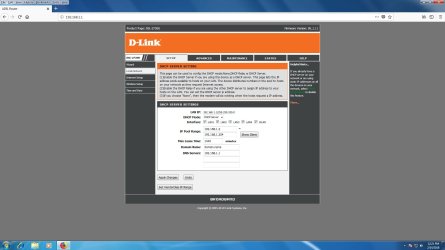
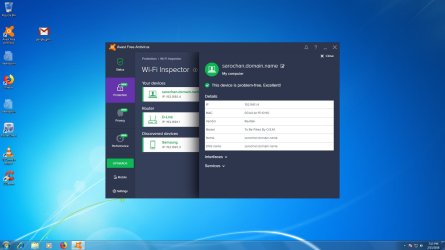
Hi, I am a lilttle bit confused. When i see the dhcp server settings, i find a domain.name in the name of the dns server, which is also getting reflected in the scan details of avast in the device name. Is there anything wrong. I am having problem of modem resyncing on every shutdown and log on.
I do not have any domain.
I am having a computer and ethernet connection, and thro the wifi modem getting wifi connections to the connected devices.
Are those connected devices would mean domain? I do not have a server connecting two or more computers. If i type set user in command prompt, i get userdomain as the name of the computer.
Note: My dsl and internet light gets disconnected on every shutdown and log on
Is that domain means connected computers to a server. I do not have any server
I do not have any domain.
I am having a computer and ethernet connection, and thro the wifi modem getting wifi connections to the connected devices.
Are those connected devices would mean domain? I do not have a server connecting two or more computers. If i type set user in command prompt, i get userdomain as the name of the computer.
Note: My dsl and internet light gets disconnected on every shutdown and log on
Is that domain means connected computers to a server. I do not have any server
Attachments
My Computer
At a glance
Microsoft Windows 7 Ultimate 64-bit 7601 Mult...Intel(R) Core(TM)2 Duo CPU E7200 @ 2.53GHz4.00 GBNVIDIA GeForce 210
- Computer type
- PC/Desktop
- Computer Manufacturer/Model Number
- custom build
- OS
- Microsoft Windows 7 Ultimate 64-bit 7601 Multiprocessor Free Service Pack 1
- CPU
- Intel(R) Core(TM)2 Duo CPU E7200 @ 2.53GHz
- Motherboard
- To be filled by O.E.M. To be filled by O.E.M.
- Memory
- 4.00 GB
- Graphics Card(s)
- NVIDIA GeForce 210
- Sound Card
- (1) NVIDIA High Definition Audio (2) Realtek High Definiti
- Screen Resolution
- 1920 x 1080 x 32 bits (4294967296 colors) @ 60 Hz
- Hard Drives
- ST3500312CS ATA Device


