Why no Customize tab in folder options?

Doublehex

New member
So, I have just installed Windows 7, and I am fairly much enjoying it, except for one quirk.

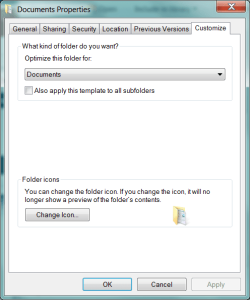
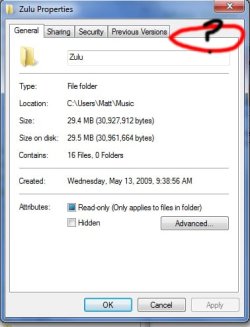
There is no Customize tab for folders! I want to set a thumbnail for it, but Microsoft has, for some reason or another, decided not to put one in. Anyone have an idea as to why, or if this is just temporary until the official release?
 

My Computer

Computer Manufacturer/Model Number
Built by me
OS
7 Ultimate
CPU
Intel Core i7 920
Motherboard
ECS X58B-A2
Memory
6GB DDR3 RAM
Graphics Card(s)
ATI HD 4870 IceQ4+ Turbo
Sound Card
Creative Labs Sound Blaster X-Fi Titanium Fata1ty
Screen Resolution
1280x1024
Hard Drives
Boot Drive: 80 GB
Drive #2: 1 TB
PSU
XFX 850W Black Edition
Case
Alienware Aurora 7500
Cooling
Cooler Master V8
Keyboard
Razer Lycosa
Mouse
Razer Lachesis
More like this. I have no Customize tab!

...What the heck is going on here?
 

Attachments

  • Heh.jpg
    Heh.jpg
    139.7 KB · Views: 83

My Computer

Computer Manufacturer/Model Number
Built by me
OS
7 Ultimate
CPU
Intel Core i7 920
Motherboard
ECS X58B-A2
Memory
6GB DDR3 RAM
Graphics Card(s)
ATI HD 4870 IceQ4+ Turbo
Sound Card
Creative Labs Sound Blaster X-Fi Titanium Fata1ty
Screen Resolution
1280x1024
Hard Drives
Boot Drive: 80 GB
Drive #2: 1 TB
PSU
XFX 850W Black Edition
Case
Alienware Aurora 7500
Cooling
Cooler Master V8
Keyboard
Razer Lycosa
Mouse
Razer Lachesis
...Heh.

So, is it because I am going there via Libraries?
 

My Computer

Computer Manufacturer/Model Number
Built by me
OS
7 Ultimate
CPU
Intel Core i7 920
Motherboard
ECS X58B-A2
Memory
6GB DDR3 RAM
Graphics Card(s)
ATI HD 4870 IceQ4+ Turbo
Sound Card
Creative Labs Sound Blaster X-Fi Titanium Fata1ty
Screen Resolution
1280x1024
Hard Drives
Boot Drive: 80 GB
Drive #2: 1 TB
PSU
XFX 850W Black Edition
Case
Alienware Aurora 7500
Cooling
Cooler Master V8
Keyboard
Razer Lycosa
Mouse
Razer Lachesis
Well, Phooie. I was rather liking the whole Library thing too.
 

My Computer

Computer Manufacturer/Model Number
Built by me
OS
7 Ultimate
CPU
Intel Core i7 920
Motherboard
ECS X58B-A2
Memory
6GB DDR3 RAM
Graphics Card(s)
ATI HD 4870 IceQ4+ Turbo
Sound Card
Creative Labs Sound Blaster X-Fi Titanium Fata1ty
Screen Resolution
1280x1024
Hard Drives
Boot Drive: 80 GB
Drive #2: 1 TB
PSU
XFX 850W Black Edition
Case
Alienware Aurora 7500
Cooling
Cooler Master V8
Keyboard
Razer Lycosa
Mouse
Razer Lachesis
Well, I have one more question. I chose the image I wanted, but it doesn't change. Any idea as to why?
 

My Computer

Computer Manufacturer/Model Number
Built by me
OS
7 Ultimate
CPU
Intel Core i7 920
Motherboard
ECS X58B-A2
Memory
6GB DDR3 RAM
Graphics Card(s)
ATI HD 4870 IceQ4+ Turbo
Sound Card
Creative Labs Sound Blaster X-Fi Titanium Fata1ty
Screen Resolution
1280x1024
Hard Drives
Boot Drive: 80 GB
Drive #2: 1 TB
PSU
XFX 850W Black Edition
Case
Alienware Aurora 7500
Cooling
Cooler Master V8
Keyboard
Razer Lycosa
Mouse
Razer Lachesis
Hello DoubleHex, and welcome to Seven Forums.

Give this reg download below a try. It removes the policy settings that normally would remove the Customize tab to then restore it. Restart the computer afterwards to apply.

Hope this helps,
Shawn

EDIT: Oh I see you were doing this from a library. Yep, there will not be one there.
 

Attachments

My Computer

Computer type
PC/Desktop
Computer Manufacturer/Model Number
Self built custom
OS
64-bit Windows 11 Pro for Workstations
CPU
Intel i7-8700K OC'd to 5 GHz
Motherboard
ASUS ROG Maximus XI Formula Z390
Memory
64 GB (4x16GB) G.SKILL TridentZ RGB DDR4 3600 MHz
Graphics Card(s)
ASUS ROG-STRIX-GTX1080TI-O11G-GAMING
Sound Card
Integrated
Monitor(s) Displays
2 x Samsung Odyssey G7 27"
Screen Resolution
2560x1440
Hard Drives
1TB Samsung 990 PRO M.2,
4TB Samsung 990 PRO PRO M.2,
TerraMaster F8 SSD Plus NAS
PSU
Seasonic Prime Titanium 850W
Case
Thermaltake Core P3
Cooling
Corsair Hydro H115i
Keyboard
Logitech wireless K800
Mouse
Logitech MX Master 4
Internet Speed
2 Gb/s Download and 100 Mb/s Upload
Antivirus
Malwarebyte Anti-Malware Premium
Browser
Google Chrome
Other Info
Logitech Z625 speaker system,
Logitech BRIO 4K Pro webcam,
HP Color LaserJet Pro MFP M477fdn,
APC SMART-UPS RT 1000 XL - SURT1000XLI,
Galaxy S23 Plus phone

My Computer

Computer Manufacturer/Model Number
Built by me
OS
7 Ultimate
CPU
Intel Core i7 920
Motherboard
ECS X58B-A2
Memory
6GB DDR3 RAM
Graphics Card(s)
ATI HD 4870 IceQ4+ Turbo
Sound Card
Creative Labs Sound Blaster X-Fi Titanium Fata1ty
Screen Resolution
1280x1024
Hard Drives
Boot Drive: 80 GB
Drive #2: 1 TB
PSU
XFX 850W Black Edition
Case
Alienware Aurora 7500
Cooling
Cooler Master V8
Keyboard
Razer Lycosa
Mouse
Razer Lachesis
I have had this problem in subfolders of the My Videos folder. When I copied the folder to an external drive, setting the folder picture worked immediately. However, i found a way to change the folder pictures under the My Videos folder too.

Set the folder picture as usual in the Customize tab and apply. You will see no change. Then click on Change Icon and on Restore Defaults and okay. Now the chosen picture is finally used as filder pictue.
 

My Computer

OS
Windows 7 Ultimate
Back
Top