Why not ALL updates?

StickBoy

New member
Local time
7:12 PM
Messages
19
As someone who is used to manually updating Windows XP through the Windows Update website, I am thrown a bit by the Windows 7 Update interface, which seems to be only a Control Panel applet. I understand it works the same way and that's fine, but why doesn't it offer to install all of the available updates?

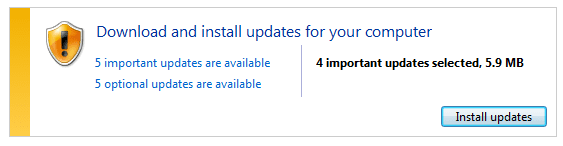
I quite often get results like this:
updates.png

As you can see in this particular instance, 5 important updates are available, but only 4 are selected. Why not select all 5 and get it over with? This happens quite often.

FYI, I clicked on the link to see all five and checked the lone one out then had it install all five and they installed just fine. Had to restart the computer after, but it's not like the one that was left unchecked was one of those "special" ones that can only be installed after all the other ones have been installed and the computer restarted.

So ... this is not really a problem, I am just curious why there always seems to be one important update left out. And if there is an option to change that, point me to it. :)

Thanks!
 

My Computer

Computer Manufacturer/Model Number
Acer Aspire 741Z-4806
OS
Windows 7 Home Premium 64bit
CPU
Intel Pentium P6200
Memory
4GB DDR3
Graphics Card(s)
Intel HD
Monitor(s) Displays
17.3" HD+ LED LCD
Hard Drives
640 GB
I think that it is because some update needs to be installed, before the one unchecked is.
 

My Computer

Computer Manufacturer/Model Number
DIY
OS
W7x64 Pro, SuSe 12.1/** W7 x64 Pro, XP MCE
CPU
Phenom II 1090T w/Noctua NH-D14 /**4400+ X2 w/CM Hyper TX 3
Motherboard
ASRock 890FX Deluxe 4/**A8N-SLI
Memory
2 x 2GB Patriot PGS34g1600LLKA/**4x1GB Corsair VS
Graphics Card(s)
EVGA GTX460 SC/**EVGA 8800GTS
Sound Card
Asus Xonar D2X/**Xonar D1
Monitor(s) Displays
Acer X233H, Dell E152FPc /**LG M237-WD
Screen Resolution
1920x1080 & 1024x768/**1980x1080
Hard Drives
WDC 2TB, 1.5TB, 1TB, 500GB,Seagate 500GB , Maxtor 80GB /**500GB Seagate & WDC 1TB Black
PSU
CM RS600 w/ APC BX1000G/**Antec 500 TP w/ APC BX1000
Case
HAF922/**Antec 1040IIB
Cooling
3x200mm, 1x140 and 1x120mm/**5x80mm fans
Keyboard
Logitech Media USB/**Saitek Eclipse
Mouse
Cordless Trackman Wheel/**Ditto
Internet Speed
3.3Mbps
Other Info
SB 560 5.1 w/ Sennheiser RS140/**Creative T20 speakers, Dvico FusionHDTV7 Gold RT, Cisco E3000, HP 5510V AIO, Linksys E3000, Belkin F5U237 hub and **F5D8055 adapter
(** = 2nd rig)
That is what I thought at first, though it would be nice if it would say, as it did with XP.

But, as I said in my post, I checked the unchecked update and had them all install at the same time, with no ill effects. After restarting the computer, I ran Update again and it said the computer was up to date. So I am just confused as to why it seems to always leave off one update.
 

My Computer

Computer Manufacturer/Model Number
Acer Aspire 741Z-4806
OS
Windows 7 Home Premium 64bit
CPU
Intel Pentium P6200
Memory
4GB DDR3
Graphics Card(s)
Intel HD
Monitor(s) Displays
17.3" HD+ LED LCD
Hard Drives
640 GB
That is what I thought at first, though it would be nice if it would say, as it did with XP.

But, as I said in my post, I checked the unchecked update and had them all install at the same time, with no ill effects. After restarting the computer, I ran Update again and it said the computer was up to date. So I am just confused as to why it seems to always leave off one update.
Possible that update resolves some issue that may not be present on all computers, hence its not automatically checked. Do you remember which update it was, then we can research into it.
 

My Computer

Computer Manufacturer/Model Number
Too many to describe...
OS
Windows 7 x64 pro/ Windows 7 x86 Pro/ XP SP3 x86
All I remember is there were two or three Win7 security updates and one of them was unchecked. It does seem to happen every time I check Update, so I will make note of it next time it happens.
Thanks!
 

My Computer

Computer Manufacturer/Model Number
Acer Aspire 741Z-4806
OS
Windows 7 Home Premium 64bit
CPU
Intel Pentium P6200
Memory
4GB DDR3
Graphics Card(s)
Intel HD
Monitor(s) Displays
17.3" HD+ LED LCD
Hard Drives
640 GB
you can check as many updates as you would like and install them all (chances are greater that you will have to restart the computer, however). Sometimes, an update installed in this way will "fail", and you only have to reinstall it one more time. if you have automatic set, shouldn't it just take care of all important updates for you?

You can also set windows to download/update your drivers automatically as well
 

My Computer

Computer type
PC/Desktop
Computer Manufacturer/Model Number
Custom Asus Build
OS
Microsoft Windows 8.1 Pro 64-bit
CPU
Intel(R) Core(TM) i3-4130 CPU @ 3.40GHz
Motherboard
B85M-E
Memory
8.00 GB
Graphics Card(s)
None
Sound Card
Realtek High Definition Audio
Monitor(s) Displays
Asus 23.6" Monitor
Screen Resolution
1920 x 1080 x 32 bits (4294967296 colors) @ 60 Hz
Hard Drives
INTEL SSDSC2BW180A4
Samsung SSD 840 PRO Series
PSU
Seasonic S12II-380Bronze
Case
Lian Li
Cooling
Fan, Passive
Keyboard
Logitech K120
Mouse
Microsoft Touch Mouse
Internet Speed
4ms Ping, 19.0 Mbps Download, 19.0 Mbps Upload
Antivirus
Eset Endpoint
Browser
Internet Explorer, Chrome
I don't have automatic set. I don't like it doing that behind my back.
Admittedly this attitude is a throwback to my older computer, where I disabled everything to save RAM. But since Microsoft apparently only releases updates once a week - often only once a month - I don't really see the need to have this checking for updates every hour, or however often it runs.
I've never run into any problems running it manually, though I know people who have had issues with automatic updates. (Usually caused by shutting down the computer in the middle of an update - which is another issue caused by something doing things without the user knowing.)
Sorry! Didn't mean to go off on a tangent against Automatic Updates! :p
It's just a personal preference.
You may have a point about updates not being installed correctly if taken all at once. You gotta wonder why there's no warning about it though....
Anyway, I'll keep my eyes on it and see how things go.
 

My Computer

Computer Manufacturer/Model Number
Acer Aspire 741Z-4806
OS
Windows 7 Home Premium 64bit
CPU
Intel Pentium P6200
Memory
4GB DDR3
Graphics Card(s)
Intel HD
Monitor(s) Displays
17.3" HD+ LED LCD
Hard Drives
640 GB
beating a deadnaught horse here but...

*You are allowed to select when to update the computer, whether or not its every month, week, or day, and the exact day it updates on.
*I have never had my computer automatically shut down after an update, and don't know what others do that makes it shut down, and I don't wonder if its just 'user error'. there is usually a prompt
*I myself don't have the updates set to automatic, and can understand why you wouldn't. I sometimes do not think an 'important' microsoft update is actually important. its rare, but it happens. such as the malicious software removal tool that installs, does a check, and then sits there like a toad on glue. I use AVs and don't think I need that tool 0.o
 

My Computer

Computer type
PC/Desktop
Computer Manufacturer/Model Number
Custom Asus Build
OS
Microsoft Windows 8.1 Pro 64-bit
CPU
Intel(R) Core(TM) i3-4130 CPU @ 3.40GHz
Motherboard
B85M-E
Memory
8.00 GB
Graphics Card(s)
None
Sound Card
Realtek High Definition Audio
Monitor(s) Displays
Asus 23.6" Monitor
Screen Resolution
1920 x 1080 x 32 bits (4294967296 colors) @ 60 Hz
Hard Drives
INTEL SSDSC2BW180A4
Samsung SSD 840 PRO Series
PSU
Seasonic S12II-380Bronze
Case
Lian Li
Cooling
Fan, Passive
Keyboard
Logitech K120
Mouse
Microsoft Touch Mouse
Internet Speed
4ms Ping, 19.0 Mbps Download, 19.0 Mbps Upload
Antivirus
Eset Endpoint
Browser
Internet Explorer, Chrome
Sooo ... after saying it happened almost every time, it hasn't happened for two months! lol
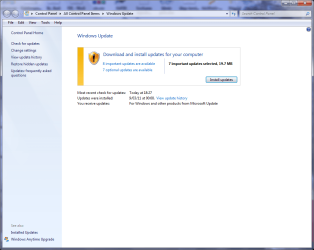
But it happened again yesterday. Here are the screenshots:
Update1.png
You can see that there are 8 important updates, but only 7 are selected.

Update2.png
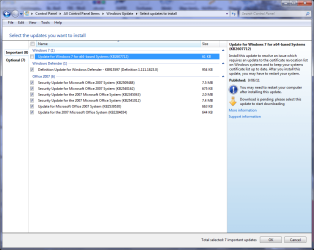
Here are the seven that are pre-selected and the one that is not.

I selected the one that wasn't and had it update all eight at once.
Update3.png
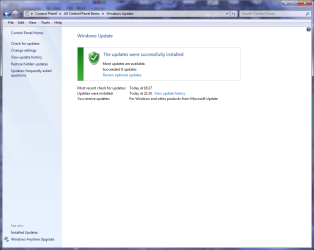
There didn't seem to be a problem!

So, any idea why this happens? Or how to change it to install all at once?

A thought occurs at this moment - could it just be limited to seven simultaneous updates, the way filemanager is limited to only open 15 files at once? I haven't noticed in the past if it has done more than seven at once. I will have to watch for that ... unless you can figure out another reason/solution. :)
 

My Computer

Computer Manufacturer/Model Number
Acer Aspire 741Z-4806
OS
Windows 7 Home Premium 64bit
CPU
Intel Pentium P6200
Memory
4GB DDR3
Graphics Card(s)
Intel HD
Monitor(s) Displays
17.3" HD+ LED LCD
Hard Drives
640 GB
Sooo ... after saying it happened almost every time, it hasn't happened for two months! lol
But it happened again yesterday. Here are the screenshots:
View attachment 174741
You can see that there are 8 important updates, but only 7 are selected.

View attachment 174742
Here are the seven that are pre-selected and the one that is not.

I selected the one that wasn't and had it update all eight at once.
View attachment 174743
There didn't seem to be a problem!

So, any idea why this happens? Or how to change it to install all at once?

A thought occurs at this moment - could it just be limited to seven simultaneous updates, the way filemanager is limited to only open 15 files at once? I haven't noticed in the past if it has done more than seven at once. I will have to watch for that ... unless you can figure out another reason/solution. :)

There isn't a limit of 7. I've had 31 be selected at the same time. I think it is MS being cautious about possible conflicts.
 

My Computer

Computer type
Laptop
Computer Manufacturer/Model Number
Hewlett-Packard/G62-107SA Notebook
OS
Microsoft Windows 7 Home Premium 64-bit Service Pack 1
CPU
Intel(R) Core(TM) i3 CPU M 330 @ 2.13GHz
Motherboard
Hewlett-Packard 1425
Memory
8 GB DDR3
Graphics Card(s)
Intel(R) HD Graphics
Sound Card
Realtek High Definition Audio
Monitor(s) Displays
Builtin
Screen Resolution
1366 x 768 x 32 bits (4294967296 colors) @ 60 Hz
Hard Drives
250 GB SATA Hard Disk Drive 7200 rpm
2TB Seagate GoFlex USB 2 Drive
1TB Iomega Prestige USB 2 Drive
1.5TB Iomega Prestige USB 2 Drive (Samsung)
2TB WD MyBook Live NAS.
Mouse
Logitech Anywhere MX
Internet Speed
152 Mbs download 10 Mbs upload
Antivirus
Norton 360
Browser
Chrome
I just registered on the sevenforums and was about to post a rant about the amount of updates of late... But I did the ol' think before you post and stopped what I assume would have been 'another one of those threads' being made, lol.


I think I'm kind of experiencing what the OP is experiencing here..

What's with ALLL the bloody updates lately? I swear at one point a month or so ago, I must have installed 3 or 4 updates all within a week. Then a short while later, I had to install some more, which took a couple of installations to complete. And now, I just installed updates and my machine boots up and it's asking me to download and install MORE, right after it's only just installed some.


Is it just me, or is everyone experiencing this annoyingly high amount of updates? Keep it to once a month or so!!!


/rant. :)
 

My Computer

OS
Windows 7 Home Prem. 64 bit
You should regard it as a good thing. The majority of updates supplied outside the monthly "Patch Tuesday" are security updates and protect your machine from the nasties. Would you rather wait up to a month for these to be issued?
 

My Computer

Computer type
Laptop
Computer Manufacturer/Model Number
Hewlett-Packard/G62-107SA Notebook
OS
Microsoft Windows 7 Home Premium 64-bit Service Pack 1
CPU
Intel(R) Core(TM) i3 CPU M 330 @ 2.13GHz
Motherboard
Hewlett-Packard 1425
Memory
8 GB DDR3
Graphics Card(s)
Intel(R) HD Graphics
Sound Card
Realtek High Definition Audio
Monitor(s) Displays
Builtin
Screen Resolution
1366 x 768 x 32 bits (4294967296 colors) @ 60 Hz
Hard Drives
250 GB SATA Hard Disk Drive 7200 rpm
2TB Seagate GoFlex USB 2 Drive
1TB Iomega Prestige USB 2 Drive
1.5TB Iomega Prestige USB 2 Drive (Samsung)
2TB WD MyBook Live NAS.
Mouse
Logitech Anywhere MX
Internet Speed
152 Mbs download 10 Mbs upload
Antivirus
Norton 360
Browser
Chrome
You should regard it as a good thing. The majority of updates supplied outside the monthly "Patch Tuesday" are security updates and protect your machine from the nasties. Would you rather wait up to a month for these to be issued?

Yeah fair enough, I know a month would probably be too long to wait. I understand they're usually security updates.

But, still... You got to understand peoples frustration when they take the plunge and press 'download updates' after ignoring it for the past week (because you never remember to do it when leaving your computer, which would be logical), restart their computer, have it install the updates, and finally boot back up and then have a message pop up saying 'new updates for download'.
 

My Computer

OS
Windows 7 Home Prem. 64 bit
Yes that is annoying. It is can be to ensure that a prerequisite update is applied first but sometimes there doesn't appear to be any sense to it..
 

My Computer

Computer type
Laptop
Computer Manufacturer/Model Number
Hewlett-Packard/G62-107SA Notebook
OS
Microsoft Windows 7 Home Premium 64-bit Service Pack 1
CPU
Intel(R) Core(TM) i3 CPU M 330 @ 2.13GHz
Motherboard
Hewlett-Packard 1425
Memory
8 GB DDR3
Graphics Card(s)
Intel(R) HD Graphics
Sound Card
Realtek High Definition Audio
Monitor(s) Displays
Builtin
Screen Resolution
1366 x 768 x 32 bits (4294967296 colors) @ 60 Hz
Hard Drives
250 GB SATA Hard Disk Drive 7200 rpm
2TB Seagate GoFlex USB 2 Drive
1TB Iomega Prestige USB 2 Drive
1.5TB Iomega Prestige USB 2 Drive (Samsung)
2TB WD MyBook Live NAS.
Mouse
Logitech Anywhere MX
Internet Speed
152 Mbs download 10 Mbs upload
Antivirus
Norton 360
Browser
Chrome
Perhaps a bit of Shakespeare would fit here:

To update, or not to update, that is the question:
Whether 'tis nobler in the mind to suffer
The slings and arrows of outrageous fortune,
Or to take arms against a sea of troubles...

No quotes, due to the liberty that I took with the verse, but it seems to express the idea. As far as I have noticed, there is usually only one update per month, with the exception of Windows Defender. Other instances are due to the fact that some updates require other updates to be installed first.
 

My Computer

Computer Manufacturer/Model Number
DIY
OS
W7x64 Pro, SuSe 12.1/** W7 x64 Pro, XP MCE
CPU
Phenom II 1090T w/Noctua NH-D14 /**4400+ X2 w/CM Hyper TX 3
Motherboard
ASRock 890FX Deluxe 4/**A8N-SLI
Memory
2 x 2GB Patriot PGS34g1600LLKA/**4x1GB Corsair VS
Graphics Card(s)
EVGA GTX460 SC/**EVGA 8800GTS
Sound Card
Asus Xonar D2X/**Xonar D1
Monitor(s) Displays
Acer X233H, Dell E152FPc /**LG M237-WD
Screen Resolution
1920x1080 & 1024x768/**1980x1080
Hard Drives
WDC 2TB, 1.5TB, 1TB, 500GB,Seagate 500GB , Maxtor 80GB /**500GB Seagate & WDC 1TB Black
PSU
CM RS600 w/ APC BX1000G/**Antec 500 TP w/ APC BX1000
Case
HAF922/**Antec 1040IIB
Cooling
3x200mm, 1x140 and 1x120mm/**5x80mm fans
Keyboard
Logitech Media USB/**Saitek Eclipse
Mouse
Cordless Trackman Wheel/**Ditto
Internet Speed
3.3Mbps
Other Info
SB 560 5.1 w/ Sennheiser RS140/**Creative T20 speakers, Dvico FusionHDTV7 Gold RT, Cisco E3000, HP 5510V AIO, Linksys E3000, Belkin F5U237 hub and **F5D8055 adapter
(** = 2nd rig)
:what:Very profound:what:
 

My Computer

Computer type
Laptop
Computer Manufacturer/Model Number
Hewlett-Packard/G62-107SA Notebook
OS
Microsoft Windows 7 Home Premium 64-bit Service Pack 1
CPU
Intel(R) Core(TM) i3 CPU M 330 @ 2.13GHz
Motherboard
Hewlett-Packard 1425
Memory
8 GB DDR3
Graphics Card(s)
Intel(R) HD Graphics
Sound Card
Realtek High Definition Audio
Monitor(s) Displays
Builtin
Screen Resolution
1366 x 768 x 32 bits (4294967296 colors) @ 60 Hz
Hard Drives
250 GB SATA Hard Disk Drive 7200 rpm
2TB Seagate GoFlex USB 2 Drive
1TB Iomega Prestige USB 2 Drive
1.5TB Iomega Prestige USB 2 Drive (Samsung)
2TB WD MyBook Live NAS.
Mouse
Logitech Anywhere MX
Internet Speed
152 Mbs download 10 Mbs upload
Antivirus
Norton 360
Browser
Chrome
Back
Top