
Why the difference between Chrome and IE9 on Gmail

kristalsoldier

New member
Power User
Local time
8:26 AM
Messages
142
Hi all...

Suddenly something came up and I am stumped. Please take a look at the attached pic. Notice the difference between how Gmail appears in Chrome and IE9. I can understand a slight variation for obvious reasons, but this?

What I am pointing to is the "cog" that the recently revamped Gmail shows. You can see it clearly in the top right corner of the Chrome window. In IE9, the "cog" is replaced with how the email address, settings etc use to appear.

I have cleaned cookies etc. I even uninstalled and reinstalled IE9 (btw, it appeared via Windows Update). No luck.

Any suggestions?

Thanks in advance.
 

Attachments
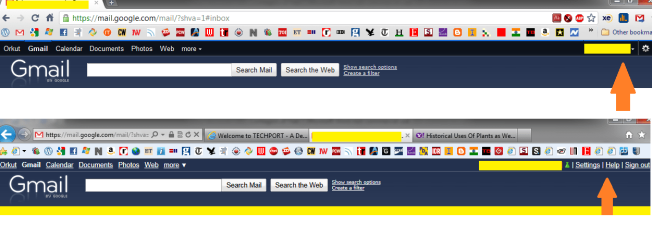
  • Gmail on IE9 and Chrome.png
    Gmail on IE9 and Chrome.png
    41.7 KB · Views: 95

My Computer

OS
Win 7 Professional 64bit
My best guess would be that, since Gmail, and Chrome are both Google products, that they have it that way on purpose, as if to "integrate" it with Chrome.
 

My Computer

Computer Manufacturer/Model Number
Toshiba Satellite L455D
OS
Windows 7 Home Premium
CPU
Amd Semperon 2.10GHz
Memory
2 Gig
Graphics Card(s)
ATI Radeon 3100
Sound Card
Realtek
Monitor(s) Displays
15.6 inch
Screen Resolution
1366x768
Hard Drives
250gig
Mouse
Logitech Wireless
Internet Speed
16/2 cable
My best guess would be that, since Gmail, and Chrome are both Google products, that they have it that way on purpose, as if to "integrate" it with Chrome.

Thanks. But the strange thing is that maybe 12 hours or so back, both Chrome and IE9 rendered the Gmail page in exactly the same way - that is to say, both had the "cog" at the top right corner!
 

My Computer

OS
Win 7 Professional 64bit
I see what you mean. My IE9 shows the cog at the moment.

EDIT: Ok, so I close IE...and come back, now the cog is gone, and it's back to the list of controls instead.....hmmm.
 

My Computer

Computer Manufacturer/Model Number
Toshiba Satellite L455D
OS
Windows 7 Home Premium
CPU
Amd Semperon 2.10GHz
Memory
2 Gig
Graphics Card(s)
ATI Radeon 3100
Sound Card
Realtek
Monitor(s) Displays
15.6 inch
Screen Resolution
1366x768
Hard Drives
250gig
Mouse
Logitech Wireless
Internet Speed
16/2 cable
I see what you mean. My IE9 shows the cog at the moment.

EDIT: Ok, so I close IE...and come back, now the cog is gone, and it's back to the list of controls instead.....hmmm.

Yeah...man! these guys - Google and MS - need to get their act together. Either Gmail renders the same in all browsers or Google needs to be explicit to say that Gmail is optimized for Chrome (and other Google products only). Or, MS needs to see how they can adjust their browser to at least render what is a popular webmail service in the best possible way!

At the end of the day, I am not going to change my browser to access a single site. I may as well change the site (if I can, which in this case is indeed possible) and continue using a single browser (for the most part).

Edit:

I suspect this is something at Google's end, because I have now tested this with not only IE9, but also FF4 and Opera11. (someone told me that this difference in rendering is to be expected in Opera - quite why was not explained)
 

My Computer

OS
Win 7 Professional 64bit
I can't tell what's going on really....depending on which time I go to Gmail with IE, it changes...one time the cog, one time the list...next time the cog....it's inconsistent, which makes it tough to figure out.
 

My Computer

Computer Manufacturer/Model Number
Toshiba Satellite L455D
OS
Windows 7 Home Premium
CPU
Amd Semperon 2.10GHz
Memory
2 Gig
Graphics Card(s)
ATI Radeon 3100
Sound Card
Realtek
Monitor(s) Displays
15.6 inch
Screen Resolution
1366x768
Hard Drives
250gig
Mouse
Logitech Wireless
Internet Speed
16/2 cable

My Computer

Computer type
Laptop
Computer Manufacturer/Model Number
Hewlett-Packard/G62-107SA Notebook
OS
Microsoft Windows 7 Home Premium 64-bit Service Pack 1
CPU
Intel(R) Core(TM) i3 CPU M 330 @ 2.13GHz
Motherboard
Hewlett-Packard 1425
Memory
8 GB DDR3
Graphics Card(s)
Intel(R) HD Graphics
Sound Card
Realtek High Definition Audio
Monitor(s) Displays
Builtin
Screen Resolution
1366 x 768 x 32 bits (4294967296 colors) @ 60 Hz
Hard Drives
250 GB SATA Hard Disk Drive 7200 rpm
2TB Seagate GoFlex USB 2 Drive
1TB Iomega Prestige USB 2 Drive
1.5TB Iomega Prestige USB 2 Drive (Samsung)
2TB WD MyBook Live NAS.
Mouse
Logitech Anywhere MX
Internet Speed
152 Mbs download 10 Mbs upload
Antivirus
Norton 360
Browser
Chrome
I'm getting no cog in any browser (IE, Chrome or FF) :confused:
 

My Computer

Computer Manufacturer/Model Number
Compaq Desktop
OS
Windows 7 Ultimate x64
CPU
AMD Sempron Dual Core
Memory
3GB
Graphics Card(s)
NVIDIA GeForce 6150SE nForce 430
Screen Resolution
1024x768
Hard Drives
150GB Sata
It's weird that it's so inconsistent. I get it in IE sometimes, and other times it's the list instead.
 

My Computer

Computer Manufacturer/Model Number
Toshiba Satellite L455D
OS
Windows 7 Home Premium
CPU
Amd Semperon 2.10GHz
Memory
2 Gig
Graphics Card(s)
ATI Radeon 3100
Sound Card
Realtek
Monitor(s) Displays
15.6 inch
Screen Resolution
1366x768
Hard Drives
250gig
Mouse
Logitech Wireless
Internet Speed
16/2 cable
Yeah...this is so weird! Since I first reported this on this forum, I have never got the "cog" in IE9. However, Chrome consistently shows the "cog". This is bit of mystery and I would very much like to know why this is happening. IE9 is supposed to be a modern browser so I would expect it to render most pages correctly. But then again, the issue could be from Google's side too and I suspect that it is. But what exactly it is, I don't know.
 

My Computer

OS
Win 7 Professional 64bit
Strange thing...that "cog" is back in IE9. And, I did nothing! Very mysterious (or maybe not).
 

My Computer

OS
Win 7 Professional 64bit
Not for me. FF is still cogless also.
 

My Computer

Computer type
Laptop
Computer Manufacturer/Model Number
Hewlett-Packard/G62-107SA Notebook
OS
Microsoft Windows 7 Home Premium 64-bit Service Pack 1
CPU
Intel(R) Core(TM) i3 CPU M 330 @ 2.13GHz
Motherboard
Hewlett-Packard 1425
Memory
8 GB DDR3
Graphics Card(s)
Intel(R) HD Graphics
Sound Card
Realtek High Definition Audio
Monitor(s) Displays
Builtin
Screen Resolution
1366 x 768 x 32 bits (4294967296 colors) @ 60 Hz
Hard Drives
250 GB SATA Hard Disk Drive 7200 rpm
2TB Seagate GoFlex USB 2 Drive
1TB Iomega Prestige USB 2 Drive
1.5TB Iomega Prestige USB 2 Drive (Samsung)
2TB WD MyBook Live NAS.
Mouse
Logitech Anywhere MX
Internet Speed
152 Mbs download 10 Mbs upload
Antivirus
Norton 360
Browser
Chrome
Well it's possible that since there are like 5000 machines backing up the gmail server that an update did not get propigated to all of them. SO randomly, which ever machine ends up serving your particular connection request, you are seeing two slightly different versions of the gmail web site...
 

My Computer

Computer Manufacturer/Model Number
Scratch built
OS
Windows 7 x64 Ultimate
CPU
i7 960
Motherboard
Asus P6X58D
Memory
12 Gig Corsair Dominator
Graphics Card(s)
Nvidia 480
Sound Card
Maudio Delta 44 + breakout box
Monitor(s) Displays
Dell UltraSharp U2410 24in and Samsung 21 dual monitors
Screen Resolution
1920x1200 and 1280x1024
Hard Drives
Primary: Intel X-25M G2 160G SSD
Secondary: Segate baracuda 1.0 TB
HDs in AHCI mode.
PSU
Corasair TX850
Case
Cooler Master HAF
Cooling
Corsair H50
Keyboard
Logitech G15 + N52 game pad
Mouse
Logitech MX518
Internet Speed
15kbs down 4.5kbps up
Other Info
WEI 7.6
CPU & RAM 7.6
Graphics 7.9
Hard disk 7.7
Well it's possible that since there are like 5000 machines backing up the gmail server that an update did not get propigated to all of them. SO randomly, which ever machine ends up serving your particular connection request, you are seeing two slightly different versions of the gmail web site...

Hmmm...possible...makes sense...never really thought of it that way. Thanks.
 

My Computer

OS
Win 7 Professional 64bit
Methinks its a bit unlikely that IE and FF would consistently use one of the not updated ones and Chrome would if this was a random event. It may be of course that Chrome is automatically routed to different servers for some reason (SPDY for instance).
 

My Computer

Computer type
Laptop
Computer Manufacturer/Model Number
Hewlett-Packard/G62-107SA Notebook
OS
Microsoft Windows 7 Home Premium 64-bit Service Pack 1
CPU
Intel(R) Core(TM) i3 CPU M 330 @ 2.13GHz
Motherboard
Hewlett-Packard 1425
Memory
8 GB DDR3
Graphics Card(s)
Intel(R) HD Graphics
Sound Card
Realtek High Definition Audio
Monitor(s) Displays
Builtin
Screen Resolution
1366 x 768 x 32 bits (4294967296 colors) @ 60 Hz
Hard Drives
250 GB SATA Hard Disk Drive 7200 rpm
2TB Seagate GoFlex USB 2 Drive
1TB Iomega Prestige USB 2 Drive
1.5TB Iomega Prestige USB 2 Drive (Samsung)
2TB WD MyBook Live NAS.
Mouse
Logitech Anywhere MX
Internet Speed
152 Mbs download 10 Mbs upload
Antivirus
Norton 360
Browser
Chrome
Sounded like people were getting inconsistant results on IE as well which led to my conclusion.

If All others really were consistant one way and chrome another then the conclusion might have been that google was in fact tailoring special pages for chrome. They are doing such things in other places. In fact on their code repository they refuse to even support IE /at all/ because "Microsoft is a big meanie and doesn't support open source" (which is compeltely wrong, but google won't hear it)
 

My Computer

Computer Manufacturer/Model Number
Scratch built
OS
Windows 7 x64 Ultimate
CPU
i7 960
Motherboard
Asus P6X58D
Memory
12 Gig Corsair Dominator
Graphics Card(s)
Nvidia 480
Sound Card
Maudio Delta 44 + breakout box
Monitor(s) Displays
Dell UltraSharp U2410 24in and Samsung 21 dual monitors
Screen Resolution
1920x1200 and 1280x1024
Hard Drives
Primary: Intel X-25M G2 160G SSD
Secondary: Segate baracuda 1.0 TB
HDs in AHCI mode.
PSU
Corasair TX850
Case
Cooler Master HAF
Cooling
Corsair H50
Keyboard
Logitech G15 + N52 game pad
Mouse
Logitech MX518
Internet Speed
15kbs down 4.5kbps up
Other Info
WEI 7.6
CPU & RAM 7.6
Graphics 7.9
Hard disk 7.7
I guess so but it has been consistent for me. Chrome cog. IE and FF no cog.
 

My Computer

Computer type
Laptop
Computer Manufacturer/Model Number
Hewlett-Packard/G62-107SA Notebook
OS
Microsoft Windows 7 Home Premium 64-bit Service Pack 1
CPU
Intel(R) Core(TM) i3 CPU M 330 @ 2.13GHz
Motherboard
Hewlett-Packard 1425
Memory
8 GB DDR3
Graphics Card(s)
Intel(R) HD Graphics
Sound Card
Realtek High Definition Audio
Monitor(s) Displays
Builtin
Screen Resolution
1366 x 768 x 32 bits (4294967296 colors) @ 60 Hz
Hard Drives
250 GB SATA Hard Disk Drive 7200 rpm
2TB Seagate GoFlex USB 2 Drive
1TB Iomega Prestige USB 2 Drive
1.5TB Iomega Prestige USB 2 Drive (Samsung)
2TB WD MyBook Live NAS.
Mouse
Logitech Anywhere MX
Internet Speed
152 Mbs download 10 Mbs upload
Antivirus
Norton 360
Browser
Chrome
Back
Top