why windows driver from microsoft shows that best driver is upto date

jraju

New member
Member
VIP
Local time
1:11 PM
Messages
759
Hi, It is basic that windows 7 installation media automatically download drivers for all the devices connected with during the period of install.
After that, when we try to update, a ready made alert that best drivers for the device is already available in your pc, but we know that there is update drivers.
For eg, mother board drivers , or basic drivers are only installed but not the updated drivers for motherboard and other hardwares.
For example, for graphics driver, the built in driver for the mother board is added, whereas nvidia driver for the nvidia graphics driver has not been touched at all. Like wise, only generic drivers for most of the hardwares are present after initial install.
Just when it displays that the driver is uptodate when they are not, how to go about forcing the windows auto update drivers to find the newer drivers . I know that support for win 7 gone away with jan 2020
 

My Computer My Computer

At a glance

Microsoft Windows 7 Ultimate 64-bit 7601 Mult...Intel(R) Core(TM)2 Duo CPU E7200 @ 2.53GHz4.00 GBNVIDIA GeForce 210
Computer type
PC/Desktop
Computer Manufacturer/Model Number
custom build
OS
Microsoft Windows 7 Ultimate 64-bit 7601 Multiprocessor Free Service Pack 1
CPU
Intel(R) Core(TM)2 Duo CPU E7200 @ 2.53GHz
Motherboard
To be filled by O.E.M. To be filled by O.E.M.
Memory
4.00 GB
Graphics Card(s)
NVIDIA GeForce 210
Sound Card
(1) NVIDIA High Definition Audio (2) Realtek High Definiti
Screen Resolution
1920 x 1080 x 32 bits (4294967296 colors) @ 60 Hz
Hard Drives
ST3500312CS ATA Device
Windows update only has a limited set of drivers which are not always the most recent. It is up to you to do the research and update the drivers as needed.
For example I just reinstalled Windows 7 on an old computer. The computer has an Nvida Geforce 5 FX5900 video card. The Windows installation only installed the generic video driver. That is because there is no Windows 7 driver for this card.

Going to the Nvidia website I found the best driver for the FX5900 and installed it:
Version: 96.85 WHQL
Release Date: 2006.10.17
Operating System: Windows Vista 32-bit

In Device Manager this shows up as:
Driver Provider: Nvidia
Driver Date: 10/9/2006
Driver Version: 9.6.8.5

Strangely there is an even newer Windows XP driver but I am sticking with the Windows Vista driver.

I also tried another video card in this computer an Nividia Geforce FX6200 (256MB). It does have a Windows 7 driver. However, I went back to the FX5900 (128MB) because it is a much faster video card even though it has less video memory.

Drivers for the motherboard are another problem. It is better that you check to see if the manufacturer has anything newer. Sometimes I have found a newer driver at the chipset manufacture's website. For example, for an ASUS motherboard with an Nvidia chipset I found a newer chipset driver at the Nvidia website.

A big priority was getting networking working. I used a wireless adapter because I was too far away to run an Ethernet cable. The adapter was a Linksys WMP54G v4 Wireless-G PCI Adapter.

Linksys had no driver for Windows 7 so a little research showed this network card uses a Ralink chipset. I went to the Ralink website and downloaded a driver for the Ralink 2500. This worked great.

Once I got Internet working I could go forward in using it to update the computer.
 
Last edited:

My Computers My Computers

  • At a glance

    Windows 7 Home Premium 64-bitsAMD FX-8350GSKILL Ripjaw-X PC3 12800 8GB (2x4GB)ASUS ROG STRIX GTX 1060 6GB
    Computer type
    PC/Desktop
    Computer Manufacturer/Model Number
    Custom build
    OS
    Windows 7 Home Premium 64-bits
    CPU
    AMD FX-8350
    Motherboard
    Gigabyte GA-990FXA-UD3 (AM3+)
    Memory
    GSKILL Ripjaw-X PC3 12800 8GB (2x4GB)
    Graphics Card(s)
    ASUS ROG STRIX GTX 1060 6GB
    Sound Card
    Integrated
    Monitor(s) Displays
    Asus VE228H (21.5-in)
    Screen Resolution
    1920x1080 60Hz
    Hard Drives
    SAMSUNG 870 EVO 2.5 Inch SATA SSD (1TB)
    SAMSUNG 870 EVO 2.5 Inch SATA SSD (1TB)
    SAMSUNG 870 EVO 2.5 Inch SATA SSD (1TB)
    PSU
    Corsair RM750x (750 watts)
    Case
    Corsair Carbide Series 200R
    Cooling
    Corsair Hydro Series H60 (CWCH60)
    Keyboard
    Logitech Elite
    Mouse
    Logitech M510 Wireless Mouse
    Internet Speed
    Comcast Gigabit Extra (1200Mbps down / 35Mbps up)
    Antivirus
    Malwarebytes
    Browser
    Firefox, Edge, Chrome
    Other Info
    ASUS DRW-24B1ST DVD-RW (24X) optical drive
    Seagate Expansion Desk (5TB) external SATA/USB HDD
    Comcast XB8 Internet Gateway
  • At a glance

    Windows 7 Pro (64-bit)AMD Phenom II 960T X4Corsair XMS2 DDR2-800 8GB (4x2GB)ASUS ENGTX560 DCII OC/2DI/1GD5 1GB
    Computer type
    PC/Desktop
    System Manufacturer/Model Number
    Custom
    OS
    Windows 7 Pro (64-bit)
    CPU
    AMD Phenom II 960T X4
    Motherboard
    ASUS M4N82 Deluxe
    Memory
    Corsair XMS2 DDR2-800 8GB (4x2GB)
    Graphics Card(s)
    ASUS ENGTX560 DCII OC/2DI/1GD5 1GB
    Monitor(s) Displays
    Samsung 930B 19-inch LCD
    Screen Resolution
    1280x1024
    Hard Drives
    Samsung SSD 870 EVO 1000 GB (Windows 10)
    Seagate ST1000DM003 1000 GB (Windows 7)
    PSU
    Antec TruePower (new) TP-650
    Case
    Antec Three Hundred
    Cooling
    AMD stock cooler from FX8350
    Mouse
    Logitech M100
    Internet Speed
    Xfinity Gigabit Extra 1200/35 Mbps
Hi, thank you mistered.
But the real problem is the alert that you are having up to date driver alert.So, if anybody going thro the device manager, he is bound to get only generic drivers , and not up to date drivers.
Today, when on install, as you say, no network driver was installed and I have a driver in a pendrive for network driver. I understand.
On seeing the movie in amazon prime, the pictures were smaller than usual.
Then I went and see the display resolution. The maximum by standard driver only support 1280x640 pixels. Then I went to nvidia and downloaded the non problematic version of 341.11, the latest being 342.01, and go to the same movie. This driver support , rather card support, 1920x1080 pixel, and the picture was bigger in size .
likewise realtek audio drivers. Previously I used to go to the realtek com and download the drivers. But now, i see so many websites , having the Realtek logo, gives drivers of different latest version and so I am a little bit confused which is realttek drivers.
Latest drivers from Brink, in the first page, is not allowed by latest firefox, saying potential malware alert.
I have written to the firefox about this .
Thanks for your reply.
I just tried drivermax, for audio drivers, it shows some other version, which is not available in realtek site.

- - - Updated - - -

Hi, intel has discontinued support to my intel q33 motherboards. Then how do I update those drivers. Is there anyway. But I know that those drivers are having updates .please
 

My Computer My Computer

At a glance

Microsoft Windows 7 Ultimate 64-bit 7601 Mult...Intel(R) Core(TM)2 Duo CPU E7200 @ 2.53GHz4.00 GBNVIDIA GeForce 210
Computer type
PC/Desktop
Computer Manufacturer/Model Number
custom build
OS
Microsoft Windows 7 Ultimate 64-bit 7601 Multiprocessor Free Service Pack 1
CPU
Intel(R) Core(TM)2 Duo CPU E7200 @ 2.53GHz
Motherboard
To be filled by O.E.M. To be filled by O.E.M.
Memory
4.00 GB
Graphics Card(s)
NVIDIA GeForce 210
Sound Card
(1) NVIDIA High Definition Audio (2) Realtek High Definiti
Screen Resolution
1920 x 1080 x 32 bits (4294967296 colors) @ 60 Hz
Hard Drives
ST3500312CS ATA Device
Sometimes you have to do Google searches to find sources for drivers when the original manufactures of the chipsets have stopped support. However, as long as the devices have a working driver you might have to settle for that.

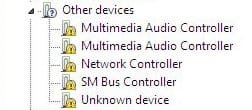
Does everything in the Device Manager have a driver. In other words is anything in a Other Devices list where there is a yellow exclamation point in front of device.

For example, here is what my Device Manager looked like after Windows 7 was installed. Afterwords I manually installed the chipset drivers so the Other Devices list disappeared after the devices received drivers. Note the chipset in my motherboard is from 2002 so is about five years older than the one in your motherboard. There are no Windows 7 drivers for my chipset. Based on the 2004 & 2005 dates they apparently are Windows XP drivers.

Other Devices.jpg

Are you running Windows 7 Ultimate 64-bit? Do you have 4GB memory? If so and you can't find drivers you might consider reinstalling with Windows 7 Ultimate 32-bit. You might have better luck finding 32-bit drivers.

One of my other computers started with Windows 7 Ultimate 32-bit and 4GB RAM. Later I upgraded to Windows 7 Ultimate 64-bit and 8GB RAM. A few years ago I did a free upgrade to Windows 10 Pro 64-bit. Note I had Windows 7 Ultimate Retail that included both 32-bit and 64-bit DVDs.
 

My Computers My Computers

  • At a glance

    Windows 7 Home Premium 64-bitsAMD FX-8350GSKILL Ripjaw-X PC3 12800 8GB (2x4GB)ASUS ROG STRIX GTX 1060 6GB
    Computer type
    PC/Desktop
    Computer Manufacturer/Model Number
    Custom build
    OS
    Windows 7 Home Premium 64-bits
    CPU
    AMD FX-8350
    Motherboard
    Gigabyte GA-990FXA-UD3 (AM3+)
    Memory
    GSKILL Ripjaw-X PC3 12800 8GB (2x4GB)
    Graphics Card(s)
    ASUS ROG STRIX GTX 1060 6GB
    Sound Card
    Integrated
    Monitor(s) Displays
    Asus VE228H (21.5-in)
    Screen Resolution
    1920x1080 60Hz
    Hard Drives
    SAMSUNG 870 EVO 2.5 Inch SATA SSD (1TB)
    SAMSUNG 870 EVO 2.5 Inch SATA SSD (1TB)
    SAMSUNG 870 EVO 2.5 Inch SATA SSD (1TB)
    PSU
    Corsair RM750x (750 watts)
    Case
    Corsair Carbide Series 200R
    Cooling
    Corsair Hydro Series H60 (CWCH60)
    Keyboard
    Logitech Elite
    Mouse
    Logitech M510 Wireless Mouse
    Internet Speed
    Comcast Gigabit Extra (1200Mbps down / 35Mbps up)
    Antivirus
    Malwarebytes
    Browser
    Firefox, Edge, Chrome
    Other Info
    ASUS DRW-24B1ST DVD-RW (24X) optical drive
    Seagate Expansion Desk (5TB) external SATA/USB HDD
    Comcast XB8 Internet Gateway
  • At a glance

    Windows 7 Pro (64-bit)AMD Phenom II 960T X4Corsair XMS2 DDR2-800 8GB (4x2GB)ASUS ENGTX560 DCII OC/2DI/1GD5 1GB
    Computer type
    PC/Desktop
    System Manufacturer/Model Number
    Custom
    OS
    Windows 7 Pro (64-bit)
    CPU
    AMD Phenom II 960T X4
    Motherboard
    ASUS M4N82 Deluxe
    Memory
    Corsair XMS2 DDR2-800 8GB (4x2GB)
    Graphics Card(s)
    ASUS ENGTX560 DCII OC/2DI/1GD5 1GB
    Monitor(s) Displays
    Samsung 930B 19-inch LCD
    Screen Resolution
    1280x1024
    Hard Drives
    Samsung SSD 870 EVO 1000 GB (Windows 10)
    Seagate ST1000DM003 1000 GB (Windows 7)
    PSU
    Antec TruePower (new) TP-650
    Case
    Antec Three Hundred
    Cooling
    AMD stock cooler from FX8350
    Mouse
    Logitech M100
    Internet Speed
    Xfinity Gigabit Extra 1200/35 Mbps
Hi, very nice points. I did not find any other drivers.
What I have done is. Went to realtek.com website to download ethernet and sound drivers for my OS win 7 64 bit. Likewise, went to nvidia drivers com and downloaded the drivers, both audio and video drivers , as I have hdmi connection. Microsoft drivers only have drivers for 1264 pixels . Nvidia drivers give you 1920 pixels .
Then use a software bit drivers , to download manually mother board drivers. Now the system has picked up speed and nicely working.
The next thing was to find a program to back up these drivers in case, you have to again install windows, to restore the latest drivers that are working. I found a software called double driver, which is not presently getting update, but which is enough for free purpose. I just clicked current drivers to load the present drivers and then took a backup of non microsoft drivers thro, it and copied the same to the pen drive . Now , if any problem comes to reinstall, then it will be handy to easily restore the drivers for the system that your are using.
The program double driver is a free one, to backup , view , and restore the drivers.
This is the link:
Download Double Driver - MajorGeeks
Just download, and open the software in elevated mode, and then execute. Just click backup tab, and click current drive.After all the drivers are loaded just go to select menu to select the drivers, all, or default non microsoft drivers , and then click backup tab, in the bottom of the screen. Select compressed form in the next menu and also select destination for backup. it will backup all the drivers to the location. copy to your pendrive , the program and the backup, to restore. Restore all the drivers for the new windows installation, of updated drivers for win 7. Microsoft and intel stopped support for windows 7. You can also save the copy of the current drivers to a text file by save menu
 
Last edited:

My Computer My Computer

At a glance

Microsoft Windows 7 Ultimate 64-bit 7601 Mult...Intel(R) Core(TM)2 Duo CPU E7200 @ 2.53GHz4.00 GBNVIDIA GeForce 210
Computer type
PC/Desktop
Computer Manufacturer/Model Number
custom build
OS
Microsoft Windows 7 Ultimate 64-bit 7601 Multiprocessor Free Service Pack 1
CPU
Intel(R) Core(TM)2 Duo CPU E7200 @ 2.53GHz
Motherboard
To be filled by O.E.M. To be filled by O.E.M.
Memory
4.00 GB
Graphics Card(s)
NVIDIA GeForce 210
Sound Card
(1) NVIDIA High Definition Audio (2) Realtek High Definiti
Screen Resolution
1920 x 1080 x 32 bits (4294967296 colors) @ 60 Hz
Hard Drives
ST3500312CS ATA Device
Back
Top