
Solved Why won't some DVDs play in my computer's DVD drive?

digiday

Banned
Local time
7:36 AM
Messages
99
Location
SF, Caleeforneea
I have a small collection of commercial movie DVDs. Most of them are from the U.S. market place and some are from Asia... ALL of these DVDs play in my Phillips DVD player that is connected to my TV.

But only some of these DVDs will play in my DVD player that is in my Dell Inspiron 531 computer with Windows 7 Ultimate.


This computer has a SAMSUNG HD161HJ SCSI DVD/CD Disk Drive.

Some of the DVDs that will play on my computer are from the U.S. market and some of them are from the Asian market, so I don't think that has anything to do with why some of these DVDs will not play on my computer. Some of the DVDs that won't play on this computer are from the U.S. market too.

The DVDs that play just fine in my Phillips DVD player on my TV that won't play on my computer don't even seem to wind up to play on my computer. The DVDs that will play on my computer wind up (you can hear the sound) in the DVD drive within about 20 seconds and they start playing automatically in the Windows Media Player... but I've allowed all the others that will not play to sit in the DVD disk drive for several minutes each in my tests and nothing at all happens... there is no wind up sound and nothing at all happens on the computer screen.

This does not seem to be a problem with the software driver for the disk drive since some of the DVDs will play.

None of these DVDs are warped and all of them are clean.

I've tried two or three times testing each of the DVDs that won't play, taking them out of the disk drive and putting them back in.

Does anyone have any suggestions?

Thanks,

digiday
 

My Computer My Computer

At a glance

Windows 7 ULT 32 bit2 GHZ2 GB
Computer Manufacturer/Model Number
Dell 531
OS
Windows 7 ULT 32 bit
CPU
2 GHZ
Memory
2 GB
Other Info
Also use Macs, but don't tell anyone

My Computer My Computer

At a glance

Win7 H.Prem. 32bit+SP1
Computer Manufacturer/Model Number
Look in my Signature.
OS
Win7 H.Prem. 32bit+SP1
What software Player are you using to play the DVDs on your computer?
 

My Computer My Computer

At a glance

Windows 7 Home Premium 32 bit
OS
Windows 7 Home Premium 32 bit
He's using WMP version unknown.
 

My Computer My Computer

At a glance

Win7 H.Prem. 32bit+SP1
Computer Manufacturer/Model Number
Look in my Signature.
OS
Win7 H.Prem. 32bit+SP1
Although two DVD's from different areas play and some do not, I wonder if it has anything to do with what region is set (or not set) in the drive?

Usually new drives come with no region initially set.
 

My Computer My Computer

At a glance

Windows 10 64 bitIntel i7 6700K16GB Corsair DominatorIntel CPU Graphics
Computer type
PC/Desktop
Computer Manufacturer/Model Number
My Own Build
OS
Windows 10 64 bit
CPU
Intel i7 6700K
Motherboard
ASUS ROG Maximus VIII Hero
Memory
16GB Corsair Dominator
Graphics Card(s)
Intel CPU Graphics
Sound Card
RealTek
Monitor(s) Displays
27" Dell S2719dgf
Screen Resolution
2560X1440
Hard Drives
1 TB Samsung 850 EVO SSD for Win 10 Pro
500GB Samsung 850 EVO SSD for Win 10 Insider
2 TB drive for backup
PSU
EVGA Supernova 750G2
Case
BeQuiet Silent Base 600
Cooling
Deepcool Captain 120EX
Keyboard
Microsoft Wireless 2000
Mouse
Microsoft wireless
Internet Speed
100 MB/sec (Cable)
Antivirus
Microsoft Defender and Malwarebytes
Browser
Edge/Firefox
Other Info
Cakewalk (Sonar) by BandLab and Studio One 4.1 Pro recording studio software. MOTU 896Mk3 Hybrid recording interface, Frontier Tranzport wireless control unit, Behringer X-Touch Control Surface.
Five USB connected optical drives for CD Audio production using Nero BurningROM
First, thanks for the recommendation Roadrunner... I thought that might be it since, according to the information on the Media Player Classic page on Wikipedia it says,

"Media Player Classic is capable of VCD, SVCD, and DVD playback without installation of additional software or codecs. MPC has built-in codecs for MPEG-2 video with support for subtitles and codecs for LPCM, MP2, 3GP, AC3, and DTS audio."

So I thought that since it has its own built-in codecs that might solve the problem, but it didn't. Since Media Player Classic does not actually install, and it just runs from the folder that the zipped file is extracted to, then I don't see how that would affect the DVD drive itself, right?

And thanks to jumanji and firebird for your input as well.

The Windows Media Player that is on this computer is version 12.0.7601.17514 dated 11/14/2010. I think I upgraded it once since I installed Windows 7 in October of 2010. But apparently that doesn't have anything to do with this problem because Media Player Classic HC doesn't see the same DVDs that WMP won't see.

Let me clarify, with the DVDs that won't play, the DVD drive does not show that there is any disk in the drive when I look at the Computer window that shows my drives... it just appears that the DVD drive is empty, whereas when there is a DVD in the drive that will play, it shows the disk and the name of the disk in the E drive.

The problem is that the DVD/CD drive is just not seeing some of these DVDs, and as I said, many of the DVDs that it will not see are from the U.S. market, and even some from the same distributor will play and others from that same distributor will not. In addition, most DVDs from Japan will play and some will not. At this point after testing about 50 or so DVDs, the ones from Japan have a better play ratio then the ones from the U.S... but a few of the DVDs from Japan will not play.

Could that have anything to do with the fact that this 2006 computer's DVD drive is a Japanese model? Again, it is a SAMSUNG HD161HJ SCSI DVD/CD Disk Drive.

I thought that possibly more codecs would make a DVD drive see more types of DVDs, but I think I understand now that isn't the case. Codecs make a video player play or convert more types of video and video editing apps deal with more types of video formats, but it has nothing to do with what a DVD/CD drive will see, right?

I edit and create some videos in Adobe Premiere, so I have at least a vague understanding of codecs and I've installed some on this computer... but I don't believe that has anything to do with this problem.

Is it possible that a newer software driver for my internal SAMSUNG HD161HJ SCSI DVD/CD Disk Drive would make it see more types of DVDs? Maybe I was wrong with my previous assumption that the driver won't make a difference.

Or is it possible to "set" the region for the DVD drive, as firebird indicated? How does one go about doing that?... and would that be likely to make it so it wouldn't play some of the DVDs that it will play now?


Thanks,

digiday
 

My Computer My Computer

At a glance

Windows 7 ULT 32 bit2 GHZ2 GB
Computer Manufacturer/Model Number
Dell 531
OS
Windows 7 ULT 32 bit
CPU
2 GHZ
Memory
2 GB
Other Info
Also use Macs, but don't tell anyone
The link I posted gives options for MPC installable & portable versions of 32 or 64bit.
 

My Computer My Computer

At a glance

Win7 H.Prem. 32bit+SP1
Computer Manufacturer/Model Number
Look in my Signature.
OS
Win7 H.Prem. 32bit+SP1
Just a comment on the CD/DVD drive's drivers. There are no drivers for CD/DVD drives (any optical drive) other than the built in Windows drivers.

Second, considering the age of an Inspiron 531 it may just be the drive is defective (laser light) and replacing it with a new drive is a viable option. Those PC's came out at the end of Windows XP/start of Vista. Optical drives are relatively inexpensive and if you have a 531 and not a 531S it will accept a standard SATA optical drive. A new drive can be purchased for $20 to $25 at www.newegg.com If its a 531S it still accepts a full size optical drive but it mounts vertically so you need one that is designed to be operated (and hold the disc) vertically.
 

My Computer My Computer

At a glance

Windows 10 64 bitIntel i7 6700K16GB Corsair DominatorIntel CPU Graphics
Computer type
PC/Desktop
Computer Manufacturer/Model Number
My Own Build
OS
Windows 10 64 bit
CPU
Intel i7 6700K
Motherboard
ASUS ROG Maximus VIII Hero
Memory
16GB Corsair Dominator
Graphics Card(s)
Intel CPU Graphics
Sound Card
RealTek
Monitor(s) Displays
27" Dell S2719dgf
Screen Resolution
2560X1440
Hard Drives
1 TB Samsung 850 EVO SSD for Win 10 Pro
500GB Samsung 850 EVO SSD for Win 10 Insider
2 TB drive for backup
PSU
EVGA Supernova 750G2
Case
BeQuiet Silent Base 600
Cooling
Deepcool Captain 120EX
Keyboard
Microsoft Wireless 2000
Mouse
Microsoft wireless
Internet Speed
100 MB/sec (Cable)
Antivirus
Microsoft Defender and Malwarebytes
Browser
Edge/Firefox
Other Info
Cakewalk (Sonar) by BandLab and Studio One 4.1 Pro recording studio software. MOTU 896Mk3 Hybrid recording interface, Frontier Tranzport wireless control unit, Behringer X-Touch Control Surface.
Five USB connected optical drives for CD Audio production using Nero BurningROM
Hello Roadrunner and Firebird, thanks for your replies.

First, Roadrunner... the MPC-HC download that I downloaded from the page you linked for me was the one labeled "Zip file" next to the "Installer" link, which usually means that it is a Zipped version of the same thing. But I see now that the download link named "Installer" downloads an actual installer... so I get that now.

But are telling me that installing that MPC-HC app will make my DVD drive see DVDs that it will not see now? I mean, even if it installed additional codecs on my system, that doesn't make my DVD drive see anything differently, right?

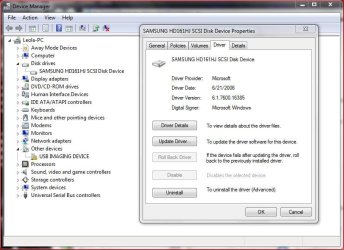
And Firebird, the Microsoft driver for my DVD drive is the one that I was referring to... which other driver would be available for it, right?... and it CAN be updated, according to the Device Manager interface for that drive, seen in my screenshot attached at the bottom of this post.

The driver for my SAMSUNG HD161HJ SCSI DVD/CD Disk Drive is the Microsoft driver, version 6.1.7600.16385, dated 6/21/2006, and it does give me the option to update it. My concern there would be that it may (for whatever reason knowing how things go) render my DVD drive inoperable in some sort of software glitch if I try updating that driver... Murphy's Law, ya know?

My last question would be, have you ever heard of or experienced a DVD drive's software driver update improving its ability to read more types of DVDs?... or have you ever heard of updating a DVD drive's driver having the opposite effect.

Since this DVD/CD drive is consistently reading the same DVDs properly over and over in my tests, and not reading the same DVDs over and over in my tests, it leads me to believe that this drive is not having an intermittent failure problem, but more of a problem where the drive or the software driver for it is not reading some types of encoding that some DVDs have. In addition, this drive has never had any problem burning any DVDs or CDs or reading any of the DVDs and CDs that I've burnt.

Let me know what you think of my last question.

Thanks,

digiday
 

Attachments

  • diskDRIVE_driverPANEL.jpg
    diskDRIVE_driverPANEL.jpg
    73.3 KB · Views: 9

My Computer My Computer

At a glance

Windows 7 ULT 32 bit2 GHZ2 GB
Computer Manufacturer/Model Number
Dell 531
OS
Windows 7 ULT 32 bit
CPU
2 GHZ
Memory
2 GB
Other Info
Also use Macs, but don't tell anyone
First, there is NO updated drivers. The default Windows/Microsoft driver that comes with Windows 7 is THE driver.

There are firmware updates for drives that can fix some problems. As you have a Dell, with an OEM drive (not a retail version drive) if there is an update from Dell you can install it and see if it helps. However, there is no "Samsung" drives listed in the available Dell optical drive firmware updates, however thare are "TSST" drives listed which are Samsung/Toshiba drives. Can you doublecheck the drive model number listed in the Device Manager. as you will need the EXACT model number to see if there is a firmware update for this drive.

Here is the Dell firmware download listing for the Inspiron 531. If you have the exact model number you can check it against this list and if there is one, download and installed using the Dell listed installation instructions. Restart the PC after the firmware update and then see if makes any difference. If not, I still think a replacement drive is a good option. Drivers and Downloads | Dell [United States]
 

My Computer My Computer

At a glance

Windows 10 64 bitIntel i7 6700K16GB Corsair DominatorIntel CPU Graphics
Computer type
PC/Desktop
Computer Manufacturer/Model Number
My Own Build
OS
Windows 10 64 bit
CPU
Intel i7 6700K
Motherboard
ASUS ROG Maximus VIII Hero
Memory
16GB Corsair Dominator
Graphics Card(s)
Intel CPU Graphics
Sound Card
RealTek
Monitor(s) Displays
27" Dell S2719dgf
Screen Resolution
2560X1440
Hard Drives
1 TB Samsung 850 EVO SSD for Win 10 Pro
500GB Samsung 850 EVO SSD for Win 10 Insider
2 TB drive for backup
PSU
EVGA Supernova 750G2
Case
BeQuiet Silent Base 600
Cooling
Deepcool Captain 120EX
Keyboard
Microsoft Wireless 2000
Mouse
Microsoft wireless
Internet Speed
100 MB/sec (Cable)
Antivirus
Microsoft Defender and Malwarebytes
Browser
Edge/Firefox
Other Info
Cakewalk (Sonar) by BandLab and Studio One 4.1 Pro recording studio software. MOTU 896Mk3 Hybrid recording interface, Frontier Tranzport wireless control unit, Behringer X-Touch Control Surface.
Five USB connected optical drives for CD Audio production using Nero BurningROM
Firebird, thanks for your reply, so much. Your post prompted me to re-check my Device Manger panel for the DVD/CD drive.


Ooops, ... the label, "Disk Drive" threw me off and I opened the wrong Device panel in my Device Manager.


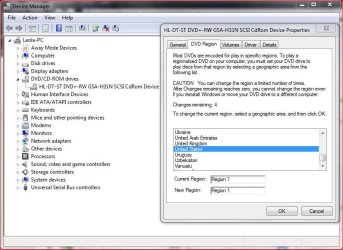
This DVD/CD drive is an HL-DT-ST DVD+-RW GSA-H31N SCSI CdRom Device, as labeled in my Device Manger... see the screenshot linked below.


But I still don't know the precise brand of this DVD/CD drive... HL-DT-ST is the only description and the Device panel has no further indication of the drive's brand.


I have a PDF manual and an HTML manual for this computer, but it still doesn't tell me any more info about the actual brand of the DVD/CD drive... probably because Dell changed the make of that drive from time to time while making this model computer.


And I just noticed that there is a tab on that Device panel named "Region", and it says...
___________________________


Most DVDs are encoded for play in specific regions. To play a regionalized DVD on your computer, you must set your DVD drive to play discs from taht region by selecting a geographic area from the following list.

CAUTION You can change the region a limited number of times. After Changes remaining reaches zero, you cannot change the region even if you reinstall Windows or move your DVD drive to a different computer.

Changes remaining: 4

To change the current region, select a geographic area, and then click OK.

Current Region: Region 1
___________________________


And apparently "Region 1" is the United States, because I tried clicking on the U.S. in the scroll list of countries and when I click on it, then there is a field that shows "New Region" as Region 1 before I click OK.


Now this explains some things but not others. Most of the DVDs that I have from the U.S. actually WILL NOT play currently, even thought my drive is set for the United States region, but most of the Japanese DVDs that I have will play currently, but some will not.


And apparently I can't just change it back and forth more than 4 times to different regions to test it, which seems to be a huge limitation in this drive's function.


I wonder if that would make this drive's DVD reading capabilities any more universal by default if I updated that firmware for this DVD/CD drive.


Let me know what you think.


Thanks so much,


digiday
 

Attachments

  • diskDRIVE_REGION-PANEL_.jpg
    diskDRIVE_REGION-PANEL_.jpg
    79 KB · Views: 6

My Computer My Computer

At a glance

Windows 7 ULT 32 bit2 GHZ2 GB
Computer Manufacturer/Model Number
Dell 531
OS
Windows 7 ULT 32 bit
CPU
2 GHZ
Memory
2 GB
Other Info
Also use Macs, but don't tell anyone
Well, this is what I've found...

Japan is region 2 and the US is region 1.


If some DVDs play and others do not (all of the same region), it is possible that the DVD laser is marginal.


Sometimes a Firmware update is issued to improve readability, however the most recent one for this drive, linked below, doesn't indicate that...


http://www.dell.com/support/drivers/us/en/19/DriverDetails?driverId=R160612http://www.dell.com/support/drivers/us/en/19/DriverDetails?driverId=R160612


I see that firmware update was from 2007, so it's possible that this computer might have an older one than that since it was purchased in 2006 or 2007 and it was probably manufactured sometime in 2005 or 2006, but it doesn't say anything about improvements in reading various types of DVDs in that firmware description... it only says...

"Firmware resolves Optilex 320 system detection issue with the HLDS GSA_H31N HH drive at boot up"...


... which I'm sure means that it had a previous problem before even seeing the drive in the Windows operating system, but I haven't had that problem and I've upgraded the OS one time on this computer from Vista to W7 and I've never had a problem with the OS not recognizing the DVD/CD drive itself.


I guess the driver update, if Microsoft has a newer one than the one that came in Windows 7, probably wouldn't do much, but if anyone thinks differently or has another recommendation, then please let me know.


I do have a LaCie DVD/CD burner/player from around 2003 that is in storage and it is a very good one, so maybe I'll try that one, if I can find it and dig it out.


Thanks so much for all of your advice, everyone.
 

My Computer My Computer

At a glance

Windows 7 ULT 32 bit2 GHZ2 GB
Computer Manufacturer/Model Number
Dell 531
OS
Windows 7 ULT 32 bit
CPU
2 GHZ
Memory
2 GB
Other Info
Also use Macs, but don't tell anyone
Most drives allow 5 region changes - I think there are one or two programs which get around that - never looked into it.

Firmware update is probably a good idea.
 

My Computers My Computers

  • At a glance

    7 X64i5 84002x8gb 3200mhz
    Computer type
    PC/Desktop
    OS
    7 X64
    CPU
    i5 8400
    Motherboard
    gigabyte b365m ds3h
    Memory
    2x8gb 3200mhz
    Hard Drives
    various
    PSU
    pure power 11 400w cm
    Case
    Coolermaster
    Cooling
    cryorig m9i
  • At a glance

    7x64g54008gb ddr4 2400
    Computer type
    PC/Desktop
    OS
    7x64
    CPU
    g5400
    Motherboard
    ga b365m ds3h
    Memory
    8gb ddr4 2400
    PSU
    xfx pro 450w
Hi SIW2,

That would be cool if there were a program to get around that issue, but then again, the way this drive is performing in my current tests, it still won't play some/most DVDs from the U.S. even when it is set to the U.S. region, and even though it is set for the U.S. region it still plays most DVDs from Japan, with the exception of a few.

So the region thing seems to be screwed up, or the actual coding in the DVDs is different, even for the same regions... maybe if I set the drive to the Japan region, it would play the rest of the DVDs from the U.S., by the logic of the way things are working now, eh?

If anyone has ever heard of the program to get around the limitation of changing the region setting more than four times, then please let me know... I wouldn't even know what to search for.

Thanks.
 

My Computer My Computer

At a glance

Windows 7 ULT 32 bit2 GHZ2 GB
Computer Manufacturer/Model Number
Dell 531
OS
Windows 7 ULT 32 bit
CPU
2 GHZ
Memory
2 GB
Other Info
Also use Macs, but don't tell anyone

My Computers My Computers

  • At a glance

    7 X64i5 84002x8gb 3200mhz
    Computer type
    PC/Desktop
    OS
    7 X64
    CPU
    i5 8400
    Motherboard
    gigabyte b365m ds3h
    Memory
    2x8gb 3200mhz
    Hard Drives
    various
    PSU
    pure power 11 400w cm
    Case
    Coolermaster
    Cooling
    cryorig m9i
  • At a glance

    7x64g54008gb ddr4 2400
    Computer type
    PC/Desktop
    OS
    7x64
    CPU
    g5400
    Motherboard
    ga b365m ds3h
    Memory
    8gb ddr4 2400
    PSU
    xfx pro 450w
Cool WIW2,

I guess you are a better Googler than me.

I've gotta check this out, especially since it is free. I'll let you know if I go ahead and install it and try it.

Thanks!
 

My Computer My Computer

At a glance

Windows 7 ULT 32 bit2 GHZ2 GB
Computer Manufacturer/Model Number
Dell 531
OS
Windows 7 ULT 32 bit
CPU
2 GHZ
Memory
2 GB
Other Info
Also use Macs, but don't tell anyone
As I wrote yesterday, I have a LaCie DVD/CD burner/player drive from around 2003... and I found it last night in storage, hooked it up and it flawlessly plays ALL of my DVDs. Even one DVD that played a little glitchy in this Dell computer's drive plays perfectly without any stuttering in this LaCie drive.

So since I'm the type of person that doesn't want to install software that I don't absolutely need, I probably won't be testing that "DVD Region+CSS Free" software to try to make my Dell computer's somewhat inferior DVD/CD drive more functional since I don't need to any longer.

And considering that this LaCie DVD/CD drive cost about as much in 2003 as this entire Dell computer cost is 2007, around $300, it should play any DVD flawlessly. Even using a USB 1 connection to run this LaCie DVD/CD drive on, it still works perfectly. This drive can use USB 1, USB 2 or Firewire, but this computer only has USB 1.


If you think about it, why would Dell spend a lot of money on any one of the components that it puts in its computers when it sells those computers for as little as $300?


This Dell Inspiron 531 came with defective RAM in it and it took years for me to finally figure out that there's a RAM test app built in to the firmware in this computer and test the RAM to find out that it has been defective and reeking infinite havoc all this time... and I thought it was just Windows Vista. Even though Vista was committing a slow suicide with corrupted, badly written software code, it took the bad RAM that Dell built in to this computer to really drive me crazy when I was troubleshooting all the problems on it for a family member. Once I put new RAM in this computer and installed Windows 7, it's a different computer with almost no problems. Since then I've inherited this computer and it is my first Windows PC.


So problem solved, but any internal DVD/CD drive in any cheepo Dell or any other stock PC drive is bound to be inferior... you get what you pay for, eh?


Thanks again.
 

My Computer My Computer

At a glance

Windows 7 ULT 32 bit2 GHZ2 GB
Computer Manufacturer/Model Number
Dell 531
OS
Windows 7 ULT 32 bit
CPU
2 GHZ
Memory
2 GB
Other Info
Also use Macs, but don't tell anyone
If MPC HC won't play your cd/dvd's it might help buying a cleaner disk for your optical drive.
 

My Computer My Computer

At a glance

Win7 H.Prem. 32bit+SP1
Computer Manufacturer/Model Number
Look in my Signature.
OS
Win7 H.Prem. 32bit+SP1
The DVD drive is bad, replace it.This is exactly how they behave when they go bad. DVD (and CD's) vary in reflectivity and the duller the disc the less likely it will play with a low emission laser. Another common failure is the inability to focus on the lower level of a dual layer disc causing the film /movie to freeze at the layer change. Do what I have done, I have Region 2 DVD's from the UK (can't be without my Madness Music DVD's) so I fit a Region 1 DVD and below it a Region 2 DVD drive. Good DVD burners can be got for between $15 and $20. I tried all those region free programs and they always broke copy protection on games, caused unexplained blue-screens. Drives are now cheaper than some of the programs that you could purchase. If you get 2 drives make sure you get a SATA cable and there is room in your case.
Newegg.com - ASUS 24X DVD Burner - Bulk 24X DVD+R 8X DVD+RW 12X DVD+R DL 24X DVD-R 6X DVD-RW 16X DVD-ROM 48X CD-R 32X CD-RW 48X CD-ROM Black SATA Model DRW-24B1ST/BLK/B/AS - CD / DVD Burners
I have 7 of these in various computers and only one was bad, that failed within 2 weeks, would not do the layer change boogie, got it replaced under warranty .
 

My Computer My Computer

At a glance

Windows 7 x64 Ultimate and numerous virtual m...AMD FX-8350 Vishera 32nm Technology @ 4.2 GHz...G Skill 32.0GB Dual-Channel DDR3 @ 1204MHz (1...EVGA GeForce GTX 960 4GB Super SC ACX 2.0+ wi...
Computer type
PC/Desktop
Computer Manufacturer/Model Number
Bluethunder II
OS
Windows 7 x64 Ultimate and numerous virtual machines
CPU
AMD FX-8350 Vishera 32nm Technology @ 4.2 GHz default
Motherboard
ASUSTeK COMPUTER INC. SABERTOOTH 990FX R2.0 (Socket 942)
Memory
G Skill 32.0GB Dual-Channel DDR3 @ 1204MHz (11-13-13-31)
Graphics Card(s)
EVGA GeForce GTX 960 4GB Super SC ACX 2.0+ with Back Plate
Sound Card
Creative X-Fi Titanium HD Audiophile PCIe
Monitor(s) Displays
LG L227WTG x 3
Screen Resolution
1680 x 1050 16:10
Hard Drives
238GB Samsung850 PRO SATA Disk Device (SSD)
1863GB Seagate ST2000DM 001-1CH164 (SATA)
1397GB Seagate ST1500DL 003-9VT16L(SATA)
466GB Western Digital WDC WD50 03AZEX-00K1GA0 (SATA) x 2
932GB Seagate ST310005 28AS SATA Disk Device (SATA)
PSU
Enermax Revolution87+ 1000 Watts Gold Certified Power Supply
Case
Rocketfish Full Tower
Cooling
Cooler Master Hyper 212 EVO Push Pull 120mm Fans
Keyboard
Logitech K740
Mouse
Logitech G100S Laser LED + Logitech Gamepad F310
Internet Speed
500 mbs down and 30mbs up
Antivirus
Malwarebytes Pro & Avast and MSE on certain Virtual Machines
Browser
Firefox (Main) Chrome, Internet Explorer (Back Up)
Other Info
Logitech X 230 2.1 Stereo System and 5.1 Yamaha RX V2090
B&W DM6 Monitor Speakers + Center and Surround Speakers
Using Mouse Without Borders (Google it)
Hi Roadrunner and Indianatone... thanks for your replies.

I'm wondering, did either of you read my last post?

My issue had nothing to do with the media player nor a defective drive, and I have another drive hooked up that plays all my DVDs now.

Windows Media Player plays all of my DVDs as long as I'm playing them through my LaCie drive that I just hooked up. So it has nothing to do with whether I use MPC-HC or not... in fact in my few tests that I did with MPC-HC, it tended to hang up and crash, even while using my LaCie drive, whereas Windows Media Player works perfectly with all my DVDs now.

And it is evident that the issue with my internal drive that I was troubleshooting is an issue with the Region setting and it is not intermittent behavior from a defective drive.

Thanks.
 

My Computer My Computer

At a glance

Windows 7 ULT 32 bit2 GHZ2 GB
Computer Manufacturer/Model Number
Dell 531
OS
Windows 7 ULT 32 bit
CPU
2 GHZ
Memory
2 GB
Other Info
Also use Macs, but don't tell anyone
Back
Top