Wi fi adapter problem

WhyFI

New member
Local time
10:54 AM
Messages
10
Here is my problem:
I have a wi fi sky adapter,and when i plug it in,it says installing driver software.
But..then it just hangs there,and eventually leads to-driver was not sucessfully installed(thats when i plug it out,but i waited for more than an hour and nothing happened)

I tried uninstaling and updating the driver for it,but it didnt helped.When i tried to uninstal the driver,again,it just hanged.That is untill i unpluged the adapter.Again.I have manually downloaded the latest driver,and when i check in properties it says that device is working.

I also tried uninstaling norton,disabling firewall,and my WLAN auto config is working,and set to automatic.So i really dont know why wont the device software install.
Btw,i tried installing it in safe mode-it worked(802.11 was sucessfully installed).But it wont install in safe mode with networking.It also just "hangs"


So i would really,really appreciate if someone could help me out (sorry if my english is bad) :picnic:
 
Last edited:

My Computer

OS
windows 7
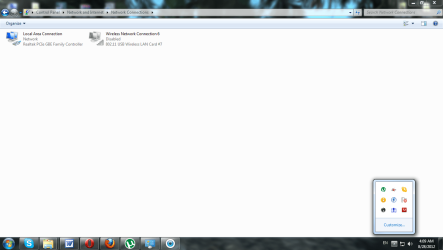
wifi.png
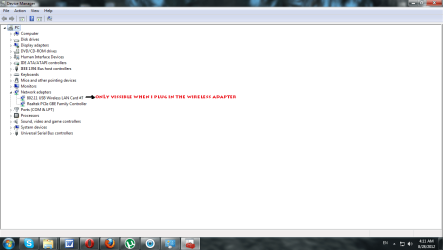
adapters.png

I have tried enabling it
it goes-enabling----enabled.But when i look at the wireless connectiont icon,it is still gray and disabled.. :confused:

Just to add-the adapter works on my friends windows 7,and my older xp.
 
Last edited:

My Computer

OS
windows 7
Here is my configuration

Windows IP Configuration

Host Name . . . . . . . . . . . . : PC
Primary Dns Suffix . . . . . . . :
Node Type . . . . . . . . . . . . : Hybrid
IP Routing Enabled. . . . . . . . : No
WINS Proxy Enabled. . . . . . . . : No
DNS Suffix Search List. . . . . . : sbb.rs

Ethernet adapter Local Area Connection:

Connection-specific DNS Suffix . : sbb.rs
Description . . . . . . . . . . . : Realtek PCIe GBE Family Controller
Physical Address. . . . . . . . . : 90-E6-BA-1F-AE-97
DHCP Enabled. . . . . . . . . . . : Yes
Autoconfiguration Enabled . . . . : Yes
Link-local IPv6 Address . . . . . : fe80::1e7:55f4:9fe7:111a%28(Preferred)
IPv4 Address. . . . . . . . . . . : 188.2.221.128(Preferred)
Subnet Mask . . . . . . . . . . . : 255.255.252.0
Lease Obtained. . . . . . . . . . : Tuesday, August 28, 2012 5:15:15 PM
Lease Expires . . . . . . . . . . : Wednesday, August 29, 2012 4:47:03 AM
Default Gateway . . . . . . . . . : 188.2.220.1
DHCP Server . . . . . . . . . . . : 89.216.1.18
DHCPv6 IAID . . . . . . . . . . . : 177268410
DHCPv6 Client DUID. . . . . . . . : 00-01-00-01-16-AC-0E-DD-90-E6-BA-1F-AE-97
DNS Servers . . . . . . . . . . . : 89.216.1.40
89.216.1.50
NetBIOS over Tcpip. . . . . . . . : Enabled

Tunnel adapter Teredo Tunneling Pseudo-Interface:

Connection-specific DNS Suffix . :
Description . . . . . . . . . . . : Teredo Tunneling Pseudo-Interface
Physical Address. . . . . . . . . : 00-00-00-00-00-00-00-E0
DHCP Enabled. . . . . . . . . . . : No
Autoconfiguration Enabled . . . . : Yes
IPv6 Address. . . . . . . . . . . : 2001:0:5ef5:73b8:38d5:1c24:43fd:227f(Preferred)
Link-local IPv6 Address . . . . . : fe80::38d5:1c24:43fd:227f%26(Preferred)
Default Gateway . . . . . . . . . :
NetBIOS over Tcpip. . . . . . . . : Disabled

Tunnel adapter isatap.sbb.rs:

Media State . . . . . . . . . . . : Media disconnected
Connection-specific DNS Suffix . : sbb.rs
Description . . . . . . . . . . . : Microsoft ISATAP Adapter #3
Physical Address. . . . . . . . . : 00-00-00-00-00-00-00-E0
DHCP Enabled. . . . . . . . . . . : No
Autoconfiguration Enabled . . . . : Yes

Tunnel adapter 6TO4 Adapter:

Connection-specific DNS Suffix . : sbb.rs
Description . . . . . . . . . . . : Microsoft 6to4 Adapter #2
Physical Address. . . . . . . . . : 00-00-00-00-00-00-00-E0
DHCP Enabled. . . . . . . . . . . : No
Autoconfiguration Enabled . . . . : Yes
IPv6 Address. . . . . . . . . . . : 2002:bc02:dd80::bc02:dd80(Preferred)
Default Gateway . . . . . . . . . : 2002:c058:6301::1
DNS Servers . . . . . . . . . . . : 89.216.1.40
89.216.1.50
NetBIOS over Tcpip. . . . . . . . : Disabled
 

My Computer

OS
windows 7
I just tried the adapter on my friends windows 7
Worked like a charm
Now i really dont have a clue what the problem seems to be
 

My Computer

OS
windows 7
Hi WhyFI, Welcome to the forums, Can I ask are you loading the drivers from a cd or manufacturers website ,or are you relying on windows update to find the drivers for you ?
Do you have any other wireless device attached which maybe causing a conflict ? :)
 

My Computer

Computer type
PC/Desktop
Computer Manufacturer/Model Number
self build
OS
win 7 ultimate32bit, Win8.1pro wmc 32bit
CPU
amd phenom x4 9600
Motherboard
asus m2n32-sli deluxe
Memory
corsair twinxs 2x2gb
Graphics Card(s)
2x nvidia 1gb 8500gt
Sound Card
onboard
Monitor(s) Displays
23" PB Viseo 233d
Screen Resolution
1920x1080
Hard Drives
maxtor sata 500gb
maxtor sata 320gb
fujitsu sata200gb
PSU
oryxx tornado 750w
Case
thermaltake xaser lll
Cooling
artic freezer64 pro + 7 case fans
Hi pebbly
The driver comes with the adapter,as soon as you plug it in,the device software begins
the instalation
Since i couldnt install it that way,i have downloaded it manually.
I installed it,but not much has changed.
I also tried updating the driver,it said it was up to date.

Not much has changed.I know that the driver that comes with the adapter is properly working,since i have tested it on two other pc's.

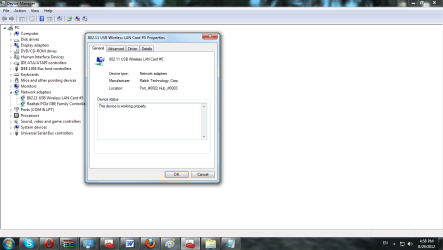
Also it says that the device is working
working.png
 

My Computer

OS
windows 7
Hi WhyFI, Are these the drivers you are using ? Ralink-A MEDIATEK COMPANY Tell us the model of the adaptor and we will see if we can find a better driver , Have you tried installing the software as admin or in compatibility mode ? ;)
 

My Computer

Computer type
PC/Desktop
Computer Manufacturer/Model Number
self build
OS
win 7 ultimate32bit, Win8.1pro wmc 32bit
CPU
amd phenom x4 9600
Motherboard
asus m2n32-sli deluxe
Memory
corsair twinxs 2x2gb
Graphics Card(s)
2x nvidia 1gb 8500gt
Sound Card
onboard
Monitor(s) Displays
23" PB Viseo 233d
Screen Resolution
1920x1080
Hard Drives
maxtor sata 500gb
maxtor sata 320gb
fujitsu sata200gb
PSU
oryxx tornado 750w
Case
thermaltake xaser lll
Cooling
artic freezer64 pro + 7 case fans
I also like to disable all other internal wireless devices if this is to be the primary wireless device, as it causes less confusion.
 

My Computer

Computer type
PC/Desktop
Computer Manufacturer/Model Number
A blend of brains, brawn and dumb luck.
OS
Windows 7 Ultimate 64
CPU
i7 3770k OC'd 4.6 @ 1.17v, also FX 8120 & i5 miniITX
Motherboard
MSI P67A-GD80 b3
Memory
32 gb G.Skill Sniper DDR3 10-12-12-31 @ 2133
Graphics Card(s)
XFX Radeon 7870 2GB DDR5
Sound Card
Sound Blaster Z Series Card
Monitor(s) Displays
(2) LG LED 23" 1920 x 1080 2ms Monitors via mini d-port
Screen Resolution
1680 X 1050 p
Hard Drives
Samsung 256 gb 830 SSD sata III
(1) 1 tb WD Black
(2) 1 tb Hitachi deskmates/sata II
(2) 1 tb WD green/sata II
(2) 3 tb Seagate Barracuda
(1) 120 gb OCZ Vertex SS
(1) Drobo 5N w/5 Seagate 3tb
PSU
EVGA modular 1000G2 80% gold rating & APC 1200 RS
Case
CoolerMaster Storm Styker
Cooling
7 case fans 140mm & 120mm, NZXT Kraken X60
Keyboard
(2) Logitech Illuminated Keyboards (1) usb (1) wireless
Mouse
Logitech G700 & T-BC21 - nano nx for the laptop
Internet Speed
Basic 120mbps down
Antivirus
Trend Micro Titanium Max Security & Malwarebytes Premium
Browser
Chrome and IE 10
Other Info
5 Noctua case fans + 3 Noctua in p/p on NZXT cooler
Integrated hot swap drive bays for 2.5" Drives
(2) Lite-on dvd/cd/Blu Ray optical 22X
Integrated fan controller and led on/off
HP Officejet Pro 8630 all-n-one
Hot-swappable 3.5" hard drive bay
Netgear Nighthawk router
Asus USB 3 & sata 6 PCIe card
Vantec IDE to sata adptr./Ultra sata adptr
Lenovo L420 i5 lappy with m sata
Drobo 5N advanced NAS
I assure you that the problem is not in the driver,i have checked it,im pretty sure.
It works on other computers.
 

My Computer

OS
windows 7
Back
Top