
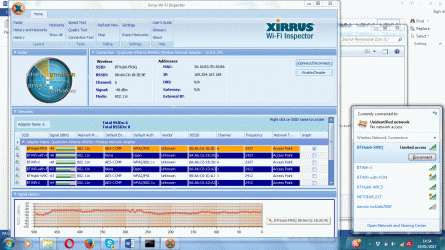
(I attach an ipconfig/all output text file and a Xirrus screenshot.)
My Windows 7 Lenovo M30 laptop has suddenly stopped connecting to my router. Other Windows 7 devices connect just fine. The problem suddenly arose for no apparent reason. (The device worked fine until yesterday.) I've read widely in forums and tried lots of things without success (below).
Troubleshooting reports these 2 errors:
1) "Wi-Fi doesn't have a valid IP configuration"
2) “Problem with the Wireless Adapter or Access point”
I’ve tried the following so far.
1) Factory reset router (BTHub6)
2) Rebooted PC
3) Disabled Microsoft Virtual WiFi Miniports
4) Disabled Bluetooth
5) Disabled then re-Enabled the (Qualcomm Atheros AR956x) Wireless Network Adapter
6) Updated the driver for the Wireless Network Adapter
7) Checked that “Obtain an IP address automatically” is checked in IPv4 and IPv6
8) Checked that “Obtain the DNS Server address automatically” is checked in IPv4 and IPv6
9) Checked that there was no McAfee Bonjour Service installed.
10) Rebooted again….
Can anyone help?
Many thanks in advance for any ideas!
My Windows 7 Lenovo M30 laptop has suddenly stopped connecting to my router. Other Windows 7 devices connect just fine. The problem suddenly arose for no apparent reason. (The device worked fine until yesterday.) I've read widely in forums and tried lots of things without success (below).
Troubleshooting reports these 2 errors:
1) "Wi-Fi doesn't have a valid IP configuration"
2) “Problem with the Wireless Adapter or Access point”
I’ve tried the following so far.
1) Factory reset router (BTHub6)
2) Rebooted PC
3) Disabled Microsoft Virtual WiFi Miniports
4) Disabled Bluetooth
5) Disabled then re-Enabled the (Qualcomm Atheros AR956x) Wireless Network Adapter
6) Updated the driver for the Wireless Network Adapter
7) Checked that “Obtain an IP address automatically” is checked in IPv4 and IPv6
8) Checked that “Obtain the DNS Server address automatically” is checked in IPv4 and IPv6
9) Checked that there was no McAfee Bonjour Service installed.
10) Rebooted again….
Can anyone help?
Many thanks in advance for any ideas!
Attachments
My Computer
At a glance
Windows 7 Professional 64-bit
- Computer type
- Laptop
- Computer Manufacturer/Model Number
- Toshiba Portege
- OS
- Windows 7 Professional 64-bit
- Hard Drives
- SSD
- Antivirus
- Avira
- Browser
- Firefox


