Wi-Fi settings keep resetting

Andarthiel

New member
Member
Local time
9:11 AM
Messages
37
Location
Melbourne VIC
Hi,
I've got an annoying problem with my Wi-Fi settings in Windows 7.
Recently I got myself a wireless D-Link router and a Realtek USB Wireless adapter for my PC. I had a bit of a problem setting it up due to annoying WEP/WPA keys and then I found the ASCII key option and got it working. However Windows 7 seems to forget the settings for my wireless connection every time I restart the computer(wrong security setting and old WPA key that doesn't work anymore because I changed it). So I guess it keeps going back to the settings I had previously. How do I get it to remember my working settings? I've already ticked that checkbox "Connect automatically" in the connection settings but that did nothing. Is there some sort of way of tricking it into remembering my new settings? It's just a hassle having to set it every time I start Windows.
 

My Computer

Computer type
PC/Desktop
Computer Manufacturer/Model Number
Gigabyte
OS
Windows 7 Ultimate 64-bit
CPU
AMD Athlon FX 4100 ~3.6GHZ
Motherboard
Gigabyte 970A-D3
Memory
16GB DDR3
Graphics Card(s)
Gigabyte 4GB GeForce GTX 760
Sound Card
Asus Xonar DG
Monitor(s) Displays
BenQ GL2230
Screen Resolution
1920x1080
Hard Drives
1x Western Digital 80GB
1x Western Digital 500GB
1x Western Digital 1TB Caviar Green
PSU
Antec 900W High Current Gaming
Case
Thermaltake Level 10 GTS(Black)
Cooling
Corsair Hydro Series H55 Water Cooler
Keyboard
Razer Deathstalker
Mouse
Razer DeathAdder
Internet Speed
4G
Browser
Google Chrome
I don't have a computer with wi-fi with me right now but the procedure is very similar in Windows Vista. Go to the Network and Sharing and on the left-hand side, click on "Manage Wireless Networks". After that, remove any networks in the preferred list by clicking on each one and removing them. After that, you should be able to click on "Add" and then click on "Add a network that is in range of this computer and follow the steps in the wizard to connect.

If however when you go to "Manage Wireless Networks", you don't see a preferred list of any kind, then please provide a screenshot of it because as I said, I don't have access to a computer with wi-fi right now.
 

My Computer

OS
Windows 7 Ultimate x64 SP1
CPU
Intel Core i3 530 2.93 Ghz Clarkdale
Motherboard
ASRock P55 PRO/USB3 LGA 1156
Memory
4 GB OCZ DDR3 1600 (PC12800) Low Voltage Desktop Memory
Graphics Card(s)
Nvidia GeForce GTX 550 Ti with 1 GB of RAM
Sound Card
Realtek HD ALC892
Monitor(s) Displays
20'' eMachines E202HDbmd Glare Panel Widescreen
Screen Resolution
1600 x 900
Hard Drives
Western Digital 1 TB Caviar Black Edition (7200 RPM) SATA
Hitachi Deskstar 500 GB (7200 RPM) SATA
Samsung SpinPoint 400 GB (7200 RPM) SATA
PSU
Rosewill Xtreme Series RX750-D-B ATX12V v2.2 & EPS12V (750W)
Case
Cooler Master Centurion 534 RC-534-KKN2-GP Mid-Tower
Cooling
Standard Case Fans and Stock CPU Heatsink
Keyboard
Microsoft Wireless Optical Desktop Elite
Mouse
Microsoft Wireless Optical Desktop Elite
Internet Speed
7.1 Mbps Verizon DSL
Last edited:

My Computer

Computer Manufacturer/Model Number
packard bell IXTREME M5722
OS
Operating System : Windows 7 Home Premium Edition 6.01.7600 SP1 (x64)
CPU
Processor : Intel Core 2 Quad Q8300 @ 2500 MHz
Motherboard
Mainboard : Packard Bell (Acer EG43M )
Memory
Physical Memory :8GB Corsair4x 2GB 800MHz C5 DDR2
Graphics Card(s)
Video Card : XFX 6700 AMD
Monitor(s) Displays
Maestro 234DL - BenQ V2220 - BenQ VW2420H
Screen Resolution
Current Display :1920x1080p pixels at 60 Hz in HD LED
Hard Drives
Hard Disks : WDC (1000 GB)
Drive C: (Hard Disk) : 428 GB available on 491 GB
Drive D: (Hard Disk) : 426 GB available on 492 GB
SAMSUNG spinpoint HD103SJ 1000.2 GB
(X 2) KINGSTON SSD NOW V 30GB
PSU
XFX ProSeries 550W PSU
Case
PACKARD BELL IXTREME
Cooling
System Blower Current: 150mA Air Flow16CFM ;Akasa 90mm rear
Keyboard
Gigabyte Aivia K8100
Mouse
TRUST-Wireless Laser Mouse - Carbon edition MI-7770C
Internet Speed
TP-LINK > TL-WN951N / AV500 Gigabit Powerline Adapters
Browser
chrome dev
Other Info
EXTRA COOLING>(FAN CONTROLLER) PC Bay Cooler 3 x 40mm fans; Akasa AK-HD-BL Blue hard drive cooler 2 x 40 mm fan 4500 rpm 29.7 dBA
Bios> American Megatrends Inc.
Version : P01-A1
Date : 08/31/2009
Hi,
I've got an annoying problem with my Wi-Fi settings in Windows 7.
Recently I got myself a wireless D-Link router and a Realtek USB Wireless adapter for my PC. I had a bit of a problem setting it up due to annoying WEP/WPA keys and then I found the ASCII key option and got it working. However Windows 7 seems to forget the settings for my wireless connection every time I restart the computer(wrong security setting and old WPA key that doesn't work anymore because I changed it). So I guess it keeps going back to the settings I had previously. How do I get it to remember my working settings? I've already ticked that checkbox "Connect automatically" in the connection settings but that did nothing. Is there some sort of way of tricking it into remembering my new settings? It's just a hassle having to set it every time I start Windows.

For this problem you need to go to "manage wireless connections" Just go to the Network and Sharing center window then on the left collum it says "manage wireless connections" find the old connection and delate it from the list then find the new connection or create the new connection, click on edit and type in the correct password and encryption there and set it to remember them. :)
 
Last edited:

My Computer

Computer type
PC/Desktop
Computer Manufacturer/Model Number
Home built
OS
Windows 7 Ult, Windows 8.1 Pro,
CPU
Q9650-4.275GHz, E8600 4.5GHz, E6750-3.8GHz
Motherboard
Evga 780i FTW
Memory
G.Skill PC2 9600 1200Mhz 5 5 5 15 2T
Graphics Card(s)
GTX480
Sound Card
Asus Xonar D2
Monitor(s) Displays
HannsG
Screen Resolution
1680X1050
Hard Drives
GSkill Phoenix Pro 120GB SSD
PSU
ThermalTake Toughpower 1000Watt modular
Case
ThermalTake XaserV
Cooling
Xigmatek S1283
Keyboard
Logitech G15
Mouse
Logitech G9
Internet Speed
T1
The fix centre didn't really help since it couldn't find anything wrong with my wireless adapter.
I don't see any preffered networks list when I create the connection. I tried deleting the connection and making a new one but that doesn't really help and I noticed that even when I delete the connection, five seconds later it just reappears in the wireless network list with the default security key and using WPA-2 which doesn't match my Router's settings at all.
 

My Computer

Computer type
PC/Desktop
Computer Manufacturer/Model Number
Gigabyte
OS
Windows 7 Ultimate 64-bit
CPU
AMD Athlon FX 4100 ~3.6GHZ
Motherboard
Gigabyte 970A-D3
Memory
16GB DDR3
Graphics Card(s)
Gigabyte 4GB GeForce GTX 760
Sound Card
Asus Xonar DG
Monitor(s) Displays
BenQ GL2230
Screen Resolution
1920x1080
Hard Drives
1x Western Digital 80GB
1x Western Digital 500GB
1x Western Digital 1TB Caviar Green
PSU
Antec 900W High Current Gaming
Case
Thermaltake Level 10 GTS(Black)
Cooling
Corsair Hydro Series H55 Water Cooler
Keyboard
Razer Deathstalker
Mouse
Razer DeathAdder
Internet Speed
4G
Browser
Google Chrome
You might also try going to the control panel and use the credential manager to delate the old credential. You will want to use WPA2 for the security.
 

My Computer

Computer type
PC/Desktop
Computer Manufacturer/Model Number
Home built
OS
Windows 7 Ult, Windows 8.1 Pro,
CPU
Q9650-4.275GHz, E8600 4.5GHz, E6750-3.8GHz
Motherboard
Evga 780i FTW
Memory
G.Skill PC2 9600 1200Mhz 5 5 5 15 2T
Graphics Card(s)
GTX480
Sound Card
Asus Xonar D2
Monitor(s) Displays
HannsG
Screen Resolution
1680X1050
Hard Drives
GSkill Phoenix Pro 120GB SSD
PSU
ThermalTake Toughpower 1000Watt modular
Case
ThermalTake XaserV
Cooling
Xigmatek S1283
Keyboard
Logitech G15
Mouse
Logitech G9
Internet Speed
T1
That didn't really help. I tried using the IP of the router and the security key as a password but it didn't really change anything.
 

My Computer

Computer type
PC/Desktop
Computer Manufacturer/Model Number
Gigabyte
OS
Windows 7 Ultimate 64-bit
CPU
AMD Athlon FX 4100 ~3.6GHZ
Motherboard
Gigabyte 970A-D3
Memory
16GB DDR3
Graphics Card(s)
Gigabyte 4GB GeForce GTX 760
Sound Card
Asus Xonar DG
Monitor(s) Displays
BenQ GL2230
Screen Resolution
1920x1080
Hard Drives
1x Western Digital 80GB
1x Western Digital 500GB
1x Western Digital 1TB Caviar Green
PSU
Antec 900W High Current Gaming
Case
Thermaltake Level 10 GTS(Black)
Cooling
Corsair Hydro Series H55 Water Cooler
Keyboard
Razer Deathstalker
Mouse
Razer DeathAdder
Internet Speed
4G
Browser
Google Chrome
Sorry I was thinking wired connection for some reason.

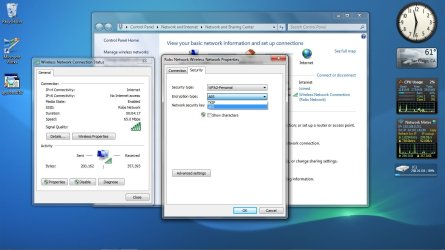
For wireless connection settings you need to go to "manage wireless networks" from the Network and Sharing center. You will see it on the left collum. Simple edit or delate the old one and remember to put a check mark to remember the credentials.
 

Attachments

  • wireless security change.jpg
    wireless security change.jpg
    103.7 KB · Views: 221

My Computer

Computer type
PC/Desktop
Computer Manufacturer/Model Number
Home built
OS
Windows 7 Ult, Windows 8.1 Pro,
CPU
Q9650-4.275GHz, E8600 4.5GHz, E6750-3.8GHz
Motherboard
Evga 780i FTW
Memory
G.Skill PC2 9600 1200Mhz 5 5 5 15 2T
Graphics Card(s)
GTX480
Sound Card
Asus Xonar D2
Monitor(s) Displays
HannsG
Screen Resolution
1680X1050
Hard Drives
GSkill Phoenix Pro 120GB SSD
PSU
ThermalTake Toughpower 1000Watt modular
Case
ThermalTake XaserV
Cooling
Xigmatek S1283
Keyboard
Logitech G15
Mouse
Logitech G9
Internet Speed
T1
Same problem

Hi,
I know this thread is outdated but if anyone's still here i'm having the same problem, my wifi security type changed from WPA-personal, encryption type TKIP to shared and encryption type WEP. Every time i restart the computer it changes back to the original settings. I have tried all the steps including deleting the network but nothing seems to work, and the same thing works perfectly on my laptop on the same network despite the same change. Any ideas anyone?
 

My Computer

OS
Windows 7 Ultimate x64
I had this same problem and found the answer!

Turns out there was separate software controlling WiFi connections overriding Windows 7. In my case it was Intel PROSet/Wireless Tools. I had an Intel PROSet Wirless folder in my All Programs Folder. Within that selected WiFi Connection Utility, then changed the WiFi security settings here by using the "Profiles..." button, selecting the Network I wanted to modify, and clicking on properties. Changed security settings to my desired settings and I was all set.
 

My Computer

Computer type
PC/Desktop
OS
Windows 7 32 bit
Back
Top