Widescreen Monitor

ConfusedUser

New member
Local time
8:43 PM
Messages
25
I have a 22" widescreen monitor I have set my resolution to 1280x720 and everything is just the way I want it. Except when I open a browser IE8 for example everything is "crunched" not stretched. I'd rather have it stretched, and I was wondering if anyone knows of a way to fix this.
 

My Computer My Computer

At a glance

Windows 7
OS
Windows 7
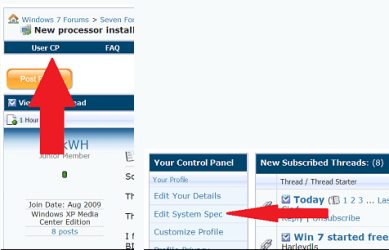
Need to know what graphics card your using. Or fillin system specs. Thanks. Fabe usercp 1.png
 

My Computer My Computer

At a glance

Windows 7 ultimate 64 bit / XP Home sp3intel Core 2 Duo E8400 3.0ghz8 gigs 1066 OCZ Fata1tyEVGA GTX 580 Call of Duty Black Ops Edition
Computer Manufacturer/Model Number
Self Built
OS
Windows 7 ultimate 64 bit / XP Home sp3
CPU
intel Core 2 Duo E8400 3.0ghz
Motherboard
Asus P5ND bios 1401
Memory
8 gigs 1066 OCZ Fata1ty
Graphics Card(s)
EVGA GTX 580 Call of Duty Black Ops Edition
Sound Card
Creative Soundblaster Audigy 2zs
Monitor(s) Displays
Asus 24in LCD's 2MS X2
Screen Resolution
1920x1080p @60Hz
Hard Drives
WD Caviar 500 Black/ WD Caviar 200 Blue
PSU
OCZ 700W GameXtreme
Case
NZXT Apollo
Cooling
Corsair H50 CPU/120mm x3 /60mm x2 /Corsair Dominator Ram
Keyboard
Logitech Bluetooth Wireless MX5000
Mouse
Logitech Bluetooth Wireless MX1000
Internet Speed
Download 19.83 Upload 0.97
Other Info
Logitech Z2300 Speakers/ Bose Noise Cancelling Headphones/Avermedia PCI-e Hybrid TV Bravo/Epson NX415 all in one/ 4 Port Powered USB Hub/ LG 10x Bluray Burner /TSST Corp DVDRW External
Is the Display Orientation set to Landscape in Screen REsolution?

Adjust the window size manually by stretching the IE8 windows to where you want them and then click the middle Box in the upper right of the window (next to Red X) twice to train the windows.

Try adjusting the Zoom and Text Size on the Page Tab of the Command Bar (with the tabs).

If nothing works, please take a Full screen snip of the problem using the Snipping Tool in the Start Menu, attach file using paper clip in reply box.
 
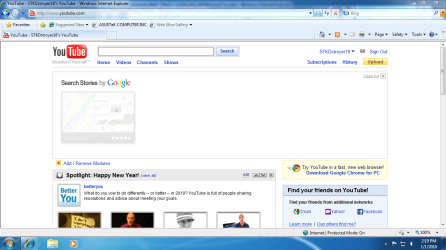
As you can see its not stretched before I did my clean upgrade it used to stretch the whole way without zoom
 

My Computer My Computer

At a glance

Windows 7
OS
Windows 7
Not sure I understand the problem. What monitor and graphics adapter are you using? (This is why filling in your specs helps others fix your problems.)

If you pull browser windows that are written to be viewed at 800 px width into full screen mode, you are bound to get some odd looking results. Why not just resize your window to view the page as it was intended to be interpreted?
 

My Computer My Computer

At a glance

7 x64 UltimateAMD Ryzen 516GB DDR4Radeon R7 360
Computer type
PC/Desktop
Computer Manufacturer/Model Number
Custom
OS
7 x64 Ultimate
CPU
AMD Ryzen 5
Motherboard
Gigabyte GA-AB350-Gaming
Memory
16GB DDR4
Graphics Card(s)
Radeon R7 360
Monitor(s) Displays
2 x Dell U2518D
Screen Resolution
2560x1440 2560x1440
Hard Drives
WD 500GB x2
Samsung SSD 128MB (OS)
XPG SX8200 Pro M.2 2280 1TB
PSU
Antec 500
Cooling
Hyper 212 EVO
Keyboard
Logitech cordless K800
Mouse
Logitech M510
Antivirus
Avira
+1 Resize the window by dragging borders, then double click on browser resize box (next to Red X) to save window size.

Normally IE8 will preconfigure your Zoom (125% is common) so it may have not done so on this install for you. Just set it there or wherever you like it best and it should save the setting. Ditto text size which looks best set a large with my Zoom at 125% as I like to sit back when I read.
 
Back
Top