Wierd problem displaying icons

predita

New member
Local time
2:38 AM
Messages
2
I recently tried to install Ati Tray Tools instead of Catalyst Control Center

Sadly, Tray Tools hates my computer. Every time it started I got the dreaded blue screen!

So eventually I gave up and went back to CCC (after a bit of messing in safe mode)

Now for some reason, certain items on my desktop appear to have no icon (that little bit of paper with shapes on it appears).
But unlike the usual where there is no icon, the little bit of paper showing no icon is displayed over the top of the actual icon :huh:

This only happens on the desktop, and nowhere else, even for the same programs and icons

I've tried refreshing desktop, replacing icons and even refreshing my icon cache by deleting it from ...users/local and restarting

Still nothing
It's not the end of the world... but it is extremely annoying.
PLEASE HELP D:

Picture of problem attached, as I realised that my description is pretty awful
 

Attachments
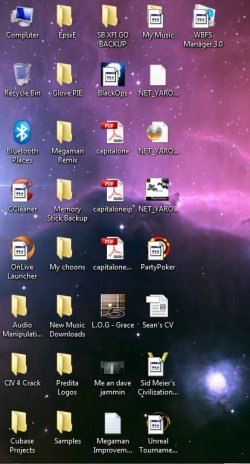
  • wierd icons.jpg
    wierd icons.jpg
    52.1 KB · Views: 19

My Computer

Computer Manufacturer/Model Number
Acer 5542
OS
Windows 7 Home Premium x64
CPU
AMD Turion II Mobile M500
Memory
4.00GB
Graphics Card(s)
ATI Mobility Radeon HD4200
Sound Card
Realtek HD Audio
Hard Drives
500GB

My Computer

Computer Manufacturer/Model Number
Hopalong/ Godzilla
OS
Windows7 Pro 64bit SP-1; Windows XP Pro 32bit
CPU
Intel Core i7-870 Lynnfield 2.93GHz LGA 1156 95W Quad-Core
Motherboard
ASUS P7P55D-E PRO
Memory
8GB@1400MHz Crucial Ballistix DDR3-1600 4x2GB
Graphics Card(s)
ASUS ENGTX460 DirectCU/2DI/1GD5 1GB 256-bit GDDR5
Sound Card
VIA Onboard
Monitor(s) Displays
Asus VS248H-P 24"; Samsung SyncMaster 941BW 19"ws
Screen Resolution
1920x1080; 1440x900
Hard Drives
Samsung 830 120GB SSD
Intel 320 120GB SSD
Western Digital Caviar Black WD7501AALS 750GB 7200 RPM SATA 3.0Gb/s
Western Digital Caviar Black WD6401AALS 640GB 7200 RPM SATA 3.0Gb/s
PSU
COOLER MASTER Silent Pro RS850-AMBAJ3-US 850W Modular
Case
COOLER MASTER HAF 932 RC-932-KKN5-GP Black
Cooling
Scythe "Mugen-2 Rev.B" (2 ScytheKaze-Jyuni PWM fans)
Keyboard
Logitech K-320
Mouse
Kensington
Antivirus
Avast Inernet Suite
Browser
IE 9 ; Chrome
A couple of things for you to check.
Have you used a "remove shortcut arrow" device of any kind? If so open the regedit.exe and navigate to the following registry entry
Code:
[HKEY_LOCAL_MACHINE\SOFTWARE\Microsoft\Windows\CurrentVersion\Explorer\Shell Icons]
"29"="[B]CHECK THE\FILE PATH\HERE[/B]"
Check the path next to the number 29 entry and make sure the replacement shortcut arrow .ico file is at that location.
Have you got Norton 360 installed? If so go into its settings, disable (un-tick) the option "Backup status indicators". Delete your iconcache.db and your thumbnail caches (through disk clean up). Re-boot. If all OK (and you have Norton 360) you can now re-enable Backup indicators.
 

My Computer

OS
windows 7 ultimate
Yep...those are definitely Shortcut overlays gone wrong.
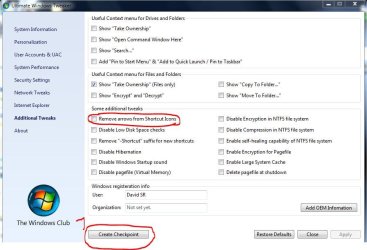
So if fimble's or Hoppy'sapproach doesn't help you could try this little program (just be sure you know what you're doing if you use one of the other options)

Ultimate Windows Tweaker, a TweakUI for Windows 7 & Vista | The Windows Club

Start as Admin, go to additional Tweaks, create a restore point (They call it Checkpoint in this program)
and remove the overlay altogether.

Capture.JPG

-DG
 

My Computer

Computer Manufacturer/Model Number
HP m8000n
OS
Windows 7 Ultimate x86
CPU
DualCore AMD Athlon 64 X2, 2600 MHz 5200+
Motherboard
Asus M2N68-LA (Narra)
Memory
Samsung 2GB DDR2
Graphics Card(s)
Onboard NVIDIA GeForce 6150SE nForce 430
Sound Card
Onboard nVIDIA nForce 6100-430 (MCP61P)
Monitor(s) Displays
Westinghouse 19" LED
Screen Resolution
1280x1024
Hard Drives
SATA II Seagate Barracuda 500GB
USB II WD Elements 500GB
USB II WD My Book 1TB
USB II WD My Book 2TB
PSU
Stock (HP)
Case
Stock (HP)
Cooling
Stock
Keyboard
Logitech Classic KB 200
Mouse
Standard HP opticle USB mouse
Checked the registry entry, and it had something like value 0 in it
Or at least something to that effect
Just tried your fix sledge
Thanks for the tip.
Worked perfect :)
I forgot I'd even removed the shortcut arrow to be honest!
If I use the same program to remove it again now, will it work properly or will it just mess up again?
 

My Computer

Computer Manufacturer/Model Number
Acer 5542
OS
Windows 7 Home Premium x64
CPU
AMD Turion II Mobile M500
Memory
4.00GB
Graphics Card(s)
ATI Mobility Radeon HD4200
Sound Card
Realtek HD Audio
Hard Drives
500GB
Hard to say...but if it messes up again, you already know how to fix it ;)

Thanks for the feedback

-DG
 

My Computer

Computer Manufacturer/Model Number
HP m8000n
OS
Windows 7 Ultimate x86
CPU
DualCore AMD Athlon 64 X2, 2600 MHz 5200+
Motherboard
Asus M2N68-LA (Narra)
Memory
Samsung 2GB DDR2
Graphics Card(s)
Onboard NVIDIA GeForce 6150SE nForce 430
Sound Card
Onboard nVIDIA nForce 6100-430 (MCP61P)
Monitor(s) Displays
Westinghouse 19" LED
Screen Resolution
1280x1024
Hard Drives
SATA II Seagate Barracuda 500GB
USB II WD Elements 500GB
USB II WD My Book 1TB
USB II WD My Book 2TB
PSU
Stock (HP)
Case
Stock (HP)
Cooling
Stock
Keyboard
Logitech Classic KB 200
Mouse
Standard HP opticle USB mouse
Back
Top