Wierd stuff, need help

thanks for the advice. Just to let you guys know. I found two CD's with windows 7 ultimate on them. One sais bootable, and the other just sais "windows 7 ultimate". When i tried both in the boot menu (both CD drives also), It doesnt seem to recognize either disks and tells me to press F1 to retry. Any ideas?
 

My Computer

OS
Windows 7 Ultimate
Place the Win7 Installation DVD which says bootable in the DVD (not CD) drive, restart the machine and boot the DVD: How to Boot your Computer from a Bootable CD or DVD

If you don't have a DVD drive, borrow or buy one or use another computer's DVD drive to extract the ISO from DVD using ImgBurn, then write the ISO to flash stick using Ultra ISO trial version: Open ISO on File tab, Write Disk Image on Bootable tab, Format, Write. Boot flash stick under USB or HD's.

On the second screen select Repair My Computer, accept any offered Repair, if it doesn't start boot back in to run Startup Repair from the DVD Repair console's Recovery Tools list. System Restore should be included in Startup Repair but you can also run it from the Tools list. http://www.sevenforums.com/tutorials/105541-startup-repair-run-3-separate-times.html

If It won't start after three separate startup Repair attempts with reboots, confirm that the Win7 partition is still marked Active and run the Repairs again: http://www.sevenforums.com/tutorials/71432-partition-mark-active.html

If it still fails you can copy out your files using DVD with this method: http://www.sevenforums.com/tutorials/93347-copy-paste-windows-recovery-console.html

Then clean reinstall after wiping the HD first to overwrite any possible infected or corrupt code, following these tips to get a purrrfect install: http://www.sevenforums.com/installation-setup/125874-re-install-windows-7-a.html#post1086729

 
Place the Win7 Installation DVD which says bootable in the DVD (not CD) drive, restart the machine and boot the DVD: How to Boot your Computer from a Bootable CD or DVD

If you don't have a DVD drive, borrow or buy one or use another computer's DVD drive to extract the ISO from DVD using ImgBurn, then write the ISO to flash stick using Ultra ISO trial version: Open ISO on File tab, Write Disk Image on Bootable tab, Format, Write. Boot flash stick under USB or HD's.

On the second screen select Repair My Computer, accept any offered Repair, if it doesn't start boot back in to run Startup Repair from the DVD Repair console's Recovery Tools list. System Restore should be included in Startup Repair but you can also run it from the Tools list. http://www.sevenforums.com/tutorials/105541-startup-repair-run-3-separate-times.html

If It won't start after three separate startup Repair attempts with reboots, confirm that the Win7 partition is still marked Active and run the Repairs again: http://www.sevenforums.com/tutorials/71432-partition-mark-active.html

If it still fails you can copy out your files using DVD with this method: http://www.sevenforums.com/tutorials/93347-copy-paste-windows-recovery-console.html

Then clean reinstall after wiping the HD first to overwrite any possible infected or corrupt code, following these tips to get a purrrfect install: http://www.sevenforums.com/installation-setup/125874-re-install-windows-7-a.html#post1086729

I have tried booting off of Both CD's. I dont think my PC recognizes my DVD drive as a bootable device...:cry:
 

My Computer

OS
Windows 7 Ultimate
Hi,

Have you changed the boot order in the BIOS, so that the PC attempts to boot from the CD\DVD first?

Regards,
Golden
 

My Computer

Computer type
PC/Desktop
Computer Manufacturer/Model Number
Golden Mk. I.4
OS
Windows 10 Pro x64 ; Xubuntu x64
CPU
Intel i7 860 @ 2.80 GHz O/C'ed to 4.0GHz
Motherboard
Gigabyte P55A-UD3R Rev.1. Award BIOS F13
Memory
16GB Corsair Vengance DDR3 @ 661 MHz Dual Channel (9-9-9-24)
Graphics Card(s)
EVGA NVidia GTX 560 1024MB
Sound Card
Realtek Integrated
Monitor(s) Displays
Dual Samsung SyncMaster 2494HS
Screen Resolution
1920*1080 and 1920*1080
Hard Drives
1*Samsung 840 EVO 120GB SSD;
1*OCZ Vertex 2 60GB SSD;
2*Samsung F3 SpinPoint 1TB in RAID0;
1*Samsung F1 SpinPoint 1TB;
2*Western Digital 1TB External USB 3.0
1*Western Digital 500GB External USB 3.0
1*Seagate 500GB External USB 2.0
PSU
Thermaltake ToughPower QFan 750W
Case
Thermaltake Element S VK60001W2Z
Cooling
Corsair H60 Water Cooling, 2*230mm and 2*80mm case fans
Keyboard
Logitech G110
Mouse
Logitech MX518
Did you set the DVD drive to boot first in BIOS setup using the tutorial posted? Can you trigger it to boot using one-time BIOS Boot Menu key given on first boot screen?

Can you post back a screenshot of both disks' contents when you rightclick on DVD drive in Computer then select Open. Use Snipping Tool in Start Menu.
 
Sorry guys i forgot to mention...I am using my laptop to talk to you. I havnt been able to log in to my computer since the problems started. And when i check the boot sequence it starts with my CD drive first then my hard drive. When i try to run of the CD at all it tells me to retry boot.
 

My Computer

OS
Windows 7 Ultimate
You want to put the DVD in the DVD drive, not CD or CD drive.

Do you have a DVD drive or combo CD/DVD drive?

Can you put these disks in your laptop and post back a screenshot of each one's contents, by rightclicking on the CD/DVD drive to choose Open? Use Snipping Tool in Start Menu to make screenshot, upload using paper clip in reply box.

One might be a CD and one a DVD. The DVD will be the Win7 installer. It's the one you want.
 
I have seperate DVD and CD drives....Ill post picks soon (whenever i get time)
 

My Computer

OS
Windows 7 Ultimate
A few points

1
Using "Automatic Updates" without some sort of automatic backup schedule, will limit your chances to make backup images (before the updates are applied).
If you can't set a backup schedule, you should try to create manual backups (before "Patch Tuesday").

Backup Tutorials (thanks to Brink):

http://www.sevenforums.com/tutorials/663-backup-complete-computer-create-image-backup.html?ltr=B
http://www.sevenforums.com/tutorials/615-backup-user-system-files.html?ltr=B
http://www.sevenforums.com/tutorials/21390-backup-user-system-files-create-shortcut.html?ltr=B
http://www.sevenforums.com/tutorials/628-backup-user-system-files-delete-backups.html?ltr=B

2
On my PC, the "System Recovery Tool" doesn't work with my 64 bit installation (it works perfectly with the 32 bit version on my backup PC).

3
On my PC, updating Windows results in my Restore Points being deleted.

Currently my only suggestion is:

  1. Create a Live Ubuntu CD.
  2. Use it to copy your important files to another location (e.g. different partition or external HDD).
  3. Reinstall Windows.
  4. Make a backup of your installation.
  5. Attempt to update again.
Sorry. :(
 
Last edited:

My Computer

Computer type
PC/Desktop
Computer Manufacturer/Model Number
n/a
OS
W7 Ultimate SP1, LM19.2 MATE, W10 Home 1703, W10 Pro 1703 VM, #All 64 bit
CPU
AMD Phenom II x6 1100T, 3.3 GHz
Motherboard
ASUS M4A88T-M/USB3 (AM3)
Memory
12GB DDR3 1333 G-Skill (4GB x 2), G-Skill (2GB x 2)
Graphics Card(s)
NVIDIA GeForce GTX 660
Sound Card
Realtek?
Monitor(s) Displays
Samsung S23B350
Screen Resolution
1920x1080
Hard Drives
WD Green 2TB (SATA), WD Green 3TB (SATA), WD Blue 4TB (SATA), WD Blue 6TB (SATA)
PSU
Cooler Master
Case
Antec GX300 Tower
Cooling
3x Antec TRICOOL 120mm Fans
Mouse
Wired Optical
Internet Speed
DSL
Antivirus
Avast
Browser
Pale Moon (64 bit)
Other Info
2018-12-27 Upgraded HDDs
2015-12-10 Upgraded case, graphics card, storage
2015-08-15 Upgraded motherboard & RAM
2015-07-15 Upgraded LM17.1 to LM17.2
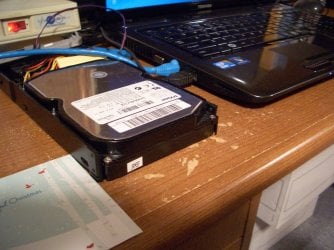
You could pull the hard drive out of the PC and put it into an external drive case with a USB connector and plug it into your laptop. Once there, you might be able to clean the drive of any malware and alter the directories that Windows is examining for queued updates.
 

Attachments

  • CIMG4921.jpg
    CIMG4921.jpg
    648.1 KB · Views: 4

My Computer

Computer type
Laptop
Computer Manufacturer/Model Number
Dell Insprion 7559 next to a Toshiba Portege
OS
Win 7 Pro 64-bit
CPU
Intel Core i5
Motherboard
Intel
Memory
16 GB Dell, 6 GB Toshiba
Graphics Card(s)
Intel crap on both but Dell also has nVidia GeForce GTX960M
Sound Card
RealTek
Monitor(s) Displays
internal and external ACER KA270H 27"
Screen Resolution
1920x1080
Hard Drives
SSD 256 GB plus numerous WD Red or Purple on USB3 docks. Used to buy a lot of Seagate but tossed them the second time I got unrecoverable disc corruption in the midst of use.
Keyboard
Garage Mouse SW and some cheap Amazon China made USB device
Mouse
Garage Mouse and some cheap Amazon China made USB device
Internet Speed
50 Mbps (allegedly, depends on server)
Antivirus
Defender, Malwarebytes Premium and Kaspersky
Browser
IE 11, and Chrome something
Quick update on my problem: I had got the windows disk to load when i put in a spare DVD drive. But a message pops up saying that a "winlog" file is missing (this may not be the exact name, i am telling you this by memory) So i have made progress but not much....
 

My Computer

OS
Windows 7 Ultimate
Are you booting the DVD? Can you post a picture of the DVD and its contents? Both disks if possible.
 
Yes i am booting the dvd. but after it "loads windows files" a message pops up that sais a file called "winload.exe" is missing or something. I happened to get picks of the Contents on the disks:

Heres the one that just says "windows 7 ultimate"
B0HY85AA5.jpg


Heres the one that says "bootable"
5IWWHQTU5.jpg


Hope these help
 

My Computer

OS
Windows 7 Ultimate
if the pics wont load give me your email and ill send them to you
 

My Computer

OS
Windows 7 Ultimate
Back
Top