WiFi connection Problems with "free" Wifis - More Info about Problem?

MPREv

New member
Member
VIP
Local time
6:06 PM
Messages
136
WiFi connection Problems with "free" Wifis - More Info about Problem?

Hi,

I have connection Problems to Wifis ...
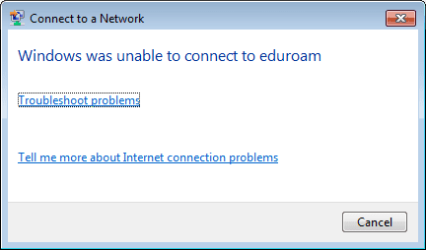
I want to connect for example to eduroam (free for students in Europe) ... I enter my Credentials -> but all I get is:
Windows was unable to connect to "eduroam"
[Troubleshot problems]
[Tell me more about Internet connection problems]
(= attached image)

I get the same for "UPC Wi-Free" (=Free WiFi of my Provider): here I have to setup the connection manually, described by the provider - but the result is the same ...

[Troubleshot problems] is helping nothing (only deactivates & reactivates WiFi network adapter) ...

So as the screenshot is not providing so much information ...
where in Windows do I get more information what was not matching?
Credentials? Some Protocols? Certificates ...
Where do I find such infos for WiFi ?
 

Attachments

  • WiFi-ConnectionProblem - Kopie.png
    WiFi-ConnectionProblem - Kopie.png
    3.8 KB · Views: 30

My Computer My Computer

At a glance

Windows 7
OS
Windows 7
WiFi

click on the >>Tell me more details<<<, and post that info.

Roy
 

My Computer My Computer

At a glance

W7 home premium 32bit/W7HP 64bit/w10 tp insid...E5300 dual core3gbNvidia Geforce 7100 Nforce 630i
Computer type
PC/Desktop
Computer Manufacturer/Model Number
medionl/Aspire 6930G/acer x55a
OS
W7 home premium 32bit/W7HP 64bit/w10 tp insider ring
CPU
E5300 dual core
Motherboard
medion MS7366
Memory
3gb
Graphics Card(s)
Nvidia Geforce 7100 Nforce 630i
Monitor(s) Displays
avixc
Internet Speed
n (isp resticted to 72)
Antivirus
mse/pands
Browser
palemoon
Other Info
Belkin Fd7050 n USB using Railink RT2870 drivers, more upto date
Perhaps it is your security software interfering?
 

My Computer My Computer

At a glance

Windows 7 Ultimate x64 SP1AMD Phenom 2 1090T2x8GB Kingston HyperX Fury Black 1600Mhz Unga...MSI GTX 970 Gaming 4G
Computer type
PC/Desktop
Computer Manufacturer/Model Number
Custom Build
OS
Windows 7 Ultimate x64 SP1
CPU
AMD Phenom 2 1090T
Motherboard
Gigabyte GA-890FXA-UD5
Memory
2x8GB Kingston HyperX Fury Black 1600Mhz Unganged
Graphics Card(s)
MSI GTX 970 Gaming 4G
Sound Card
Realtek On-Board HD 7.1 Audio / Logitech G35
Monitor(s) Displays
3xAcer GD245HQ
Screen Resolution
1920x1080
Hard Drives
Samsung 850 Pro 512GB SSD - OS /
WD Caviar Black SATA 3 - 1 TBx2 - Dynamic RAID 0 /
WD Caviar Green SATA 2 - 640GBx2 - Dynamic RAID 0 /
WD Caviar Green SATA 2 - 640GB - Internal Backup /
Seagate Barracude SATA 3 - 3TB - External Backup/ Sync
PSU
HighPower 1000W
Case
Cooler Master HAF 932
Cooling
Noctua NH-D14
Keyboard
Logitech G19
Mouse
Logitech G500
Internet Speed
100/4 Mbit Cable (100GB quota)
Antivirus
ZoneAlarm Extreme Security / MBAM Pro / MBAE Free / SAS Free
Browser
IE 11 - Firefox - Chrome
Other Info
Logitech F710/ G27/ G940/ Z5500 // TrackIR 5 // Nvidia 3D Surround Vision
click on the >>Tell me more details<<<, and post that info.
Where do I find this Link?
Do you mean "[Tell me more about Internet connection problems]"?
This only provides some generic info about general connections problem ... like checking connection cables, restart Modem, ... useless.

Perhaps it is your security software interfering?
Could be, but I don't see this (should be notified).
 

My Computer My Computer

At a glance

Windows 7
OS
Windows 7
Hit the troubleshooter it will produce the detail.

Roy
 

My Computer My Computer

At a glance

W7 home premium 32bit/W7HP 64bit/w10 tp insid...E5300 dual core3gbNvidia Geforce 7100 Nforce 630i
Computer type
PC/Desktop
Computer Manufacturer/Model Number
medionl/Aspire 6930G/acer x55a
OS
W7 home premium 32bit/W7HP 64bit/w10 tp insider ring
CPU
E5300 dual core
Motherboard
medion MS7366
Memory
3gb
Graphics Card(s)
Nvidia Geforce 7100 Nforce 630i
Monitor(s) Displays
avixc
Internet Speed
n (isp resticted to 72)
Antivirus
mse/pands
Browser
palemoon
Other Info
Belkin Fd7050 n USB using Railink RT2870 drivers, more upto date
Hit the troubleshooter it will produce the detail.

No, It does not ...
simply tries to fix the probelm ... only thing I can "see" is that it is deactivating the wireless adapter and activates it again ...
Than it says something like I can try to restart the modem/access point (I can not!) and check the cables (it is wireless)
giving two option -> check if fixed (is not) -> try fixing again (fails: and no more Info)

 

My Computer My Computer

At a glance

Windows 7
OS
Windows 7
Back
Top