Wifi Connection shortcut?

MatthewRuddy

New member
Local time
3:32 PM
Messages
18
Hey, not sure if this is posted in the correct forum or not so moderators feel free to move it if you have too.. Just wondering if it is possible to create a shortcut on your desktop to the system tray "connect to networks" window? For Wifi.. as I like to keep my taskbar hidden yet everytime I wish to change networks I have to make it visible again. I know I could just make shortcuts to different networks, but that would clutter my desktop as I often connect to many different networks and I don't wish to do this.

So is this possible? Simply a shortcut that open the "Connect to network" small box that opens normally when you click the wifi tab in the system tray?

Thanks,
Matthew.
 

My Computer

OS
Windows 7
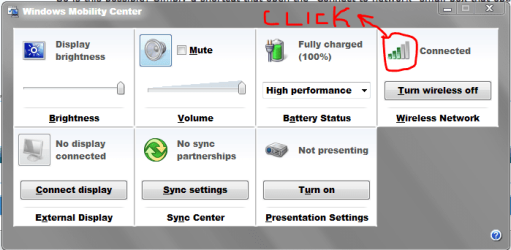
How about try the shortcut on they keyboard : Windows key + X.
Should look like this:
Capture.PNG
Just click and it shows the centre (or the little box that shows in the right bottom hand corner).
 

My Computer

Computer type
PC/Desktop
Computer Manufacturer/Model Number
The Dominator?
OS
Windows Seven Ultimate
CPU
AMD Piledriver FX 8320 @ 3.5GHz
Motherboard
ASUS M5A97 EVO R2.0
Memory
Crucial Ballistix 8GB 1600 MHz DDR3
Graphics Card(s)
ASUS GeForce GTX 970 Strix Edition @ 1.114 GHz
Sound Card
Integrated
Monitor(s) Displays
LG 23EA63V 23" IPS 1080p Monitor
Screen Resolution
1920x1080
Hard Drives
Samsung SSD 840 EVO 120 GB
1x WD GreenPower 500GB 7200RPM
1 External HDD 1TB
PSU
Corsair CX500
Case
Zalman Z9 Plus
Cooling
CPU - Corsair Hydro H80i, Case - 3x Aerocool Shark Edition
Keyboard
Xenta Backlit Keyboard (Not very good!)
Mouse
Logitech G400
Internet Speed
Download: 7 mb/s Upload: 0.76 mb/s
Antivirus
Microsoft Security Essentials
Browser
Google Chrome
Other Info
Overclockers UK Desk Pad 89 x 45 cm
1200x730x600mm Desk
Using Virtual Audio Cable to split stereo sound into Audio Technica ATH-M50 headphones and Logitech X-530 speakers.
I guess that's a good compromise but is it actually possible to get a desktop icon like I
asked in my original post? Because then I can put it into Objectdock, making life easier.

Pity System tray icons doesn't work on Objectdock for Windows 7 64-bit, otherwise this wouldn't be a problem :(
 

My Computer

OS
Windows 7
Code:
Control Panel\Network and Internet\Network and Sharing Center
Highlight that, press 'Ctrl' + 'C' then 'Ctrl' + 'V' into the address bar of explorer and press enter.
Right click on the Network and sharing centre(Capture.PNG), and press 'Copy Address' (first option), then right click on the desktop and press 'Copy shortcut'.
This should work :)
 

My Computer

Computer type
PC/Desktop
Computer Manufacturer/Model Number
The Dominator?
OS
Windows Seven Ultimate
CPU
AMD Piledriver FX 8320 @ 3.5GHz
Motherboard
ASUS M5A97 EVO R2.0
Memory
Crucial Ballistix 8GB 1600 MHz DDR3
Graphics Card(s)
ASUS GeForce GTX 970 Strix Edition @ 1.114 GHz
Sound Card
Integrated
Monitor(s) Displays
LG 23EA63V 23" IPS 1080p Monitor
Screen Resolution
1920x1080
Hard Drives
Samsung SSD 840 EVO 120 GB
1x WD GreenPower 500GB 7200RPM
1 External HDD 1TB
PSU
Corsair CX500
Case
Zalman Z9 Plus
Cooling
CPU - Corsair Hydro H80i, Case - 3x Aerocool Shark Edition
Keyboard
Xenta Backlit Keyboard (Not very good!)
Mouse
Logitech G400
Internet Speed
Download: 7 mb/s Upload: 0.76 mb/s
Antivirus
Microsoft Security Essentials
Browser
Google Chrome
Other Info
Overclockers UK Desk Pad 89 x 45 cm
1200x730x600mm Desk
Using Virtual Audio Cable to split stereo sound into Audio Technica ATH-M50 headphones and Logitech X-530 speakers.
Code:
Control Panel\Network and Internet\Network and Sharing Center
Highlight that, press 'Ctrl' + 'C' then 'Ctrl' + 'V' into the address bar of explorer and press enter.
Right click on the Network and sharing centre(View attachment 45877), and press 'Copy Address' (first option), then right click on the desktop and press 'Copy shortcut'.
This should work :)

Hmm tried it and it didn't work :confused:

But thats not exactly what I'm looking for .. I'm looking for a shortcut to the "Connect or Disconnect" link within the network and sharing centre.. Exactly the same as when you click the wifi icon in the system tray, except I want to turn it into a shortcut to put into Objectdock.
 

My Computer

OS
Windows 7
Code:
Control Panel\Network and Internet\Network and Sharing Center
Highlight that, press 'Ctrl' + 'C' then 'Ctrl' + 'V' into the address bar of explorer and press enter.
Right click on the Network and sharing centre(View attachment 45877), and press 'Copy Address' (first option), then right click on the desktop and press 'Copy shortcut'.
This should work :)

Hmm tried it and it didn't work :confused:

But thats not exactly what I'm looking for .. I'm looking for a shortcut to the "Connect or Disconnect" link within the network and sharing centre.. Exactly the same as when you click the wifi icon in the system tray, except I want to turn it into a shortcut to put into Objectdock.
I don't think you can do what you want for what you want. I personally think keyboard shortcuts are faster.
Just do Windows key + X then quickly press W x2.
 

My Computer

Computer type
PC/Desktop
Computer Manufacturer/Model Number
The Dominator?
OS
Windows Seven Ultimate
CPU
AMD Piledriver FX 8320 @ 3.5GHz
Motherboard
ASUS M5A97 EVO R2.0
Memory
Crucial Ballistix 8GB 1600 MHz DDR3
Graphics Card(s)
ASUS GeForce GTX 970 Strix Edition @ 1.114 GHz
Sound Card
Integrated
Monitor(s) Displays
LG 23EA63V 23" IPS 1080p Monitor
Screen Resolution
1920x1080
Hard Drives
Samsung SSD 840 EVO 120 GB
1x WD GreenPower 500GB 7200RPM
1 External HDD 1TB
PSU
Corsair CX500
Case
Zalman Z9 Plus
Cooling
CPU - Corsair Hydro H80i, Case - 3x Aerocool Shark Edition
Keyboard
Xenta Backlit Keyboard (Not very good!)
Mouse
Logitech G400
Internet Speed
Download: 7 mb/s Upload: 0.76 mb/s
Antivirus
Microsoft Security Essentials
Browser
Google Chrome
Other Info
Overclockers UK Desk Pad 89 x 45 cm
1200x730x600mm Desk
Using Virtual Audio Cable to split stereo sound into Audio Technica ATH-M50 headphones and Logitech X-530 speakers.

My Computer

Computer type
PC/Desktop
Computer Manufacturer/Model Number
Self built custom
OS
64-bit Windows 11 Pro for Workstations
CPU
Intel i7-8700K OC'd to 5 GHz
Motherboard
ASUS ROG Maximus XI Formula Z390
Memory
64 GB (4x16GB) G.SKILL TridentZ RGB DDR4 3600 MHz
Graphics Card(s)
ASUS ROG-STRIX-GTX1080TI-O11G-GAMING
Sound Card
Integrated
Monitor(s) Displays
2 x Samsung Odyssey G7 27"
Screen Resolution
2560x1440
Hard Drives
1TB Samsung 990 PRO M.2,
4TB Samsung 990 PRO PRO M.2,
TerraMaster F8 SSD Plus NAS
PSU
Seasonic Prime Titanium 850W
Case
Thermaltake Core P3
Cooling
Corsair Hydro H115i
Keyboard
Logitech wireless K800
Mouse
Logitech MX Master 4
Internet Speed
2 Gb/s Download and 100 Mb/s Upload
Antivirus
Malwarebyte Anti-Malware Premium
Browser
Google Chrome
Other Info
Logitech Z625 speaker system,
Logitech BRIO 4K Pro webcam,
HP Color LaserJet Pro MFP M477fdn,
APC SMART-UPS RT 1000 XL - SURT1000XLI,
Galaxy S23 Plus phone
Hmm beginning to think this is probably impossible.. Here an image of what I'm talking about..

shortcut.jpg
 
Last edited:

My Computer

OS
Windows 7
Hmm beginning to think this is probably impossible.. Here an image of what I'm talking about..

shortcut.jpg

Being me, I'd insist of using keyboard shortcuts.
 

My Computer

Computer type
PC/Desktop
Computer Manufacturer/Model Number
The Dominator?
OS
Windows Seven Ultimate
CPU
AMD Piledriver FX 8320 @ 3.5GHz
Motherboard
ASUS M5A97 EVO R2.0
Memory
Crucial Ballistix 8GB 1600 MHz DDR3
Graphics Card(s)
ASUS GeForce GTX 970 Strix Edition @ 1.114 GHz
Sound Card
Integrated
Monitor(s) Displays
LG 23EA63V 23" IPS 1080p Monitor
Screen Resolution
1920x1080
Hard Drives
Samsung SSD 840 EVO 120 GB
1x WD GreenPower 500GB 7200RPM
1 External HDD 1TB
PSU
Corsair CX500
Case
Zalman Z9 Plus
Cooling
CPU - Corsair Hydro H80i, Case - 3x Aerocool Shark Edition
Keyboard
Xenta Backlit Keyboard (Not very good!)
Mouse
Logitech G400
Internet Speed
Download: 7 mb/s Upload: 0.76 mb/s
Antivirus
Microsoft Security Essentials
Browser
Google Chrome
Other Info
Overclockers UK Desk Pad 89 x 45 cm
1200x730x600mm Desk
Using Virtual Audio Cable to split stereo sound into Audio Technica ATH-M50 headphones and Logitech X-530 speakers.
The closest shortcut to the one you want was Brink's tutorial
 

My Computer

Computer type
PC/Desktop
Computer Manufacturer/Model Number
The Dominator?
OS
Windows Seven Ultimate
CPU
AMD Piledriver FX 8320 @ 3.5GHz
Motherboard
ASUS M5A97 EVO R2.0
Memory
Crucial Ballistix 8GB 1600 MHz DDR3
Graphics Card(s)
ASUS GeForce GTX 970 Strix Edition @ 1.114 GHz
Sound Card
Integrated
Monitor(s) Displays
LG 23EA63V 23" IPS 1080p Monitor
Screen Resolution
1920x1080
Hard Drives
Samsung SSD 840 EVO 120 GB
1x WD GreenPower 500GB 7200RPM
1 External HDD 1TB
PSU
Corsair CX500
Case
Zalman Z9 Plus
Cooling
CPU - Corsair Hydro H80i, Case - 3x Aerocool Shark Edition
Keyboard
Xenta Backlit Keyboard (Not very good!)
Mouse
Logitech G400
Internet Speed
Download: 7 mb/s Upload: 0.76 mb/s
Antivirus
Microsoft Security Essentials
Browser
Google Chrome
Other Info
Overclockers UK Desk Pad 89 x 45 cm
1200x730x600mm Desk
Using Virtual Audio Cable to split stereo sound into Audio Technica ATH-M50 headphones and Logitech X-530 speakers.
Solved!

This should do the trick.

RunDll32.exe van.dll,RunVAN

In ObjectDock's "Dock Entry Properties", type "RunDll32.exe" (without the quotes) into the "Link" box and "van.dll,RunVAN" into the "Arguments" box, then pick an icon such as "Internet 2" from C:\Program Files (x86)\Stardock\ObjectDock\Bundled Images\Misc Icons -- or something else from WinCustomize -- you're good to go.;)
 

My Computer

OS
Windows 7
  • Like
Reactions: Dom
Create a Wifi Shortcut

This is how you can create a shortcut to whichever network device you want.

From the Network and Sharing Center, click on "Change Adapter Settings" on the right hand side of the box. This will take you the Network Connections window. You will see icons for all of your networking devices. Right click on the one you want a shortcut for, choose "Create Shortcut" and opt to put it on the desktop.
 

My Computer

Computer type
PC/Desktop
OS
Windows 7 Pro 64
Back
Top