
Solved WiFi Icon

ben946210

New member
Power User
Local time
5:42 PM
Messages
236
Does anyone know how to change this icon back to a WiFi icon? This is on my laptop and it is really annoying that I see this instead of the signal strength of the network I am connected to. Also, whenever I move the mouse over the icon to see the network I am connected to (I have two) it always displays the wrong router name until I click on the button that opens the WiFi connect window. I don't know why this is like this but it seemed to have happened after I plugged in my Ethernet to transfer some files to my Xbox. It has never returned to the original icon since then. :(

Any help would be appreciated:D,
Ben
 

Attachments

  • Capture.PNG
    Capture.PNG
    490 bytes · Views: 3,041

My Computer

Computer type
PC/Desktop
Computer Manufacturer/Model Number
Custom (desktop), Custom (desktop), Lenovo U530 Touch
OS
Windows 7 Ultimate x64, Windows 7 Pro x64, Windows 10 Home x64
CPU
Intel i7-4790K , Intel i7-3770K, Intel i7-4510ULT
Motherboard
Asus Z87-PRO (main), Asus P8P67 Rev 3.1(secondary)
Memory
12GB Corsair Vengeance
Graphics Card(s)
EVGA GeForce GTX 660 2GB, 2X GIGABYTE 6890, Nvidia GT730M
Sound Card
Realtek Integrated, IDT (both laptops)
Monitor(s) Displays
Samsung S22C300H 21.5"
Screen Resolution
1920x1080 (Both machines)
Hard Drives
Main:
Muskin SSD 240GB
Seagate 320GB
Western Digital 1TB
Seagate 2TB

Seconday:
Toshiba 1TB
WD 1TB

Lenovo Laptop:
SAMSUNG SM843 SSD 480GB
PSU
Corsair GS700, COOLMAX CUL-850B (secondary)
Case
Thermaltake Chaser
Cooling
Corsair H60 Dual Fans, Stock Cooler
Keyboard
Logitech K360
Mouse
Logitech M310
Internet Speed
16Mbps
Antivirus
Comodo Internet Security Premium, MWB
Browser
Chrome, Firefox
Other Info
I have three systems listed in the specs area. My main desktop and my secondary desktop that was my previous build. The last one (in all the sections) is my Lenovo laptop.

Thanks for your interest in my machines! :)
Is there an arrow just on the left of the icons ? If so, click that and it should show the full range of icons available, one of which should be your signal strength. What you are seeing is the icon for your ethernet connection status(not connected at present)
 

My Computer

OS
win7
Re

I thought the same thing until I relized that is the same icon for all network adapters. Like I said, when I click on the icon it shows the local wifi networks.
 

My Computer

Computer type
PC/Desktop
Computer Manufacturer/Model Number
Custom (desktop), Custom (desktop), Lenovo U530 Touch
OS
Windows 7 Ultimate x64, Windows 7 Pro x64, Windows 10 Home x64
CPU
Intel i7-4790K , Intel i7-3770K, Intel i7-4510ULT
Motherboard
Asus Z87-PRO (main), Asus P8P67 Rev 3.1(secondary)
Memory
12GB Corsair Vengeance
Graphics Card(s)
EVGA GeForce GTX 660 2GB, 2X GIGABYTE 6890, Nvidia GT730M
Sound Card
Realtek Integrated, IDT (both laptops)
Monitor(s) Displays
Samsung S22C300H 21.5"
Screen Resolution
1920x1080 (Both machines)
Hard Drives
Main:
Muskin SSD 240GB
Seagate 320GB
Western Digital 1TB
Seagate 2TB

Seconday:
Toshiba 1TB
WD 1TB

Lenovo Laptop:
SAMSUNG SM843 SSD 480GB
PSU
Corsair GS700, COOLMAX CUL-850B (secondary)
Case
Thermaltake Chaser
Cooling
Corsair H60 Dual Fans, Stock Cooler
Keyboard
Logitech K360
Mouse
Logitech M310
Internet Speed
16Mbps
Antivirus
Comodo Internet Security Premium, MWB
Browser
Chrome, Firefox
Other Info
I have three systems listed in the specs area. My main desktop and my secondary desktop that was my previous build. The last one (in all the sections) is my Lenovo laptop.

Thanks for your interest in my machines! :)
Try:

*Start Menu
*Search "system icons"
*Click first result (should be "Customize icons on the taskbar")
*Click Restore Default Icon Behaviors
*Click Okay.

If you have CC cleaner, you can also use it to clean the "Tray notifications cache"

I'd also try disabling the ethernet adapter and reenable it again

*Go to Device Manager (just search for it at the Start Menu)
*Collapse "Network Adapters"
*Find the one with the name "Ethernet" on it
*Right Click->Disable

To reenable:
*Right Click->Enable
 

My Computer

Computer Manufacturer/Model Number
Asus G73SW-XN2
OS
Windows 2000 5.0 Build 2195
CPU
Intel Core i7-2630QM@2GHz(2.9GHz Turbo Boost) [Sandy Bridge]
Motherboard
Asus G73SW (Intel HM65 Chipset)
Memory
Kingston DDR3 1333 16GB (4GBx4)
Graphics Card(s)
nVidia GTX 460m 1.5GB
Sound Card
EAX Advanced HD 5.0, THX TruStudio
Monitor(s) Displays
17.3 in. primary & 23 in. secondary
Screen Resolution
1920x1080
Hard Drives
Seagate Momentus XT (SATA II) 500 GB @ 7200 RPM
Hitachi (SATA II) 500GB @ 7200 RPM

Non Raid because ASUS was crappy to choose an HM65 Chipset
Keyboard
Built-in 102-Key Backlit Keyboard
Other Info
It's a Laptop.
If it has the red X on it that means (it thinks) its not connected to a network. You won't get the signal strength ICON unless its connected. I think I would open the list, click disconnect, and connect to your preferred network again and see what happens. If that doesn't work I might clear the list and setup your connection again.
 

My Computer

Computer type
PC/Desktop
Computer Manufacturer/Model Number
Home Built
OS
Windows 10 Education 64 bit
CPU
AMD Phenom II X4 980 Black Edition Deneb 3.7GHz
Motherboard
Asus M4N68T-M V2 µATX Motherboard
Memory
8GB 4GBx2 Kingston PC10600 DDR3 1333 Memory
Graphics Card(s)
Zotac NVIDIA Geforce GT640 2 Gig DDR3 PCIe
Sound Card
VIA VT1708s High Definition Audio 8-channel Onboard
Monitor(s) Displays
22" LG E2242 1080p and 2 19" I-INC AG191D
Screen Resolution
1280x1024 - 1920x1080 - 1280x1024
Hard Drives
Crucial M100 256 GB SSD and 500 GB WD Blue SATA
PSU
Thermaltake TR 620
Case
Power Up Black ATX Mid-Tower Case
Cooling
Stock heatsink and fan
Keyboard
Logitech Wireless K350 Wave
Mouse
Logitech Wireless M570 Trackman Wheel
Internet Speed
80 Mbps Down 30 Mbps Up
Antivirus
Windows Defender
Browser
Internet Explorer 11
Other Info
HP DVD1040e Lightscribe - External USB2
Re

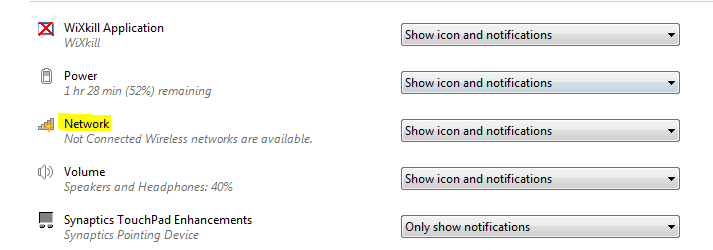
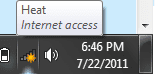
Ok arkhi, I did what you said, disabled the ethernet and vmware network adapter(which I should have mentioned) and now the icon is showing something else. It is still not showing what is suppose to. I also noticed when I opened the customize icon window it said that it was not connected to the network, which it is. As shown in picture 3, when I move over the icon it shows "Heat"(my network name) and "Internet access".
 

Attachments

  • Capture2.PNG
    Capture2.PNG
    388 bytes · Views: 3,000
  • Capture3.PNG
    Capture3.PNG
    8.2 KB · Views: 83
  • Capture4.png
    Capture4.png
    2.5 KB · Views: 3,005

My Computer

Computer type
PC/Desktop
Computer Manufacturer/Model Number
Custom (desktop), Custom (desktop), Lenovo U530 Touch
OS
Windows 7 Ultimate x64, Windows 7 Pro x64, Windows 10 Home x64
CPU
Intel i7-4790K , Intel i7-3770K, Intel i7-4510ULT
Motherboard
Asus Z87-PRO (main), Asus P8P67 Rev 3.1(secondary)
Memory
12GB Corsair Vengeance
Graphics Card(s)
EVGA GeForce GTX 660 2GB, 2X GIGABYTE 6890, Nvidia GT730M
Sound Card
Realtek Integrated, IDT (both laptops)
Monitor(s) Displays
Samsung S22C300H 21.5"
Screen Resolution
1920x1080 (Both machines)
Hard Drives
Main:
Muskin SSD 240GB
Seagate 320GB
Western Digital 1TB
Seagate 2TB

Seconday:
Toshiba 1TB
WD 1TB

Lenovo Laptop:
SAMSUNG SM843 SSD 480GB
PSU
Corsair GS700, COOLMAX CUL-850B (secondary)
Case
Thermaltake Chaser
Cooling
Corsair H60 Dual Fans, Stock Cooler
Keyboard
Logitech K360
Mouse
Logitech M310
Internet Speed
16Mbps
Antivirus
Comodo Internet Security Premium, MWB
Browser
Chrome, Firefox
Other Info
I have three systems listed in the specs area. My main desktop and my secondary desktop that was my previous build. The last one (in all the sections) is my Lenovo laptop.

Thanks for your interest in my machines! :)
Try right clicking and select the troubleshoot option and see what it comes up with. Generally speaking, when this happens to my beast it just requires a reboot of my router.
 

My Computer

OS
win7
Re

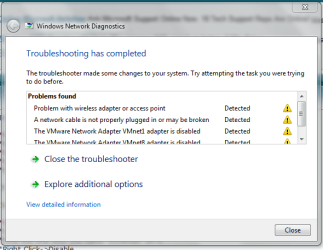
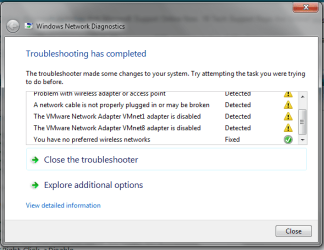
Thanks for replying :D. I did that and it reset the card and here is what it said...
 

Attachments

  • Capture6.PNG
    Capture6.PNG
    20.6 KB · Views: 71
  • Capture7.PNG
    Capture7.PNG
    19.3 KB · Views: 61

My Computer

Computer type
PC/Desktop
Computer Manufacturer/Model Number
Custom (desktop), Custom (desktop), Lenovo U530 Touch
OS
Windows 7 Ultimate x64, Windows 7 Pro x64, Windows 10 Home x64
CPU
Intel i7-4790K , Intel i7-3770K, Intel i7-4510ULT
Motherboard
Asus Z87-PRO (main), Asus P8P67 Rev 3.1(secondary)
Memory
12GB Corsair Vengeance
Graphics Card(s)
EVGA GeForce GTX 660 2GB, 2X GIGABYTE 6890, Nvidia GT730M
Sound Card
Realtek Integrated, IDT (both laptops)
Monitor(s) Displays
Samsung S22C300H 21.5"
Screen Resolution
1920x1080 (Both machines)
Hard Drives
Main:
Muskin SSD 240GB
Seagate 320GB
Western Digital 1TB
Seagate 2TB

Seconday:
Toshiba 1TB
WD 1TB

Lenovo Laptop:
SAMSUNG SM843 SSD 480GB
PSU
Corsair GS700, COOLMAX CUL-850B (secondary)
Case
Thermaltake Chaser
Cooling
Corsair H60 Dual Fans, Stock Cooler
Keyboard
Logitech K360
Mouse
Logitech M310
Internet Speed
16Mbps
Antivirus
Comodo Internet Security Premium, MWB
Browser
Chrome, Firefox
Other Info
I have three systems listed in the specs area. My main desktop and my secondary desktop that was my previous build. The last one (in all the sections) is my Lenovo laptop.

Thanks for your interest in my machines! :)
My Computer

Computer type
PC/Desktop
Computer Manufacturer/Model Number
Custom (desktop), Custom (desktop), Lenovo U530 Touch
OS
Windows 7 Ultimate x64, Windows 7 Pro x64, Windows 10 Home x64
CPU
Intel i7-4790K , Intel i7-3770K, Intel i7-4510ULT
Motherboard
Asus Z87-PRO (main), Asus P8P67 Rev 3.1(secondary)
Memory
12GB Corsair Vengeance
Graphics Card(s)
EVGA GeForce GTX 660 2GB, 2X GIGABYTE 6890, Nvidia GT730M
Sound Card
Realtek Integrated, IDT (both laptops)
Monitor(s) Displays
Samsung S22C300H 21.5"
Screen Resolution
1920x1080 (Both machines)
Hard Drives
Main:
Muskin SSD 240GB
Seagate 320GB
Western Digital 1TB
Seagate 2TB

Seconday:
Toshiba 1TB
WD 1TB

Lenovo Laptop:
SAMSUNG SM843 SSD 480GB
PSU
Corsair GS700, COOLMAX CUL-850B (secondary)
Case
Thermaltake Chaser
Cooling
Corsair H60 Dual Fans, Stock Cooler
Keyboard
Logitech K360
Mouse
Logitech M310
Internet Speed
16Mbps
Antivirus
Comodo Internet Security Premium, MWB
Browser
Chrome, Firefox
Other Info
I have three systems listed in the specs area. My main desktop and my secondary desktop that was my previous build. The last one (in all the sections) is my Lenovo laptop.

Thanks for your interest in my machines! :)
edit
 
Last edited:

My Computer

Computer type
PC/Desktop
Computer Manufacturer/Model Number
Custom (desktop), Custom (desktop), Lenovo U530 Touch
OS
Windows 7 Ultimate x64, Windows 7 Pro x64, Windows 10 Home x64
CPU
Intel i7-4790K , Intel i7-3770K, Intel i7-4510ULT
Motherboard
Asus Z87-PRO (main), Asus P8P67 Rev 3.1(secondary)
Memory
12GB Corsair Vengeance
Graphics Card(s)
EVGA GeForce GTX 660 2GB, 2X GIGABYTE 6890, Nvidia GT730M
Sound Card
Realtek Integrated, IDT (both laptops)
Monitor(s) Displays
Samsung S22C300H 21.5"
Screen Resolution
1920x1080 (Both machines)
Hard Drives
Main:
Muskin SSD 240GB
Seagate 320GB
Western Digital 1TB
Seagate 2TB

Seconday:
Toshiba 1TB
WD 1TB

Lenovo Laptop:
SAMSUNG SM843 SSD 480GB
PSU
Corsair GS700, COOLMAX CUL-850B (secondary)
Case
Thermaltake Chaser
Cooling
Corsair H60 Dual Fans, Stock Cooler
Keyboard
Logitech K360
Mouse
Logitech M310
Internet Speed
16Mbps
Antivirus
Comodo Internet Security Premium, MWB
Browser
Chrome, Firefox
Other Info
I have three systems listed in the specs area. My main desktop and my secondary desktop that was my previous build. The last one (in all the sections) is my Lenovo laptop.

Thanks for your interest in my machines! :)
Sometimes the router gets its settings screwed up, it may be worth resetting your router to factory settings and start again.
 

My Computer

OS
win7
Believe me I know a lot about routers. I have connected to 3 different routers and still have the same problem of the icon.
 

My Computer

Computer type
PC/Desktop
Computer Manufacturer/Model Number
Custom (desktop), Custom (desktop), Lenovo U530 Touch
OS
Windows 7 Ultimate x64, Windows 7 Pro x64, Windows 10 Home x64
CPU
Intel i7-4790K , Intel i7-3770K, Intel i7-4510ULT
Motherboard
Asus Z87-PRO (main), Asus P8P67 Rev 3.1(secondary)
Memory
12GB Corsair Vengeance
Graphics Card(s)
EVGA GeForce GTX 660 2GB, 2X GIGABYTE 6890, Nvidia GT730M
Sound Card
Realtek Integrated, IDT (both laptops)
Monitor(s) Displays
Samsung S22C300H 21.5"
Screen Resolution
1920x1080 (Both machines)
Hard Drives
Main:
Muskin SSD 240GB
Seagate 320GB
Western Digital 1TB
Seagate 2TB

Seconday:
Toshiba 1TB
WD 1TB

Lenovo Laptop:
SAMSUNG SM843 SSD 480GB
PSU
Corsair GS700, COOLMAX CUL-850B (secondary)
Case
Thermaltake Chaser
Cooling
Corsair H60 Dual Fans, Stock Cooler
Keyboard
Logitech K360
Mouse
Logitech M310
Internet Speed
16Mbps
Antivirus
Comodo Internet Security Premium, MWB
Browser
Chrome, Firefox
Other Info
I have three systems listed in the specs area. My main desktop and my secondary desktop that was my previous build. The last one (in all the sections) is my Lenovo laptop.

Thanks for your interest in my machines! :)
If it has the red X on it that means (it thinks) its not connected to a network. You won't get the signal strength ICON unless its connected. I think I would open the list, click disconnect, and connect to your preferred network again and see what happens. If that doesn't work I might clear the list and setup your connection again.


I ma connected to the internet right now and i am getting that red ex on the icon :(
 

My Computer

Computer Manufacturer/Model Number
acer aspire one d257 netbook
OS
windows 7 starter 32 bit
Memory
1 GB RAM | 8 GB readyboost USB/ SD CARD cache
Sound Card
realtek
Monitor(s) Displays
acer
Hard Drives
acer 250 GB
Case
aspire one
Cooling
acer fan
Other Info
I have two computers. One is a netbook and theother is a windows XP dell inspiron 6000
Ok, it is now December and I have not yet found a solution to this problem. :mad: Someone please help!! Any help is appreciated.
 

My Computer

Computer type
PC/Desktop
Computer Manufacturer/Model Number
Custom (desktop), Custom (desktop), Lenovo U530 Touch
OS
Windows 7 Ultimate x64, Windows 7 Pro x64, Windows 10 Home x64
CPU
Intel i7-4790K , Intel i7-3770K, Intel i7-4510ULT
Motherboard
Asus Z87-PRO (main), Asus P8P67 Rev 3.1(secondary)
Memory
12GB Corsair Vengeance
Graphics Card(s)
EVGA GeForce GTX 660 2GB, 2X GIGABYTE 6890, Nvidia GT730M
Sound Card
Realtek Integrated, IDT (both laptops)
Monitor(s) Displays
Samsung S22C300H 21.5"
Screen Resolution
1920x1080 (Both machines)
Hard Drives
Main:
Muskin SSD 240GB
Seagate 320GB
Western Digital 1TB
Seagate 2TB

Seconday:
Toshiba 1TB
WD 1TB

Lenovo Laptop:
SAMSUNG SM843 SSD 480GB
PSU
Corsair GS700, COOLMAX CUL-850B (secondary)
Case
Thermaltake Chaser
Cooling
Corsair H60 Dual Fans, Stock Cooler
Keyboard
Logitech K360
Mouse
Logitech M310
Internet Speed
16Mbps
Antivirus
Comodo Internet Security Premium, MWB
Browser
Chrome, Firefox
Other Info
I have three systems listed in the specs area. My main desktop and my secondary desktop that was my previous build. The last one (in all the sections) is my Lenovo laptop.

Thanks for your interest in my machines! :)
So you are able to connect and surf the internet through wifi it's just the notification icon that's improperly displaying disconnected?
 

My Computer

Computer type
PC/Desktop
Computer Manufacturer/Model Number
Custom Build
OS
Windows 7 Pro 64bit build 7601 SP1
CPU
Intel Core I5 3570K 3.4Ghz w/ Zalman CNPS9900NT RT
Motherboard
MSI Z77A-G45 Gaming
Memory
G.Skill F3-12800CL9D-8GbXL ; 4Gx2
Graphics Card(s)
EVGA Geforce GTX 770 Superclocked
Sound Card
Creative Sound Blaster Z
Monitor(s) Displays
Dual ViewSonic VX2770Smh-LED Black 27"IPS-Panel
Screen Resolution
1920x1080
Hard Drives
Kingston Hyper X 240GB SSD Win8 Pro 64bit 6GB/s Sata III
Intel 335 Series SSD 240GB Win8 Storage 6GB/s Sata III
Intel 320 Series SSD 600GB Storage 3GB/s Sata II
Western Digital Scorpio Black 1TB - Docked via Esata
PSU
Coolermaster GX 750W
Case
Corsair Vengence C70
Cooling
Coolermaster 120mm and Enermax 140mm
Keyboard
Corsair Vengence K70
Mouse
Logitech G500
Internet Speed
22mbps+
Browser
Firefox, Chrome, IE
Other Info
Swan M50W 2.1 speakers
APC UPS
Thermaltake BlacX HDD Dock
Samsung BD Optical Drive
Netgear WNDR4500
re

Yes that is correct. I don't know what happened, it just changed one day and never went back.
 

My Computer

Computer type
PC/Desktop
Computer Manufacturer/Model Number
Custom (desktop), Custom (desktop), Lenovo U530 Touch
OS
Windows 7 Ultimate x64, Windows 7 Pro x64, Windows 10 Home x64
CPU
Intel i7-4790K , Intel i7-3770K, Intel i7-4510ULT
Motherboard
Asus Z87-PRO (main), Asus P8P67 Rev 3.1(secondary)
Memory
12GB Corsair Vengeance
Graphics Card(s)
EVGA GeForce GTX 660 2GB, 2X GIGABYTE 6890, Nvidia GT730M
Sound Card
Realtek Integrated, IDT (both laptops)
Monitor(s) Displays
Samsung S22C300H 21.5"
Screen Resolution
1920x1080 (Both machines)
Hard Drives
Main:
Muskin SSD 240GB
Seagate 320GB
Western Digital 1TB
Seagate 2TB

Seconday:
Toshiba 1TB
WD 1TB

Lenovo Laptop:
SAMSUNG SM843 SSD 480GB
PSU
Corsair GS700, COOLMAX CUL-850B (secondary)
Case
Thermaltake Chaser
Cooling
Corsair H60 Dual Fans, Stock Cooler
Keyboard
Logitech K360
Mouse
Logitech M310
Internet Speed
16Mbps
Antivirus
Comodo Internet Security Premium, MWB
Browser
Chrome, Firefox
Other Info
I have three systems listed in the specs area. My main desktop and my secondary desktop that was my previous build. The last one (in all the sections) is my Lenovo laptop.

Thanks for your interest in my machines! :)
Hmm...well just for the hell of it run a sfc /scannow and see if it fixes anything. If it finds nothing than try uninstalling the wifi and reinstall with the latest drivers from the wifi brands site. Then report back.
 

My Computer

Computer type
PC/Desktop
Computer Manufacturer/Model Number
Custom Build
OS
Windows 7 Pro 64bit build 7601 SP1
CPU
Intel Core I5 3570K 3.4Ghz w/ Zalman CNPS9900NT RT
Motherboard
MSI Z77A-G45 Gaming
Memory
G.Skill F3-12800CL9D-8GbXL ; 4Gx2
Graphics Card(s)
EVGA Geforce GTX 770 Superclocked
Sound Card
Creative Sound Blaster Z
Monitor(s) Displays
Dual ViewSonic VX2770Smh-LED Black 27"IPS-Panel
Screen Resolution
1920x1080
Hard Drives
Kingston Hyper X 240GB SSD Win8 Pro 64bit 6GB/s Sata III
Intel 335 Series SSD 240GB Win8 Storage 6GB/s Sata III
Intel 320 Series SSD 600GB Storage 3GB/s Sata II
Western Digital Scorpio Black 1TB - Docked via Esata
PSU
Coolermaster GX 750W
Case
Corsair Vengence C70
Cooling
Coolermaster 120mm and Enermax 140mm
Keyboard
Corsair Vengence K70
Mouse
Logitech G500
Internet Speed
22mbps+
Browser
Firefox, Chrome, IE
Other Info
Swan M50W 2.1 speakers
APC UPS
Thermaltake BlacX HDD Dock
Samsung BD Optical Drive
Netgear WNDR4500
re

Ok I did that and it said this:
"Beginning system scan. This process will take some time.

Beginning verification phase of system scan.
Verification 100% complete.
Windows Resource Protection found corrupt files but was unable to fix some of them.
Details are included in the CBS.Log windir\Logs\CBS\CBS.log. For example
C:\Windows\Logs\CBS\CBS.log

The system file repair changes will take effect after the next reboot." I attached the log file in a zip because of the log file size limit on here.
 

My Computer

Computer type
PC/Desktop
Computer Manufacturer/Model Number
Custom (desktop), Custom (desktop), Lenovo U530 Touch
OS
Windows 7 Ultimate x64, Windows 7 Pro x64, Windows 10 Home x64
CPU
Intel i7-4790K , Intel i7-3770K, Intel i7-4510ULT
Motherboard
Asus Z87-PRO (main), Asus P8P67 Rev 3.1(secondary)
Memory
12GB Corsair Vengeance
Graphics Card(s)
EVGA GeForce GTX 660 2GB, 2X GIGABYTE 6890, Nvidia GT730M
Sound Card
Realtek Integrated, IDT (both laptops)
Monitor(s) Displays
Samsung S22C300H 21.5"
Screen Resolution
1920x1080 (Both machines)
Hard Drives
Main:
Muskin SSD 240GB
Seagate 320GB
Western Digital 1TB
Seagate 2TB

Seconday:
Toshiba 1TB
WD 1TB

Lenovo Laptop:
SAMSUNG SM843 SSD 480GB
PSU
Corsair GS700, COOLMAX CUL-850B (secondary)
Case
Thermaltake Chaser
Cooling
Corsair H60 Dual Fans, Stock Cooler
Keyboard
Logitech K360
Mouse
Logitech M310
Internet Speed
16Mbps
Antivirus
Comodo Internet Security Premium, MWB
Browser
Chrome, Firefox
Other Info
I have three systems listed in the specs area. My main desktop and my secondary desktop that was my previous build. The last one (in all the sections) is my Lenovo laptop.

Thanks for your interest in my machines! :)
Back
Top