WiFi printer not found on laptop when desktop sleeps.

carroll0320

New member
Local time
3:26 PM
Messages
4
Location
Los Lunas, NM
Hubby and bought a great new desktop and set up our wireless network on it. We have a wifi printer, and whenever the desktop is on (actively being used), my laptop can 'find' the printer. When the desktop sleeps, my laptop tells me that the printer is offline. How can I fix this?

I get a screen in printer sharing where it tells me that the printer will not be available when the computer is asleep, but that I can change the settings. I've tried to go into the Network Sharing Center but nothing about the printer is in there.

Can anyone help?
 

My Computer My Computer

At a glance

Windows 7 Home Premium 64 bit
OS
Windows 7 Home Premium 64 bit
Forgot to memtion that both computers have the same OS, win 7 home premium 64.
 

My Computer My Computer

At a glance

Windows 7 Home Premium 64 bit
OS
Windows 7 Home Premium 64 bit
Is the printer connected only to the network via WiFi?

What's the make/model of the printer?
 

My Computer My Computer

At a glance

Windows 7 Ultimate x64
OS
Windows 7 Ultimate x64
Most likely the printer drivers on your laptop were added through the Homegroup printer sharing feature on the desktop.

In order to use the wireless printer from the laptop only you will need to install and configure (enter the wireless encryption key) the printer driver package on your laptop.
 

My Computer My Computer

At a glance

Windows 7 64 Bit Home Premium SP1i7-3820GSkill F3-14900CL9Q - 16GBEVGA GeForce GTX660 - Driver 352.86
Computer type
PC/Desktop
Computer Manufacturer/Model Number
Home Built - Jan 2013
OS
Windows 7 64 Bit Home Premium SP1
CPU
i7-3820
Motherboard
Asus P9X79-PRO - Bios 4608
Memory
GSkill F3-14900CL9Q - 16GB
Graphics Card(s)
EVGA GeForce GTX660 - Driver 352.86
Sound Card
On board Realtek ALC898
Monitor(s) Displays
Acer S271HL
Screen Resolution
1920 x 1080
Hard Drives
#1- Samsung 840 Pro Series
#2- Western Digital WD1002FAEX Sata3 Black
#3- Western Digital WD1002FAEX Sata3 Black
PSU
Corsair CMPSU-850TX-V2 - 850 watt (by Seasonic)
Case
Corsair Obsidian 550D
Cooling
Standard 3 120mm case fans, Cooler Master Hyper 212 EVO
Keyboard
MS KC-0405
Mouse
Intellimouse 5-button
Internet Speed
56 Mbits/Sec (on a good day)
Antivirus
Avast & Malwarebytes
Browser
Firefox
Other Info
Asus DVD - DRW-24B1ST 24X
the printer is hard connected to the desktop and then on the network so that i can access it from my laptop. i installed all of the drivers on both computers using the installation cd that came with it. its a Canon MX340.

i can get the printer to work just fine from my laptop as long as the desktop is on. as soon as the desktop goes to sleep, my laptop tells me that my printer is offline.

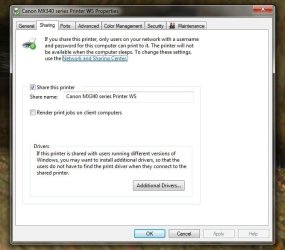
i've attached a screen shot where it tells me that it won't be available when the computer sleeps, but that i can change the settings. i've tried changing every setting i can think of, but still can't access my printer when the desktop is asleep.
 

Attachments

  • Untitled.jpg
    Untitled.jpg
    46.3 KB · Views: 12
Last edited:

My Computer My Computer

At a glance

Windows 7 Home Premium 64 bit
OS
Windows 7 Home Premium 64 bit
the printer is hard connected to the desktop
I am guessing that as you have the printer connected (via a USB cable) to your desktop, the printer "is being informed" once the desktop sleeps/is shut down and goes to eco mode/goes to sleep too.

Why not just make the printer available over WiFi for both machines - without wiring it to one or the other?

The message from the screenshot you provided reads that if you choose to share the printer it will not be available while computer sleeps. Maybe disable sharing so that the printer, once connected to your WiFi is available to any computer connected to your WiFi.
 

My Computer My Computer

At a glance

Windows 7
OS
Windows 7
^^i thought the printer had to be plugged in to the desktop in order to be available wifi. i'm not super experienced with networking in my own home. doesn't it have to be plugged in (usb) to something in order to work? if not, that's cool...just something that i didn't know.

also, if i disable sharing, will i still be able to access the printer from my laptop?

don't laugh too hard at me...i'm still learning ;)
 

My Computer My Computer

At a glance

Windows 7 Home Premium 64 bit
OS
Windows 7 Home Premium 64 bit
No, don't disable sharing.

In your first post you mentioned "wireless network". This led me to think you have a wireless printer. You might not.

If the printer in question is not wireless, and is only connected to your desktop PC by USB then the behavior you are experiencing is "normal". The Desktop must be on in order to access and use the printer through it. This applies even if the laptop's connection to the desktop is wireless.

You must have a wireless printer to be able to access it independently on your laptop. The wireless printer would be connected to your home network through your router and then accessible by any computer connected to the network that has the wireless drivers installed. (If the printer has an Ethernet jack then there are other options, but that is another story entirely.)

So: Wired USB printer connected to the desktop connected to the network = desktop must be on or no access, and that is normal.

Hope that helps!
 

My Computer My Computer

At a glance

Windows 7 64 Bit Home Premium SP1i7-3820GSkill F3-14900CL9Q - 16GBEVGA GeForce GTX660 - Driver 352.86
Computer type
PC/Desktop
Computer Manufacturer/Model Number
Home Built - Jan 2013
OS
Windows 7 64 Bit Home Premium SP1
CPU
i7-3820
Motherboard
Asus P9X79-PRO - Bios 4608
Memory
GSkill F3-14900CL9Q - 16GB
Graphics Card(s)
EVGA GeForce GTX660 - Driver 352.86
Sound Card
On board Realtek ALC898
Monitor(s) Displays
Acer S271HL
Screen Resolution
1920 x 1080
Hard Drives
#1- Samsung 840 Pro Series
#2- Western Digital WD1002FAEX Sata3 Black
#3- Western Digital WD1002FAEX Sata3 Black
PSU
Corsair CMPSU-850TX-V2 - 850 watt (by Seasonic)
Case
Corsair Obsidian 550D
Cooling
Standard 3 120mm case fans, Cooler Master Hyper 212 EVO
Keyboard
MS KC-0405
Mouse
Intellimouse 5-button
Internet Speed
56 Mbits/Sec (on a good day)
Antivirus
Avast & Malwarebytes
Browser
Firefox
Other Info
Asus DVD - DRW-24B1ST 24X
That model printer can be used either way:
  • Hardwired via USB to a PC that needs to be on for any other PC to access.
  • Wireless to an access point (router) that allows access by any of your PCs.
From your manual:

Capture6.PNG

If you want to use it completely wirelessly per the above diagram, the USB cable it came with is only necessary for initial setup of the printer. After setup you can remove it and now you've got a spare USB cable you can use for something else.

Go to page 34 of your printed manual to set it up for wireless use (or page 36 of the pdf).

When set up wirelessly only the access point (router) and printer need to be powered up to print (and of course the PC you're printing from).
 

My Computer My Computer

At a glance

Windows 7 Ultimate x64
OS
Windows 7 Ultimate x64
doesn't it have to be plugged in (usb) to something in order to work? if not, that's cool...just something that i didn't know.

As your printer has the ability to wirelessly connect to your WiFi network, you wouldn't need to connect it to any of your PCs.

You might find the below Microsoft guide to connecting to wireless printers useful. Read the Network printers section:

Install a printer
 

My Computer My Computer

At a glance

Windows 7
OS
Windows 7
Back
Top