
Wifi Question

groze

Tester
Power User
VIP
Local time
3:02 PM
Messages
1,162
I wish I could explain this better but I will try my best.


Here is what I did. I decided I wanted to scan some pictures, so what I did outside of windows, I used the printer wifi setting and WPS of the router to set up the local 10.x ip address. That worked.

Here comes the interesting part. (The computer itself is not connected to the wifi part of the router). I say, I know it is not going to work unless I turn the wife-connection on. I open up the scan settings. Choose network, the 10x ip address shows up. I choose that and it scans. Then if that works, would a printer. Yes, it did but I had to install a driver and this time windows 10 asked if I wanted to share the computer, I said no.

What keeps my neighbor from accessing the 10x ip and turning on my scanner to scan nothing or even use my printer?
 

My Computer

Computer type
PC/Desktop
Computer Manufacturer/Model Number
Dell All in one Inspiron 2020
OS
W10 32 bit, XUbuntu 18.xx 64 bit
CPU
Intel(R) Celeron(R) CPU G1620T @ 2.40GHz, 2400 Mhz
Motherboard
Dell
Memory
4GB
Graphics Card(s)
Intel HD graphics
Sound Card
High Definition Audio Device
Monitor(s) Displays
20 inch Screen
Screen Resolution
W7=1280 x 720 & Linux Mint Xfce=1360 x 768
Hard Drives
500 GB hard drive
Keyboard
Usb
Mouse
Usb
Internet Speed
High-Speed
Antivirus
MSE
Browser
Main Browser Firefox
Other Info
I have done a clean install of Windows 7 using Dell re-installation disk (Dell sent me one). I also use Free Macrium reflect backup and restore.

My Computer

Computer Manufacturer/Model Number
HP Media Center
OS
Windows 7 32 bit
CPU
AMD 5200+ dual core
Memory
2 GB
Graphics Card(s)
NVidia GeForce 6150SE 128 MB
Monitor(s) Displays
CRT
Screen Resolution
1280x1024
Hard Drives
500 GB Sata internal :

SIIG USB 3.0 docking stations w/WD Caviar Black 6 Gb/s drives
Keyboard
PS/2
Mouse
PS/2 Wheel Mouse
Other Info
SIIG USB 3.0 PCIexpress card.
MilesAhead,

You notice, no security or pass code was required for the printers IP or the scanner setting.


This will be up through May 26, 2015
 

My Computer

Computer type
PC/Desktop
Computer Manufacturer/Model Number
Dell All in one Inspiron 2020
OS
W10 32 bit, XUbuntu 18.xx 64 bit
CPU
Intel(R) Celeron(R) CPU G1620T @ 2.40GHz, 2400 Mhz
Motherboard
Dell
Memory
4GB
Graphics Card(s)
Intel HD graphics
Sound Card
High Definition Audio Device
Monitor(s) Displays
20 inch Screen
Screen Resolution
W7=1280 x 720 & Linux Mint Xfce=1360 x 768
Hard Drives
500 GB hard drive
Keyboard
Usb
Mouse
Usb
Internet Speed
High-Speed
Antivirus
MSE
Browser
Main Browser Firefox
Other Info
I have done a clean install of Windows 7 using Dell re-installation disk (Dell sent me one). I also use Free Macrium reflect backup and restore.
You don't mention the tutorial and what if any measures you took to secure the network mentioned therein.
 

My Computer

Computer Manufacturer/Model Number
HP Media Center
OS
Windows 7 32 bit
CPU
AMD 5200+ dual core
Memory
2 GB
Graphics Card(s)
NVidia GeForce 6150SE 128 MB
Monitor(s) Displays
CRT
Screen Resolution
1280x1024
Hard Drives
500 GB Sata internal :

SIIG USB 3.0 docking stations w/WD Caviar Black 6 Gb/s drives
Keyboard
PS/2
Mouse
PS/2 Wheel Mouse
Other Info
SIIG USB 3.0 PCIexpress card.
You notice, no security or pass code was required for the printers IP or the scanner setting.

Of course not. The whole point of a network printer is to be used by the network computers, i.e. anyone who is on your 10.x.x.x network should be able to use the printer.

If you don't want your neighbour to be able to use the printer, you need to make sure your neighbour cannot access your network (not your printer). You usually do this by setting up a decent password on your wifi.

Side Notes:

1. you don't have to connect your PC to the "wifi part of the router" in order to use your wireless printer - you can still use the Ethernet ports on your WAP.

2. if security is paramount, don't use WPS. It's susceptible to brute force which could open up your network to a determined hacker.
 

My Computer

Computer type
PC/Desktop
OS
Windows 7 Pro
You notice, no security or pass code was required for the printers IP or the scanner setting.

Of course not. The whole point of a network printer is to be used by the network computers, i.e. anyone who is on your 10.x.x.x network should be able to use the printer.

If you don't want your neighbour to be able to use the printer, you need to make sure your neighbour cannot access your network (not your printer). You usually do this by setting up a decent password on your wifi.

Side Notes:

1. you don't have to connect your PC to the "wifi part of the router" in order to use your wireless printer - you can still use the Ethernet ports on your WAP.

2. if security is paramount, don't use WPS. It's susceptible to brute force which could open up your network to a determined hacker.


Referring to number 1. I know that. My question is why didn't the Network passcode security key prompt popup for either the scanner setup and the printer setup? My computer wifi wasn't connected, I always used Ethernet. I also removed the Ethernet cord before doing the above.

I can't make a video of the wifi connections because it reveals my neighbors last names or business.

You don't need to hide the 10.x number because a lot of people have that same address. Just search google.
 
Last edited:

My Computer

Computer type
PC/Desktop
Computer Manufacturer/Model Number
Dell All in one Inspiron 2020
OS
W10 32 bit, XUbuntu 18.xx 64 bit
CPU
Intel(R) Celeron(R) CPU G1620T @ 2.40GHz, 2400 Mhz
Motherboard
Dell
Memory
4GB
Graphics Card(s)
Intel HD graphics
Sound Card
High Definition Audio Device
Monitor(s) Displays
20 inch Screen
Screen Resolution
W7=1280 x 720 & Linux Mint Xfce=1360 x 768
Hard Drives
500 GB hard drive
Keyboard
Usb
Mouse
Usb
Internet Speed
High-Speed
Antivirus
MSE
Browser
Main Browser Firefox
Other Info
I have done a clean install of Windows 7 using Dell re-installation disk (Dell sent me one). I also use Free Macrium reflect backup and restore.
My Computer

Computer Manufacturer/Model Number
HP Media Center
OS
Windows 7 32 bit
CPU
AMD 5200+ dual core
Memory
2 GB
Graphics Card(s)
NVidia GeForce 6150SE 128 MB
Monitor(s) Displays
CRT
Screen Resolution
1280x1024
Hard Drives
500 GB Sata internal :

SIIG USB 3.0 docking stations w/WD Caviar Black 6 Gb/s drives
Keyboard
PS/2
Mouse
PS/2 Wheel Mouse
Other Info
SIIG USB 3.0 PCIexpress card.
Referring to number 1. I know that. My question is why didn't the Network passcode security key prompt popup for either the scanner setup and the printer setup? My computer wifi wasn't connected, I always used Ethernet. I also removed the Ethernet code before doing the above.

I can't make a video of the wifi connections because it reveals my neighbors last names or business.

You don't need to hide the 10.x number because a lot of people have that same address. Just search google.

You are looking at it the wrong way.

The printer is not password-protected, your wifi is password-protected. So if you want to restrict access to the printer - you need to restrict access to the network. Since your computer is already part of the network - it can access the printer. Your neighbor cannot access your printer, unless he logs in into your wifi.

But the main point here is that the password you entered on the printer when setting up WPS was to allow the printer to join the network, not the other way around.
 

My Computer

Computer type
PC/Desktop
OS
Windows 7 Pro
Using MAC addresses is not a whole lot safer, a little bit better than totally being open.
Guys, Gals, would OP be able to do what is wanted via WPA-2, and not use WPS?
 

My Computer

Computer type
PC/Desktop
Computer Manufacturer/Model Number
Antec desktop; Acer Aspire laptops
OS
Windows 7 Professional 64-bit
CPU
Desktop i5; Acers i5 & i7
Memory
desktop 16GB; 1 Acer 8GB & 1 Acer 16GB
Hard Drives
1TB split into 2 equal partitions [OS and data] usable by RJS
Internet Speed
AT&T DSL
Browser
FF, GChrome, msIE
Other Info
Windows 7 Firewall, Emsisoft AM/AV, MSE [scan-only], SpywareBlaster, Ruiware/BillP combine
Guys, Gals, would OP be able to do what is wanted via WPA-2, and not use WPS?

As long as the printer supports it. Then WPS should be turned off at the wifi to improve security.
 

My Computer

Computer type
PC/Desktop
OS
Windows 7 Pro
Just for info, I wasn't prompted for a network password key for the printer. It does have a hidden ssid though, I don't even know it.
 

My Computer

Computer type
PC/Desktop
Computer Manufacturer/Model Number
Dell All in one Inspiron 2020
OS
W10 32 bit, XUbuntu 18.xx 64 bit
CPU
Intel(R) Celeron(R) CPU G1620T @ 2.40GHz, 2400 Mhz
Motherboard
Dell
Memory
4GB
Graphics Card(s)
Intel HD graphics
Sound Card
High Definition Audio Device
Monitor(s) Displays
20 inch Screen
Screen Resolution
W7=1280 x 720 & Linux Mint Xfce=1360 x 768
Hard Drives
500 GB hard drive
Keyboard
Usb
Mouse
Usb
Internet Speed
High-Speed
Antivirus
MSE
Browser
Main Browser Firefox
Other Info
I have done a clean install of Windows 7 using Dell re-installation disk (Dell sent me one). I also use Free Macrium reflect backup and restore.
Are you saying that your wifi doesn't require password? You should fix that asap
 

My Computer

Computer type
PC/Desktop
OS
Windows 7 Pro
Are you saying that your wifi doesn't require password? You should fix that asap

Sort-of

For wifi printer and wifi scanner no
For wifi internet yes,

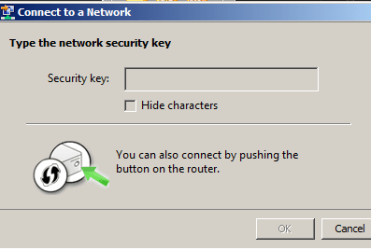
I was expecting the that dialog to pop-up for both the printer & Scanner settings but it doesn't. However, it does for the internet connection.

Here I will show you a screen shot.
 

Attachments

  • np1.png
    np1.png
    6.1 KB · Views: 4

My Computer

Computer type
PC/Desktop
Computer Manufacturer/Model Number
Dell All in one Inspiron 2020
OS
W10 32 bit, XUbuntu 18.xx 64 bit
CPU
Intel(R) Celeron(R) CPU G1620T @ 2.40GHz, 2400 Mhz
Motherboard
Dell
Memory
4GB
Graphics Card(s)
Intel HD graphics
Sound Card
High Definition Audio Device
Monitor(s) Displays
20 inch Screen
Screen Resolution
W7=1280 x 720 & Linux Mint Xfce=1360 x 768
Hard Drives
500 GB hard drive
Keyboard
Usb
Mouse
Usb
Internet Speed
High-Speed
Antivirus
MSE
Browser
Main Browser Firefox
Other Info
I have done a clean install of Windows 7 using Dell re-installation disk (Dell sent me one). I also use Free Macrium reflect backup and restore.
Back
Top