
I'm going to start from the very beginning, and use as much detail as possible, because this is my final hope. I have seriously tried everything. I'm not the most tech smart person but I am willing to try whatever else I am suggested.
I have comcast and a d3 modem. I have a linksys router EA6300 running firmware version 1.1.40.153731
I have a Asus G74sx laptop running windows 7 ultimate 64bit.
I have a Intel Centrilo Wireless N 6150 Wireless adapter
Never had a single problem ever, I play WoW, use ventrillo, have steam open, and constantly browse reddit and youtube. For years no problems.
Two weeks ago i started getting strong interruptions, they would last for about ten minutes, It was primarily when I was in a game of League of legends or streaming a youtube video. I just thought it was me putting to much on my internet as my wife also uses her ipad to watch netflix.
However now it is frustrating me so bad. When I am just browsing sites it will only kick me off occasionally, however if Im connected to ventrillo, or streaming a youtube video its pretty much a sure thing to knock me off.
I first made sure all other devices were working fine and they are. Ipad stays connected, our phones stay online. I reset my modem, and router and called comcast to make sure they didnt see any interuptions on their side and they did not. I have the router about three feet from the modem, the cables are connected fine, and my laptop is only about 4 feet from the router with no walls in between or any other devices around.
I completely wiped my hard drive, i have Kaspersky installed, i manually downloaded the drivers from intel to make sure they were up to date. I have WPA2-psk security on my wifi. There are literally no other programs or files on my computer except, steam, wow and ventrillo and google chrome. I have tried changing the power management on my network adapter to not let it go to sleep. I tried running the admin command prompt with netsh winsock reset catalog and netsh ipv4 reset reset.log and restarting my laptop. I have tried changing the channel on my wifi to 4. I took my to a friends house and his wifi worked perfect on my laptop. I took replaced my wifi card (5 bucks on amazon, not bad) and still the problem persists. My comcast plan allows me 25Mbps although soon ill be switching providers. I seriously have no idea what the problem is. I took it to a local computer store (good reviews, nice older couple) and they kept it for a few days and didnt charge me anything but said they could not find a single thing wrong with the laptop.
Lastly when it disconnects the wifi goes from 5 bars down to 4 and then a little yellow hazard sign comes up. I run troubleshooting and it tells me different things, sometimes its something along the lines or "Reseting Wireless Adapter" or "The Default gateway is not available" or "A connection is broken between your modem, router or wireless adapter"
I am so frustrated and confused I really have no clue what to do.
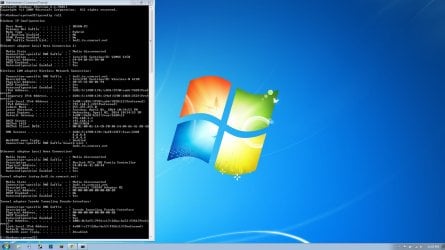
I have seen a few people attaching ipconfigs to their files so i thought i would do that but seriously anything anyone can help me with would be amazing and i would name my first born child after them....probably.
Edit : Just another note, forgot that occasionally the troubleshooting will tell me something along the lines of The Device is not set up(microsoft.com) to receive access to The World Wide Web.
I have comcast and a d3 modem. I have a linksys router EA6300 running firmware version 1.1.40.153731
I have a Asus G74sx laptop running windows 7 ultimate 64bit.
I have a Intel Centrilo Wireless N 6150 Wireless adapter
Never had a single problem ever, I play WoW, use ventrillo, have steam open, and constantly browse reddit and youtube. For years no problems.
Two weeks ago i started getting strong interruptions, they would last for about ten minutes, It was primarily when I was in a game of League of legends or streaming a youtube video. I just thought it was me putting to much on my internet as my wife also uses her ipad to watch netflix.
However now it is frustrating me so bad. When I am just browsing sites it will only kick me off occasionally, however if Im connected to ventrillo, or streaming a youtube video its pretty much a sure thing to knock me off.
I first made sure all other devices were working fine and they are. Ipad stays connected, our phones stay online. I reset my modem, and router and called comcast to make sure they didnt see any interuptions on their side and they did not. I have the router about three feet from the modem, the cables are connected fine, and my laptop is only about 4 feet from the router with no walls in between or any other devices around.
I completely wiped my hard drive, i have Kaspersky installed, i manually downloaded the drivers from intel to make sure they were up to date. I have WPA2-psk security on my wifi. There are literally no other programs or files on my computer except, steam, wow and ventrillo and google chrome. I have tried changing the power management on my network adapter to not let it go to sleep. I tried running the admin command prompt with netsh winsock reset catalog and netsh ipv4 reset reset.log and restarting my laptop. I have tried changing the channel on my wifi to 4. I took my to a friends house and his wifi worked perfect on my laptop. I took replaced my wifi card (5 bucks on amazon, not bad) and still the problem persists. My comcast plan allows me 25Mbps although soon ill be switching providers. I seriously have no idea what the problem is. I took it to a local computer store (good reviews, nice older couple) and they kept it for a few days and didnt charge me anything but said they could not find a single thing wrong with the laptop.
Lastly when it disconnects the wifi goes from 5 bars down to 4 and then a little yellow hazard sign comes up. I run troubleshooting and it tells me different things, sometimes its something along the lines or "Reseting Wireless Adapter" or "The Default gateway is not available" or "A connection is broken between your modem, router or wireless adapter"
I am so frustrated and confused I really have no clue what to do.
I have seen a few people attaching ipconfigs to their files so i thought i would do that but seriously anything anyone can help me with would be amazing and i would name my first born child after them....probably.
Edit : Just another note, forgot that occasionally the troubleshooting will tell me something along the lines of The Device is not set up(microsoft.com) to receive access to The World Wide Web.
Attachments
Last edited:
My Computer
At a glance
Windows 7 ultimate 64 bitnvidia Geforcegtx 560m 2g
- Computer type
- Laptop
- Computer Manufacturer/Model Number
- Asus G74sx
- OS
- Windows 7 ultimate 64 bit
- Graphics Card(s)
- nvidia Geforcegtx 560m 2g
- Antivirus
- Kaspersky


