WiFi speed issues - From ~8MB/s to ~300KB/s

bartjuh10

New member
Local time
12:24 PM
Messages
5
Dear community,

I must first admit that I am on Windows 8. The reason I went over to here instead of eightforums is due to the activity there. I am really fed up of this problem so I found myself best to post it here.

The problem I am trying to resolve is that after the upgrade of my Laptop from Win7 to Win8, everything was behaving fine. My WiFi speeds were around 6-8MB/s as it has been before. Just perfect, nothing wrong. It lasted like a day or 5.

Suddenly, when I had been at a friend with my laptop I realised that my network speed was terrible. I had a quick speedtest: 300KB/s. I was shocked, and decided it had to be my router. Resetting however did not help. The strange thing was that all other devices (even my phone) gave around 8MB/s. I concluded it was my laptop that was behaving improper.

I had tried everything: from updating drivers to getting old ones, from reconfiguring to disabling a variety of settings and so forth. Nothing helped. Until today, when I realised that at my friend's home I had my own speeds back (well, his speeds :p). This is very strange, as this shows neither the laptop nor the router is the problem.

I have just resetted my router to factory settings and still a nope. I am completely confused. What am I to do now?
 

My Computer My Computer

At a glance

Windows 8 Enterprise NIntel i7 3.6Ghz
Computer type
Laptop
Computer Manufacturer/Model Number
Acer
OS
Windows 8 Enterprise N
CPU
Intel i7 3.6Ghz
Antivirus
None
Browser
Chrome
Welcome to Seven Forums,

You may fiddle the wireless mode setting of your router. If your router is a modern one that supports N, usually by default it's on Mixed Mode, change it to an G/N or N. Depending on your Wi-Fi adapter, if your Wi-Fi adapter supports N then try my suggestion.

Is your router's firmware also up to date?

An update will be much appreciated.
 

My Computer My Computer

At a glance

Win7 & Win8 64bitIntel i5
Computer Manufacturer/Model Number
Lenovo Desktop/Samsung Laptop
OS
Win7 & Win8 64bit
CPU
Intel i5
Internet Speed
Charter-20 Mbps
Antivirus
Avast
Browser
FF, IE9 and Chrome
Hello,

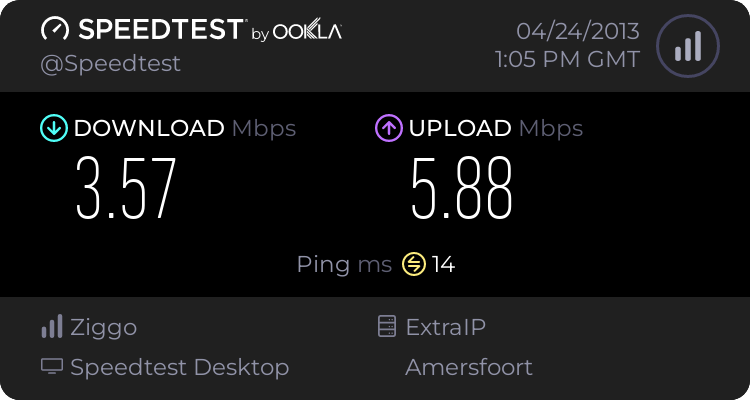
I have tried both G+N and N and it seemed that N was able to bring me up to 500KB/s. I have also updated the router firmware yesterday but it was already at the latest. Strangely I just am not able to get the full speed. It also seems to be unreliable: it goes from fast to slow, back and forth.
This is an image of what I mean:

2666535297.png


The adapter I have is an Acer Nplify 802.11b/g/n.

Regards.
 

My Computer My Computer

At a glance

Windows 8 Enterprise NIntel i7 3.6Ghz
Computer type
Laptop
Computer Manufacturer/Model Number
Acer
OS
Windows 8 Enterprise N
CPU
Intel i7 3.6Ghz
Antivirus
None
Browser
Chrome
Have you tried changing the wireless mode in your Wi-Fi adapter as well?
 

My Computer My Computer

At a glance

Win7 & Win8 64bitIntel i5
Computer Manufacturer/Model Number
Lenovo Desktop/Samsung Laptop
OS
Win7 & Win8 64bit
CPU
Intel i5
Internet Speed
Charter-20 Mbps
Antivirus
Avast
Browser
FF, IE9 and Chrome
Have you tried changing the wireless mode in your Wi-Fi adapter as well?

Not yet, but I must ask you how :p
 

My Computer My Computer

At a glance

Windows 8 Enterprise NIntel i7 3.6Ghz
Computer type
Laptop
Computer Manufacturer/Model Number
Acer
OS
Windows 8 Enterprise N
CPU
Intel i7 3.6Ghz
Antivirus
None
Browser
Chrome
Hello again,

I found what you were trying to show me. I noticed that the setting 'IBSS mode' was set to '802.11a/b only'. Strangely, after setting it to '802.11a/b/g/n Auto' my speeds have not changed. These are the settings that were enlisted:

20/40 Coexistance: Auto (auto/enabled/disabled)
40Mhz Intolerant: Disabled
802.11n Preamble: Auto (auto/mixed mode)
Bandwidth capability: 11b/g:20/40Mhz (11b/g:20/40Mhz / 11b/g:20Mhz)
Fragmentation Threshold: 2346 (numerical input)
IBSS 54g(tm) Protection Mode: Auto (auto/disabled)
IBSS Mode: see above (802.11a/b Only, 802.11a/b/g Auto, 802.11a/b/b Performance, 802.11a/b/g/n Auto)
Locally Administered MAC Address: Not present
'No Description': 11 (numerical input)
Priority & VLAN: enabled (VLAN only, Priotity only, enabled, disabled)
Rate: best rate (dropdown menu from 1 to 54 + 'Best rate')
RTS Threshold: 2347 (numerical input)
Short GI: Auto (auto/disabled)
Wake-Up Mode: Magic & Wake-Up Frame

Hopefully you can determine the problem using these values. I'll try a reboot aswell, maybe it requires after changing adapter settings. Hope to hear from you :)
 

My Computer My Computer

At a glance

Windows 8 Enterprise NIntel i7 3.6Ghz
Computer type
Laptop
Computer Manufacturer/Model Number
Acer
OS
Windows 8 Enterprise N
CPU
Intel i7 3.6Ghz
Antivirus
None
Browser
Chrome
If you tried everything, I'd be calling your ISP for assistance and what is wrong over at Eightforums? Report it to their mods, unless it is them. muhahaha
 

My Computer My Computer

At a glance

Windows 7 Ultimate Retail Box (64-bit install...AMD FX-8350 CPU v1.15 (or 1.0F) BIOS was requ...8G CAS-7 G-Skill DDR3 @1333 (2 fours) [mobo n...Radeon HD 7950 [3 gigs of GDDR5] MSI Twin Fro...
Computer type
PC/Desktop
Computer Manufacturer/Model Number
Self Built Custom
OS
Windows 7 Ultimate Retail Box (64-bit installed) + Service Pack 1
CPU
AMD FX-8350 CPU v1.15 (or 1.0F) BIOS was required!
Motherboard
MSI 890FXA-GD70
Memory
8G CAS-7 G-Skill DDR3 @1333 (2 fours) [mobo nonOC max rec'd]
Graphics Card(s)
Radeon HD 7950 [3 gigs of GDDR5] MSI Twin Frozr model
Sound Card
Realtek High Definition Audio (onboard mobo, ALC-889 chip)
Monitor(s) Displays
2 WS LED Monitors: One LG One Viewsonic
Screen Resolution
1920 by 1080
Hard Drives
SSD for OS: Samsung 840 Pro
SSD for VM and utilities: Adata SX900
7200 RPM SATA HDs for the rest: Hitachi and Seagate
PSU
Corsair TX850 - 850W max, in service since August 2010.
Case
Thermaltake Armor A90
Cooling
Thermaltake Spin Q CPU Cooler, in service since August 2010
Keyboard
Logitech G11
Mouse
Logitech M310 Wireless
Internet Speed
100 Megabit broadband supposedly upgraded from 50 (Cable)
Antivirus
Bitdefender Internet Security 2014 suite
Browser
Pale Moon 64-bit main, also IceDragon, Opera, and Maxthon.
Other Info
CompTIA A+ certified (220-800 series) in July 2013.
If you tried everything, I'd be calling your ISP for assistance and what is wrong over at Eightforums? Report it to their mods, unless it is them. muhahaha

Well eightforums is less active I saw :p
A new update: I figured that I get speed based on.. a formula it seems. It looks like I get the speed / 4 or something, maybe even more. I'm currently at my father, and over here it's far worse. It definitely is my laptop.
 

My Computer My Computer

At a glance

Windows 8 Enterprise NIntel i7 3.6Ghz
Computer type
Laptop
Computer Manufacturer/Model Number
Acer
OS
Windows 8 Enterprise N
CPU
Intel i7 3.6Ghz
Antivirus
None
Browser
Chrome
Back
Top