wifi will never run stable, reason?

kjo

New member
Member
Local time
12:49 AM
Messages
52
OS: windows 7 hp 32 and/or 32 bit (makes no difference).
Windows 7 (64bit) desk top.

Info: So far I've installed about 4 different wifi devices (read below). Everytime
this happens: The driver gets installed succesfully, using a firmware win 7 driver or windows' automatic driver updater.
The key is entered. Sometimes straight away, sometimes not, the wifi connection
is established.
The wifi starts running at 1/2 speed or less (benchmark: another notebook or the
desktop running win xp).
After one minut or two, the transferspeed decreases rapidly, and after 5 -10
minuts the datatransfer in reality has stopped. The wifi connection icon is often
still showing "internet access", but there isn't.
I find it hard to blame the router, because the notebook running win 7 is most of
the time running stable and fast. Sometime it jams the same way, but not often.
And if the desktop runs win xp, it is very stable in terms of wifi.
I can't find a software update for the router.
Note: desktop connected to router via cable runs flawlessly.

Devices: usb dongle wifi sagem xg-760a, win 7 update installs a driver that
doesn't work.
pci wifi card d link dwl g510 rev.c2 firmware 5.00 probably chipset rt61,
(ven 1814 dev 0302) used dlink win 7 driver v 5.30, same story.
usb wifi dongle 802.11n probably chipset ralink rt3000u1t1r 11bgn,
(vid 148f pid 3070) used win 7 firmware driver, same story.

I don't understand what is going on?
Do you have stable win 7 drivers for these devices, please let me know.
 

My Computer

OS
windows 7 home premium
If you've tried four wifi adapters, it's time to look at the wireless router. First, check for the latest firmware update. Do other notebooks have trouble with your router? It you router set for b/g/n/a? A setting can enable it just to allow b, which would really slow you down.
 

My Computer

Computer Manufacturer/Model Number
Dell and Custom
OS
Systems 1 and 2: Windows 7 Enterprise x64, Win 8 Developer
CPU
System 1: i7 [email protected], System 2: AMD FX-4100 Zambezi 3.6G
Motherboard
System 1:Dell 06NWYK System 2: ASUS M5A97 AM3+
Memory
System 1: 8GB System 2: 8GB
Graphics Card(s)
System 1: ATI FirePro V4800 System 2: Radeon HD 6850
Sound Card
System 1: onboard System 2: onboard
Monitor(s) Displays
System1: Viewsonic HDMI 24"
Screen Resolution
System 1: 1920x1080 System 2: 1920x1080
Hard Drives
System 1: Mirrored .5B drives System 2: Seagate Barracuda ST1000DM003 1TB 7200 RPM 64MB Cache SATA 6.0Gb/s
Case
System 1: Dell System 2: Cooler Master
Internet Speed
10 MBPS
Have you checked your Power Management settings for that NIC?
 

My Computer

Computer Manufacturer/Model Number
Dell, Sony, Gateway
OS
Windows 7 Pro x64, Windows 7 Pro 32bit, Windows XP Pro
OS: windows 7 hp 32 and/or 32 bit (makes no difference).
Windows 7 (64bit) desk top.

Info: So far I've installed about 4 different wifi devices (read below). Everytime
this happens: The driver gets installed succesfully, using a firmware win 7 driver or windows' automatic driver updater.
The key is entered. Sometimes straight away, sometimes not, the wifi connection
is established.
The wifi starts running at 1/2 speed or less (benchmark: another notebook or the
desktop running win xp).
After one minut or two, the transferspeed decreases rapidly, and after 5 -10
minuts the datatransfer in reality has stopped. The wifi connection icon is often
still showing "internet access", but there isn't.
I find it hard to blame the router, because the notebook running win 7 is most of
the time running stable and fast. Sometime it jams the same way, but not often.
And if the desktop runs win xp, it is very stable in terms of wifi.
I can't find a software update for the router.
Note: desktop connected to router via cable runs flawlessly.

Devices: usb dongle wifi sagem xg-760a, win 7 update installs a driver that
doesn't work.
pci wifi card d link dwl g510 rev.c2 firmware 5.00 probably chipset rt61,
(ven 1814 dev 0302) used dlink win 7 driver v 5.30, same story.
usb wifi dongle 802.11n probably chipset ralink rt3000u1t1r 11bgn,
(vid 148f pid 3070) used win 7 firmware driver, same story.

I don't understand what is going on?
Do you have stable win 7 drivers for these devices, please let me know.

You should at least make sure that the channel you are using isn't being used by one of your neighbors as this will cause endless connection problems.

This program will help you figure out which channels are clear in your area.
Xirrus: The Leader in High Performance Wi-Fi - Advanced IT Wi-Fi Networking Tools
 

My Computer

Computer type
PC/Desktop
Computer Manufacturer/Model Number
Home built
OS
Windows 7 Ult, Windows 8.1 Pro,
CPU
Q9650-4.275GHz, E8600 4.5GHz, E6750-3.8GHz
Motherboard
Evga 780i FTW
Memory
G.Skill PC2 9600 1200Mhz 5 5 5 15 2T
Graphics Card(s)
GTX480
Sound Card
Asus Xonar D2
Monitor(s) Displays
HannsG
Screen Resolution
1680X1050
Hard Drives
GSkill Phoenix Pro 120GB SSD
PSU
ThermalTake Toughpower 1000Watt modular
Case
ThermalTake XaserV
Cooling
Xigmatek S1283
Keyboard
Logitech G15
Mouse
Logitech G9
Internet Speed
T1
Solved, kind of.

Thank you for your answers.

I have bothered you for nothing.
I shouldn't have asked the question.
My mistake.

It turns out it's all about distance.
I reduced the distance to the computer 1/2.
immediately the signal strength was high, and one usb wifi card
and one pci wifi card ran stable and fast.

However manufacturers shouldn't write these wrong distance data
about their wifi cards.
And the notebook wifi and an old win xp usb card runs stable and fast,
and with signal strength is low, at the full distance.
Therfore I wasn't aware of the distance problem.

Now I will try an omni 12db antenna, but I don't know whether it will work.

Is their a way to know in advance, that a wifi card will run at distances
about 30feet?
 

My Computer

OS
windows 7 home premium

My Computer

Computer Manufacturer/Model Number
Dell and Custom
OS
Systems 1 and 2: Windows 7 Enterprise x64, Win 8 Developer
CPU
System 1: i7 [email protected], System 2: AMD FX-4100 Zambezi 3.6G
Motherboard
System 1:Dell 06NWYK System 2: ASUS M5A97 AM3+
Memory
System 1: 8GB System 2: 8GB
Graphics Card(s)
System 1: ATI FirePro V4800 System 2: Radeon HD 6850
Sound Card
System 1: onboard System 2: onboard
Monitor(s) Displays
System1: Viewsonic HDMI 24"
Screen Resolution
System 1: 1920x1080 System 2: 1920x1080
Hard Drives
System 1: Mirrored .5B drives System 2: Seagate Barracuda ST1000DM003 1TB 7200 RPM 64MB Cache SATA 6.0Gb/s
Case
System 1: Dell System 2: Cooler Master
Internet Speed
10 MBPS
Thank you for your answers.

I have bothered you for nothing.
I shouldn't have asked the question.
My mistake.

It turns out it's all about distance.
I reduced the distance to the computer 1/2.
immediately the signal strength was high, and one usb wifi card
and one pci wifi card ran stable and fast.

However manufacturers shouldn't write these wrong distance data
about their wifi cards.
And the notebook wifi and an old win xp usb card runs stable and fast,
and with signal strength is low, at the full distance.
Therfore I wasn't aware of the distance problem.

Now I will try an omni 12db antenna, but I don't know whether it will work.

Is their a way to know in advance, that a wifi card will run at distances
about 30feet?

This is actually a good question. :D

The problem is that as you add walls and other obsticles you decrease both the signal strength and the reliablity of the connection, the machine may connect but after about two walls the connection may start to get flakey, you will also lose connection speed and reliablity.

Distance isn't so much of an issue as are the walls and other obsticles in the way. The antenna might help especially if you can move it to a place that allows the signal to go straight to the antenna rather than through too many walls.

I recently added a Dlink DAP-1522 wireless N access point outside my house so I can get a better signal to my garage computer which was fifty feet away from my router going through two walls, the connection worked "ok" but not quite good enough for streaming movies.

I already had a GB wired switch at the other end of the house so I only needed to run an eithernet cable from the wired switch to the access point tucked under the eves "dry" outside the house. This gave me a clear path to the USB adaptor on my garage machines USB adaptor thirty feet away, although it was at an angle with the garages USB adaptor on a short extension sitting just outside the window.

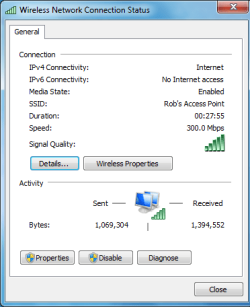
The connection was great at 4-5 bars and 270Mbps-300Mbps and allowed for streaming movies to the garage without any glitches.

But me being the big network guru and all "joke" I had to go a step further and added a 16 foot extension to my garage machines USB adaptor which is a Dlink DWA-140 "excellent adaptor". This allowed me to place the USB adaptor up under the eves "dry place" of the garage and only 20 feet from my access point with nothing in the way. The signal strength went up to 5 bars all the time and 300Mbps constant with 100 percent signal strength.

What it amounts to with wirless is that the signal strength, network speed and connection quality are only as good as you make them, there is no magic involved or special effects. It's a bit of work to get it right and a hardware purchase "access point or bridge" or extended USB adaptor antenna may be required to get it working really well.
 

Attachments

  • 300Mbps my Network speed.PNG
    300Mbps my Network speed.PNG
    12.5 KB · Views: 8

My Computer

Computer type
PC/Desktop
Computer Manufacturer/Model Number
Home built
OS
Windows 7 Ult, Windows 8.1 Pro,
CPU
Q9650-4.275GHz, E8600 4.5GHz, E6750-3.8GHz
Motherboard
Evga 780i FTW
Memory
G.Skill PC2 9600 1200Mhz 5 5 5 15 2T
Graphics Card(s)
GTX480
Sound Card
Asus Xonar D2
Monitor(s) Displays
HannsG
Screen Resolution
1680X1050
Hard Drives
GSkill Phoenix Pro 120GB SSD
PSU
ThermalTake Toughpower 1000Watt modular
Case
ThermalTake XaserV
Cooling
Xigmatek S1283
Keyboard
Logitech G15
Mouse
Logitech G9
Internet Speed
T1
big antenna didn't work.

I've tried a much bigger omni antenna, but it didn't work.
 

My Computer

OS
windows 7 home premium
Back
Top