WiFi won't reconnect after hibernation wake

davesev

New member
Member
Local time
8:04 PM
Messages
56
If I connect to WiFi somewhere outside of my home, shut the lid of the laptop to hibernate, then wake when I'm home, Windows will not reconnect to my home WiFi. It's just stuck in Disconnected state. I have to manually click to connect to my home WiFi SSID again, then type in the password again. It's super annoying. I don't know how to fix this.

I'm using a Dell Latitude E6540.
 

My Computer My Computer

At a glance

Windows 7 Pro 64-bit
Computer type
PC/Desktop
OS
Windows 7 Pro 64-bit
Hi davesev,
How is your wifi for home set, auto connect?
right-click wifi icon in system tray > network and sharing center > Manage wireless networks > your home wifi should be set to Connect automatically when this network is in range
If not, double click your wifi entry, check Connect automatically when this network is in range
 

My Computer My Computer

At a glance

Win 10 x64, Linux Lite, Win 7 x64, BlackArch,...
Computer type
PC/Desktop
Computer Manufacturer/Model Number
HP Desktop & Compaq Laptop
OS
Win 10 x64, Linux Lite, Win 7 x64, BlackArch, & Kali
Hard Drives
Samsung 850 Pro 256Gb,
Hitachi HDD 1Tb,
Crucial MX SSD 250Gb
Segate 3Tb USB 3.0 Ext. Backup HDD
Internet Speed
150Mbps dn, 20Mbps up
Antivirus
Avast Free, Malwarebytes Anti-Exploit & Anti-Ransomware
Browser
Firefox, Chrome, Opera, & VPN
Hi davesev,
How is your wifi for home set, auto connect?
right-click wifi icon in system tray > network and sharing center > Manage wireless networks > your home wifi should be set to Connect automatically when this network is in range
If not, double click your wifi entry, check Connect automatically when this network is in range

The home WiFi is fine, and already set to auto-connect; if the computer has shut down and boots up while at home, it reconnects fine. The problem is not reconnecting automatically after waking up from hibernation after being connected to another WiFi somewhere else (typically public/free WiFi).

I've already tried unchecking the setting and re-checking it, or unchecking it, saving, rebooting, then checking it again, etc (troubleshooting).

I don't even know where to check for any error messages or notifications about it after it fails to reconnect.
 
Last edited:

My Computer My Computer

At a glance

Windows 7 Pro 64-bit
Computer type
PC/Desktop
OS
Windows 7 Pro 64-bit
At home, are you running on Battery or AC adapter (wall plug)
What power option are you using?
What setting?
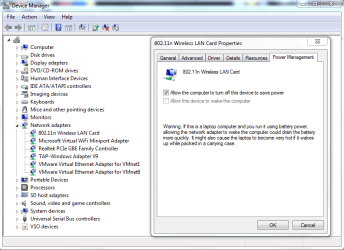
Device Manager > Network Adapter > right-click > properties > tab Power Management
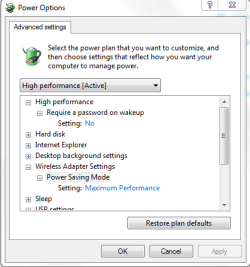
power options > Change plan setting > Change advanced power settings

Computer Management>Event Viewer/Applications and Services logs/Microsoft/Windows/WLAN-Autoconfig will tell you what the adapter is doing.

Capture_2.PNG
Capture_1.PNG

2 questions, just curious, not related to WiFi connection issue, since you said you use public WiFi.
Are using public when setting up your connection?
Are you running VPN on public WiFi?
 
Last edited:

My Computer My Computer

At a glance

Win 10 x64, Linux Lite, Win 7 x64, BlackArch,...
Computer type
PC/Desktop
Computer Manufacturer/Model Number
HP Desktop & Compaq Laptop
OS
Win 10 x64, Linux Lite, Win 7 x64, BlackArch, & Kali
Hard Drives
Samsung 850 Pro 256Gb,
Hitachi HDD 1Tb,
Crucial MX SSD 250Gb
Segate 3Tb USB 3.0 Ext. Backup HDD
Internet Speed
150Mbps dn, 20Mbps up
Antivirus
Avast Free, Malwarebytes Anti-Exploit & Anti-Ransomware
Browser
Firefox, Chrome, Opera, & VPN
At home, are you running on Battery or AC adapter (wall plug)

At home I plug the laptop into a Dell dock then open the lid and hit the power button to wake it from hibernation.

What power option are you using?
What setting?
Device Manager > Network Adapter > right-click > properties > tab Power Management
power options > Change plan setting > Change advanced power settings

Device Manager > Network Adapter > right-click > properties only has a General tab. I don't have "802.11n Wireless LAN Card" device like you do, the closest I have is "Intel(R) Centrino(R) Advanced-N 6235" which does have a Power Management tab and "Allow this device to wake the computer" checkbox but it's checked... above that it has the same checkbox checked, but below it it has unchecked "Only allow a magic packet to wake the computer". I don't really see what any of those have to do with the WiFi not automatically reconnecting to my home router after hibernating from a public WiFi.

Computer Management>Event Viewer/Applications and Services logs/Microsoft/Windows/WLAN-Autoconfig will tell you what the adapter is doing.

I'm guessing under WLAN-Autoconfig you mean Network Adapter: Intel(R) Centrino(R) Advanced-N 6235

2 questions, just curious, not related to WiFi connection issue, since you said you use public WiFi.
Are using public when setting up your connection?
Are you running VPN on public WiFi?

Like I said, I connect to public WiFi, hibernated, then on wake the WiFi doesn't reconnect. I'm not using VPN.
 

My Computer My Computer

At a glance

Windows 7 Pro 64-bit
Computer type
PC/Desktop
OS
Windows 7 Pro 64-bit
Maybe what I've said here is misunderstood... can someone please review the conversation and clarify?

My WiFi settings have not been customized... they are whatever is the default from Windows 7 factory install.

Windows is supposed to automatically reconnect to known WiFi if the "Connect automatically" checkbox is checked (you can see this if you click the WiFi icon at the bottom right then click one you're not connected to)... but it doesn't. So far nothing that's been said here has helped.

Can someone please offer something helpful, or some kind of troubleshooting (or which logs to review), or offer another website that understands what's under the hood better? I honestly am not sure where to go from here, and I'm not a Windows technical expert.
 

My Computer My Computer

At a glance

Windows 7 Pro 64-bit
Computer type
PC/Desktop
OS
Windows 7 Pro 64-bit
Back
Top