Will adding a 2nd network card improve local network transfer speed

davidinblack

New member
Local time
8:13 AM
Messages
7
This sounds really noobie of me but is it possible to improve local network transfer speed by adding a 2nd network card. I was planning to connect one exclusively for lan transfers and another one hooked to a separate wireless router.

Right now only a maximum of 3 users can stream SD videos off the PC before it gets a little choppy.

The pc in question runs on windows 7 and it's board has built in gigabit, I happen to have a spare gigabit card.
 

My Computer My Computer

OS
Windows 7 Ultimate x32 and 64
CPU
Intel 2600k
Graphics Card(s)
MSI 560TI
Case
NZXT Phantom
That won't really help the way you are describing the problem, although adding access points will help with streaming to wireless devices.

Although there is a setting in Group Policy that allows you to use two connections at the same time, I don't believe it will help in this situation.

I've done many HD movie streaming tests on my system.

I can stream from my media PC to at least 7 other machines at the same time, 4 wired, 3 wireless, plus my TV, and have no problems at all, no skipping, no freezing, even with the same movie in the same place or with 8 different movies at once, my TV is connected to my media center PC so counts as the 8th one.

This is Gb LAN, and 300Mbps wireless but even the 65Mbps limited laptop has no problem.

I'm not really sure why you are seeing these limitations but it may be the router.
 

My Computer My Computer

Computer type
PC/Desktop
Computer Manufacturer/Model Number
Home built
OS
Windows 7 Ult, Windows 8.1 Pro,
CPU
Q9650-4.275GHz, E8600 4.5GHz, E6750-3.8GHz
Motherboard
Evga 780i FTW
Memory
G.Skill PC2 9600 1200Mhz 5 5 5 15 2T
Graphics Card(s)
GTX480
Sound Card
Asus Xonar D2
Monitor(s) Displays
HannsG
Screen Resolution
1680X1050
Hard Drives
GSkill Phoenix Pro 120GB SSD
PSU
ThermalTake Toughpower 1000Watt modular
Case
ThermalTake XaserV
Cooling
Xigmatek S1283
Keyboard
Logitech G15
Mouse
Logitech G9
Internet Speed
T1
That won't really help the way you are describing the problem, although adding access points will help with streaming to wireless devices.

Although there is a setting in Group Policy that allows you to use two connections at the same time, I don't believe it will help in this situation.

I've done many HD movie streaming tests on my system.

I can stream from my media PC to at least 7 other machines at the same time, 4 wired, 3 wireless, plus my TV, and have no problems at all, no skipping, no freezing, even with the same movie in the same place or with 8 different movies at once, my TV is connected to my media center PC so counts as the 8th one.

This is Gb LAN, and 300Mbps wireless but even the 65Mbps limited laptop has no problem.

I'm not really sure why you are seeing these limitations but it may be the router.

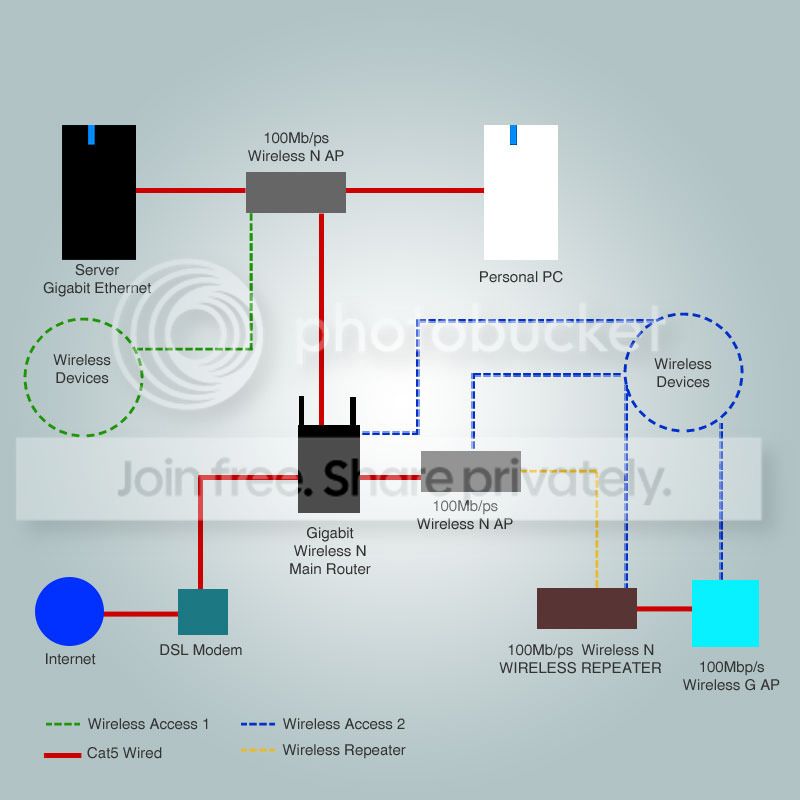
Hmm here have a look:

This is my current network setup:
networkmap.jpg


This brings me to my next question: obviously my gigabit isn't being utilized just yet and it's probably running on 100. Will adding a gigabit switch where the green linked wireless N AP is and connecting green AP, server and personal PC to it and connecting the gigabit switch directly to the main router improve local network sharing performance.
 
Last edited:

My Computer My Computer

OS
Windows 7 Ultimate x32 and 64
CPU
Intel 2600k
Graphics Card(s)
MSI 560TI
Case
NZXT Phantom
Well my A/P's have Gb Ethernet ports and all my switches are Gb as well. So LAN connections limited to 100Mbps may be limiting bandwidth as far as trying to stream to all network locations.

All of the wired connections should be connected to Gb switches or A/P's with Gb LAN ports, and my A/P's can do 300Mbps "wireless" . This presents no problems with streaming HD movies to all network locations.
 

My Computer My Computer

Computer type
PC/Desktop
Computer Manufacturer/Model Number
Home built
OS
Windows 7 Ult, Windows 8.1 Pro,
CPU
Q9650-4.275GHz, E8600 4.5GHz, E6750-3.8GHz
Motherboard
Evga 780i FTW
Memory
G.Skill PC2 9600 1200Mhz 5 5 5 15 2T
Graphics Card(s)
GTX480
Sound Card
Asus Xonar D2
Monitor(s) Displays
HannsG
Screen Resolution
1680X1050
Hard Drives
GSkill Phoenix Pro 120GB SSD
PSU
ThermalTake Toughpower 1000Watt modular
Case
ThermalTake XaserV
Cooling
Xigmatek S1283
Keyboard
Logitech G15
Mouse
Logitech G9
Internet Speed
T1
This brings me to my next question: obviously my gigabit isn't being utilized just yet and it's probably running on 100. Will adding a gigabit switch where the green linked wireless N AP is and connecting green AP, server and personal PC to it and connecting the gigabit switch directly to the main router improve local network sharing performance.

It would greatly improve your performance. atm everything connecting to your server is running at 100Mbps or 12.5MBps. Its pretty obvious that once 3 people are streaming your exceeding your 12.5MBps so you get choppy signal.
 

My Computer My Computer

OS
Windows 7 Ultimate x64
@Chev65 and Parman

But will the Switch benefit the none-gigabit APs? I'm more concerned with the output of the server to the rest of the devices than the devices to the server which I know will be limited by the APs and wireless limitations.

What I'm thinking is: using a water analogy is that if you add a bigger main pipe the adjoining smaller pipes should get better water flow.

Thank you guys for helping out really appreciate it. :)
 

My Computer My Computer

OS
Windows 7 Ultimate x32 and 64
CPU
Intel 2600k
Graphics Card(s)
MSI 560TI
Case
NZXT Phantom
You really have to look at the flow of the traffic. currently your AV server is connected to a 100Mbps port. This limits everything connecting to it to 100Mbps, even the stuff connected to the gigabit router. After your AV server is moved to a gigabit port then anything on the gigabit port can access it at 1Gbps while the other devices are still connecting at 100Mbps.

Your bottleneck will still be your 100Mbps AP's but you will not have as much traffic flowing through them. Unless you have 10 devices connecting to the same AP and streaming at the same time.
 

My Computer My Computer

OS
Windows 7 Ultimate x64
From my point of view those AP's and switches need to be Gb capable, the one Gb switch won't eliminate all of the bottle necks I see here.

Yes the Gb server and the Gb router are both handcuffed because they are both sitting behind 100Mbps A/P switch's so installing the new Gb capable A/P would help there.

But the other wireless devices connected to the 100Mbps A/P, which is to the right of the router in the diagram will still be bottle necking through that 100Mbps A/P.

Here is what I use for the AP which has Gb LAN ports and can handle 300Mbps wireless.

Amazon.com: D-Link DAP-1522 Extreme 4-Port Gigabit Dual-Band Wireless-N Bridge/Access Point: Electronics
 

My Computer My Computer

Computer type
PC/Desktop
Computer Manufacturer/Model Number
Home built
OS
Windows 7 Ult, Windows 8.1 Pro,
CPU
Q9650-4.275GHz, E8600 4.5GHz, E6750-3.8GHz
Motherboard
Evga 780i FTW
Memory
G.Skill PC2 9600 1200Mhz 5 5 5 15 2T
Graphics Card(s)
GTX480
Sound Card
Asus Xonar D2
Monitor(s) Displays
HannsG
Screen Resolution
1680X1050
Hard Drives
GSkill Phoenix Pro 120GB SSD
PSU
ThermalTake Toughpower 1000Watt modular
Case
ThermalTake XaserV
Cooling
Xigmatek S1283
Keyboard
Logitech G15
Mouse
Logitech G9
Internet Speed
T1
Your point of view is correct. Placing everything on gigabit will eliminate all bottlenecks shown. The downfall is that in the situation it can be expensive.

I still believe the first step step should be placing the av server on gigabit and going from there. Unless there is high traffic on the wireless ap. Since each wireless is on 100Mbps lines they each will share the gigabit access to the server instead of sharing (1) 100Mbps connection.
 

My Computer My Computer

OS
Windows 7 Ultimate x64
Your point of view is correct. Placing everything on gigabit will eliminate all bottlenecks shown. The downfall is that in the situation it can be expensive.

I still believe the first step step should be placing the av server on gigabit and going from there. Unless there is high traffic on the wireless ap. Since each wireless is on 100Mbps lines they each will share the gigabit access to the server instead of sharing (1) 100Mbps connection.

Yes replacing the one A/P between the main PC and router will do the most good as the Op suggested, before spending too much money on three Gb capable A/P's "expensive" I'd try replacing that one A/P first.

As it is, all traffic to and from the server was being routed through that one slow A/P so that's the biggest bottle neck I agree. :)
 

My Computer My Computer

Computer type
PC/Desktop
Computer Manufacturer/Model Number
Home built
OS
Windows 7 Ult, Windows 8.1 Pro,
CPU
Q9650-4.275GHz, E8600 4.5GHz, E6750-3.8GHz
Motherboard
Evga 780i FTW
Memory
G.Skill PC2 9600 1200Mhz 5 5 5 15 2T
Graphics Card(s)
GTX480
Sound Card
Asus Xonar D2
Monitor(s) Displays
HannsG
Screen Resolution
1680X1050
Hard Drives
GSkill Phoenix Pro 120GB SSD
PSU
ThermalTake Toughpower 1000Watt modular
Case
ThermalTake XaserV
Cooling
Xigmatek S1283
Keyboard
Logitech G15
Mouse
Logitech G9
Internet Speed
T1
Sounds great guys thank you will give it a shot and let you both know if there's any improvement. Thanks again!
 

My Computer My Computer

OS
Windows 7 Ultimate x32 and 64
CPU
Intel 2600k
Graphics Card(s)
MSI 560TI
Case
NZXT Phantom
Back
Top