Solved Will AMD Radeon HD 6450 work on my PC?

VincentStrike

New member
Member
Local time
9:56 PM
Messages
79
Location
Finland
AMD Radeon HD 6450, 1GB DDR3, passive, Low Profile, PCI-E


Asus AMD Radeon HD 6450, 1GB DDR3, passiivinen, Low Profile, PCI-E | 46.00e - Jimms.fi

So lot of people says that that graphic card works on 200w power supplys, so i wanna hear what you guys think? Because i'm about to order it now. Later i'll buy new case, motherboard etc.... But will that graphic card work on my current power supply and motherboard? :)

My motherboard is Acer WMCP78M (Socket AM2 )
My power supply is 220W

PS. I'm sorry for doing lot of this kind of threads. I'm just that kind of person who likes to ask ALOOOT :)
 

My Computer My Computer

Computer Manufacturer/Model Number
Acer Aspire X1301
OS
Windows 7 64 bit
CPU
AMD Athlon(tm) II X2 215 Processor 2.70 GHz
Motherboard
Acer Aspire
Memory
4gb RAM (3.75 In use)
Graphics Card(s)
Nvidia Integrated Geforce 9200
Monitor(s) Displays
Philips 192E
Screen Resolution
1368 x 766 (Recommended)
Hard Drives
HDD 1TB
Internet Speed
110MB/S (11 - 12MB Download per second.)
AMD Radeon HD 6450, 1GB DDR3, passive, Low Profile, PCI-E


Asus AMD Radeon HD 6450, 1GB DDR3, passiivinen, Low Profile, PCI-E | 46.00e - Jimms.fi

So lot of people says that that graphic card works on 200w power supplys, so i wanna hear what you guys think? Because i'm about to order it now. Later i'll buy new case, motherboard etc.... But will that graphic card work on my current power supply and motherboard? :)

My motherboard is Acer WMCP78M (Socket AM2 )
My power supply is 220W

PS. I'm sorry for doing lot of this kind of threads. I'm just that kind of person who likes to ask ALOOOT :)
It looks like it will work. I won't guarantee that it will work, but I think it will.
 

My Computer My Computer

Computer type
PC/Desktop
Computer Manufacturer/Model Number
HP Pavilion P7-1010
OS
Windows 7 Professional x64 Service Pack 1
CPU
AMD Athlon X4 645
Motherboard
Foxxcon N-Alvorix RS880
Memory
6GB DDR3 1066
Graphics Card(s)
Sapphire Radeon HD 5670 512MB GDDR5
Sound Card
Realtek Integrated Audio
Monitor(s) Displays
HP 2011x
Screen Resolution
1600x900
Hard Drives
1. Crucial M4 128GB SSD
2. 1TB Seagate Barracuda 7200.12 RPM
3. 1TB Western Digital Caviar Green 5400RPM
PSU
Seasonic S12 II Bronze 380 Watt
Case
HP OEM
Cooling
Coolermaster Heatsink, AVC Case Fan
Keyboard
HP OEM- Made by Chicony
Mouse
HP OEM- Made by Logitech
Internet Speed
20MBit Down/4 Up
Antivirus
Microsoft Security Essentials
Browser
Internet Explorer 10
So that's a YES to me xD, if i get like 1 more positive answer i will order it from that page :P
 

My Computer My Computer

Computer Manufacturer/Model Number
Acer Aspire X1301
OS
Windows 7 64 bit
CPU
AMD Athlon(tm) II X2 215 Processor 2.70 GHz
Motherboard
Acer Aspire
Memory
4gb RAM (3.75 In use)
Graphics Card(s)
Nvidia Integrated Geforce 9200
Monitor(s) Displays
Philips 192E
Screen Resolution
1368 x 766 (Recommended)
Hard Drives
HDD 1TB
Internet Speed
110MB/S (11 - 12MB Download per second.)
So that's a YES to me xD, if i get like 1 more positive answer i will order it from that page :P
Let me find someone else to verify that this will work.
 

My Computer My Computer

Computer type
PC/Desktop
Computer Manufacturer/Model Number
HP Pavilion P7-1010
OS
Windows 7 Professional x64 Service Pack 1
CPU
AMD Athlon X4 645
Motherboard
Foxxcon N-Alvorix RS880
Memory
6GB DDR3 1066
Graphics Card(s)
Sapphire Radeon HD 5670 512MB GDDR5
Sound Card
Realtek Integrated Audio
Monitor(s) Displays
HP 2011x
Screen Resolution
1600x900
Hard Drives
1. Crucial M4 128GB SSD
2. 1TB Seagate Barracuda 7200.12 RPM
3. 1TB Western Digital Caviar Green 5400RPM
PSU
Seasonic S12 II Bronze 380 Watt
Case
HP OEM
Cooling
Coolermaster Heatsink, AVC Case Fan
Keyboard
HP OEM- Made by Chicony
Mouse
HP OEM- Made by Logitech
Internet Speed
20MBit Down/4 Up
Antivirus
Microsoft Security Essentials
Browser
Internet Explorer 10

My Computer My Computer

Computer Manufacturer/Model Number
Acer Aspire X1301
OS
Windows 7 64 bit
CPU
AMD Athlon(tm) II X2 215 Processor 2.70 GHz
Motherboard
Acer Aspire
Memory
4gb RAM (3.75 In use)
Graphics Card(s)
Nvidia Integrated Geforce 9200
Monitor(s) Displays
Philips 192E
Screen Resolution
1368 x 766 (Recommended)
Hard Drives
HDD 1TB
Internet Speed
110MB/S (11 - 12MB Download per second.)
Hi,

Unfortunately, I cannot be sure this will work. The AMD site for this card (AMD Radeon) gives a minimum of a 400W PSU. The card on its own probably only uses 200W but add the CPU and other things, the wattage goes up. I would recommend you install a 400W PSU if using this card. A 200W PSU will cause instability.

Sorry
Stephen
 
Last edited:

My Computer My Computer

Computer Manufacturer/Model Number
Dell XPS 15 L502x
OS
Windows 7 Home Premium 64bit (O.E.M)
CPU
Intel Core i7 2630QM @2.00GHz
Memory
6GB DDR3
Graphics Card(s)
Intel Intergrated Graphics 3000, nVidia GT525M (1GB)
Screen Resolution
1366x768
Hard Drives
750GB Seagate 7200rpm
Keyboard
Backlit Dell XPS 15 L502x Keyboard
Mouse
Microsoft Wireless Mobile Mouse 4000
Internet Speed
2.5 Mb/s down, 0.36 up
I have to say that I very much doubt it. According to AMD here AMD Radeon, they recommend a minimum PSU rating of 400W for this card. Your PSU of just 220W is not going to cut the mustard here, and I would suspect that it is very much near its capacity with what you currently have on this computer. Certainly, if you are currently using on-board graphics, then factoring in a graphics card to the equation is likely to cause system failure due to the overloading of the PSU.
 

My Computer My Computer

Computer type
PC/Desktop
Computer Manufacturer/Model Number
Dwarf Dwf/11/2012 r09/2013
OS
Windows 8.1 Pro RTM x64
CPU
Intel Core-i5-3570K 4-core @ 3.4GHz (Ivy Bridge) (OC 4.4GHz)
Motherboard
ASRock Z77 Extreme4-M
Memory
4 x 4GB DDR3-1600 Corsair Vengeance CMZ8GX3M2A1600C9B (16GB)
Graphics Card(s)
MSI GeForce GTX770 Gaming OC 2GB
Sound Card
Realtek High Definition on board solution (ALC 898)
Monitor(s) Displays
ViewSonic VA1912w Widescreen (VGA)
Screen Resolution
1440x900
Hard Drives
OCZ Agility 3 SSD 120GB SATA III x2 (RAID 0)
Samsung HD501LJ 500GB SATA II x2
Hitachi HDS721010CLA332 1TB SATA II
Iomega 1.5TB Ext USB 2.0
WD 2.0TB Ext USB 3.0
PSU
XFX Pro Series 850W Semi-Modular
Case
Gigabyte IF233
Cooling
1 x 120mm Front Inlet 1 x 120mm Rear Exhaust
Keyboard
Microsoft Comfort Curve Keyboard 3000 (USB)
Mouse
Microsoft Comfort Mouse 3000 for Business (USB)
Internet Speed
NetGear DG834Gv3 ADSL Modem/Router (Ethernet) ~4.0 Mb/s (O2)
Antivirus
Avast! 8.0.1497
Browser
IE 11
Other Info
Optical Drive: HL-DT-ST BD-RE BH10LS30 SATA Bluray
Lexmark S305 Printer/Scanner/Copier (USB)
WEI Score: 8.1/8.1/8.5/8.5/8.25
Asus Eee PC 1011PX Netbook (Windows 7 x86 Starter)
I'm sorry, but after some more research of my own, I agree too. You do need to upgrade your pc's power supply. 220 isn't enough.
 

My Computer My Computer

Computer type
PC/Desktop
Computer Manufacturer/Model Number
HP Pavilion P7-1010
OS
Windows 7 Professional x64 Service Pack 1
CPU
AMD Athlon X4 645
Motherboard
Foxxcon N-Alvorix RS880
Memory
6GB DDR3 1066
Graphics Card(s)
Sapphire Radeon HD 5670 512MB GDDR5
Sound Card
Realtek Integrated Audio
Monitor(s) Displays
HP 2011x
Screen Resolution
1600x900
Hard Drives
1. Crucial M4 128GB SSD
2. 1TB Seagate Barracuda 7200.12 RPM
3. 1TB Western Digital Caviar Green 5400RPM
PSU
Seasonic S12 II Bronze 380 Watt
Case
HP OEM
Cooling
Coolermaster Heatsink, AVC Case Fan
Keyboard
HP OEM- Made by Chicony
Mouse
HP OEM- Made by Logitech
Internet Speed
20MBit Down/4 Up
Antivirus
Microsoft Security Essentials
Browser
Internet Explorer 10
I don't think so either. The AMD website says that you need at least a 400 Watt PSU. Something to keep in mind is that a video card only draws as much power as it needs. It will draw less power when browsing the web, than when playing PC games or watching HD video. I've seen a few cases where someone has a PSU that was only 50 watts or so under what it said it needed, and Youtube worked fine, but when they tried to play a game, the computer would crash after a few seconds.
 

My Computer My Computer

Computer type
Laptop
Computer Manufacturer/Model Number
Toshiba P775-S7100
OS
Windows 7 Professional SP1 64-bit
CPU
Intel Core i5-2450M @2.5 GHz
Memory
6 GB DDR3 1333MHz
Graphics Card(s)
Intel HD 3000
Monitor(s) Displays
Built-in 17.3" LED; 22" Insignia NS-L22Q-10A
Screen Resolution
1600x900; 1360x768
Hard Drives
750 GB Hitachi
1TB Seagate FreeAgent External
Internet Speed
Verizon DSL Speed(Down/Up): 3360 Kbps / 800 Kbps
Antivirus
MSE and MBAM Pro
Browser
IE10
All right thank you all for your help.
 

My Computer My Computer

Computer Manufacturer/Model Number
Acer Aspire X1301
OS
Windows 7 64 bit
CPU
AMD Athlon(tm) II X2 215 Processor 2.70 GHz
Motherboard
Acer Aspire
Memory
4gb RAM (3.75 In use)
Graphics Card(s)
Nvidia Integrated Geforce 9200
Monitor(s) Displays
Philips 192E
Screen Resolution
1368 x 766 (Recommended)
Hard Drives
HDD 1TB
Internet Speed
110MB/S (11 - 12MB Download per second.)
The only way to be sure would be to purchase that card or borrow one from someone, and try it.

I wouldn't doubt that you could possibly run that card with a 200W PSU, but IMHO I think you will be disappointed. :(

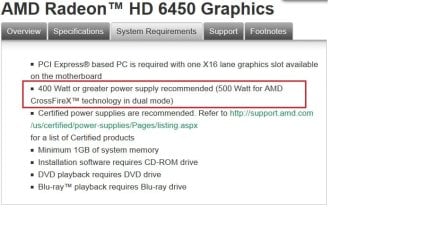
A minimum of 400W is AMD's recommendation.

Radeon Power Req.jpg
Source of snip: AMD Radeon


PSU's from your link. I would stay with Seasonic or Corsair.
PC-komponentit / Virtalähteet - Jimms.fi

120W to 500W: PC-komponentit / Virtalähteet / ATX 120W - 500W - Jimms.fi

520W to 775W: PC-komponentit / Virtalähteet / ATX 520W - 775W - Jimms.fi

Leave your present machine as it is, and save your markka's or Euro's for your new dream machine.
 

My Computer My Computer

Computer type
PC/Desktop
Computer Manufacturer/Model Number
Gateway DX4831-01e (Mid-Tower Desktop)
OS
Originally Win 7 Hm Prem x64 Ver 6.1.7600 Build 7601-SP1 | Upgraded to Windows 10 December 14, 2019
CPU
Intel i3 530 2.93GHz, 2933MHz 2 Cores 4 Logical Processors
Motherboard
Gateway H57M01 133 megahertz
Memory
6GB of 1,333MHz DDR3 SDRAM
Graphics Card(s)
32MB Intel Graphics Media Accelerator HD IGChip
Sound Card
Realtek High Definition Audio
Monitor(s) Displays
Gateway HX2000 20inch TFT active matrix TN
Screen Resolution
1600 x 900 x 59 hertz
Hard Drives
WDC WD10EADS-00M2B0 [HDD] (1000.20 GB) -- drive 0,
HL-DT-ST DVDRAM GH41N [CD-ROM dr]
Four card readers, and Four USB 2.0
PSU
300watts.
Case
Mid-Tower Desktop
Cooling
Stock from Gateway
Keyboard
Natural Ergonomic Keyboard 4000, see Other Info
Mouse
Orig. Gateway wore out now using Insignia USB wired optical
Internet Speed
Vz FIOS 10ms png 57.64Mbps down 65.53Mbps up Speedtest.org
Antivirus
Zamana Anti-logger with Anti-malware, MSE, Windows Firewall,
Browser
IE11.0.9600.19399-Upd ver11.0.135, Firefox 68.0.1 x64
Other Info
System Specs by Belarc.

BIOS: American Megatrends Inc. P01-A0 11/17/2009

Replaced the MS 'Natural' Standard PS/2 Enhanced 101-102 Keyboard with a new Natural Ergonomic Keyboard 4000 on August 1st 2014.

Canon Pixma MG3222 Printer.

Updated to IE11 on 12102015 | Fios Quantum Router g1100

Additional AV: SpywareBlaster, manual Mbam, SAS

My Computer My Computer

Computer Manufacturer/Model Number
Dell XPS 15 L502x
OS
Windows 7 Home Premium 64bit (O.E.M)
CPU
Intel Core i7 2630QM @2.00GHz
Memory
6GB DDR3
Graphics Card(s)
Intel Intergrated Graphics 3000, nVidia GT525M (1GB)
Screen Resolution
1366x768
Hard Drives
750GB Seagate 7200rpm
Keyboard
Backlit Dell XPS 15 L502x Keyboard
Mouse
Microsoft Wireless Mobile Mouse 4000
Internet Speed
2.5 Mb/s down, 0.36 up
Beep

The only way to be sure would be to purchase that card or borrow one from someone, and try it.

I wouldn't doubt that you could possibly run that card with a 200W PSU, but IMHO I think you will be disappointed. :(

A minimum of 400W is AMD's recommendation.

View attachment 214313
Source of snip: AMD Radeon


PSU's from your link. I would stay with Seasonic or Corsair.
PC-komponentit / Virtalähteet - Jimms.fi

120W to 500W: PC-komponentit / Virtalähteet / ATX 120W - 500W - Jimms.fi

520W to 775W: PC-komponentit / Virtalähteet / ATX 520W - 775W - Jimms.fi

Leave your present machine as it is, and save your markka's or Euro's for your new dream machine.


Well anyways i bought this HD 3850 1gb DDR3 so i won't have to go later buy it.
I set the card in the right slot (fan did run so it worked) and after turning my PC on, there came only beep beeping sounds and won't start up. Is it because of the power supply?
 

My Computer My Computer

Computer Manufacturer/Model Number
Acer Aspire X1301
OS
Windows 7 64 bit
CPU
AMD Athlon(tm) II X2 215 Processor 2.70 GHz
Motherboard
Acer Aspire
Memory
4gb RAM (3.75 In use)
Graphics Card(s)
Nvidia Integrated Geforce 9200
Monitor(s) Displays
Philips 192E
Screen Resolution
1368 x 766 (Recommended)
Hard Drives
HDD 1TB
Internet Speed
110MB/S (11 - 12MB Download per second.)
The only way to be sure would be to purchase that card or borrow one from someone, and try it.

I wouldn't doubt that you could possibly run that card with a 200W PSU, but IMHO I think you will be disappointed. :(

A minimum of 400W is AMD's recommendation.

View attachment 214313
Source of snip: AMD Radeon


PSU's from your link. I would stay with Seasonic or Corsair.
PC-komponentit / Virtalähteet - Jimms.fi

120W to 500W: PC-komponentit / Virtalähteet / ATX 120W - 500W - Jimms.fi

520W to 775W: PC-komponentit / Virtalähteet / ATX 520W - 775W - Jimms.fi

Leave your present machine as it is, and save your markka's or Euro's for your new dream machine.


Well anyways i bought this HD 3850 1gb DDR3 so i won't have to go later buy it.
I set the card in the right slot (fan did run so it worked) and after turning my PC on, there came only beep beeping sounds and won't start up. Is it because of the power supply?

Possibly. We need to know how many beeps there were to diagnose the issue but the PSU is probably the culprit
 

My Computer My Computer

Computer Manufacturer/Model Number
Dell XPS 15 L502x
OS
Windows 7 Home Premium 64bit (O.E.M)
CPU
Intel Core i7 2630QM @2.00GHz
Memory
6GB DDR3
Graphics Card(s)
Intel Intergrated Graphics 3000, nVidia GT525M (1GB)
Screen Resolution
1366x768
Hard Drives
750GB Seagate 7200rpm
Keyboard
Backlit Dell XPS 15 L502x Keyboard
Mouse
Microsoft Wireless Mobile Mouse 4000
Internet Speed
2.5 Mb/s down, 0.36 up
The only way to be sure would be to purchase that card or borrow one from someone, and try it.

I wouldn't doubt that you could possibly run that card with a 200W PSU, but IMHO I think you will be disappointed. :(

A minimum of 400W is AMD's recommendation.

View attachment 214313
Source of snip: AMD Radeon


PSU's from your link. I would stay with Seasonic or Corsair.
PC-komponentit / Virtalähteet - Jimms.fi

120W to 500W: PC-komponentit / Virtalähteet / ATX 120W - 500W - Jimms.fi

520W to 775W: PC-komponentit / Virtalähteet / ATX 520W - 775W - Jimms.fi

Leave your present machine as it is, and save your markka's or Euro's for your new dream machine.


Well anyways i bought this HD 3850 1gb DDR3 so i won't have to go later buy it.
I set the card in the right slot (fan did run so it worked) and after turning my PC on, there came only beep beeping sounds and won't start up. Is it because of the power supply?

Possibly. We need to know how many beeps there were to diagnose the issue but the PSU is probably the culprit

It was like Beep Beeep (wfhhhhhhhhhh (graphic card fan) whz....) Beep Beep, then i turned off my computer. My friend told me to buy motherboard and case.
But i also think that i should buy case & PSU
CoolerMaster Elite 430 ATX-kotelo, musta | 59.00e - Jimms.fi
Corsair 600W CX V2 Builder Series, ATX-virtalähde, 80Plus | 65.00e - Jimms.fi
So we both agree each other. I really appreciate of this help i get :) And i hope i won't break my computer after putting those in my new case etc... :D:D
 

My Computer My Computer

Computer Manufacturer/Model Number
Acer Aspire X1301
OS
Windows 7 64 bit
CPU
AMD Athlon(tm) II X2 215 Processor 2.70 GHz
Motherboard
Acer Aspire
Memory
4gb RAM (3.75 In use)
Graphics Card(s)
Nvidia Integrated Geforce 9200
Monitor(s) Displays
Philips 192E
Screen Resolution
1368 x 766 (Recommended)
Hard Drives
HDD 1TB
Internet Speed
110MB/S (11 - 12MB Download per second.)
Hmmmmmmm. As no other hardware has been changed apart from the graphics card that is causing the issue or the PSU. Some times the computer will issue specific beep codes when they perform POST (power on self test) to give a hint on the issue. Can you either, boot with the intergrated graphics/old gfx card or boot into the BIOS?

Stephen
 

My Computer My Computer

Computer Manufacturer/Model Number
Dell XPS 15 L502x
OS
Windows 7 Home Premium 64bit (O.E.M)
CPU
Intel Core i7 2630QM @2.00GHz
Memory
6GB DDR3
Graphics Card(s)
Intel Intergrated Graphics 3000, nVidia GT525M (1GB)
Screen Resolution
1366x768
Hard Drives
750GB Seagate 7200rpm
Keyboard
Backlit Dell XPS 15 L502x Keyboard
Mouse
Microsoft Wireless Mobile Mouse 4000
Internet Speed
2.5 Mb/s down, 0.36 up
Hmmmmmmm. As no other hardware has been changed apart from the graphics card that is causing the issue or the PSU. Some times the computer will issue specific beep codes when they perform POST (power on self test) to give a hint on the issue. Can you either, boot with the intergrated graphics/old gfx card or boot into the BIOS?

Stephen


I'm not sure if i get this right...When i boot my pc with the intergrated (old gfx) It gives always one beep at start. But this 3850 it gives this voice: Beep Beeep (wfhhhhhhhhhh (graphic card fan) whz....) Beep Beep and repeating it. (black screen)
 

My Computer My Computer

Computer Manufacturer/Model Number
Acer Aspire X1301
OS
Windows 7 64 bit
CPU
AMD Athlon(tm) II X2 215 Processor 2.70 GHz
Motherboard
Acer Aspire
Memory
4gb RAM (3.75 In use)
Graphics Card(s)
Nvidia Integrated Geforce 9200
Monitor(s) Displays
Philips 192E
Screen Resolution
1368 x 766 (Recommended)
Hard Drives
HDD 1TB
Internet Speed
110MB/S (11 - 12MB Download per second.)
The card on its own probably only uses 200W

Not even close. Might want to divide that number by about 10 and then you'll be close to what that card uses,

AMD Radeon HD 6450 512 MB Review | techPowerUp

6W at idle, and a whole 24W average. The reason that AMD and Nvidia overstate PSU requirements is to avoid people from using the cards in just this situation. And here is a very good example of why they state what they do,

Well anyways i bought this HD 3850 1gb DDR3 so i won't have to go later buy it.
I set the card in the right slot (fan did run so it worked) and after turning my PC on, there came only beep beeping sounds and won't start up. Is it because of the power supply?

Small wonder that it won't work with that card, as the 3850 users about 3x what the 6450 does,

Video Card Comparison - GPUReview.com

The HD 6450 will likely work just fine on a 220W power supply as long as it is of decent quality and not some no name piece of junk. The HD 3850, no way will it run on a 220W power supply.
 

My Computer My Computer

Computer type
PC/Desktop
Computer Manufacturer/Model Number
Me
OS
Win 7 Ultimate x64
CPU
FX-8350 @ 4.6 GHz so far
Motherboard
Asus M5A97 EVO
Memory
ADATA XPG V1 Series Black 8GB DDR3 1600
Graphics Card(s)
Sapphire R9 270x Dual-X
Sound Card
Xonar DGX w/ Corsair Vengence 1300
Monitor(s) Displays
Acer S232HL Abid
Screen Resolution
1920x1080
Hard Drives
120 GB OCZ Vertex 3
500 GB Seagate 7200.12
PSU
Antec Earthwatts 650W Green
Case
Antec Three Hundred
Cooling
Cooler Master 212 EVO
Keyboard
Logitech G510
Mouse
Logitech G500s
Internet Speed
35000/3000
I can't understand what u replied :( Sorry for my English understanding
biggrin.gif
can you explain somehow that i could understand it?
biggrin.gif

Apologies for confusing you. I'll try again :)

Sometimes motherboard give out certain patterns of beeps when the computer has an issue. It might go for example 1 beep, pause, 2 beeps, pause, 1 beep. Let it finish beeping unless it is one constant beep. If it gives out a detectable sequence, report it back.

If no beep pattern is recognisable, remove the card and install the old one back in. Can you boot again. If you can, put the new one in and try again. It might work. If not, can you boot into the BIOS? This is usually done by pressing Delete, F2 or F1 when the computer first starts, before going into windows. If yes, report back.

Hope this is clearer.
Stephen
 

My Computer My Computer

Computer Manufacturer/Model Number
Dell XPS 15 L502x
OS
Windows 7 Home Premium 64bit (O.E.M)
CPU
Intel Core i7 2630QM @2.00GHz
Memory
6GB DDR3
Graphics Card(s)
Intel Intergrated Graphics 3000, nVidia GT525M (1GB)
Screen Resolution
1366x768
Hard Drives
750GB Seagate 7200rpm
Keyboard
Backlit Dell XPS 15 L502x Keyboard
Mouse
Microsoft Wireless Mobile Mouse 4000
Internet Speed
2.5 Mb/s down, 0.36 up
As Tekno Venus said, try booting without the new card. If the computer boots with the old hardware configuration, chances are the graphics card can't run with the current power supply. I would go aheard and get the 600 watt PSU you linked to if I were you. If it can fit in the old case, I wouldn't worry about getting a new one too much. I definitely don't see how a new motherboard would help, but I might be missing something.
 

My Computer My Computer

Computer type
Laptop
Computer Manufacturer/Model Number
Toshiba P775-S7100
OS
Windows 7 Professional SP1 64-bit
CPU
Intel Core i5-2450M @2.5 GHz
Memory
6 GB DDR3 1333MHz
Graphics Card(s)
Intel HD 3000
Monitor(s) Displays
Built-in 17.3" LED; 22" Insignia NS-L22Q-10A
Screen Resolution
1600x900; 1360x768
Hard Drives
750 GB Hitachi
1TB Seagate FreeAgent External
Internet Speed
Verizon DSL Speed(Down/Up): 3360 Kbps / 800 Kbps
Antivirus
MSE and MBAM Pro
Browser
IE10
Back
Top