Will installing the NVMe hotfix foul up my already existing NVMe?

riffwraith

New member
Member
VIP
Local time
9:14 PM
Messages
240
Will installing the NVMe hotfix... OK, installed. What next?

Hi :)


First, thanks to @SIW2 for the NVMe hotfix


Nvme Driver


I already have two Samsung EVO NVMe M2 SSDs working in W7, as Samsung has a controller for that model. So, no hotfix needed there.


I would like to add a 4TB Sabrent M2 SSD - they do not have a controller for their drive, and they are telling me it will not work in W7 "without the hotfix previously avail".


I am hopeful that the hotfix posted in the above thread will work, however, my main concern is screwing up the SSDs I already have, one of which is the OS.


Anything to worry about here?


Thanks in advance.
 
Last edited:

My Computer My Computer

At a glance

W7 64 UltIntel Core i9-7940xGSkill 128GBAMD Radeon RX 560
Computer type
PC/Desktop
Computer Manufacturer/Model Number
Custom
OS
W7 64 Ult
CPU
Intel Core i9-7940x
Motherboard
ASUS x299 TUF
Memory
GSkill 128GB
Graphics Card(s)
AMD Radeon RX 560
Sound Card
RME
Screen Resolution
1920x1080
Hard Drives
5
PSU
BeQuiet!
Case
BeQuiet!
Keyboard
HyperX
Mouse
Logitech
Browser
IE - what else is there?
Never heard of any probs with that - are you using the older samsung pro can't remember the model that had the oprom - 850 maybe?

If you are paranoid you could make a backup image before installing the hotfixes
 

My Computers My Computers

  • At a glance

    7 X64i5 84002x8gb 3200mhz
    Computer type
    PC/Desktop
    OS
    7 X64
    CPU
    i5 8400
    Motherboard
    gigabyte b365m ds3h
    Memory
    2x8gb 3200mhz
    Hard Drives
    various
    PSU
    pure power 11 400w cm
    Case
    Coolermaster
    Cooling
    cryorig m9i
  • At a glance

    7x64g54008gb ddr4 2400
    Computer type
    PC/Desktop
    OS
    7x64
    CPU
    g5400
    Motherboard
    ga b365m ds3h
    Memory
    8gb ddr4 2400
    PSU
    xfx pro 450w
Hey - I thought your name looked familiar!


Transfer b/u image to new SSD drive?


The SSDs I have are 970 EVO Plus V-NAND. Not sure if it has an oprom, but I think not.


I have a b/u of my OS, and can reinstall with Acronis if anything gets screwy.


I was just wondering if anything can happen to the SSD itself.


Thanks!
 

My Computer My Computer

At a glance

W7 64 UltIntel Core i9-7940xGSkill 128GBAMD Radeon RX 560
Computer type
PC/Desktop
Computer Manufacturer/Model Number
Custom
OS
W7 64 Ult
CPU
Intel Core i9-7940x
Motherboard
ASUS x299 TUF
Memory
GSkill 128GB
Graphics Card(s)
AMD Radeon RX 560
Sound Card
RME
Screen Resolution
1920x1080
Hard Drives
5
PSU
BeQuiet!
Case
BeQuiet!
Keyboard
HyperX
Mouse
Logitech
Browser
IE - what else is there?
So, I ran the hotfix from post #3 here:


Nvme Driver


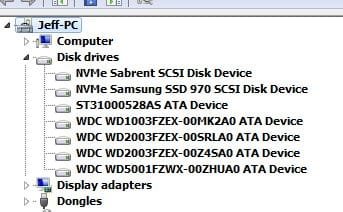
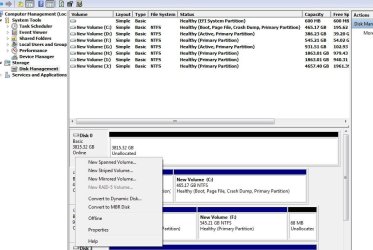
And physically installed the Sabrent M2 SSD. The dev mgr sees it as SCSi (DISK 0):

(2nd pic below)

And I am not too sure what to do next in disk mgmt. (that's a r-click on DISK 0)

Ideas?

Thanks in advance.
 

Attachments

  • ssd1.jpg
    ssd1.jpg
    17.4 KB · Views: 26
  • ssd2.jpg
    ssd2.jpg
    81.7 KB · Views: 0

My Computer My Computer

At a glance

W7 64 UltIntel Core i9-7940xGSkill 128GBAMD Radeon RX 560
Computer type
PC/Desktop
Computer Manufacturer/Model Number
Custom
OS
W7 64 Ult
CPU
Intel Core i9-7940x
Motherboard
ASUS x299 TUF
Memory
GSkill 128GB
Graphics Card(s)
AMD Radeon RX 560
Sound Card
RME
Screen Resolution
1920x1080
Hard Drives
5
PSU
BeQuiet!
Case
BeQuiet!
Keyboard
HyperX
Mouse
Logitech
Browser
IE - what else is there?
Have you tried partitioning it? Rt click where it says unallocated.
 

My Computers My Computers

  • At a glance

    7 X64i5 84002x8gb 3200mhz
    Computer type
    PC/Desktop
    OS
    7 X64
    CPU
    i5 8400
    Motherboard
    gigabyte b365m ds3h
    Memory
    2x8gb 3200mhz
    Hard Drives
    various
    PSU
    pure power 11 400w cm
    Case
    Coolermaster
    Cooling
    cryorig m9i
  • At a glance

    7x64g54008gb ddr4 2400
    Computer type
    PC/Desktop
    OS
    7x64
    CPU
    g5400
    Motherboard
    ga b365m ds3h
    Memory
    8gb ddr4 2400
    PSU
    xfx pro 450w

My Computers My Computers

  • At a glance

    7 X64i5 84002x8gb 3200mhz
    Computer type
    PC/Desktop
    OS
    7 X64
    CPU
    i5 8400
    Motherboard
    gigabyte b365m ds3h
    Memory
    2x8gb 3200mhz
    Hard Drives
    various
    PSU
    pure power 11 400w cm
    Case
    Coolermaster
    Cooling
    cryorig m9i
  • At a glance

    7x64g54008gb ddr4 2400
    Computer type
    PC/Desktop
    OS
    7x64
    CPU
    g5400
    Motherboard
    ga b365m ds3h
    Memory
    8gb ddr4 2400
    PSU
    xfx pro 450w
Have you tried partitioning it? Rt click where it says unallocated.


Ah, ok. I just added a part, and Windows now sees it. I can also r/w


It still says SCSI, tho.


And load times for one of my piano sample libraries is a bit slower. Not sure if that's due to the SSD being a lot larger, or something else?


Thank you!
 

My Computer My Computer

At a glance

W7 64 UltIntel Core i9-7940xGSkill 128GBAMD Radeon RX 560
Computer type
PC/Desktop
Computer Manufacturer/Model Number
Custom
OS
W7 64 Ult
CPU
Intel Core i9-7940x
Motherboard
ASUS x299 TUF
Memory
GSkill 128GB
Graphics Card(s)
AMD Radeon RX 560
Sound Card
RME
Screen Resolution
1920x1080
Hard Drives
5
PSU
BeQuiet!
Case
BeQuiet!
Keyboard
HyperX
Mouse
Logitech
Browser
IE - what else is there?
So, as it turns out, it's the OS drive (Samsung EVO) that's telling me it's a SCSI. Hmm.

In any event, all is working well.

Still wondering about the speed thing... :)
 

My Computer My Computer

At a glance

W7 64 UltIntel Core i9-7940xGSkill 128GBAMD Radeon RX 560
Computer type
PC/Desktop
Computer Manufacturer/Model Number
Custom
OS
W7 64 Ult
CPU
Intel Core i9-7940x
Motherboard
ASUS x299 TUF
Memory
GSkill 128GB
Graphics Card(s)
AMD Radeon RX 560
Sound Card
RME
Screen Resolution
1920x1080
Hard Drives
5
PSU
BeQuiet!
Case
BeQuiet!
Keyboard
HyperX
Mouse
Logitech
Browser
IE - what else is there?

My Computers My Computers

  • At a glance

    7 X64i5 84002x8gb 3200mhz
    Computer type
    PC/Desktop
    OS
    7 X64
    CPU
    i5 8400
    Motherboard
    gigabyte b365m ds3h
    Memory
    2x8gb 3200mhz
    Hard Drives
    various
    PSU
    pure power 11 400w cm
    Case
    Coolermaster
    Cooling
    cryorig m9i
  • At a glance

    7x64g54008gb ddr4 2400
    Computer type
    PC/Desktop
    OS
    7x64
    CPU
    g5400
    Motherboard
    ga b365m ds3h
    Memory
    8gb ddr4 2400
    PSU
    xfx pro 450w
Back
Top