Solved Will My Data Be Safe If I Use Diskpart To Deactivate an External Drive

Durango

New member
Member
Local time
2:23 PM
Messages
83
Location
North Central Arkansas
Somehow my 2TB Seagate external drive got marked as Active and it causes my system to crash (system goes straight to BIOS). The drive contains many valuable photos and short videos; even though they are backed up, I really don't want to lose them off this drive.

So my question is.......if I use Diskpart to mark the drive inactive, will my data remain intact?

Thanks in advance.
 

My Computer My Computer

At a glance

win 7 proIntel Core i5-6600, 4 core @ 3.3GHz16 GB Crucial Ballistix2GB EVGA NVIDIA GeForce GTX950 GDDR5
Computer type
PC/Desktop
Computer Manufacturer/Model Number
Custom Build by Velocity Micro/Raptor Z55 SKYLAKE
OS
win 7 pro
CPU
Intel Core i5-6600, 4 core @ 3.3GHz
Motherboard
Asus Z170-P Intel Z170 base chipset
Memory
16 GB Crucial Ballistix
Graphics Card(s)
2GB EVGA NVIDIA GeForce GTX950 GDDR5
Sound Card
On-Board Integrated Realtek ALC887 7.1 Channel Audio
Monitor(s) Displays
Viewsonic 28"
Hard Drives
512GB Samsung 950 Pros PCIe 3.0 SSD
Two - 2TB 7200 SATA 600 with 64MB Cache
PSU
750 Watt EVGA SuperNOVA
Case
Full Sized ATX
Cooling
Intel High Performance Heatsink
Keyboard
Logitech Illuminated k740
Mouse
Logitech Wireless M310
Internet Speed
2.5 (slow DSL)
Antivirus
Microsoft Security Essentials, Malwarebytes
Browser
Internet Explorer 11
Other Info
TeamViewer installed
Acronis True Image installed
If done correctly you will not loose your data.

This tutorial by Brink will explain things.

http://www.sevenforums.com/tutorials/197157-partition-mark-inactive.html


First we need to know something.
Does you system boot properly with the external drive unhook from your computer?

Now we need to see your Disk Management so we understand you setup better.
Complete this tutorial by Brink so we can have a look see.

http://www.sevenforums.com/tutorials/274797-disk-management-post-screen-capture-image.html
 

My Computer My Computer

At a glance

Windows 10 Pro. 64/ version 1709 Windows 7 Pr...Intel i7-6800K @ 4.3Corsair Platinum 16 gig @2400EVGA GTX 1070 OC
Computer type
PC/Desktop
Computer Manufacturer/Model Number
Home made Desktop
OS
Windows 10 Pro. 64/ version 1709 Windows 7 Pro/64
CPU
Intel i7-6800K @ 4.3
Motherboard
ASUS X-99 Deluxe II
Memory
Corsair Platinum 16 gig @2400
Graphics Card(s)
EVGA GTX 1070 OC
Monitor(s) Displays
Asus 27" LED LCD/VE278Q
Screen Resolution
1920-1080 or 1280-720 HDMI
Hard Drives
INTEL SSD 730-240 Gb Sata 3.0/
PSU
EVGA Platium 1200W
Case
Phanteks Luxe Tempered Glass 8 fans/ one radiator
Cooling
XSPC/ Water Cooled CPU
Keyboard
Das 4 Professional
Mouse
Logitech M705/MX Anywhere 2-S
Internet Speed
100 mbits
Antivirus
Microsoft Security Essentials/ Malwarebytes Premium 3.0/ SAS
Browser
I.E. 11 default/Firefox/ ISP Time Warner Cable/Spectrum
Other Info
LG BluRay Burner/
Sound system-KLipsch-THX/
Icy Dock ssd Hot Swap bays.
I had actually read Brinks tutorial, but it was silent on the subject of data contained on the drive. I used his tutorial to make another external drive inactive, but that drive contained no data.

And yes, if the external drive in question (M:) is unhooked from my computer, the system boots just fine.

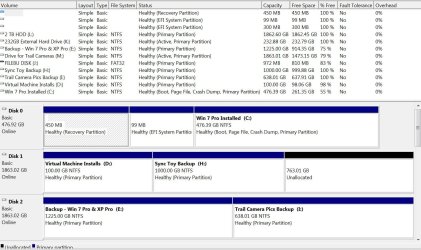
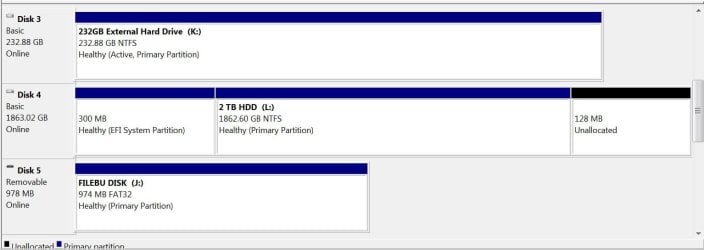
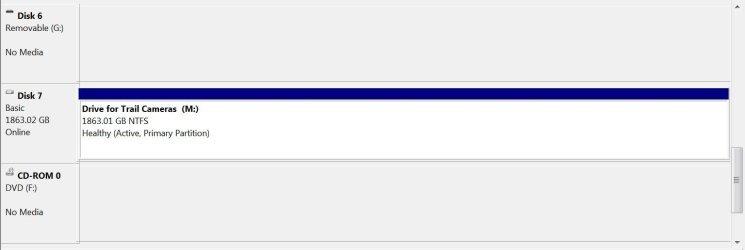
Attached is a jpg file of my disk management (in three parts).
- The volume in question is Drive M - Drive for Trail Cameras (I need to make it inactive)
- Subsequent to snipping this jpg file, I did deactivate Drive K - 232GB External Hard Drive

Thanks for your help.
 

Attachments

  • drives1.JPG
    drives1.JPG
    191.2 KB · Views: 1
  • drives2.JPG
    drives2.JPG
    64.6 KB · Views: 1
  • drives3.JPG
    drives3.JPG
    38.4 KB · Views: 1

My Computer My Computer

At a glance

win 7 proIntel Core i5-6600, 4 core @ 3.3GHz16 GB Crucial Ballistix2GB EVGA NVIDIA GeForce GTX950 GDDR5
Computer type
PC/Desktop
Computer Manufacturer/Model Number
Custom Build by Velocity Micro/Raptor Z55 SKYLAKE
OS
win 7 pro
CPU
Intel Core i5-6600, 4 core @ 3.3GHz
Motherboard
Asus Z170-P Intel Z170 base chipset
Memory
16 GB Crucial Ballistix
Graphics Card(s)
2GB EVGA NVIDIA GeForce GTX950 GDDR5
Sound Card
On-Board Integrated Realtek ALC887 7.1 Channel Audio
Monitor(s) Displays
Viewsonic 28"
Hard Drives
512GB Samsung 950 Pros PCIe 3.0 SSD
Two - 2TB 7200 SATA 600 with 64MB Cache
PSU
750 Watt EVGA SuperNOVA
Case
Full Sized ATX
Cooling
Intel High Performance Heatsink
Keyboard
Logitech Illuminated k740
Mouse
Logitech Wireless M310
Internet Speed
2.5 (slow DSL)
Antivirus
Microsoft Security Essentials, Malwarebytes
Browser
Internet Explorer 11
Other Info
TeamViewer installed
Acronis True Image installed
I know of no reason why Partition (M) should be active.

Why do you have Partition (K) active?
 

My Computer My Computer

At a glance

Windows 10 Pro. 64/ version 1709 Windows 7 Pr...Intel i7-6800K @ 4.3Corsair Platinum 16 gig @2400EVGA GTX 1070 OC
Computer type
PC/Desktop
Computer Manufacturer/Model Number
Home made Desktop
OS
Windows 10 Pro. 64/ version 1709 Windows 7 Pro/64
CPU
Intel i7-6800K @ 4.3
Motherboard
ASUS X-99 Deluxe II
Memory
Corsair Platinum 16 gig @2400
Graphics Card(s)
EVGA GTX 1070 OC
Monitor(s) Displays
Asus 27" LED LCD/VE278Q
Screen Resolution
1920-1080 or 1280-720 HDMI
Hard Drives
INTEL SSD 730-240 Gb Sata 3.0/
PSU
EVGA Platium 1200W
Case
Phanteks Luxe Tempered Glass 8 fans/ one radiator
Cooling
XSPC/ Water Cooled CPU
Keyboard
Das 4 Professional
Mouse
Logitech M705/MX Anywhere 2-S
Internet Speed
100 mbits
Antivirus
Microsoft Security Essentials/ Malwarebytes Premium 3.0/ SAS
Browser
I.E. 11 default/Firefox/ ISP Time Warner Cable/Spectrum
Other Info
LG BluRay Burner/
Sound system-KLipsch-THX/
Icy Dock ssd Hot Swap bays.
I know of no reason why Partition (M) should be active.

Why do you have Partition (K) active?
Come on Layback.......please answer my question. I didn't ask why Partition M should be active. What I asked was "if I use Diskpart to mark the drive inactive, will my data remain intact?

And if you read my response with the disk management you requested, you will see that subsequent to snipping those jpg files, I used Brink's tutorial to make Partition K inactive.

Now you have me nervous about any other response you might give me. You pay little attention to my original question, and to my reply to your request.:mad:

I hope there is someone else on the forum who can really help me. Regards........
 

My Computer My Computer

At a glance

win 7 proIntel Core i5-6600, 4 core @ 3.3GHz16 GB Crucial Ballistix2GB EVGA NVIDIA GeForce GTX950 GDDR5
Computer type
PC/Desktop
Computer Manufacturer/Model Number
Custom Build by Velocity Micro/Raptor Z55 SKYLAKE
OS
win 7 pro
CPU
Intel Core i5-6600, 4 core @ 3.3GHz
Motherboard
Asus Z170-P Intel Z170 base chipset
Memory
16 GB Crucial Ballistix
Graphics Card(s)
2GB EVGA NVIDIA GeForce GTX950 GDDR5
Sound Card
On-Board Integrated Realtek ALC887 7.1 Channel Audio
Monitor(s) Displays
Viewsonic 28"
Hard Drives
512GB Samsung 950 Pros PCIe 3.0 SSD
Two - 2TB 7200 SATA 600 with 64MB Cache
PSU
750 Watt EVGA SuperNOVA
Case
Full Sized ATX
Cooling
Intel High Performance Heatsink
Keyboard
Logitech Illuminated k740
Mouse
Logitech Wireless M310
Internet Speed
2.5 (slow DSL)
Antivirus
Microsoft Security Essentials, Malwarebytes
Browser
Internet Explorer 11
Other Info
TeamViewer installed
Acronis True Image installed
If you setup Layback Bear = one of the nicest members on this forum - you won't get much sympathy from us.
 

My Computer My Computer

At a glance

Vista, Windows7, Mint Mate, Zorin, Windows 8from 1.6GHz Duo to i7
Computer Manufacturer/Model Number
HP, Dell, Gateway, Toshiba - 4 laptops and 2 desktops
OS
Vista, Windows7, Mint Mate, Zorin, Windows 8
CPU
from 1.6GHz Duo to i7
Monitor(s) Displays
2x HP w2207
Hard Drives
5x HDD, 7x SSD, 12x Externals
Keyboard
with trackball - no mices
Mouse
Trackball mice
Internet Speed
DSL 6000
If you setup Layback Bear = one of the nicest members on this forum - you won't get much sympathy from us.
I didn't set him up at all....please go back and read the sequence of postings/replies.

I asked a very fair question. He asked for more data so he could understand my setup better. I gladly provided such data, which I guess he pretty-much ignored.

If Layback is busy and will get back with me later, that's fine......I can accept that. Just please don't ignore my request for help.

Regards.......
 

My Computer My Computer

At a glance

win 7 proIntel Core i5-6600, 4 core @ 3.3GHz16 GB Crucial Ballistix2GB EVGA NVIDIA GeForce GTX950 GDDR5
Computer type
PC/Desktop
Computer Manufacturer/Model Number
Custom Build by Velocity Micro/Raptor Z55 SKYLAKE
OS
win 7 pro
CPU
Intel Core i5-6600, 4 core @ 3.3GHz
Motherboard
Asus Z170-P Intel Z170 base chipset
Memory
16 GB Crucial Ballistix
Graphics Card(s)
2GB EVGA NVIDIA GeForce GTX950 GDDR5
Sound Card
On-Board Integrated Realtek ALC887 7.1 Channel Audio
Monitor(s) Displays
Viewsonic 28"
Hard Drives
512GB Samsung 950 Pros PCIe 3.0 SSD
Two - 2TB 7200 SATA 600 with 64MB Cache
PSU
750 Watt EVGA SuperNOVA
Case
Full Sized ATX
Cooling
Intel High Performance Heatsink
Keyboard
Logitech Illuminated k740
Mouse
Logitech Wireless M310
Internet Speed
2.5 (slow DSL)
Antivirus
Microsoft Security Essentials, Malwarebytes
Browser
Internet Explorer 11
Other Info
TeamViewer installed
Acronis True Image installed
From your post #1

So my question is.......if I use Diskpart to mark the drive inactive, will my data remain intact?
From my post #2

If done correctly you will not loose your data.
From your post #3

- The volume in question is Drive M - Drive for Trail Cameras (I need to make it inactive)
From my post #4

I know of no reason why Partition (M) should be active.
I did answer your questions.

The other information I requested was to make sure the information I gave was correct and would not cause problems.
I wanted to see what was active and what wasn't, just to be careful.
I request information so I can try my best not to give incorrect guidance and cause damage to someones computer. You don't like my answers is obvious so I suggest you wait for other to give guidance.

Have a nice day.
 

My Computer My Computer

At a glance

Windows 10 Pro. 64/ version 1709 Windows 7 Pr...Intel i7-6800K @ 4.3Corsair Platinum 16 gig @2400EVGA GTX 1070 OC
Computer type
PC/Desktop
Computer Manufacturer/Model Number
Home made Desktop
OS
Windows 10 Pro. 64/ version 1709 Windows 7 Pro/64
CPU
Intel i7-6800K @ 4.3
Motherboard
ASUS X-99 Deluxe II
Memory
Corsair Platinum 16 gig @2400
Graphics Card(s)
EVGA GTX 1070 OC
Monitor(s) Displays
Asus 27" LED LCD/VE278Q
Screen Resolution
1920-1080 or 1280-720 HDMI
Hard Drives
INTEL SSD 730-240 Gb Sata 3.0/
PSU
EVGA Platium 1200W
Case
Phanteks Luxe Tempered Glass 8 fans/ one radiator
Cooling
XSPC/ Water Cooled CPU
Keyboard
Das 4 Professional
Mouse
Logitech M705/MX Anywhere 2-S
Internet Speed
100 mbits
Antivirus
Microsoft Security Essentials/ Malwarebytes Premium 3.0/ SAS
Browser
I.E. 11 default/Firefox/ ISP Time Warner Cable/Spectrum
Other Info
LG BluRay Burner/
Sound system-KLipsch-THX/
Icy Dock ssd Hot Swap bays.
From your post #1

So my question is.......if I use Diskpart to mark the drive inactive, will my data remain intact?
From my post #2

If done correctly you will not loose your data.
From your post #3

- The volume in question is Drive M - Drive for Trail Cameras (I need to make it inactive)
From my post #4

I know of no reason why Partition (M) should be active.
I did answer your questions.

The other information I requested was to make sure the information I gave was correct and would not cause problems.
I wanted to see what was active and what wasn't, just to be careful.
I request information so I can try my best not to give incorrect guidance and cause damage to someones computer. You don't like my answers is obvious so I suggest you wait for other to give guidance.

Have a nice day.
OK then, my apologies. I know you said in your initial response that if done correctly I will not lose my data. But then you requested more info, including disk management photos. I assumed that was to make doubly sure that making Drive M Inactive would indeed leave my data intact. So I guess I was expecting a confirming answer after you inspected the requested data......something like, your data should be safe.

BTW, I looked back at an old printout of disk management data from when I purchased Drive M a few years ago and the drive was Active then. So I can only assume that it came that way from Seagate. It being Active didn't seem to bother the boot order on my old computer, but it caused my new computer to crash and go straight to BIOS. Thus my need to make Drive M Inactive......and I plan on doing that this morning using Brink's tutorial.

Again, I apologize. I thought you were blowing me off, but I see now that you weren't.

Regards...........
 

My Computer My Computer

At a glance

win 7 proIntel Core i5-6600, 4 core @ 3.3GHz16 GB Crucial Ballistix2GB EVGA NVIDIA GeForce GTX950 GDDR5
Computer type
PC/Desktop
Computer Manufacturer/Model Number
Custom Build by Velocity Micro/Raptor Z55 SKYLAKE
OS
win 7 pro
CPU
Intel Core i5-6600, 4 core @ 3.3GHz
Motherboard
Asus Z170-P Intel Z170 base chipset
Memory
16 GB Crucial Ballistix
Graphics Card(s)
2GB EVGA NVIDIA GeForce GTX950 GDDR5
Sound Card
On-Board Integrated Realtek ALC887 7.1 Channel Audio
Monitor(s) Displays
Viewsonic 28"
Hard Drives
512GB Samsung 950 Pros PCIe 3.0 SSD
Two - 2TB 7200 SATA 600 with 64MB Cache
PSU
750 Watt EVGA SuperNOVA
Case
Full Sized ATX
Cooling
Intel High Performance Heatsink
Keyboard
Logitech Illuminated k740
Mouse
Logitech Wireless M310
Internet Speed
2.5 (slow DSL)
Antivirus
Microsoft Security Essentials, Malwarebytes
Browser
Internet Explorer 11
Other Info
TeamViewer installed
Acronis True Image installed
Layback Bear - I used Brink's tutorial and was successful in marking my Drive M as Inactive, without losing any of my data. Just as you predicted.......thanks.
 

My Computer My Computer

At a glance

win 7 proIntel Core i5-6600, 4 core @ 3.3GHz16 GB Crucial Ballistix2GB EVGA NVIDIA GeForce GTX950 GDDR5
Computer type
PC/Desktop
Computer Manufacturer/Model Number
Custom Build by Velocity Micro/Raptor Z55 SKYLAKE
OS
win 7 pro
CPU
Intel Core i5-6600, 4 core @ 3.3GHz
Motherboard
Asus Z170-P Intel Z170 base chipset
Memory
16 GB Crucial Ballistix
Graphics Card(s)
2GB EVGA NVIDIA GeForce GTX950 GDDR5
Sound Card
On-Board Integrated Realtek ALC887 7.1 Channel Audio
Monitor(s) Displays
Viewsonic 28"
Hard Drives
512GB Samsung 950 Pros PCIe 3.0 SSD
Two - 2TB 7200 SATA 600 with 64MB Cache
PSU
750 Watt EVGA SuperNOVA
Case
Full Sized ATX
Cooling
Intel High Performance Heatsink
Keyboard
Logitech Illuminated k740
Mouse
Logitech Wireless M310
Internet Speed
2.5 (slow DSL)
Antivirus
Microsoft Security Essentials, Malwarebytes
Browser
Internet Explorer 11
Other Info
TeamViewer installed
Acronis True Image installed
Back
Top