Solved Will not accept RDP incoming

mlvogt57

New member
Local time
3:42 PM
Messages
4
Hello,

I have done everything I can think of to allow incoming RDP sessions, but it is not working.

I have checked the box under system properties/remote (Allow Remote Assistance connection to this computer) and I have check the box under McAfee Firewall/ports and system services for port 3389.

I have also temporarily turned off the firewall....no good.

I know that system I am RDP'ing from works because I can get to a Windows XP machine.

Thanks in advance.
 

My Computer

OS
Windows 7 Home Premium 64bit
Hello,

I have done everything I can think of to allow incoming RDP sessions, but it is not working.

I have checked the box under system properties/remote (Allow Remote Assistance connection to this computer) and I have check the box under McAfee Firewall/ports and system services for port 3389.

I have also temporarily turned off the firewall....no good.

I know that system I am RDP'ing from works because I can get to a Windows XP machine.

Thanks in advance.


What version of win 7 are you using (starter,home,pro,ultimate)??


ken J
 

My Computer

Computer Manufacturer/Model Number
HP Pavillion dv-7 1005 Tx
OS
Win 8 Release candidate 8400
CPU
[email protected]
Memory
4 gigs
Graphics Card(s)
Nvidia 9600M
Sound Card
HD built-in
Monitor(s) Displays
17" Wxga
Screen Resolution
1440x900
Cooling
none
Internet Speed
45Mb down 5Mb up
Windows 7 home premium
 

My Computer

OS
Windows 7 Home Premium 64bit

My Computer

Computer type
PC/Desktop
Computer Manufacturer/Model Number
Dell OP7010
OS
Windows 7 Enterprise (x64); Windows Server 2008 R2 (x64)
Memory
16GB
Monitor(s) Displays
4 Dell 24" LCD
Screen Resolution
1280x1024
Keyboard
Dell
Mouse
Dell Optical
Internet Speed
40meg
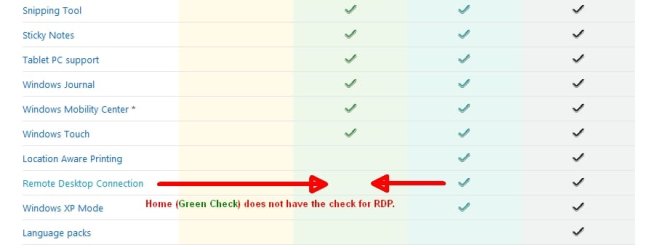
From whatg I read it is Windows XP Home that does not support it. I thought all versions of Windows 7 did. I will double check that. The settings are there, the RDP app is there I can control another machine from the Windows 7 machine.
 

My Computer

OS
Windows 7 Home Premium 64bit
From whatg I read it is Windows XP Home that does not support it. I thought all versions of Windows 7 did. I will double check that. The settings are there, the RDP app is there I can control another machine from the Windows 7 machine.

From the link I provided:
 

Attachments

  • HomeNoRDP.jpg
    HomeNoRDP.jpg
    22.9 KB · Views: 96

My Computer

Computer type
PC/Desktop
Computer Manufacturer/Model Number
Dell OP7010
OS
Windows 7 Enterprise (x64); Windows Server 2008 R2 (x64)
Memory
16GB
Monitor(s) Displays
4 Dell 24" LCD
Screen Resolution
1280x1024
Keyboard
Dell
Mouse
Dell Optical
Internet Speed
40meg
Hi, Thanks, they make a patch I can apply, fix I did and it works fine now....thanks for the direction. Everything is working now.
 

My Computer

OS
Windows 7 Home Premium 64bit
Hi, Thanks, they make a patch I can apply, fix I did and it works fine now....thanks for the direction. Everything is working now.

Glad you have it worked out. -WS
 

My Computer

Computer type
PC/Desktop
Computer Manufacturer/Model Number
Dell OP7010
OS
Windows 7 Enterprise (x64); Windows Server 2008 R2 (x64)
Memory
16GB
Monitor(s) Displays
4 Dell 24" LCD
Screen Resolution
1280x1024
Keyboard
Dell
Mouse
Dell Optical
Internet Speed
40meg
Hi, Thanks, they make a patch I can apply, fix I did and it works fine now....thanks for the direction. Everything is working now.

How about posting the link to the patch for this because it may help others with this same limitation.
 

My Computer

Computer type
PC/Desktop
Computer Manufacturer/Model Number
Home built
OS
Windows 7 Ult, Windows 8.1 Pro,
CPU
Q9650-4.275GHz, E8600 4.5GHz, E6750-3.8GHz
Motherboard
Evga 780i FTW
Memory
G.Skill PC2 9600 1200Mhz 5 5 5 15 2T
Graphics Card(s)
GTX480
Sound Card
Asus Xonar D2
Monitor(s) Displays
HannsG
Screen Resolution
1680X1050
Hard Drives
GSkill Phoenix Pro 120GB SSD
PSU
ThermalTake Toughpower 1000Watt modular
Case
ThermalTake XaserV
Cooling
Xigmatek S1283
Keyboard
Logitech G15
Mouse
Logitech G9
Internet Speed
T1
Back
Top