Will Sigmatel High Definition Audio CODEC work with 7?

bobb4jesus

New member
I have a three year old Dell E1405 laptop that shipped with Vista. It's specs are modest: 2 GB RAM (Originally 1 GB), 120 GB Hard Drive, 1.4-1.7 Ghz processor, etc. and it definitely meets the required to run 7 since it runs Vista fairly smoothly. My problem is, I installed the RC for about a week on it and I had problems with my audio playing. It eventually found a driver for the audio but it would get most of the way through the song, but then it would lose audio again.

Now I've run the Windows 7 compatibility checker and it says my audio device is fine. My question is, will the Sigmatel High Definition Audio CODEC v. 6.10.0.5614 work with 7 and if it doesn't when 7 is installed, will there be a updated driver in the future? Because I don't want to install only to find out that I can't get sound. Thanks for any help and sorry for the long read. :sleepy:
 

My Computer

Computer Manufacturer/Model Number
Dell E1405
OS
Windows Vista
Memory
Crucial 2GB
Sound Card
Sigmatel
Hard Drives
Western Digital, Unknown Serial, 120 GB
It works fine in my Dell D800 and Dell M4400. Also using it on my main system.

Ken
 
Last edited:

My Computer

Computer Manufacturer/Model Number
Dell Optiplex 980
OS
Win7 x64 Ultimate SP1
CPU
Intel i7-2600
Memory
8 Gig
Graphics Card(s)
Geforce gt 520
Monitor(s) Displays
LG & Acer
Screen Resolution
1920x1080
Internet Speed
Fios 45/35
Other Info
Windows Home Server
Thanks!

I am so glad to hear that, because I am going to be installing the Windows 7 Home Premium 32 bit software probably about two weeks from now and having no sound would severely hamper the effectiveness of my system. I work with multimedia a lot so no sound simply wouldn't work. Glad to hear it works with you guys' systems.
 

My Computer

Computer Manufacturer/Model Number
Dell E1405
OS
Windows Vista
Memory
Crucial 2GB
Sound Card
Sigmatel
Hard Drives
Western Digital, Unknown Serial, 120 GB
Glad to help and Welcome to Win 7 Forum! Be sure to click on the little scale in the upper right the give positive rep to those how help
 

My Computer

Computer Manufacturer/Model Number
Dell Optiplex 980
OS
Win7 x64 Ultimate SP1
CPU
Intel i7-2600
Memory
8 Gig
Graphics Card(s)
Geforce gt 520
Monitor(s) Displays
LG & Acer
Screen Resolution
1920x1080
Internet Speed
Fios 45/35
Other Info
Windows Home Server
Mine works for playback, but NOT for "what you hear" recording in Audacity.

I have an Intel motherboard with onboard Sigmatel "High Definition Audio Device" sound and had no issues with Vista, either on playback or when recording whatever happened to be playing on my speakers (with Audacity).

I installed Windows 7 Home Premium 32-bit a couple of days ago and so for can't get the recording capability going.

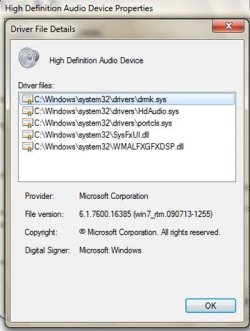
The driver installed during the Windows install was version 6.1.7600.16385, made by Microsoft, dated 7/13/09.

If anyone has been able to get Sigmatel sound working for recording purposes, please tell me your sound control panel settings. I have no playback issues.

I have not yet tried using Sigmatel Vista drivers.
 

My Computer

Computer type
PC/Desktop
Computer Manufacturer/Model Number
Ignatz Special; 4 speed manual gearbox; factory air conditioning; one of one
OS
Windows 7 Home Premium SP1, 64-bit
CPU
Intel Skylake i5-6600K, not overclocked
Motherboard
AsRock Z170M Extreme 4, micro ATX
Memory
8 GB HyperX DDR4-2666 (2 x 4 GB)
Graphics Card(s)
none; graphics are integrated on CPU
Sound Card
onboard: Realtek ALC1150; external: USB Behringer UF0-202
Monitor(s) Displays
Dell S2340M 23 inch IPS
Screen Resolution
1600 x 900
Hard Drives
System: Crucial MX100 series SSD, 128 GB;
Data: Samsung Spinpoint 103SJ, 1 TB;
Backup: WD Caviar Green WD30EZRX-00D8PB0, 3 TB
PSU
Rosewill SilentNight 500 watt fanless, semi-modular
Case
Antec Solo II
Cooling
Noctua NH-U12S; Noctua F12 intake, Noctua S12A exhaust
Keyboard
Microsoft 200 6JH-00001 USB
Mouse
Dell or Microsoft optical wired; USB
Antivirus
Microsoft Security Essentials and Malwarebytes Premium
Browser
Pale Moon
Other Info
All fans PWM; speeds at idle: CPU circa 500 rpm; intake circa 600 rpm; exhaust circa 600 rpm; CPU temps 27 idle and 47 C load in a warm room (27 C/81 F) when running Intel Extreme Tuning Utility stress test.
Microsoft doesn't make drivers. They repackage them only from manufacturer.
6.1.7600.16385 is your Windows 7 build number.
Visit Intel and/or Sigmatel sites to see if they have a driver available for you as it's generally the advice to use a driver from them.
 

My Computer

Computer Manufacturer/Model Number
self built
OS
7600.20510 x86
CPU
P4 550 3.4 GHz HT running at 3.5 GHz
Motherboard
MSI PM8M3-V (MS-7211 v1.x) Micro-ATX mainboard
Memory
OCZ 2 GB(2x1GB) DDR400mHz running @ 414 mHz
Graphics Card(s)
HIS Radeon HD 3850 IceQ 3 Turbo HDMI Dual DL-DVI AGP
Sound Card
MOTU Traveler firewire studio interface 192 kHz 24 bit
Monitor(s) Displays
22" widescreen Acer X223W LCD, 17" Compaq P75 CRT
Screen Resolution
1680x1050 and 1280x1024
Hard Drives
SATA I x2 WD, 400 GB and 120 GB, SATA 2 WD Caviar Black 1 TB
PSU
350W generic
Case
Cybertronpc, it glows blue
Cooling
stock cpu fan, Ice-Q 3 gpu and system, many case fans
Keyboard
Logitch Classical Keyboard 200
Mouse
Logitech Mediaplay cordless
Internet Speed
1792/448 kbits/sec
Other Info
SATA II PCI fake RAID adapter, 1 GB Readyboost, original ATI Remote Wonder (even works with WMC perfectly), Logitech Rumblepad 2 game controller x2
Torrent:

Sigmatel was sold to Freescale and is not doing well after the sale. I just found this note on Wikipedia;

"On February 25, 2009, Freescale laid off 70% of the former Sigmatel team as part of a company-wide reduction in force. No new products under the old Sigmatel design teams will be created. A 'skeleton crew' was chosen to stay and support existing OEM customers that are using the existing chips until the chips are 'End Of Lifed'."

Regarding my drivers; the jpeg below is the maximum detail I can find in Windows 7. The driver may well have been written by someone other than MS.

I have a 3 year old Intel board and Intel has stated they will not be developing Win 7 drivers for it.

MS has no newer driver than what I am using.

Sigmatel no longer has a website. I haven't yet checked the Freescale site; it was a Motorola spinoff I think.

I have also tried to get recording going with my standalone Creative Labs sound card, which has Windows 7 drivers.

No luck there either. Playback is fine.

The "stereo mix" (aka "record what you hear") option is not shown in the sound control panel, regardless of whether I am trying onboard sound or Creative Lab.

So, the question is has anyone got "record what you hear" going with Windows 7?????????

If so, with what onboard sound chip or with what standalone card??

I may try Vista drivers next. Recording worked well under Vista.

Thanks for any further info. I may be overlooking something.
 

Attachments

  • sigmatel drivers.JPG
    sigmatel drivers.JPG
    41.5 KB · Views: 285

My Computer

Computer type
PC/Desktop
Computer Manufacturer/Model Number
Ignatz Special; 4 speed manual gearbox; factory air conditioning; one of one
OS
Windows 7 Home Premium SP1, 64-bit
CPU
Intel Skylake i5-6600K, not overclocked
Motherboard
AsRock Z170M Extreme 4, micro ATX
Memory
8 GB HyperX DDR4-2666 (2 x 4 GB)
Graphics Card(s)
none; graphics are integrated on CPU
Sound Card
onboard: Realtek ALC1150; external: USB Behringer UF0-202
Monitor(s) Displays
Dell S2340M 23 inch IPS
Screen Resolution
1600 x 900
Hard Drives
System: Crucial MX100 series SSD, 128 GB;
Data: Samsung Spinpoint 103SJ, 1 TB;
Backup: WD Caviar Green WD30EZRX-00D8PB0, 3 TB
PSU
Rosewill SilentNight 500 watt fanless, semi-modular
Case
Antec Solo II
Cooling
Noctua NH-U12S; Noctua F12 intake, Noctua S12A exhaust
Keyboard
Microsoft 200 6JH-00001 USB
Mouse
Dell or Microsoft optical wired; USB
Antivirus
Microsoft Security Essentials and Malwarebytes Premium
Browser
Pale Moon
Other Info
All fans PWM; speeds at idle: CPU circa 500 rpm; intake circa 600 rpm; exhaust circa 600 rpm; CPU temps 27 idle and 47 C load in a warm room (27 C/81 F) when running Intel Extreme Tuning Utility stress test.
I would love to know this as well
 

My Computer

Computer Manufacturer/Model Number
Gateway/NV7923u & NV79C52u Laptops
OS
windows 7 professional & ultimate 64bit laptops
CPU
2.27 boost to 2.53 & 2.53 boost to 2.80
Motherboard
Mobile Intel® HM55 Express Chipset ???
Memory
4GB
Graphics Card(s)
Intel® Graphics Media Accelerator HD
Sound Card
realtek High-definition audio support
Monitor(s) Displays
17.3 " HD 1600 x 900
Hard Drives
hatachi Travelstar 5400 500GB & west digital 500GB
Internet Speed
35MB fios
Hi there
on an OLD SONY VAIO laptop (PCG GRT816S) Windows 7 x-86 ultimate installed just fine with the sigma tel driver already working. This laptop is DONKEYS years old -- no prob whatsoever.

Can't say about x-64 as all my other X-64 machines use some type of AC97 / Realtek HD audio.

Cheers
jimbo
 

My Computer

Computer type
PC/Desktop
Computer Manufacturer/Model Number
Custom built, several laptops HP/ASUS
OS
Linux CENTOS 7 / various Windows OS'es and servers
CPU
Intel i7 Intel i5
Memory
8GB, 16GB
Graphics Card(s)
On Motherboard
Sound Card
Realtek HD audio
Monitor(s) Displays
Apple Cinema display, Samsung LCD
Screen Resolution
1920 X 1080
Hard Drives
4 X 1TB SATA
Mouse
Toshiba wireless laser
Internet Speed
> 20MB up
Jimbo:

Are you specifically stating you can "record what you hear" (what is playing on your speakers) with Windows 7 and an old Vista or earlier Sigmatel driver??

I take it you DO see a choice for "stereo mix" in the sound control panel??

Are you using Windows 7 Home Premium 32-bit?
 

My Computer

Computer type
PC/Desktop
Computer Manufacturer/Model Number
Ignatz Special; 4 speed manual gearbox; factory air conditioning; one of one
OS
Windows 7 Home Premium SP1, 64-bit
CPU
Intel Skylake i5-6600K, not overclocked
Motherboard
AsRock Z170M Extreme 4, micro ATX
Memory
8 GB HyperX DDR4-2666 (2 x 4 GB)
Graphics Card(s)
none; graphics are integrated on CPU
Sound Card
onboard: Realtek ALC1150; external: USB Behringer UF0-202
Monitor(s) Displays
Dell S2340M 23 inch IPS
Screen Resolution
1600 x 900
Hard Drives
System: Crucial MX100 series SSD, 128 GB;
Data: Samsung Spinpoint 103SJ, 1 TB;
Backup: WD Caviar Green WD30EZRX-00D8PB0, 3 TB
PSU
Rosewill SilentNight 500 watt fanless, semi-modular
Case
Antec Solo II
Cooling
Noctua NH-U12S; Noctua F12 intake, Noctua S12A exhaust
Keyboard
Microsoft 200 6JH-00001 USB
Mouse
Dell or Microsoft optical wired; USB
Antivirus
Microsoft Security Essentials and Malwarebytes Premium
Browser
Pale Moon
Other Info
All fans PWM; speeds at idle: CPU circa 500 rpm; intake circa 600 rpm; exhaust circa 600 rpm; CPU temps 27 idle and 47 C load in a warm room (27 C/81 F) when running Intel Extreme Tuning Utility stress test.
Hi there

Don't know about Recording as I don't do any - but the output sound is fine into external speakers so "real time" recording should work.

Version RTM W7 x-86 Ultimate (from Ms Technet) - clean install .

I've long since lost the old Sony drivers disc so the sound was just the one W7 found while installing and it installed -- fine.

Cheers
jimbo
 

My Computer

Computer type
PC/Desktop
Computer Manufacturer/Model Number
Custom built, several laptops HP/ASUS
OS
Linux CENTOS 7 / various Windows OS'es and servers
CPU
Intel i7 Intel i5
Memory
8GB, 16GB
Graphics Card(s)
On Motherboard
Sound Card
Realtek HD audio
Monitor(s) Displays
Apple Cinema display, Samsung LCD
Screen Resolution
1920 X 1080
Hard Drives
4 X 1TB SATA
Mouse
Toshiba wireless laser
Internet Speed
> 20MB up
Jimbo:

Are you specifically stating you can "record what you hear" (what is playing on your speakers) with Windows 7 and an old Vista or earlier Sigmatel driver??

I take it you DO see a choice for "stereo mix" in the sound control panel??

Are you using Windows 7 Home Premium 32-bit?


eggs at likely
 

My Computer

Computer Manufacturer/Model Number
Gateway/NV7923u & NV79C52u Laptops
OS
windows 7 professional & ultimate 64bit laptops
CPU
2.27 boost to 2.53 & 2.53 boost to 2.80
Motherboard
Mobile Intel® HM55 Express Chipset ???
Memory
4GB
Graphics Card(s)
Intel® Graphics Media Accelerator HD
Sound Card
realtek High-definition audio support
Monitor(s) Displays
17.3 " HD 1600 x 900
Hard Drives
hatachi Travelstar 5400 500GB & west digital 500GB
Internet Speed
35MB fios
not really but well enough

it works for the most part playing files and watching or listening to things online

recording from input doesn't work very well or not at all
but this might not be a problem for you
 

My Computer

OS
Many XP versions and 7 home premium
In my case (Win 7 Home Premium 32 bit, Sigmatel 92xx on an Intel DG965RY motherboard), the default drivers as installed by the Windows disc worked for PLAYBACK, but did not work for recording, at least for "what you hear" aka "stereo mix".

To get that functionality I had a major ordeal, but finally got "what you hear" recording going through a Vista driver and numerous false starts as delineated here:

http://www.sevenforums.com/sound-au...ereo-mix-works-including-audacity-record.html
 

My Computer

Computer type
PC/Desktop
Computer Manufacturer/Model Number
Ignatz Special; 4 speed manual gearbox; factory air conditioning; one of one
OS
Windows 7 Home Premium SP1, 64-bit
CPU
Intel Skylake i5-6600K, not overclocked
Motherboard
AsRock Z170M Extreme 4, micro ATX
Memory
8 GB HyperX DDR4-2666 (2 x 4 GB)
Graphics Card(s)
none; graphics are integrated on CPU
Sound Card
onboard: Realtek ALC1150; external: USB Behringer UF0-202
Monitor(s) Displays
Dell S2340M 23 inch IPS
Screen Resolution
1600 x 900
Hard Drives
System: Crucial MX100 series SSD, 128 GB;
Data: Samsung Spinpoint 103SJ, 1 TB;
Backup: WD Caviar Green WD30EZRX-00D8PB0, 3 TB
PSU
Rosewill SilentNight 500 watt fanless, semi-modular
Case
Antec Solo II
Cooling
Noctua NH-U12S; Noctua F12 intake, Noctua S12A exhaust
Keyboard
Microsoft 200 6JH-00001 USB
Mouse
Dell or Microsoft optical wired; USB
Antivirus
Microsoft Security Essentials and Malwarebytes Premium
Browser
Pale Moon
Other Info
All fans PWM; speeds at idle: CPU circa 500 rpm; intake circa 600 rpm; exhaust circa 600 rpm; CPU temps 27 idle and 47 C load in a warm room (27 C/81 F) when running Intel Extreme Tuning Utility stress test.
tried it...did not work.

I went back to what I had updated
 
Last edited:

My Computer

Computer Manufacturer/Model Number
Gateway/NV7923u & NV79C52u Laptops
OS
windows 7 professional & ultimate 64bit laptops
CPU
2.27 boost to 2.53 & 2.53 boost to 2.80
Motherboard
Mobile Intel® HM55 Express Chipset ???
Memory
4GB
Graphics Card(s)
Intel® Graphics Media Accelerator HD
Sound Card
realtek High-definition audio support
Monitor(s) Displays
17.3 " HD 1600 x 900
Hard Drives
hatachi Travelstar 5400 500GB & west digital 500GB
Internet Speed
35MB fios
Sigmatel who?

Well, I upgraded to Win 7 on my Dell XPS machine and my sound (Sigma Tel) drops when I play BF2142. Still trying to find a resolution.
 

My Computer

Computer Manufacturer/Model Number
Dell XPS 420
OS
Windows 7
CPU
Intel core duo 3.16mhz
Memory
4 gig
Graphics Card(s)
Nivideo 8600
Sound Card
Sigma Tel High Def Audio Codec
Monitor(s) Displays
Dell 21"
i had the same problem with my Micron Transport T2300..Windows 7 did not support my Sigma-tel sound card..So I installed the drivers for Windows XP and it's up and running and sounds great...hope this was some help...
 

My Computer

OS
windows 7
Back
Top