
Will windows7 start on "Simple" type partition?

Did you read what I wrote? PW CD does not show drive letters.

Try booting Win7 now. If it won't boot follow the exact steps I gave to repair it so it will start. Wait for the Paragon solution until we know for sure it won't start.
 
Did you read what I wrote? PW CD does not show drive letters.

Try booting Win7 now. If it won't boot follow the exact steps I gave to repair it so it will start. Wait for the Paragon solution until we know for sure it won't start.

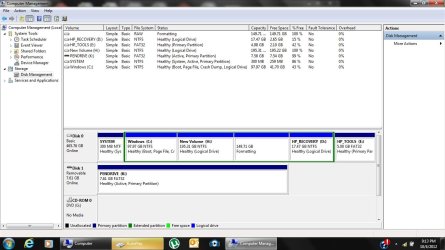
Yes i read that, which is why I was going for paragorn, but let me get my win7 dvd and repair it.
 

My Computer

Computer Manufacturer/Model Number
Intel
OS
Windows 7 Ultimate 64bit
CPU
1.80Ghz Core 2 Duo
Motherboard
p5l-mx Asus
Memory
2048mb
Graphics Card(s)
128mb
Internet Speed
100kbps
Did you already confirm System is still marked Active and run Partition Wizard Rebuild MBR - Video Help?

You need to read for comprehension because you've now created multiple disasters because you didn't read what was clearly written right in front of your eyes.

We can pull off miracles here unlike anywhere else on the web ( you would never get a single such workaround from MS sites) but we need cooperation from someone who reads and makes sure they understand the steps.
 
Omg i love you! Xd

Edit:
1.Set System active
2. rebuild MBR

windows just started! woot!

THANKS TO YOU!

now lets get back to making partitions xD


NO NEED, partitions FIXED!!
 

Attachments

  • Untitled.jpg
    Untitled.jpg
    247.7 KB · Views: 7

My Computer

Computer Manufacturer/Model Number
Intel
OS
Windows 7 Ultimate 64bit
CPU
1.80Ghz Core 2 Duo
Motherboard
p5l-mx Asus
Memory
2048mb
Graphics Card(s)
128mb
Internet Speed
100kbps
Stop mucking with your brothers computer mate......it will end in tears.
 

My Computer

Computer type
PC/Desktop
Computer Manufacturer/Model Number
Golden Mk. I.4
OS
Windows 10 Pro x64 ; Xubuntu x64
CPU
Intel i7 860 @ 2.80 GHz O/C'ed to 4.0GHz
Motherboard
Gigabyte P55A-UD3R Rev.1. Award BIOS F13
Memory
16GB Corsair Vengance DDR3 @ 661 MHz Dual Channel (9-9-9-24)
Graphics Card(s)
EVGA NVidia GTX 560 1024MB
Sound Card
Realtek Integrated
Monitor(s) Displays
Dual Samsung SyncMaster 2494HS
Screen Resolution
1920*1080 and 1920*1080
Hard Drives
1*Samsung 840 EVO 120GB SSD;
1*OCZ Vertex 2 60GB SSD;
2*Samsung F3 SpinPoint 1TB in RAID0;
1*Samsung F1 SpinPoint 1TB;
2*Western Digital 1TB External USB 3.0
1*Western Digital 500GB External USB 3.0
1*Seagate 500GB External USB 2.0
PSU
Thermaltake ToughPower QFan 750W
Case
Thermaltake Element S VK60001W2Z
Cooling
Corsair H60 Water Cooling, 2*230mm and 2*80mm case fans
Keyboard
Logitech G110
Mouse
Logitech MX518

My Computer

Computer Manufacturer/Model Number
Intel
OS
Windows 7 Ultimate 64bit
CPU
1.80Ghz Core 2 Duo
Motherboard
p5l-mx Asus
Memory
2048mb
Graphics Card(s)
128mb
Internet Speed
100kbps
You want to keep HP Recovery Primary so it remains bootable. Boot into PW CD to rightclick Recovery to Modify>Set to Primary, OK, Apply. Have your brother help you with this so it isn't all on you.

With HP's to keep the Recovery and Diagnostics Tools partitions bootable you should convert C to Logical to add as many adjacent Logical Partitions as you want. Video help on how to set partition as Primary or Logical.

Make your HP REcovery disks so you have a path back, or save a Win7 backup image externally. Backup Complete Computer - Create an Image Backup
Recover Windows 7 Operating System Using HP Recovery - HP Customer Care (United States - English)


In addition your brother should consider getting the superior Clean Reinstall OEM
or at least to Clean Up Bloatware.
 
Back
Top