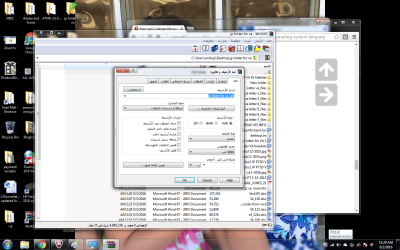
Win 32 WINRAR zip files are in arabic

smilecj777

New member
Local time
11:04 PM
Messages
8
I have sent 2 screen shots in the attachments. I have not changed (that I'm aware of) anything that would change the text to Arabic. I have tried to go in and change in the region and language but its not working. Last time I even looked at the zip files they were in English.
I run McAfee for my virus protection and come up with no viruses.
I run Win 7 ultimate 32 bit operating system
I just want the Arabic OFF my computer. Any help would be great!!!!!
Thank you!!!!!
 

Attachments
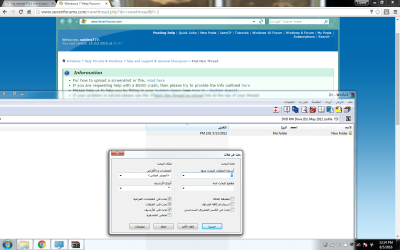
  • winrar.png
    winrar.png
    101 KB · Views: 1
  • Untitled.png
    Untitled.png
    168 KB · Views: 6

My Computer My Computer

At a glance

Arizona
Computer type
PC/Desktop
OS
Arizona
Browser
GOOGLE
Does anyone else have access to your computer who may have changed the language settings as a joke? Obviously your WinRAR is set to Arabic.

If you can't figure out where the language setting is (take a look at screenshots for the settings in English and go from there), I'd just uninstall WinRAR completely (make sure settings are removed too - not sure how WinRAR handles that) and do a fresh install. Good luck.
 

My Computer My Computer

At a glance

7 Home Premium 64bit SP1XEON E5450 (LGA771/775 Mod)8 GBGTX 750Ti GigaByte Black Edition
Computer type
PC/Desktop
Computer Manufacturer/Model Number
Custom
OS
7 Home Premium 64bit SP1
CPU
XEON E5450 (LGA771/775 Mod)
Motherboard
MSI P35 Neo2FIR
Memory
8 GB
Graphics Card(s)
GTX 750Ti GigaByte Black Edition
Sound Card
M-Audio M-Track MKII
Monitor(s) Displays
1x 22" average TN + 1x 22" average VA
Screen Resolution
(1920 x 1080) x 2
Hard Drives
2x OCZ ARC 100 240 GB (OS + Prog)
1 Samsung data HDD 1TB
PSU
Seasonic M12ii 500
Keyboard
Cherry MX 3.0 (red keys)
Mouse
Sharkoon Fireglider
Internet Speed
60 down wohoo...(ISOs in a few minutes) only 2 up :(
Antivirus
I am paying for it :O
Browser
Pale Moon, Basilisk, Firefox(Was no.1 now rarely)
Other Info
No O/C
WinRar

Thanks for getting back to me on that I've already going to lay with you and check everything is in English if I uninstall the WinRAR will that also get rid of my zip files that I also? I haven't looked at my zip files for so long and I don't know what made me go in there and everything was changed nobody goes on my computer but me and my husband and trust me he doesn't have to change anything in it it couldn't be a virus could it?
 

My Computer My Computer

At a glance

Arizona
Computer type
PC/Desktop
OS
Arizona
Browser
GOOGLE
Uninstalling WinRAR won't delete your ZIP files unless you saved them in the WinRAR folder and delete that too.

Before uninstalling, try the following:

+ Make sure WinRAR is not running.
+ Locate and delete the file "winrar.lng" which is in the WinRAR program folder: C:\Program Files\WinRAR or C:\Program Files (x86)\WinRAR
+ Restart WinRAR which should now be in English (if not you will have to reinstall)

Also what I did not know before this is that the language depends on the installer - this means you downloaded and installed an Arabic version of WinRAR.
 

My Computer My Computer

At a glance

7 Home Premium 64bit SP1XEON E5450 (LGA771/775 Mod)8 GBGTX 750Ti GigaByte Black Edition
Computer type
PC/Desktop
Computer Manufacturer/Model Number
Custom
OS
7 Home Premium 64bit SP1
CPU
XEON E5450 (LGA771/775 Mod)
Motherboard
MSI P35 Neo2FIR
Memory
8 GB
Graphics Card(s)
GTX 750Ti GigaByte Black Edition
Sound Card
M-Audio M-Track MKII
Monitor(s) Displays
1x 22" average TN + 1x 22" average VA
Screen Resolution
(1920 x 1080) x 2
Hard Drives
2x OCZ ARC 100 240 GB (OS + Prog)
1 Samsung data HDD 1TB
PSU
Seasonic M12ii 500
Keyboard
Cherry MX 3.0 (red keys)
Mouse
Sharkoon Fireglider
Internet Speed
60 down wohoo...(ISOs in a few minutes) only 2 up :(
Antivirus
I am paying for it :O
Browser
Pale Moon, Basilisk, Firefox(Was no.1 now rarely)
Other Info
No O/C
Back
Top