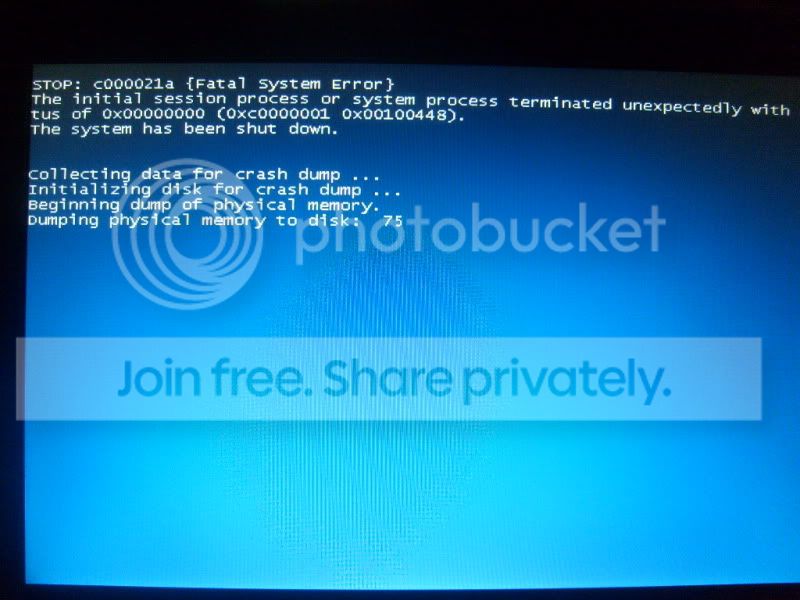
Win 7 64 Bit BSOD.

AtticTron

New member
Local time
5:13 PM
Messages
23
Location
Los Angeles, CA
Hopefully some on can help me with this.I have been using Windows 7 since the 7000 beta however, for some reason whenever i install the 64 bit version of the 7000, 7022, 7048, and even 7057 builds i always get a BSOD right after the starting windows screen. The message i get is STOP : c000021a Fatal System Error. The weird thing is i only get this on the 64 bit version and not the 32. I thought it had something to do with my drivers but it also happens on a fresh install. Anyone have idea on how to fix this? I really want to use the 64 bit version since i have 4gb of ram

Also i noticed that i get this error by random, so sometimes i am able to boot into Win7 and sometimes i can't. Here is some of the information i got when i was able to succesfully boot into windows:
Code:
Problem signature:
Problem Event Name: BlueScreen
OS Version: 6.1.7057.2.0.0.256.1
Locale ID: 1033
Additional information about the problem:
BCCode: c000021a
BCP1: FFFFF8A0037AC9A0
BCP2: 0000000000000000
BCP3: FFFFFFFFC0000001
BCP4: 0000000000100448
OS Version: 6_1_7057
Service Pack: 0_0
Product: 256_1
I also have a picture of the error:
S6302296.jpg
 

My Computer

Computer Manufacturer/Model Number
Toshiba
OS
Windows 7 Build 7048
CPU
AMD Turion X2 Ultra
Memory
4GB DDR2 PC6400
Graphics Card(s)
ATI Radeon HD 3100
Sound Card
Realtek
Hopefully some on can help me with this.I have been using Windows 7 since the 7000 beta however, for some reason whenever i install the 64 bit version of the 7000, 7022, 7048, and even 7057 builds i always get a BSOD right after the starting windows screen.

Also i noticed that i get this error by random, so sometimes i am able to boot into Win7 and sometimes i can't. Here is some of the information i got when i was able to succesfully boot into windows:
Code:
[/quote]
 
Same with mine, after installing the 7048 x64 build, on a Core 2 Duo. Right after I install and ran the quicksys registry defragmenter. I will re-install the 7048 again without installing the registry defragmenter and see if the BSOD will happen again. To me it looks like either of two things. Number 1 the x64 build is not good with Core 2 Duos (ie it will work only for AMD 64 bit processors), or Number 2 certain applications make the 7048 build crash.
 
It would be nice if we can get more reliable findings from experts.
 

My Computer

OS
Windows 2000
can you catch the dump and post it...
while i think its not really usefull it might lead to something...;)
 

My Computer

Computer Manufacturer/Model Number
Tx2500z Tablet Pc/Homemade Server
OS
Windows 7 Ult x64(x2), HomePrem x32(x4), Server 08 (+VM), 08 R2 (VM) , SuSe 11.2 (VM), XP 32 (VM)
CPU
Turion X2 ultra (oh well came with laptop)/P4 @3.2 (yes P4)
Motherboard
IDK HP Motherboard / Intel DG965SS
Memory
OCZ Dual Channel 4GB kit/ 1gb Dual Channel
Graphics Card(s)
HD 3200 graphics /GMA x3100 (yay for intergrated!!)
Sound Card
Realtek HD Audio(mic working, well sort of)/Siig IC-70012
Monitor(s) Displays
built-in Hp 12" laptop screen/ Acer 19"
Screen Resolution
1280x800 /1440x900
Cooling
All Air Cooled
Mouse
Logi MX Rev. /MS Wheel Optical 1.1A /Logitech Optical Mouse
Internet Speed
College baby but its still routed through vpn to 1536k...
Other Info
love my wacom pen and pressure sensitivity...
wished it worked in 7, SUSE for that matter though
can you catch the dump and post it...
while i think its not really usefull it might lead to something...;)

I really would like to, please show me how to catch the dump, and I will do it when I get back to the PC tonight.

Thanks.

P.S. Also how do I post the image? Maybe paste will do?
 

My Computer

OS
Windows 2000
I really would like to, please show me how to catch the dump, and I will do it when I get back to the PC tonight.

Thanks.

P.S. Also how do I post the image? Maybe paste will do?

hello pogi
the way to catch a dump is after the system restart where it tells you that windows shutdown unexpectanly and you should be able to navigate to where it says view temporary copy of the files
one will have the extension HDMP (i,e. WERDE6E.tmp.hdmp) and either a xml or a txt file or both
zip all of them (right after selecting all and then click on send to
then to "compressed (zipped) folder" and upload it here...
if you cant find i will direct you through it (as i was preparing for a 7057 clean install on a comp and will not have acess to debugging tools) tommorrow

as for the image this was caught on a camera...

also before i go (its the wee hours of the night where i reside)
what exactly did you do before the BSOD and can you reproduce it (you will have to detail all your hardware though)
and if just happens just at a random time can you check what apps you have open all the time (apart from the MS apps)?
what do you have installed in these systems?
i want to see if there might be a similiarity between either software (including drivers) or hardware (firmware, bios)
what i suggest is to check for any driver updates and bios updates
also do a virus and malware scans so that we can be pretty sure its not a *pest* problem..
 

My Computer

Computer Manufacturer/Model Number
Tx2500z Tablet Pc/Homemade Server
OS
Windows 7 Ult x64(x2), HomePrem x32(x4), Server 08 (+VM), 08 R2 (VM) , SuSe 11.2 (VM), XP 32 (VM)
CPU
Turion X2 ultra (oh well came with laptop)/P4 @3.2 (yes P4)
Motherboard
IDK HP Motherboard / Intel DG965SS
Memory
OCZ Dual Channel 4GB kit/ 1gb Dual Channel
Graphics Card(s)
HD 3200 graphics /GMA x3100 (yay for intergrated!!)
Sound Card
Realtek HD Audio(mic working, well sort of)/Siig IC-70012
Monitor(s) Displays
built-in Hp 12" laptop screen/ Acer 19"
Screen Resolution
1280x800 /1440x900
Cooling
All Air Cooled
Mouse
Logi MX Rev. /MS Wheel Optical 1.1A /Logitech Optical Mouse
Internet Speed
College baby but its still routed through vpn to 1536k...
Other Info
love my wacom pen and pressure sensitivity...
wished it worked in 7, SUSE for that matter though
To me it looks like either of two things. Number 1 the x64 build is not good with Core 2 Duos (ie it will work only for AMD 64 bit processors)


I use 7000 x64 on my Q6600 (Core 2 Quad is just 2 Core 2 duo on the same chip) without any problem.
EMT64 is a strict copy-past of AMD64, there's no difference in there for the OS.

AtticTron ->
Do you have some overclocking ?
Did you made a memory test ?
 

My Computer

OS
Vista H.P. SP1 x32 Seven RC x64
CPU
Q6600 @ 3.4Ghz
Motherboard
GA-EP45-DS3L
Memory
4Go PC2-6400
Graphics Card(s)
8500GT @ 700/500
Sound Card
Audigy Platinium
Monitor(s) Displays
Mitsubishi Diamond Pro 920 + Mitsubishi Diamond Pro 720
Screen Resolution
1600x1200 twice
Hard Drives
Hitachi 160Go
Maxtor 160Go (system drive)
Maxtor 200Go in Antec MX-1 EC external box (eSATA-USB2.0)
PSU
Corsair VX550W
Case
Thermaltake Xaser III
Cooling
Watercooling (CPU, GPU, HDD, NB)
Keyboard
MS Wireless Multimedia 6000 V2.0
Mouse
IntellEye Explorer 3.0
Internet Speed
ADSL 18Mbit/s/1Mbit/s
Hi Guys, thanks for responding. Darkassain I will use your guide to get the info.

The specs of my rig are fairly modest:

Core 2 Duo 2.2
Gigabyte MOBO
2 GB RAM
EVGA 8 series
160 GB Western Digital HDD

Honestly this is the first time I began installing 64 bit OS to this unit, after I found out that Core 2 Duos + 64 bit OS can go together. Initially I thought Core 2 Duos are not like the 64 bit AMD processors, I mean they are only 32 bit specced. I have an AMD Turion MT32 running the W7 7000 build, which I find stable enough. I would like to do a clean install of the 7048 on it if I can be really certain of stability.

If it helps, here is the chronological event prior to the BSOD:

1. Clean install of 7048 on Drive C:. There are 2 more partitions Drive D, Drive E

2. Moved Temporary Internet Files to D:. Move My Documents and Public Folders to D:

3. Disable remote settings, disabled backup, unticked indexing option, removed Tablet PC and Media Center features, deleted any backup file, cleaned Drive C. Set page file to 0, defragmented HDD, set page file again to 2056 MB.

4. Installed Chipset, LAN, Sound drivers. Installed latest GEForce for the graphics card. All went smooth.

5. Installed CCleaner, used it to clean registry.

All of the above were done with the restarts whenever required. So far so good.

6. Installed quicksys registry defrag and ran it and after restarting the BSOD appear.

That's what I did as best as I can recall and I think I will do again except No. 6.

I did a memory test when I was trying to repair using the 7048 CD, and it said the memory is OK

P.S. Somewhere on another forum on this site with the title Software to Avoid, quicksys defrag was mentioned. What makes it complicated is that there were more applications on listed which trigger BSODs.
 
Last edited:

My Computer

OS
Windows 2000
For me the BSOD's were caused by low SPP "northbridge" voltage. I had no problems with Vista but as soon as I went to the build 7000 is was BSOD's until I made the small voltage adjustment. I also bumped up my Ram voltage a bit. Not a single BSOD since doing that.
 

My Computer

Computer type
PC/Desktop
Computer Manufacturer/Model Number
Home built
OS
Windows 7 Ult, Windows 8.1 Pro,
CPU
Q9650-4.275GHz, E8600 4.5GHz, E6750-3.8GHz
Motherboard
Evga 780i FTW
Memory
G.Skill PC2 9600 1200Mhz 5 5 5 15 2T
Graphics Card(s)
GTX480
Sound Card
Asus Xonar D2
Monitor(s) Displays
HannsG
Screen Resolution
1680X1050
Hard Drives
GSkill Phoenix Pro 120GB SSD
PSU
ThermalTake Toughpower 1000Watt modular
Case
ThermalTake XaserV
Cooling
Xigmatek S1283
Keyboard
Logitech G15
Mouse
Logitech G9
Internet Speed
T1
I use 7000 x64 on my Q6600 (Core 2 Quad is just 2 Core 2 duo on the same chip) without any problem.
EMT64 is a strict copy-past of AMD64, there's no difference in there for the OS.

AtticTron ->
Do you have some overclocking ?
Did you made a memory test ?

Nope i am not overclocking since i am on a Notebook
And i have done a memory test and have not gotten any errors.
EDIT: Also, i have Vista 64 installed on the same machine and never get any errors.
 
Last edited:

My Computer

Computer Manufacturer/Model Number
Toshiba
OS
Windows 7 Build 7048
CPU
AMD Turion X2 Ultra
Memory
4GB DDR2 PC6400
Graphics Card(s)
ATI Radeon HD 3100
Sound Card
Realtek
I managed to get my dump file if it will help.
 

My Computer

Computer Manufacturer/Model Number
Toshiba
OS
Windows 7 Build 7048
CPU
AMD Turion X2 Ultra
Memory
4GB DDR2 PC6400
Graphics Card(s)
ATI Radeon HD 3100
Sound Card
Realtek
I've been doing some research as to how to fix it but i haven't found anything yet.:(
After hearing about build 7068 i got my hopes up and downloaded it right away. After trying to install it i get the same BSOD right at the installation.
 

My Computer

Computer Manufacturer/Model Number
Toshiba
OS
Windows 7 Build 7048
CPU
AMD Turion X2 Ultra
Memory
4GB DDR2 PC6400
Graphics Card(s)
ATI Radeon HD 3100
Sound Card
Realtek
I am running 7000 on an AMD 64X2 Foxconn mbd, and yes, BSOD ON INSTALL of Win 7 64. Win 7 32 did install, runs ok for a few hours, then BSOD. Event log just shows lots of "surprise" system shutdowns. Gee.
This system is solid as a rock under XP 64. I mean no problems whatever.
Yes, I am slightly overclocked. But do you really expect me to try and figure out if and how to tweak my Northbridge voltage just to run Win 7?
Whining aside, my guess is that soon MSFT will stop supporting XP, and I will have to migrate (Vista is just too aggravating). So, HOW do I start hunting down these issues systematically? To WHOM do I send dumpfiles? Who at MSFT is a Win7 poc? Have not seen any answers to these questions on the Win 7 site.Shouldn't MSFT be ashamed of themselves?
FYI, my MSI Wind netbook runs both XP AND OSX Leopard flawlessly. Win7 on the MSI Wind had, no surprise to me, lots of driver problems, just like the Vista beta.
 

My Computer

OS
uh, win 7?
Windows 7 seems to put more of a load on the memory controller which tends to cause crashing if the voltages aren't up to snuff. I have an easy bios to use and it only takes a minute to raise the northbridge SPP voltage which made all the difference in system stability. Before I moved the up the SPP it was crash city all the time, especially when trying to move files accross the network.

It could be Ram voltage or the SPP voltage that is causing this issue but with so many different types of systems it's hard to nail this one down, but for me it was easy to fix after a frustration week of BSOD's.
 

My Computer

Computer type
PC/Desktop
Computer Manufacturer/Model Number
Home built
OS
Windows 7 Ult, Windows 8.1 Pro,
CPU
Q9650-4.275GHz, E8600 4.5GHz, E6750-3.8GHz
Motherboard
Evga 780i FTW
Memory
G.Skill PC2 9600 1200Mhz 5 5 5 15 2T
Graphics Card(s)
GTX480
Sound Card
Asus Xonar D2
Monitor(s) Displays
HannsG
Screen Resolution
1680X1050
Hard Drives
GSkill Phoenix Pro 120GB SSD
PSU
ThermalTake Toughpower 1000Watt modular
Case
ThermalTake XaserV
Cooling
Xigmatek S1283
Keyboard
Logitech G15
Mouse
Logitech G9
Internet Speed
T1
no no

I have core 2 duo and i run 7068 x64 no problems at al l:geek:
 

My Computer

OS
Windows 7 x64
CPU
intel 6850 core 2 duo
Motherboard
Gigabyte x38T
Memory
OCZ Platinum 4 gb ddr 3 pc1800
Graphics Card(s)
Asus ATI Radeon 4870 1GB DDR5 PCI-E Dark knight
Sound Card
SB X-Fi Fatal1ty
Monitor(s) Displays
Samsung 226BW
Screen Resolution
1680x1050
Hard Drives
1xWD Raptor 150 GB + 2 x WD 250 GB
PSU
Corsair TX750W
Case
LIAN LI
Cooling
Zalman
Keyboard
logitech G15
Mouse
Logitech G9
Internet Speed
7 Mbit down 1 Mbit up
Other Info
No probems in windows 7
Windows 7 seems to put more of a load on the memory controller which tends to cause crashing if the voltages aren't up to snuff. I have an easy bios to use and it only takes a minute to raise the northbridge SPP voltage which made all the difference in system stability. Before I moved the up the SPP it was crash city all the time, especially when trying to move files accross the network.

It could be Ram voltage or the SPP voltage that is causing this issue but with so many different types of systems it's hard to nail this one down, but for me it was easy to fix after a frustration week of BSOD's.

Well i would try changing the voltage but for me the BSODs only happen on my laptop and the bios for it are very limited.
 

My Computer

Computer Manufacturer/Model Number
Toshiba
OS
Windows 7 Build 7048
CPU
AMD Turion X2 Ultra
Memory
4GB DDR2 PC6400
Graphics Card(s)
ATI Radeon HD 3100
Sound Card
Realtek
From Bug Check 0xC000021A: STATUS_SYSTEM_PROCESS_TERMINATED

The STATUS_SYSTEM_PROCESS_TERMINATED bug check has a value of 0xC000021A. This means that an error has occurred in a crucial user-mode subsystem.
Parameters

The following parameters are displayed on the blue screen.
ParameterDescription 1A string that identifies the problem 2The error code 3Reserved 4Reserved Cause

This error occurs when a user-mode subsystem, such as WinLogon or the Client Server Run-Time Subsystem (CSRSS), has been fatally compromised and security can no longer be guaranteed. In response, the operating system switches to kernel mode. Microsoft Windows cannot run without WinLogon or CSRSS. Therefore, this is one of the few cases where the failure of a user-mode service can shut down the system.
Mismatched system files can also cause this error. This can occur if you have restored your hard disk from a backup. Some backup programs might skip restoring system files that they determine are in use.
Resolving the Problem

Running the kernel debugger is not useful in this situation because the actual error occurred in a user-mode process.
Resolving an error in a user-mode device driver, system service, or third-party application: Because bug check 0xC000021A occurs in a user-mode process, the most common culprits are third-party applications. If the error occurred after the installation of a new or updated device driver, system service, or third-party application, the new software should be removed or disabled. Contact the manufacturer of the software about a possible update.
 

My Computers

System One System Two

  • Computer type
    PC/Desktop
    Computer Manufacturer/Model Number
    The Beast Model A (homebrew)
    OS
    Windows 11 21H2 Current build
    CPU
    AMD Ryzen 9 3950X
    Motherboard
    MSI MEG X570 GODLIKE
    Memory
    4 * 32 GB - Corsair Vengeance 3600 MHz
    Graphics Card(s)
    EVGA GeForce RTX 3080 Ti XC3 ULTRA GAMING (12G-P5-3955-KR)
    Sound Card
    Realtek® ALC1220 Codec
    Monitor(s) Displays
    2x Eve Spectrum ES07D03 4K Gaming Monitor (Matte) | Eve Spec
    Screen Resolution
    3x 3840 x 2160
    Hard Drives
    3x Samsung 980 Pro NVMe PCIe 4 M.2 2 TB SSD (MZ-V8P2T0B/AM) } 3x Sabrent Rocket NVMe 4.0 1 TB SSD
    PSU
    PC Power & Cooling’s Silencer Series 1050 Watt, 80 Plus Plat
    Case
    Fractal Design Define 7 XL Dark ATX Full Tower Case
    Cooling
    SteelSeries Apex Pro Wired Gaming Keyboard
    Keyboard
    SteelSeries Apex Pro
    Mouse
    Logitech MX Master 3S | MX Master 3 for business
    Internet Speed
    AT&T LightSpeed Gigabit Duplex Ftth
    Antivirus
    Windows Defender + MB 3
    Browser
    Nightly (default) + Firefox (stable),Chrome, Edge
  • Computer type
    PC/Desktop
    System Manufacturer/Model Number
    Dell Latitude E5470
    OS
    ChromeOS Flex Dev Channel (current)
    CPU
    Intel(R) Core(TM) i5-6300U CPU @ 2.40GHz, 2501 Mhz, 2 Core(s), 4 Logical Processor(s)
    Motherboard
    Dell
    Memory
    16 GB
    Graphics Card(s)
    Intel(R) HD Graphics 520
    Sound Card
    Intel(R) HD Graphics 520 + RealTek Audio
    Monitor(s) Displays
    Dell laptop display 15"
    Screen Resolution
    1920 * 1080
    Hard Drives
    Toshiba 128GB M.2 22300 drive
    INTEL Cherryville 520 Series SSDSC2CW180A 180 GB SATA III SSD
    PSU
    Dell
    Case
    Dell
    Cooling
    Dell
    Keyboard
    Dell
    Mouse
    Logitech MX Master 3S (shared w. Sys 1) | Dell TouchPad
    Internet Speed
    AT&T LightSpeed Gigabit Duplex Ftth

My Computer

Computer Manufacturer/Model Number
Toshiba
OS
Windows 7 Build 7048
CPU
AMD Turion X2 Ultra
Memory
4GB DDR2 PC6400
Graphics Card(s)
ATI Radeon HD 3100
Sound Card
Realtek
I finally solved my BSOD problem with Windows 7 Build 7000 - 7068 x64. It was an issue with my Sata drive and AHCI mode. Here are the steps i took to resolve the issue, hope it helps other with the same problem.

1) Went into Bios and set up my HDD to IDE/Compatibility mode.
2) Started up Windows Setup.
3) Once inside the desktop after first reboot go to HKLM\System\CurrentControlSet\Services\Msahci.
4) Change Start value from 3 to 0
5) Reboot back into Bios and change HDD back to AHCI.

After that i went back to Windows 7 and everything worked fine. Rebooted about 5 times to make sure i didn't get the BSOD again, so far everything is working good.
 

My Computer

Computer Manufacturer/Model Number
Toshiba
OS
Windows 7 Build 7048
CPU
AMD Turion X2 Ultra
Memory
4GB DDR2 PC6400
Graphics Card(s)
ATI Radeon HD 3100
Sound Card
Realtek
Another Holy Cow Incident....

'gratz on figuring it out, bud.
 

My Computers

System One System Two

  • Computer type
    PC/Desktop
    Computer Manufacturer/Model Number
    The Beast Model A (homebrew)
    OS
    Windows 11 21H2 Current build
    CPU
    AMD Ryzen 9 3950X
    Motherboard
    MSI MEG X570 GODLIKE
    Memory
    4 * 32 GB - Corsair Vengeance 3600 MHz
    Graphics Card(s)
    EVGA GeForce RTX 3080 Ti XC3 ULTRA GAMING (12G-P5-3955-KR)
    Sound Card
    Realtek® ALC1220 Codec
    Monitor(s) Displays
    2x Eve Spectrum ES07D03 4K Gaming Monitor (Matte) | Eve Spec
    Screen Resolution
    3x 3840 x 2160
    Hard Drives
    3x Samsung 980 Pro NVMe PCIe 4 M.2 2 TB SSD (MZ-V8P2T0B/AM) } 3x Sabrent Rocket NVMe 4.0 1 TB SSD
    PSU
    PC Power & Cooling’s Silencer Series 1050 Watt, 80 Plus Plat
    Case
    Fractal Design Define 7 XL Dark ATX Full Tower Case
    Cooling
    SteelSeries Apex Pro Wired Gaming Keyboard
    Keyboard
    SteelSeries Apex Pro
    Mouse
    Logitech MX Master 3S | MX Master 3 for business
    Internet Speed
    AT&T LightSpeed Gigabit Duplex Ftth
    Antivirus
    Windows Defender + MB 3
    Browser
    Nightly (default) + Firefox (stable),Chrome, Edge
  • Computer type
    PC/Desktop
    System Manufacturer/Model Number
    Dell Latitude E5470
    OS
    ChromeOS Flex Dev Channel (current)
    CPU
    Intel(R) Core(TM) i5-6300U CPU @ 2.40GHz, 2501 Mhz, 2 Core(s), 4 Logical Processor(s)
    Motherboard
    Dell
    Memory
    16 GB
    Graphics Card(s)
    Intel(R) HD Graphics 520
    Sound Card
    Intel(R) HD Graphics 520 + RealTek Audio
    Monitor(s) Displays
    Dell laptop display 15"
    Screen Resolution
    1920 * 1080
    Hard Drives
    Toshiba 128GB M.2 22300 drive
    INTEL Cherryville 520 Series SSDSC2CW180A 180 GB SATA III SSD
    PSU
    Dell
    Case
    Dell
    Cooling
    Dell
    Keyboard
    Dell
    Mouse
    Logitech MX Master 3S (shared w. Sys 1) | Dell TouchPad
    Internet Speed
    AT&T LightSpeed Gigabit Duplex Ftth
Back
Top