JavaScript is disabled. For a better experience, please enable JavaScript in your browser before proceeding.
You are using an out of date browser. It may not display this or other websites correctly.
You should upgrade or use an
alternative browser .
Win 7 7100 system restore
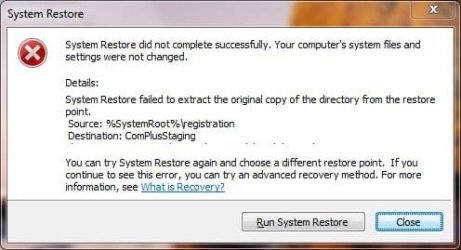
I cannot get system restore to work. It shuts down and tells me restore completed. but when it reboots it gives me this error message. Any ideas on how to troubleshoot this? I have created new restore points but they all fail with the same error.
norestore.JPG
31.2 KB
· Views: 44
Computer Manufacturer/Model Number HP XW4600 Workstation OS win 7 build 7100 CPU 3.00 gigahertz Intel Core2 Duo Motherboard Hewlett-Packard 0AA0h Memory 6128 Megabytes Installed Memory Graphics Card(s) NVIDIA Quadro FX 1700 [Display adapter] Sound Card Realtek High Definition Audio Monitor(s) Displays HP w2007 [Monitor] Hard Drives ST310005 28AS SCSI Disk Device (1000.20 GB) -- drive 7
Perhaps running the system file checker might help set things right. Couldn't hurt to try it.sfc /scannow Then wait a few minutes while it completes. If it finds any corrupt system files and repairs them, it will tell you.
Computer Manufacturer/Model Number HP DV8t quad OS Windows 7 Ultimate x64 (Retail) CPU i7-Q 720 Motherboard Motherboard Chipset Intel Ibex Peak-M PM55, Intel Lynnfield Memory 6 GB Graphics Card(s) nVidia GeForce GT 230M (1GB) Sound Card IDT High Definition Audio CODEC Monitor(s) Displays 18.4 inch HP Infinity FHD (Samsung 184HT03-001) Screen Resolution 1920 x 1080 Hard Drives Hitachi 500GB 7200 rpm (x2) Cooling Zalman NC-2000 notebook cooling pad Keyboard laptop Mouse Logitech VX Revolution Other Info Backup Unit: Lenovo T61p
New member
Thread Starter
Perhaps running the system file checker might help set things right. Couldn't hurt to try it.sfc /scannow Then wait a few minutes while it completes. If it finds any corrupt system files and repairs them, it will tell you.
I ran this and it did not find anything. Also ran Mbam and Eset online scanner which also found nothing.
Also in the events it logs "The restore point selected was damaged or deleted during the restore."
Computer Manufacturer/Model Number HP XW4600 Workstation OS win 7 build 7100 CPU 3.00 gigahertz Intel Core2 Duo Motherboard Hewlett-Packard 0AA0h Memory 6128 Megabytes Installed Memory Graphics Card(s) NVIDIA Quadro FX 1700 [Display adapter] Sound Card Realtek High Definition Audio Monitor(s) Displays HP w2007 [Monitor] Hard Drives ST310005 28AS SCSI Disk Device (1000.20 GB) -- drive 7
Professional Lurker
Guru
SF Team
I would strongly suggest that you install a later version of Windows 7... or, put up with your issue for a few more weeks until 7 is released to retailers....
Computer type PC/Desktop Computer Manufacturer/Model Number LENOVO K450 @3.0GHZ OS 64-bit Windows 8.1 Pro CPU Core(TM) i5 CPU 4330 Haswell @ 3.20GHz Motherboard LENOVO Memory 12.00 GB Graphics Card(s) Intel(R) HD Graphics Sound Card Intel HD integtrated Monitor(s) Displays HP 25' ISP Monitor Screen Resolution 1900/1020 Hard Drives (1) ST1000DM003-1CH162 (2) Generic STORAGE DEVICE USB Device (3) Generic STORAGE DEVICE USB Device Internet Speed 100mb down/10mb up
Are you running Restore as Administrator? I had this message when I ran it as User, but not Administrator.
Computer Manufacturer/Model Number Gateway, Toshiba Laptop, and Home Brew OS Windows 7 x64 HP, Windows 7 HP, Windows 7 Ult CPU Intel I3, Cerelon, Pentium 4 @ 3Ghz Motherboard Intel, Intel, Asus Memory 8G, 3G, 3G Graphics Card(s) On-board Intel, On-board nVidia, nVIDIA card Sound Card on-board, on-board, SoundBlaster Monitor(s) Displays Hannspree HF237, Toshiba, SyncMaster 931B Screen Resolution default (all) Hard Drives 1T internal, 320G internal, 160G internal, 1T networked PSU 300w, unk, 650w Case black, black, grey Cooling air (all) Keyboard standard wired (all) Mouse standard wired (all) Internet Speed 6M down, 768K up Other Info Home LAN through Linksys hub to 4 port and wireless switch/router. Networked HP 2600n. Wife's computer running Windows 7, and spare laptop running Ubuntu "Karmic Kola" (9.10).
New member
Thread Starter
Are you running Restore as Administrator? I had this message when I ran it as User, but not Administrator.
Yes I am running it as administrator.
Computer Manufacturer/Model Number HP XW4600 Workstation OS win 7 build 7100 CPU 3.00 gigahertz Intel Core2 Duo Motherboard Hewlett-Packard 0AA0h Memory 6128 Megabytes Installed Memory Graphics Card(s) NVIDIA Quadro FX 1700 [Display adapter] Sound Card Realtek High Definition Audio Monitor(s) Displays HP w2007 [Monitor] Hard Drives ST310005 28AS SCSI Disk Device (1000.20 GB) -- drive 7