
Win 7 and Vista connection woes

Smiling Carcass

New member
Local time
3:44 AM
Messages
15
I am trying to network my 32 bit Vista laptop and 64 bit Win 7 desktop.

Win 7 desktop can see and connect to Vista laptop and I have set up folder synching using Allway Sync.

My Vista laptop can see my Win 7 desktop in network ‘full map’ and I can ping the desktop from the laptop. But it will not let me open files or folders on the desktop. It asks for the username and password, which I enter correctly but I get the response the username and/or password is incorrect.

The funny thing is, I had this setup before, but had the reverse issue where the laptop would connect to the desktop but the desktop would not connect to the laptop with the same symptoms.

Am I missing something simple? I have ‘googled’ for a solution, but lots of people have similar problems with no solution and the advice is generally to do what I have already done.
 

My Computer My Computer

Computer Manufacturer/Model Number
Home Build
OS
Win7 Home & Pro (Desktop & Laptop) 64bit
I am trying to network my 32 bit Vista laptop and 64 bit Win 7 desktop.

Win 7 desktop can see and connect to Vista laptop and I have set up folder synching using Allway Sync.

My Vista laptop can see my Win 7 desktop in network ‘full map’ and I can ping the desktop from the laptop. But it will not let me open files or folders on the desktop. It asks for the username and password, which I enter correctly but I get the response the username and/or password is incorrect.

The funny thing is, I had this setup before, but had the reverse issue where the laptop would connect to the desktop but the desktop would not connect to the laptop with the same symptoms.

Am I missing something simple? I have ‘googled’ for a solution, but lots of people have similar problems with no solution and the advice is generally to do what I have already done.


I suspect you have two problems.. First you are probably running homegroup. Since you have vista and win 7 you should be running "workgroup", second Joe on vista is not the same as joe on win 7. So user name Joe with password on one must be set up as machine name\joe\password.

Let us know if you need help

Ken
 

My Computer My Computer

Computer Manufacturer/Model Number
HP Pavillion dv-7 1005 Tx
OS
Win 8 Release candidate 8400
CPU
[email protected]
Memory
4 gigs
Graphics Card(s)
Nvidia 9600M
Sound Card
HD built-in
Monitor(s) Displays
17" Wxga
Screen Resolution
1440x900
Cooling
none
Internet Speed
45Mb down 5Mb up
Thanks, Ken but I am not using Homegroup both machines are in the same workgroup.
I'll try your 'name' suggestion and see where it goes. Be back to let you know.
 

My Computer My Computer

Computer Manufacturer/Model Number
Home Build
OS
Win7 Home & Pro (Desktop & Laptop) 64bit
Tried:
\\computername\username

username@computername

COMPUTERNAME\username

username

The last 3 suggested by Vista


Still no joy. Using the 3 Vista suggestions I got a ‘Login unsuccessful’ but the one I tried with the double backslash resulted in the Vista suggestions.
 

My Computer My Computer

Computer Manufacturer/Model Number
Home Build
OS
Win7 Home & Pro (Desktop & Laptop) 64bit
Which A/V software are you using? Which ever one you are using it's most likely causing this problem.
 

My Computer My Computer

Computer type
PC/Desktop
Computer Manufacturer/Model Number
Home built
OS
Windows 7 Ult, Windows 8.1 Pro,
CPU
Q9650-4.275GHz, E8600 4.5GHz, E6750-3.8GHz
Motherboard
Evga 780i FTW
Memory
G.Skill PC2 9600 1200Mhz 5 5 5 15 2T
Graphics Card(s)
GTX480
Sound Card
Asus Xonar D2
Monitor(s) Displays
HannsG
Screen Resolution
1680X1050
Hard Drives
GSkill Phoenix Pro 120GB SSD
PSU
ThermalTake Toughpower 1000Watt modular
Case
ThermalTake XaserV
Cooling
Xigmatek S1283
Keyboard
Logitech G15
Mouse
Logitech G9
Internet Speed
T1
Using AVGv Free on both machines but I wouldn't have thought A/V would block a wireless connection, at least not without a warning that I usually get when AVG identifies problems. Maybe a firewall. but I do not use software firewall, only the routers firewall.

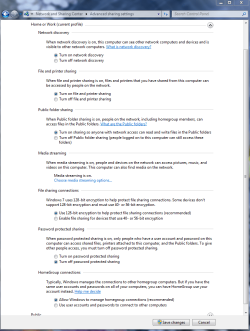
I did read that I need to change the encryption in advanced sharing options from 128 bit to 64 bit in Win 7 but I'm blowed if I can find the option.
 

My Computer My Computer

Computer Manufacturer/Model Number
Home Build
OS
Win7 Home & Pro (Desktop & Laptop) 64bit
I can assure you that AVG can easily cause this type of problem. A/V's are pretty much made to block connections from being made including wireless connections. It's also famous for causing intermittent sharing problems such as you seem to be having. I have no reason to make this information up. It's a fact and has proven to be true so many times I've lost count.

If you are using a workgroup you should make sure that the Workgroup name is the same for all machines.

After that run the network setup wizard on the Vista machines and be sure and set permissions for sharing. You may need to uninstall AVG completely before this works. Your third party sync program can also cause problems in some cases. Make sure the time/date settings are in sync on your machines because that can cause the User name password are incorrect problem.

It's always best to set up sharing and make sure it's all working before installing any type of A/V software.

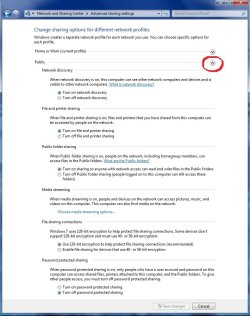
The options for the encryption and other advanced sharing options can be found under the Advance Sharing Options window which you can get to by going to the Network and Sharing center of the Windows 7 machine.

Make sure that all the correct options are enabled on both the Home-Work and the Public Advanced sharing options windows.
 

Attachments

  • Home or work homegroup enable.PNG
    Home or work homegroup enable.PNG
    45 KB · Views: 32
  • public sharing enabled all found.jpg
    public sharing enabled all found.jpg
    91.5 KB · Views: 32
Last edited:

My Computer My Computer

Computer type
PC/Desktop
Computer Manufacturer/Model Number
Home built
OS
Windows 7 Ult, Windows 8.1 Pro,
CPU
Q9650-4.275GHz, E8600 4.5GHz, E6750-3.8GHz
Motherboard
Evga 780i FTW
Memory
G.Skill PC2 9600 1200Mhz 5 5 5 15 2T
Graphics Card(s)
GTX480
Sound Card
Asus Xonar D2
Monitor(s) Displays
HannsG
Screen Resolution
1680X1050
Hard Drives
GSkill Phoenix Pro 120GB SSD
PSU
ThermalTake Toughpower 1000Watt modular
Case
ThermalTake XaserV
Cooling
Xigmatek S1283
Keyboard
Logitech G15
Mouse
Logitech G9
Internet Speed
T1
Chev65, even though I think it unlikely, I am open to all suggestions at this stage. I even read somewhere that turning off hardware acceleration for graphics cards has been effective for this problem. Totally unintuitive, but at least one person said it worked for them.

So, I prevented AVG from starting on both machines with msconfig. No joy (though I have noted you think it might need to be uninstalled)

I found the encryption option and the choice was to turn off 128 bit encryption and enable 40 – 56 bit encryption- no mention of 64 bit so I tried this. No result.

I’m really stumped with this one. I can see the desktop on the network and can ping it. But I cannot access it because the password/login combination are reported as incorrect. (Which they aren’t).

Now going to try running the network wizard on the vista laptop.
 

My Computer My Computer

Computer Manufacturer/Model Number
Home Build
OS
Win7 Home & Pro (Desktop & Laptop) 64bit
I had this.
Problem was that all my PCs have the same user name and pw. The old Vista kept reverting to oldVistaComputerName\userName if inputting just userName and inputting win7ComputerName\userName was rejected.
For anyone else the following worked: setup a new account in Win7 (can use same pw) and input newUserName. Magic.
 

My Computer My Computer

OS
Win 7 64bit
Sorry if I missed this, but do you have NTFS permissions set on the Win7 machine to let the Vista user in?
 

My Computer My Computer

Computer type
PC/Desktop
Computer Manufacturer/Model Number
dell precision t3400 tower
OS
Linux Lite 3.2 x64; Windows 7, 8.1
CPU
Core2Duo 2.4
Memory
6GB ddr2
Graphics Card(s)
nVidia
Hard Drives
120gb SSD, 1TB HD, 2TB HD; sata II
Internet Speed
12/2
Browser
Vivaldi, Slimjet (Chromium) x64
Hello Paul.
Never had a problem on W7 which let Vista in from the start.
It was my 2 Vistas which would *not* access W7 until the 'trick' of setting a new user account in W7 (with a different user name to all the others).
BTW reference the other posts: I have always used AVG and it is not a/the problem.
 

My Computer My Computer

OS
Win 7 64bit

My Computer My Computer

Computer Manufacturer/Model Number
HP Pavilion Elite 495UK
OS
Windows 7 Ultimate SP1 64-Bit
CPU
Intel Core i7 870 @ 2.93GHz
Motherboard
MSI 2A9C (CPU1)
Memory
8Gb Dual-Channel DDR3 @ 664MHz
Graphics Card(s)
nVidia GeForce GTX 460 1024MB dedicated RAM
Sound Card
Realtek HD Audio
Monitor(s) Displays
HP2310i
Screen Resolution
1920 x 1080
Hard Drives
1x1954GB Hitachi HDS22020ALA 330 (RAID), 1x1954GB Hitachi External for backup and storage
PSU
460W
Case
HP Elite
Cooling
Air cooled
Keyboard
Logitech K750 solar-powered keyboard
Mouse
Logitech Wireless M180 mouse
Internet Speed
2Mb
Other Info
Pure Avanti Flow Internet Radio with iPod Dock, 64Gb iPod, HP USB Speakers, Sony MDR-V500 Headphones, Sony Vaio F-Series Laptop
Seavixen/ Useful link but for others..
- all my network ports/firewalls/permissions/workgroups/etc./etc. must have already been set OK for my solution to work,
- I'm guessing that Vista was somehow substituting its own \\nw path name. However, I never had that when connecting Vista pcs together.
(My) conclusion: you cannot network login to W7 from Vista using one common userName. That may be crap but it is a solution that worked for me.
 

My Computer My Computer

OS
Win 7 64bit
Solved

Sorry I haven’t been back for a while. The solution I found, contrary to all logic and advice was to have the same password and username on both machines. It shouldn’t have made a difference, but it did.

I’m now running Win 7 on both machines so the problem is both fixed and irrelevant!
 

My Computer My Computer

Computer Manufacturer/Model Number
Home Build
OS
Win7 Home & Pro (Desktop & Laptop) 64bit
Back
Top