Win 7 and XP file sharing issue

roca

New member
Local time
10:31 PM
Messages
3
Just after your help guys.
i have 2 PCs that i am trying to get file sharing going, but seem to only get 1 direction file sharing.


PC1: winxp pro sp3 (wireless connection)
PC2: win7 pro (ethernet connection)


extra info:
same workgroup
different computer name
same subnet mask & gateway
tried DHCP and static IPs for both PCs
file sharing enabled, password off
same username account.
have followed the link/guide from howtogeek website..
enabled NETBIOS over TCP/IP


on PC1(XP) i can access the PC2(W7) shared folders/files, Read&Write, ping OK = everything GOOD.


on PC2(W7) i cannot access the PC1(XP) shared folders
- I can remote desktop, VNC, ping to PC1(XP)
- I can see PC1(XP) in the workgroup but can't access it.


Firewalls are disabled on both PCs.


Can anyone help me out?


Cheers
 
Last edited:

My Computer

OS
w7
Hi and Welcome to SF,

That is a very detailed post, which is good on you for giving it to us. From here i can only see a shares issue from XP machine, possible permissions. When you tried mapping to the share eg \\PC1's IP\sharename. Are you prompted with a log in window?
 

My Computer

Computer Manufacturer/Model Number
Lenovo ThinkPad T60
OS
Windows 7 Ultimate 64Bit
CPU
GenuineIntel Intel(R) Core(TM) DuoCore T2400 @ 1.83GHz
Motherboard
Intel(R) 82801G (ICH7 Family)
Memory
2.00 GB
Graphics Card(s)
Mobile Intel(R) 945 Express Chipset
Sound Card
SoundMAX Integrated Digital HD Audio
Monitor(s) Displays
ThinkPad Display
Screen Resolution
1400x1050
Hard Drives
100Gb SATA
Keyboard
Standard Keyboard
Mouse
HID-compliant Mouse
Internet Speed
Cable Broadband - 54Mbps
Other Info
Intel(R) PRO/1000 PL Network Connection
11a/b/g Wireless LAN Mini PCI Express Adapter
Thank you for your reply.

\\PC1 IP\sharename & \\pcname\sharename works which is good..better than nothing

Just unable to double click on the shared PC when viewing on windows 7 "Networks"

If there are any other suggestions it will be great!
 

My Computer

OS
w7
When you say Windows 7 Networks is that Workgroup or Public file sharing?

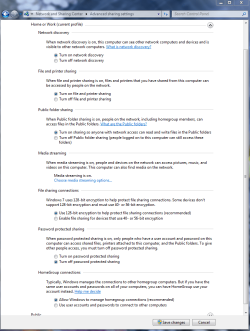
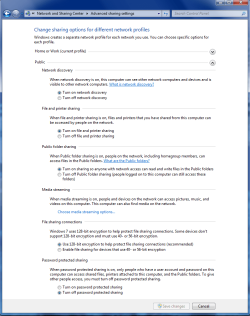
It sometimes help to enable the settings in both the Advanced Public file sharing window and the Advanced Work and Homegroup sharing windows, like in the pictures below.

It also helps if you use the same user name and password on both machines. You still need to use a different "machine" name on both machines however.
 

Attachments

  • Home or work homegroup enable.PNG
    Home or work homegroup enable.PNG
    45 KB · Views: 247
  • public sharing enabled all.PNG
    public sharing enabled all.PNG
    39.7 KB · Views: 935

My Computer

Computer type
PC/Desktop
Computer Manufacturer/Model Number
Home built
OS
Windows 7 Ult, Windows 8.1 Pro,
CPU
Q9650-4.275GHz, E8600 4.5GHz, E6750-3.8GHz
Motherboard
Evga 780i FTW
Memory
G.Skill PC2 9600 1200Mhz 5 5 5 15 2T
Graphics Card(s)
GTX480
Sound Card
Asus Xonar D2
Monitor(s) Displays
HannsG
Screen Resolution
1680X1050
Hard Drives
GSkill Phoenix Pro 120GB SSD
PSU
ThermalTake Toughpower 1000Watt modular
Case
ThermalTake XaserV
Cooling
Xigmatek S1283
Keyboard
Logitech G15
Mouse
Logitech G9
Internet Speed
T1
When you say Windows 7 Networks is that Workgroup or Public file sharing?

Win7 > My Computer > Networks

I can see both PCs, when i double click on the XP PC it says windows cannot access...

if type \\PC1 NAME\Share then it works.

I already have the sames settings that you posted, both PCs have same username login details. difference computer/machine names of course.
 

My Computer

OS
w7
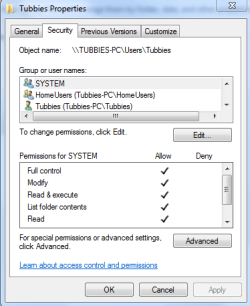
See if by allowing remote assistance and remote desktop of PC1 helps. Also try and give Full permission on root C: to Everyone, as well as adding username that you are using. Don't forget the Security tab.
 

My Computer

Computer Manufacturer/Model Number
Lenovo ThinkPad T60
OS
Windows 7 Ultimate 64Bit
CPU
GenuineIntel Intel(R) Core(TM) DuoCore T2400 @ 1.83GHz
Motherboard
Intel(R) 82801G (ICH7 Family)
Memory
2.00 GB
Graphics Card(s)
Mobile Intel(R) 945 Express Chipset
Sound Card
SoundMAX Integrated Digital HD Audio
Monitor(s) Displays
ThinkPad Display
Screen Resolution
1400x1050
Hard Drives
100Gb SATA
Keyboard
Standard Keyboard
Mouse
HID-compliant Mouse
Internet Speed
Cable Broadband - 54Mbps
Other Info
Intel(R) PRO/1000 PL Network Connection
11a/b/g Wireless LAN Mini PCI Express Adapter
Yes sometimes the permission security tab needs some attention.

Although you should try using either the Work or Public file share for networking on the Windows 7 machine because it sets up exceptions in the firewall to allow for network file sharing and media streaming. The built in GUI makes it kinda easy that way, there is a reason for using it I can assure you.

After you set up either the Work or Public network on the Windows 7 machine you should run the network set up wizard from the XP machine making sure to set up file shares along the way. Everything should work as it should after that.
This covers it pretty well .
http://windows.microsoft.com/en-US/...mputers-running-different-versions-of-Windows

Take ownership with permissions info.
http://www.blogsdna.com/2159/how-to...sions-to-access-files-folder-in-windows-7.htm
 

Attachments

  • Tubbies access full control.PNG
    Tubbies access full control.PNG
    13.2 KB · Views: 29
Last edited:

My Computer

Computer type
PC/Desktop
Computer Manufacturer/Model Number
Home built
OS
Windows 7 Ult, Windows 8.1 Pro,
CPU
Q9650-4.275GHz, E8600 4.5GHz, E6750-3.8GHz
Motherboard
Evga 780i FTW
Memory
G.Skill PC2 9600 1200Mhz 5 5 5 15 2T
Graphics Card(s)
GTX480
Sound Card
Asus Xonar D2
Monitor(s) Displays
HannsG
Screen Resolution
1680X1050
Hard Drives
GSkill Phoenix Pro 120GB SSD
PSU
ThermalTake Toughpower 1000Watt modular
Case
ThermalTake XaserV
Cooling
Xigmatek S1283
Keyboard
Logitech G15
Mouse
Logitech G9
Internet Speed
T1
Back
Top