
Win 7 boot mgr

clayp

New member
Member
Local time
1:43 PM
Messages
97
Just re-installed Win 7 64 and when it boots I get the regular post screen and then it shows a screen that says WINDOWS boot manager at the top and wants to know what to start.Press enter and system boots.Why is this screen there and anyway to fix it?
 

My Computer

Computer type
PC/Desktop
Computer Manufacturer/Model Number
Custom/Digital Storm
OS
Windows 7 Ultimate x64
CPU
Intel Core i5 3570K 3.40 GHz (Unlocked CPU) (Quad Core)
Motherboard
ASUS SABERTOOTH Z77 (Intel Z77
Memory
16GB DDR3 1600MHz
Graphics Card(s)
NVIDIA GeForce GTX 680 2GB
Sound Card
Creative Labs X-Fi Titanium HD 24-bit
Monitor(s) Displays
SyncMaster 245 24"
Screen Resolution
1920X1200
PSU
1050W Corsair Pro Silver 1050HX
Case
Cooler Master
Cooling
Air
Internet Speed
High-Speed Cable / DSL / Network Connections)
Antivirus
Avast
Browser
IE 10
Other Info
OS Boost: Yes, Disable and tweak all of the non-crucial services on the operating system
Windows OS: Microsoft Windows 7 Ultimate (64-Bit Edition)

My Computer

Computer Manufacturer/Model Number
* BFK Customs *
OS
W 7 64-bit Ultimate
CPU
Intel Q9550 Yorkfield
Motherboard
ASUS P5Q Pro
Memory
8GB Dominator 8500C5D
Graphics Card(s)
ATI : XFX 5870
Sound Card
Realtek HD Audio 7-1
Monitor(s) Displays
1x 47" LCD HDMI & 3x 26" LCD HDMI
Screen Resolution
1920x1080P & 1920x1200
Hard Drives
1x 80GB Intel X25-M G2 SSD : 1x 500GB & 1x 640GB WD Caviar Black(s)
PSU
Corsair 620HX
Case
Cooler Master RC-690
Cooling
Tuniq Tower 120, 2x 140mm and 3x 120mm case fans
Keyboard
Microsoft 500
Mouse
Razer Diamondback 3G
Internet Speed
14 Mb/s
Other Info
1x Koutech 3Gb/s SATA HDD Hot Swap Rack
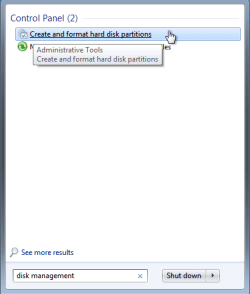
Is this what you want?
Untitled.jpg
 

My Computer

Computer type
PC/Desktop
Computer Manufacturer/Model Number
Custom/Digital Storm
OS
Windows 7 Ultimate x64
CPU
Intel Core i5 3570K 3.40 GHz (Unlocked CPU) (Quad Core)
Motherboard
ASUS SABERTOOTH Z77 (Intel Z77
Memory
16GB DDR3 1600MHz
Graphics Card(s)
NVIDIA GeForce GTX 680 2GB
Sound Card
Creative Labs X-Fi Titanium HD 24-bit
Monitor(s) Displays
SyncMaster 245 24"
Screen Resolution
1920X1200
PSU
1050W Corsair Pro Silver 1050HX
Case
Cooler Master
Cooling
Air
Internet Speed
High-Speed Cable / DSL / Network Connections)
Antivirus
Avast
Browser
IE 10
Other Info
OS Boost: Yes, Disable and tweak all of the non-crucial services on the operating system
Windows OS: Microsoft Windows 7 Ultimate (64-Bit Edition)
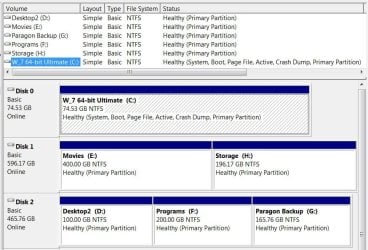
System Active MBR still remains on DISK0, which needs to be unplugged while you recover the MBR into DISK1.

Unplug DISK0, either swap its cable to DISK1 or set DISK1 as first HD to boot in BIOS setup, after DVD drive.

Next boot into Win 7 DVD Repair console or Repair CD, click through to Recovery Tools list to run Startup Repair up to 3 separate times with reboots to write the MBR to DISK1.

When you plug the other HD back in, clean it using DISKPART: http://www.sevenforums.com/tutorials/52129-disk-clean-clean-all-diskpart-command.html

Edit: THere may be interference with DISK2 being incorrectly marked Active. If so, mark it "Inactive" using Diskpart from the DVD/CD Command Line: http://www.sevenforums.com/tutorials/71432-partition-mark-active.html
 
Last edited:
Thank you.....:)
 

My Computer

Computer type
PC/Desktop
Computer Manufacturer/Model Number
Custom/Digital Storm
OS
Windows 7 Ultimate x64
CPU
Intel Core i5 3570K 3.40 GHz (Unlocked CPU) (Quad Core)
Motherboard
ASUS SABERTOOTH Z77 (Intel Z77
Memory
16GB DDR3 1600MHz
Graphics Card(s)
NVIDIA GeForce GTX 680 2GB
Sound Card
Creative Labs X-Fi Titanium HD 24-bit
Monitor(s) Displays
SyncMaster 245 24"
Screen Resolution
1920X1200
PSU
1050W Corsair Pro Silver 1050HX
Case
Cooler Master
Cooling
Air
Internet Speed
High-Speed Cable / DSL / Network Connections)
Antivirus
Avast
Browser
IE 10
Other Info
OS Boost: Yes, Disable and tweak all of the non-crucial services on the operating system
Windows OS: Microsoft Windows 7 Ultimate (64-Bit Edition)
Back
Top