
win 7 boot screen on second display !

saad1957

New member
Local time
11:41 PM
Messages
49
my configuration as follow :

first display : samsung syncmaster 2333HD ( maind display ) , HDMI to HDMI connection
No. 1 on nvedia cp ,1680*1050

second display : samsung 32" , (DVI converted to HDMI) to HDMI

no problem but when start pc boot screen goes on second display ( and some other popups boxes ) and then back to main monitor .

in nvedia contro; panel number of every display is correct but no. 2 is before no. 1 , like attached , any help will be apprecieted .
 

Attachments
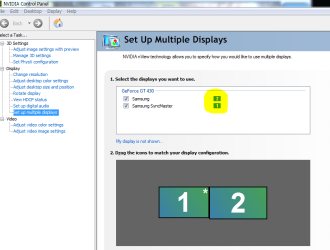
  • nvedia cp.PNG
    nvedia cp.PNG
    25.1 KB · Views: 39

My Computer

Computer Manufacturer/Model Number
own built
OS
win 7 home premium
CPU
Intel core I7-920
Motherboard
ga-ex58-ud3r
Memory
KINGSTON KVR1066D3N7/3G ValueRAM
Graphics Card(s)
Gigabyte GT 430
Monitor(s) Displays
PRIMARY: samsung 2333m 23' , SECONDARY : SAMSUNG 32'
Screen Resolution
1080p , 1360*768
Hard Drives
Intel® X25-V Value SATA Solid-State Drive / WD caviar black 750G
PSU
Cooler Master GX Series RS750 750W
Case
azza 910
Cooling
Zalman 9900
Internet Speed
20 MB
I have the same issue, I'd suggest to leave it as it is, theres no hardship in using the second screen for the boot setup if you need it.
 

My Computer

Computer Manufacturer/Model Number
Custom
OS
Windows 7 Ultimate 64 Bit
CPU
Intel Core i7 2600k 3.8GHz
Motherboard
Asus P8Z68-V Pro
Memory
Corsair Vengeance 16GB DDR3 1600Mhz
Graphics Card(s)
Asus NVIDIA GeForce GTX 680 - 2GB GDDR5
Sound Card
On Board
Monitor(s) Displays
LG DM2780D
Screen Resolution
1920 x 1080
Hard Drives
OCZ Vertex 4 240GB SATA-III SSD
OCZ Agility 3 240GB SATA-III SSD
WD 500 GB SATA-II HDD
Hitachi 500 GB SATA-II HDD
Hitachi 1 TB SATA-II HDD
Seagate Barracuda 2 TB SATA-III HDD
250GB External HD
PSU
Corsair TX650M PSU
Case
NZXT Phantom Full Tower Case - Black
Cooling
1 x Sickleflow, 2 x AF120 Quiet, 1 x 200mm Top, Corsair H70
Keyboard
Logitech G110
Mouse
Logitech G500
Internet Speed
80 Down / 20 Up
Think you will find that that is one of those things that is hard codded into the bios of the video card, the DVI connection is primary and the HDMI is secondary. That is also why it switches once Windows starts to load, as it has nothing to do with the Windows settings but how the card is configured at the hardware level.
 

My Computer

Computer type
PC/Desktop
Computer Manufacturer/Model Number
Me
OS
Win 7 Ultimate x64
CPU
FX-8350 @ 4.6 GHz so far
Motherboard
Asus M5A97 EVO
Memory
ADATA XPG V1 Series Black 8GB DDR3 1600
Graphics Card(s)
Sapphire R9 270x Dual-X
Sound Card
Xonar DGX w/ Corsair Vengence 1300
Monitor(s) Displays
Acer S232HL Abid
Screen Resolution
1920x1080
Hard Drives
120 GB OCZ Vertex 3
500 GB Seagate 7200.12
PSU
Antec Earthwatts 650W Green
Case
Antec Three Hundred
Cooling
Cooler Master 212 EVO
Keyboard
Logitech G510
Mouse
Logitech G500s
Internet Speed
35000/3000
unplug the secondary display and that will force the computer to recognize the one you want into primary...if all else fails.. go to default.
 

My Computer

Computer Manufacturer/Model Number
HP Pavilion Elite HPE-410f
OS
Windows 7 Ultimate x64
CPU
AMD Phenom x6 1045t
Motherboard
N/A
Memory
8 GB
Graphics Card(s)
ATI Radeon HD 5570
Sound Card
Realtek Highdefinition Audio / 5.1 Dolby Setup
Monitor(s) Displays
HP w2207h Widescreen
Screen Resolution
1680*1050
Hard Drives
1 TB (fixed), 320 Portable maxtor, Server Hard drives
PSU
350 Watt
Case
HP CASE
Cooling
Bass
Keyboard
Logitech MX 5500
Mouse
Logitech MX 5500
Internet Speed
ROAD RUNNER 16MB D/512 U
unplug the secondary display and that will force the computer to recognize the one you want into primary...if all else fails.. go to default.

it is already primary , check photo attached in first post.

when set to default , main monitor becomes secondary .

when inverse cables , primary (DVI converted to HDMI) to HDMI , win 7 boot on it but i got red bars on boot screen and then no signal .
 
Last edited:

My Computer

Computer Manufacturer/Model Number
own built
OS
win 7 home premium
CPU
Intel core I7-920
Motherboard
ga-ex58-ud3r
Memory
KINGSTON KVR1066D3N7/3G ValueRAM
Graphics Card(s)
Gigabyte GT 430
Monitor(s) Displays
PRIMARY: samsung 2333m 23' , SECONDARY : SAMSUNG 32'
Screen Resolution
1080p , 1360*768
Hard Drives
Intel® X25-V Value SATA Solid-State Drive / WD caviar black 750G
PSU
Cooler Master GX Series RS750 750W
Case
azza 910
Cooling
Zalman 9900
Internet Speed
20 MB
i tried every thing + google , found nothing .

i think that is windows who assigne default output when installing os for first time , later ( 4 weeks ) i will format pc and see if this true .
 

My Computer

Computer Manufacturer/Model Number
own built
OS
win 7 home premium
CPU
Intel core I7-920
Motherboard
ga-ex58-ud3r
Memory
KINGSTON KVR1066D3N7/3G ValueRAM
Graphics Card(s)
Gigabyte GT 430
Monitor(s) Displays
PRIMARY: samsung 2333m 23' , SECONDARY : SAMSUNG 32'
Screen Resolution
1080p , 1360*768
Hard Drives
Intel® X25-V Value SATA Solid-State Drive / WD caviar black 750G
PSU
Cooler Master GX Series RS750 750W
Case
azza 910
Cooling
Zalman 9900
Internet Speed
20 MB
first display : samsung syncmaster 2333HD ( maind display ) , HDMI to HDMI connection
No. 1 on nvedia cp ,1680*1050

second display : samsung 32" , (DVI converted to HDMI) to HDMI
Easy solution, connect the monitor to the DVI port instead of the TV; using the converted DVI (or better just a straight DVI cable as that monitor does have a DVI port), with the TV using the HDMI port.

If it as I said previously then the HDMI port can never be primary if another display is connected. Also why are you using HDMI to the monitor? Unless your 9800GX2 has a SPDIF port on it and you did something like this,

Guide: 8800GT/9800GT/9800GTX Sound over HDMI (Now including Creative cards) - Overclock.net - Overclocking.net

then you are not getting audio to the monitor anyway.

i think that is windows who assigne default output when installing os for first time

No it is not Windows causing it. Windows can not set which display is primary and which is secondary as that doesn't happen until Windows starts to load the drivers for the video card, and that just isn't possible while on the bios loading screen.
 

My Computer

Computer type
PC/Desktop
Computer Manufacturer/Model Number
Me
OS
Win 7 Ultimate x64
CPU
FX-8350 @ 4.6 GHz so far
Motherboard
Asus M5A97 EVO
Memory
ADATA XPG V1 Series Black 8GB DDR3 1600
Graphics Card(s)
Sapphire R9 270x Dual-X
Sound Card
Xonar DGX w/ Corsair Vengence 1300
Monitor(s) Displays
Acer S232HL Abid
Screen Resolution
1920x1080
Hard Drives
120 GB OCZ Vertex 3
500 GB Seagate 7200.12
PSU
Antec Earthwatts 650W Green
Case
Antec Three Hundred
Cooling
Cooler Master 212 EVO
Keyboard
Logitech G510
Mouse
Logitech G500s
Internet Speed
35000/3000
my new card gt430 with three out puts : hdmi with audio , vga , dvi

monitor resolution with vga 1080p , with hdmi 1680*1050 didn't try dvi to dvi because i am witing for cable now , i tried dvi converted to hdmi but result is a very bad pictur with red bars.
you said :" If it as I said previously then the HDMI port can never be primary if another display is connected."
but now my monitor connected via VGA and it is secondry , while tv hdmi connected and is primary.
 

My Computer

Computer Manufacturer/Model Number
own built
OS
win 7 home premium
CPU
Intel core I7-920
Motherboard
ga-ex58-ud3r
Memory
KINGSTON KVR1066D3N7/3G ValueRAM
Graphics Card(s)
Gigabyte GT 430
Monitor(s) Displays
PRIMARY: samsung 2333m 23' , SECONDARY : SAMSUNG 32'
Screen Resolution
1080p , 1360*768
Hard Drives
Intel® X25-V Value SATA Solid-State Drive / WD caviar black 750G
PSU
Cooler Master GX Series RS750 750W
Case
azza 910
Cooling
Zalman 9900
Internet Speed
20 MB
Back
Top