Win 7 cannot detect wired network on pc, but internet can be used

cornerblue

New member
Local time
8:33 AM
Messages
9
Win 7 Ultimate 64bit, dual ssd's (120g) in raid. Connected to router, router connected to modem.
When I put curser on network icon it says "no connections available" I checked for drivers and they are fine. Both device (onboard) and drivers are fine. I removed and re-installed drivers, but same. i can connect to internet and surf fine, but some programs i have will not launch simply because i believe it detects first if i am on network or not and since windows cant detect network, these programs wont launch. I have already flashed the bios, re-installed chipset and changed net cable. I also bypassed the router straight to moden. When i try to run win network troubleshooter, it says the same "no network to troubleshoot".
Dont know wat else, any thoughts?
 

My Computer My Computer

Computer Manufacturer/Model Number
Gateway/ GM5478
OS
Win 7 Ultimate x64
CPU
Itell Duel quad
Motherboard
G33
Memory
4
Graphics Card(s)
MSI amd 6950 twin frozr III
Sound Card
OB
Monitor(s) Displays
20"
Hard Drives
SSD 120g X2
PSU
800w
Case
Cooler Master
Cooling
air
Win 7 Ultimate 64bit, dual ssd's (120g) in raid. Connected to router, router connected to modem.
When I put curser on network icon it says "no connections available" I checked for drivers and they are fine. Both device (onboard) and drivers are fine. I removed and re-installed drivers, but same. i can connect to internet and surf fine, but some programs i have will not launch simply because i believe it detects first if i am on network or not and since windows cant detect network, these programs wont launch. I have already flashed the bios, re-installed chipset and changed net cable. I also bypassed the router straight to moden. When i try to run win network troubleshooter, it says the same "no network to troubleshoot".
Dont know wat else, any thoughts?

If you can post a screen shot of the ipconfig/all from this machine it would be most helpful. :)
 

My Computer My Computer

Computer type
PC/Desktop
Computer Manufacturer/Model Number
Home built
OS
Windows 7 Ult, Windows 8.1 Pro,
CPU
Q9650-4.275GHz, E8600 4.5GHz, E6750-3.8GHz
Motherboard
Evga 780i FTW
Memory
G.Skill PC2 9600 1200Mhz 5 5 5 15 2T
Graphics Card(s)
GTX480
Sound Card
Asus Xonar D2
Monitor(s) Displays
HannsG
Screen Resolution
1680X1050
Hard Drives
GSkill Phoenix Pro 120GB SSD
PSU
ThermalTake Toughpower 1000Watt modular
Case
ThermalTake XaserV
Cooling
Xigmatek S1283
Keyboard
Logitech G15
Mouse
Logitech G9
Internet Speed
T1
Win 7 Ultimate 64bit, dual ssd's (120g) in raid. Connected to router, router connected to modem.
When I put curser on network icon it says "no connections available" I checked for drivers and they are fine. Both device (onboard) and drivers are fine. I removed and re-installed drivers, but same. i can connect to internet and surf fine, but some programs i have will not launch simply because i believe it detects first if i am on network or not and since windows cant detect network, these programs wont launch. I have already flashed the bios, re-installed chipset and changed net cable. I also bypassed the router straight to moden. When i try to run win network troubleshooter, it says the same "no network to troubleshoot".
Dont know wat else, any thoughts?

If you can post a screen shot of the ipconfig/all from this machine it would be most helpful. :)

Thanks for reply.


Windows IP Configuration

Ethernet adapter Local Area Connection:
Connection-specific DNS Suffix . :
Link-local IPv6 Address . . . . . : fe80::dc37:f3fd:5814:7087%13
IPv4 Address. . . . . . . . . . . : 192.168.1.7
Subnet Mask . . . . . . . . . . . : 255.255.255.0
Default Gateway . . . . . . . . . : 192.168.1.1
Tunnel adapter isatap.{DCB58891-04F9-4C29-8B0D-97E24488EE57}:
Media State . . . . . . . . . . . : Media disconnected
Connection-specific DNS Suffix . :
Tunnel adapter Local Area Connection* 10:
Media State . . . . . . . . . . . : Media disconnected
Connection-specific DNS Suffix . :
 

My Computer My Computer

Computer Manufacturer/Model Number
Gateway/ GM5478
OS
Win 7 Ultimate x64
CPU
Itell Duel quad
Motherboard
G33
Memory
4
Graphics Card(s)
MSI amd 6950 twin frozr III
Sound Card
OB
Monitor(s) Displays
20"
Hard Drives
SSD 120g X2
PSU
800w
Case
Cooler Master
Cooling
air
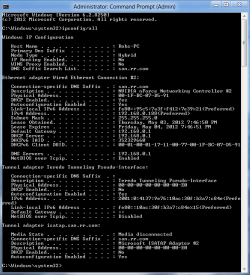
If you can post an actual screen shot of the ipconfig like the picture below it could show me other possible problems.
 

Attachments

  • My ipconfig.PNG
    My ipconfig.PNG
    21 KB · Views: 5

My Computer My Computer

Computer type
PC/Desktop
Computer Manufacturer/Model Number
Home built
OS
Windows 7 Ult, Windows 8.1 Pro,
CPU
Q9650-4.275GHz, E8600 4.5GHz, E6750-3.8GHz
Motherboard
Evga 780i FTW
Memory
G.Skill PC2 9600 1200Mhz 5 5 5 15 2T
Graphics Card(s)
GTX480
Sound Card
Asus Xonar D2
Monitor(s) Displays
HannsG
Screen Resolution
1680X1050
Hard Drives
GSkill Phoenix Pro 120GB SSD
PSU
ThermalTake Toughpower 1000Watt modular
Case
ThermalTake XaserV
Cooling
Xigmatek S1283
Keyboard
Logitech G15
Mouse
Logitech G9
Internet Speed
T1
Yeah, sry i think i forgot to to add /all

and sry i dont know how else the screen shot works "print screen", not working i guess


Windows IP Configuration
Host Name . . . . . . . . . . . . : Neo1-PC
Primary Dns Suffix . . . . . . . :
Node Type . . . . . . . . . . . . : Hybrid
IP Routing Enabled. . . . . . . . : No
WINS Proxy Enabled. . . . . . . . : No
Ethernet adapter Local Area Connection:
Connection-specific DNS Suffix . :
Description . . . . . . . . . . . : Realtek PCIe GBE Family Controller
Physical Address. . . . . . . . . : 8C-89-A5-C6-E5-A9
DHCP Enabled. . . . . . . . . . . : Yes
Autoconfiguration Enabled . . . . : Yes
Link-local IPv6 Address . . . . . : fe80::e403:9541:8614:2b5f%10(Preferred)
IPv4 Address. . . . . . . . . . . : 192.168.1.3(Preferred)
Subnet Mask . . . . . . . . . . . : 255.255.255.0
Lease Obtained. . . . . . . . . . : Thursday, September 27, 2012 10:20:32 AM
Lease Expires . . . . . . . . . . : Saturday, September 29, 2012 10:20:32 AM
Default Gateway . . . . . . . . . : 192.168.1.1
DHCP Server . . . . . . . . . . . : 192.168.1.1
DHCPv6 IAID . . . . . . . . . . . : 244091301
DHCPv6 Client DUID. . . . . . . . : 00-01-00-01-17-5E-C1-3C-8C-89-A5-C6-E5-A9
DNS Servers . . . . . . . . . . . : 192.168.1.1
NetBIOS over Tcpip. . . . . . . . : Enabled
Tunnel adapter isatap.{8EB06D6B-E4BF-4729-8BC1-B998B752255C}:
Media State . . . . . . . . . . . : Media disconnected
Connection-specific DNS Suffix . :
Description . . . . . . . . . . . : Microsoft ISATAP Adapter
Physical Address. . . . . . . . . : 00-00-00-00-00-00-00-E0
DHCP Enabled. . . . . . . . . . . : No
Autoconfiguration Enabled . . . . : Yes
Tunnel adapter Teredo Tunneling Pseudo-Interface:
Connection-specific DNS Suffix . :
Description . . . . . . . . . . . : Teredo Tunneling Pseudo-Interface
Physical Address. . . . . . . . . : 00-00-00-00-00-00-00-E0
DHCP Enabled. . . . . . . . . . . : No
Autoconfiguration Enabled . . . . : Yes
IPv6 Address. . . . . . . . . . . : 2001:0:4137:9e76:1080:1387:3f57:fefc(Pref
erred)
Link-local IPv6 Address . . . . . : fe80::1080:1387:3f57:fefc%12(Preferred)
Default Gateway . . . . . . . . . : ::
NetBIOS over Tcpip. . . . . . . . : Disabled
C:\Users\Neo1>
 

My Computer My Computer

Computer Manufacturer/Model Number
Gateway/ GM5478
OS
Win 7 Ultimate x64
CPU
Itell Duel quad
Motherboard
G33
Memory
4
Graphics Card(s)
MSI amd 6950 twin frozr III
Sound Card
OB
Monitor(s) Displays
20"
Hard Drives
SSD 120g X2
PSU
800w
Case
Cooler Master
Cooling
air

My Computer My Computer

Computer type
PC/Desktop
Computer Manufacturer/Model Number
Home built
OS
Windows 7 Ult, Windows 8.1 Pro,
CPU
Q9650-4.275GHz, E8600 4.5GHz, E6750-3.8GHz
Motherboard
Evga 780i FTW
Memory
G.Skill PC2 9600 1200Mhz 5 5 5 15 2T
Graphics Card(s)
GTX480
Sound Card
Asus Xonar D2
Monitor(s) Displays
HannsG
Screen Resolution
1680X1050
Hard Drives
GSkill Phoenix Pro 120GB SSD
PSU
ThermalTake Toughpower 1000Watt modular
Case
ThermalTake XaserV
Cooling
Xigmatek S1283
Keyboard
Logitech G15
Mouse
Logitech G9
Internet Speed
T1
just tried that. I deleted the values in the config, still the same after reboot.
 

My Computer My Computer

Computer Manufacturer/Model Number
Gateway/ GM5478
OS
Win 7 Ultimate x64
CPU
Itell Duel quad
Motherboard
G33
Memory
4
Graphics Card(s)
MSI amd 6950 twin frozr III
Sound Card
OB
Monitor(s) Displays
20"
Hard Drives
SSD 120g X2
PSU
800w
Case
Cooler Master
Cooling
air
just tried that. I deleted the values in the config, still the same after reboot.

From the ipconfig you should be online so it appears as if something is blocking the connection.

Which A/V software do you have installed on this system?
 

My Computer My Computer

Computer type
PC/Desktop
Computer Manufacturer/Model Number
Home built
OS
Windows 7 Ult, Windows 8.1 Pro,
CPU
Q9650-4.275GHz, E8600 4.5GHz, E6750-3.8GHz
Motherboard
Evga 780i FTW
Memory
G.Skill PC2 9600 1200Mhz 5 5 5 15 2T
Graphics Card(s)
GTX480
Sound Card
Asus Xonar D2
Monitor(s) Displays
HannsG
Screen Resolution
1680X1050
Hard Drives
GSkill Phoenix Pro 120GB SSD
PSU
ThermalTake Toughpower 1000Watt modular
Case
ThermalTake XaserV
Cooling
Xigmatek S1283
Keyboard
Logitech G15
Mouse
Logitech G9
Internet Speed
T1
Sry chev, i was away. At the moment i do not have an a/v installed. I had uninstalled it to see if that was the issue. Like i said before, i can surf the web in this state, but my network icon (taskbar) says no network and it is crossed out.
 

My Computer My Computer

Computer Manufacturer/Model Number
Gateway/ GM5478
OS
Win 7 Ultimate x64
CPU
Itell Duel quad
Motherboard
G33
Memory
4
Graphics Card(s)
MSI amd 6950 twin frozr III
Sound Card
OB
Monitor(s) Displays
20"
Hard Drives
SSD 120g X2
PSU
800w
Case
Cooler Master
Cooling
air
Sry chev, i was away. At the moment i do not have an a/v installed. I had uninstalled it to see if that was the issue. Like i said before, i can surf the web in this state, but my network icon (taskbar) says no network and it is crossed out.

Intermittent connection problems aren't so easy to fix and I don't see anything wrong with the ipconfig. Do you have iTunes installed on this system?

Maybe it's time to reset the network stack and flush the DNS.

Save the file below, unzip and run the file, your machine will reboot automatically.
 

Attachments

My Computer My Computer

Computer type
PC/Desktop
Computer Manufacturer/Model Number
Home built
OS
Windows 7 Ult, Windows 8.1 Pro,
CPU
Q9650-4.275GHz, E8600 4.5GHz, E6750-3.8GHz
Motherboard
Evga 780i FTW
Memory
G.Skill PC2 9600 1200Mhz 5 5 5 15 2T
Graphics Card(s)
GTX480
Sound Card
Asus Xonar D2
Monitor(s) Displays
HannsG
Screen Resolution
1680X1050
Hard Drives
GSkill Phoenix Pro 120GB SSD
PSU
ThermalTake Toughpower 1000Watt modular
Case
ThermalTake XaserV
Cooling
Xigmatek S1283
Keyboard
Logitech G15
Mouse
Logitech G9
Internet Speed
T1
no, no itunes or any such. i will download and run, will let you know.
 

My Computer My Computer

Computer Manufacturer/Model Number
Gateway/ GM5478
OS
Win 7 Ultimate x64
CPU
Itell Duel quad
Motherboard
G33
Memory
4
Graphics Card(s)
MSI amd 6950 twin frozr III
Sound Card
OB
Monitor(s) Displays
20"
Hard Drives
SSD 120g X2
PSU
800w
Case
Cooler Master
Cooling
air
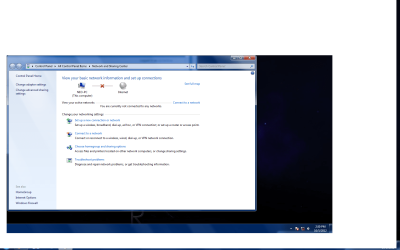
reset was good but still same. i know it cant be the actuall script of the icon thats bad because as i said i have a program that wont launch because it also thinks i have no internet. when i right click on connection status icon it says no not connected to any network. This is just a hunch, but is it possible that win 7 is confused somehow with wired and lan? Although their is no wireless status showing and i have no wireless device on it, perhaps something in that sense? Because i just dont know how can win not detect network yet i am connected to internet and able to surf. If it wasnt for that program that cant launch because it doesnt detect my network, all of this would be fine with me.
 

Attachments

  • Untitled.png
    Untitled.png
    84.1 KB · Views: 7

My Computer My Computer

Computer Manufacturer/Model Number
Gateway/ GM5478
OS
Win 7 Ultimate x64
CPU
Itell Duel quad
Motherboard
G33
Memory
4
Graphics Card(s)
MSI amd 6950 twin frozr III
Sound Card
OB
Monitor(s) Displays
20"
Hard Drives
SSD 120g X2
PSU
800w
Case
Cooler Master
Cooling
air

My Computer My Computer

Computer type
PC/Desktop
Computer Manufacturer/Model Number
Home built
OS
Windows 7 Ult, Windows 8.1 Pro,
CPU
Q9650-4.275GHz, E8600 4.5GHz, E6750-3.8GHz
Motherboard
Evga 780i FTW
Memory
G.Skill PC2 9600 1200Mhz 5 5 5 15 2T
Graphics Card(s)
GTX480
Sound Card
Asus Xonar D2
Monitor(s) Displays
HannsG
Screen Resolution
1680X1050
Hard Drives
GSkill Phoenix Pro 120GB SSD
PSU
ThermalTake Toughpower 1000Watt modular
Case
ThermalTake XaserV
Cooling
Xigmatek S1283
Keyboard
Logitech G15
Mouse
Logitech G9
Internet Speed
T1
safe was the same. running out of options here i think. I had downladed Winkleaner pro but not run it yet as i wanted to try a check things out first. The program does hav network troubleshooter but i a was afraid it might make some changes in reg that might not be recoverable, but at this point i hav little choice. I can try to do a reg back up first, then i'll let do his thing.
 

My Computer My Computer

Computer Manufacturer/Model Number
Gateway/ GM5478
OS
Win 7 Ultimate x64
CPU
Itell Duel quad
Motherboard
G33
Memory
4
Graphics Card(s)
MSI amd 6950 twin frozr III
Sound Card
OB
Monitor(s) Displays
20"
Hard Drives
SSD 120g X2
PSU
800w
Case
Cooler Master
Cooling
air
The program worked! I cant really tell what it did, but the icon is working and it is detecting the network now, thank god. Much thanx for your efforts though.
 

My Computer My Computer

Computer Manufacturer/Model Number
Gateway/ GM5478
OS
Win 7 Ultimate x64
CPU
Itell Duel quad
Motherboard
G33
Memory
4
Graphics Card(s)
MSI amd 6950 twin frozr III
Sound Card
OB
Monitor(s) Displays
20"
Hard Drives
SSD 120g X2
PSU
800w
Case
Cooler Master
Cooling
air
Back
Top