Solved Win 7 corrupt MBR

petrox

New member
Member
Local time
5:51 PM
Messages
69
Location
Ontario Canada
Dear forum members I need some help please. I am currently in Directory services repair safe mode. My MBR is corrupted. The Computer is in a continued restart mode. I can get to safe mode only via f8. I do not know what caused this problem. I do have easy BCD and have tried to reset my MBR but it does not work. Acronis back up does its job but does not fix the boot system either. Running CHKDSK on all drives does not show any problems nor does CHKDSK /f. Also I cannot get BootRec.exe to work it tells me that my Win7 install disk is not the correct version. My version is Win 7 home 64 bit SP1. My original install disk is without SP1. I could not uninstall SP1. Please help. I have been trying to fix my box for many hours now. I have downloaded and burnt a win 7 SP1 but it is also not a correct version for some reason. What would be the correct way to use Easy BCD in my situation? Any help would be very, very much appreciated. Regards Peter
 
Last edited:

My Computer

Computer type
PC/Desktop
Computer Manufacturer/Model Number
Custom
OS
win 7 home premium
CPU
Intel I-5-6400 Skylake
Motherboard
MSI H110 M Pro VD
Memory
8 gig
Graphics Card(s)
Radeon RX 470
Sound Card
onboard
Monitor(s) Displays
Samsung 245T
Screen Resolution
1920X1200
Hard Drives
WD 500 Gig X2, 1 SSD 250 GB ( OS) plus 1External WD 1 tera byte
PSU
750 Watts
Case
Thermal Take
Keyboard
Microsoft net keyboard
Mouse
Microsoft optical wireless
Internet Speed
10 mps
Antivirus
Avast
Browser
Fire Fox

My Computer

Computer Manufacturer/Model Number
HP, Dell, Gateway, Toshiba - 4 laptops and 2 desktops
OS
Vista, Windows7, Mint Mate, Zorin, Windows 8
CPU
from 1.6GHz Duo to i7
Monitor(s) Displays
2x HP w2207
Hard Drives
5x HDD, 7x SSD, 12x Externals
Keyboard
with trackball - no mices
Mouse
Trackball mice
Internet Speed
DSL 6000
Thank you WHS and GregRocker for your help. I was able to do the Msconfig part of the procedure. The BCDEDIT part I could not as I am too dumb. It is now in win 7 regular mode thanks to msconfig etc..
I have copied the contents of the D: drive to another drive and formated D:. The reason is that D: was replaced and then the Acronis backup of it was placed back on the new D:. Maybe the backup from the other drive was corrupted reinfecting the new D:. Now that I have Win7 back and not in safe mode I am too scared to turn or restart the Computer. I will instead use sleep mode. Regards Peter
 

My Computer

Computer type
PC/Desktop
Computer Manufacturer/Model Number
Custom
OS
win 7 home premium
CPU
Intel I-5-6400 Skylake
Motherboard
MSI H110 M Pro VD
Memory
8 gig
Graphics Card(s)
Radeon RX 470
Sound Card
onboard
Monitor(s) Displays
Samsung 245T
Screen Resolution
1920X1200
Hard Drives
WD 500 Gig X2, 1 SSD 250 GB ( OS) plus 1External WD 1 tera byte
PSU
750 Watts
Case
Thermal Take
Keyboard
Microsoft net keyboard
Mouse
Microsoft optical wireless
Internet Speed
10 mps
Antivirus
Avast
Browser
Fire Fox
You need to reboot your PC not be afraid if it. You want these issues to be resolved not feared. This is what we do here by the thousands and are the best forums because of it. We do not fear, quit or fail.

Post back a screenshot of http://www.sevenforums.com/tutorials/274797-disk-management-post-screen-capture-image.html so we can see if its configured correctly. If not it will be apparent.

While you wait run full scans with Malwarebytes, Superantispyware and System File Checker from http://www.sevenforums.com/tutorials/220165-troubleshooting-steps-windows-7-a.html. You can wait til you hear back on Disk Mgmt before rebooting. But all repairs can also be done from boot. The worst that can happen is you'd have to do a perfect reinstall and have a better system than 90% of users out there.

Make sure all files are backed up.
 
Last edited:
Hi gregrocker, I did restart but as feared it went into its reboot mode. After looking at windows disk management I discovered that the D: drive for some very strange reason had a 100 MB EFI partion. I did not do that. So google is a friend, I went into diskpart and deleted it as well as everything on Drive D: . The system rebooted normaly after that. Drive D: is now empty. Do you think that there is something wrong with a brand new, 1 week old Hard disk? Would it not show up when I do a Chkdsk D:?
Anyway hopefully this exercise will help someone in the future. Thank you very much again. Regards Peter
 

My Computer

Computer type
PC/Desktop
Computer Manufacturer/Model Number
Custom
OS
win 7 home premium
CPU
Intel I-5-6400 Skylake
Motherboard
MSI H110 M Pro VD
Memory
8 gig
Graphics Card(s)
Radeon RX 470
Sound Card
onboard
Monitor(s) Displays
Samsung 245T
Screen Resolution
1920X1200
Hard Drives
WD 500 Gig X2, 1 SSD 250 GB ( OS) plus 1External WD 1 tera byte
PSU
750 Watts
Case
Thermal Take
Keyboard
Microsoft net keyboard
Mouse
Microsoft optical wireless
Internet Speed
10 mps
Antivirus
Avast
Browser
Fire Fox
If you had an EFI System partition then it must have been installed in EFI mode. It's especially important that we see the screenshot of http://www.sevenforums.com/tutorials/274797-disk-management-post-screen-capture-image.html so we can see if its configured correctly. If not it will be apparent.

You also need to run full scans with Malwarebytes, Superantispyware and System File Checker from http://www.sevenforums.com/tutorials/220165-troubleshooting-steps-windows-7-a.html to make sure you're not infected and System files are intact.

Make sure all files are backed up.
 
corrupt MBR

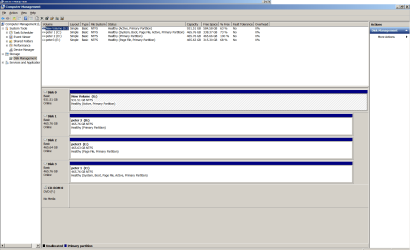
Hi gregrocker, here is the disks sceenshot. This morning it was back to its boot dance. I ghave since made a win7 repair disk as all burnt ISO system disks say not a correct version of windows. Regards Peter
 

Attachments

  • disks.png
    disks.png
    45.8 KB · Views: 5

My Computer

Computer type
PC/Desktop
Computer Manufacturer/Model Number
Custom
OS
win 7 home premium
CPU
Intel I-5-6400 Skylake
Motherboard
MSI H110 M Pro VD
Memory
8 gig
Graphics Card(s)
Radeon RX 470
Sound Card
onboard
Monitor(s) Displays
Samsung 245T
Screen Resolution
1920X1200
Hard Drives
WD 500 Gig X2, 1 SSD 250 GB ( OS) plus 1External WD 1 tera byte
PSU
750 Watts
Case
Thermal Take
Keyboard
Microsoft net keyboard
Mouse
Microsoft optical wireless
Internet Speed
10 mps
Antivirus
Avast
Browser
Fire Fox
Corrupt MBR

Hi gregrocker, for some reason the previous post was made with the system working properly. I had to let the boot run three time and each time click on boot windows normally. By the third time it worked. Then I made a windows repair disk from my machine and it did not work as it says incorrect version for my copy of Windows. How is that possible? I just made it from my machine. Anyway we are back to square one. Currently I am in directory services SAFE mode. I am not successful in getting the BootRec command working from the elevated command prompt. Any further ideas? I ran chkdsk no problems found also Malware bytes which found a entry in the registry called speed up. Not my doing. So I cleaned it. Regards Peter
 

My Computer

Computer type
PC/Desktop
Computer Manufacturer/Model Number
Custom
OS
win 7 home premium
CPU
Intel I-5-6400 Skylake
Motherboard
MSI H110 M Pro VD
Memory
8 gig
Graphics Card(s)
Radeon RX 470
Sound Card
onboard
Monitor(s) Displays
Samsung 245T
Screen Resolution
1920X1200
Hard Drives
WD 500 Gig X2, 1 SSD 250 GB ( OS) plus 1External WD 1 tera byte
PSU
750 Watts
Case
Thermal Take
Keyboard
Microsoft net keyboard
Mouse
Microsoft optical wireless
Internet Speed
10 mps
Antivirus
Avast
Browser
Fire Fox
Power down to Unplug all but the Win7 HD plugged into DISK0. Will it start?

If not run 3 Startup Repairs from Repair console on F8 menu at boot or from fresh ISO for your version Win7 disk for your version provided in Reinstall tutorial below.
 
Hi gregrocker, thank you I have made the change to G: marking it as not actve in diskpart. For your information the G: drive is external via a E sata card. It is described as disk 0 I do not know how to change that as I do not recall ever seeing a SATA 0 location on the motherboard for the sata cables. Sadly the change to inactive partition did not fix the problem. Would my burnt ISO of win7 from digital river work with my Windows key from my original DVD? I am thinking of reinstalling Windows as this problem has been going on for too long and it is taking your effort , much appreciated, but I can not seem to get it to work properly. What do you think? Regards Peter
 

My Computer

Computer type
PC/Desktop
Computer Manufacturer/Model Number
Custom
OS
win 7 home premium
CPU
Intel I-5-6400 Skylake
Motherboard
MSI H110 M Pro VD
Memory
8 gig
Graphics Card(s)
Radeon RX 470
Sound Card
onboard
Monitor(s) Displays
Samsung 245T
Screen Resolution
1920X1200
Hard Drives
WD 500 Gig X2, 1 SSD 250 GB ( OS) plus 1External WD 1 tera byte
PSU
750 Watts
Case
Thermal Take
Keyboard
Microsoft net keyboard
Mouse
Microsoft optical wireless
Internet Speed
10 mps
Antivirus
Avast
Browser
Fire Fox
Thanks
 

My Computer

Computer type
PC/Desktop
Computer Manufacturer/Model Number
Acer
OS
Windows 7 Home Premium 32bit
CPU
Intel
Motherboard
DSL-20Mbps
Memory
4 GB
Graphics Card(s)
Nvidia
Antivirus
Avast
Browser
Mozzila
Last edited:
Hi gregrocker, yes I only have a paging file on drive C: now. I also unplugged the E-sata drive which used to showed up as disk 0 in disk mgmt, now 0 moved to drive D:. Tomorrow I will switch the C: and D: cables on the motherboard so C: will be on station 1, D: on 2, E: on 3 and the CD rom on 4. I ill advise how it goes. Thank you for your continued advice and help. Regards Peter
 

My Computer

Computer type
PC/Desktop
Computer Manufacturer/Model Number
Custom
OS
win 7 home premium
CPU
Intel I-5-6400 Skylake
Motherboard
MSI H110 M Pro VD
Memory
8 gig
Graphics Card(s)
Radeon RX 470
Sound Card
onboard
Monitor(s) Displays
Samsung 245T
Screen Resolution
1920X1200
Hard Drives
WD 500 Gig X2, 1 SSD 250 GB ( OS) plus 1External WD 1 tera byte
PSU
750 Watts
Case
Thermal Take
Keyboard
Microsoft net keyboard
Mouse
Microsoft optical wireless
Internet Speed
10 mps
Antivirus
Avast
Browser
Fire Fox
Not quite. I suggested to first only plug in C to see if that resolves it.

If so add back the other drives one at a time to find which is fouling boot.

Remember to power down, unplug, drain residual power by holding power button down, touch case before reaching inside to discharge static.
 
Hi gregrocker, I did unplug all drives except C:. Then tried to reboot it said mbr error. It did not go. then I plugged in one at a time and tried to reboot same thing with all of them. However; this morning it started into Windows on the third try clicking start windows normally. Then windows update came on and needed to restart the Computer. Back to the boot dance. I am once again in Directory services safe mode. I have been, along with you, on this task for several days now while I would like to fix it I am thinking of taking the beast to my Computer store and let them fix it. Regards Peter
 

My Computer

Computer type
PC/Desktop
Computer Manufacturer/Model Number
Custom
OS
win 7 home premium
CPU
Intel I-5-6400 Skylake
Motherboard
MSI H110 M Pro VD
Memory
8 gig
Graphics Card(s)
Radeon RX 470
Sound Card
onboard
Monitor(s) Displays
Samsung 245T
Screen Resolution
1920X1200
Hard Drives
WD 500 Gig X2, 1 SSD 250 GB ( OS) plus 1External WD 1 tera byte
PSU
750 Watts
Case
Thermal Take
Keyboard
Microsoft net keyboard
Mouse
Microsoft optical wireless
Internet Speed
10 mps
Antivirus
Avast
Browser
Fire Fox
Was C set as first HD to boot in BIOS?

Did you run 3 separate Startup Repairs with reboots on C drive?

The issue is likely bad boot code on C remedied by wiping it With Diskpart Clean command before reinstalling. Or you could do a test install to another HD plugged in alone to be assured it isn't hardware.

But the likelihood it's hardware is low at this point so I'd wait before wasting money in a shop.
 
Hi gregrocker, problem solved. I ran win repair disk 3 times with only the c: drive hooked up and it fixed the problem. A very big Thank You for your continued support during all the diagnostic steps.
Now I been getting a Windows genuine check which stays on the screen for hours saying do not navigate from this page. Well after 3 hours I did to type my reply to you. Thank you again. Regards Peter
 

My Computer

Computer type
PC/Desktop
Computer Manufacturer/Model Number
Custom
OS
win 7 home premium
CPU
Intel I-5-6400 Skylake
Motherboard
MSI H110 M Pro VD
Memory
8 gig
Graphics Card(s)
Radeon RX 470
Sound Card
onboard
Monitor(s) Displays
Samsung 245T
Screen Resolution
1920X1200
Hard Drives
WD 500 Gig X2, 1 SSD 250 GB ( OS) plus 1External WD 1 tera byte
PSU
750 Watts
Case
Thermal Take
Keyboard
Microsoft net keyboard
Mouse
Microsoft optical wireless
Internet Speed
10 mps
Antivirus
Avast
Browser
Fire Fox
Let us know the exact wording of any further error messages or google it yourself for solution.

Is Win7 activated at Computer>Properties? If not do so again now.
 
Back
Top