Win 7 crashes to BSOD when starting XP Mode

horse88

New member
Local time
10:56 PM
Messages
5
I need help with windosw xp mode in windows 7. When i go through the startup process for XP mode, my pc crashes. I have other pc's with win 7 and have no problem with them.View attachment XP Mode Crash.zip
 

My Computer My Computer

Computer Manufacturer/Model Number
self
OS
windows 7 pro 64 bit
CPU
i5-2500
Motherboard
Gig H61M-USB3-B3
Memory
8G
Graphics Card(s)
Nil
Sound Card
Nil
Monitor(s) Displays
22" Samsung
Hard Drives
SSD
Zip up a few of the latest crash dump from \Windows\minidump and upload here, or run BlueScreenViewm and paste it's output here.

Never mind, I found them buried in all the other files in one of the folders, sorry.
 

My Computer My Computer

Computer type
PC/Desktop
Computer Manufacturer/Model Number
Lenovo IdeaCenter 450
OS
Windows 10 Pro X64
CPU
Intel Quad Core i7-4770 @ 3.4Ghz
Memory
16.0GB PC3-12800 DDR3 SDRAM 1600 MHz
Graphics Card(s)
Intel Integrated HD Graphics
Sound Card
Realtek HD Audio
Monitor(s) Displays
HP 22" LCD
Screen Resolution
1680 x 1050
Hard Drives
250GB Samsung EVO SATA-3 SSD
2TB Seagate ST2000DM001 SATA-2
1.5TB Seagate ST3150041AS SATA
Keyboard
Dell USB
Mouse
Lenovo USB
Internet Speed
Cable via Road Runner 3MB Upload, 30MB Download
Antivirus
Windows Defender, MBAM Pro, MBAE
Browser
Seamonkey
Other Info
UEFI/GPT
PLDS DVD-RW DH16AERSH
Has XP mode ever worked on this PC, or is this the first time you've tried using it on this one? Is this PC the one in your specs?
 

My Computer My Computer

Computer Manufacturer/Model Number
Dell XPS 15 L502x
OS
Windows 7 Ultimate x64 SP1
CPU
Core i7-2670QM
Memory
8GB DDR3 PC3-10600
Graphics Card(s)
Intel HD Graphics 3000 + GeForce GT 540M
Screen Resolution
1920x1080
Hard Drives
1TB 5400RPM Seagate
this is the first time on this pc
 

My Computer My Computer

Computer Manufacturer/Model Number
self
OS
windows 7 pro 64 bit
CPU
i5-2500
Motherboard
Gig H61M-USB3-B3
Memory
8G
Graphics Card(s)
Nil
Sound Card
Nil
Monitor(s) Displays
22" Samsung
Hard Drives
SSD
yes, this pc's specs. the on I'm trying to run xp mode on.
 

My Computer My Computer

Computer Manufacturer/Model Number
self
OS
windows 7 pro 64 bit
CPU
i5-2500
Motherboard
Gig H61M-USB3-B3
Memory
8G
Graphics Card(s)
Nil
Sound Card
Nil
Monitor(s) Displays
22" Samsung
Hard Drives
SSD
All 3 dumps are identical:

ntoskrnl.exe
hal.dll
kdcom.dll
mcupdate_GenuineIntel.dll
PSHED.dll
CLFS.SYS

Are all drivers up to date, including chipset?
Try testing your ram:
Download Memtest86+ (you want the 2nd one Download - Pre-Compiled Bootable ISO (.zip)). Unzip it then create a CD from the iso file using your CD burning software. There is a good freeware burner called ImgBurn which will do this easily.

DO NOT burn the .iso file directly to CD. It must be used as input to a program that knows what to do with it, like the one I mentioned above.

Boot the CD and run for at least 3 complete passes unless it shows errors sooner than that.

Edit: You could also try removing ram and see what happens. If you have two 4GB modules, remove one. If you have four 2GB modules, remove two (in pairs).
 

My Computer My Computer

Computer type
PC/Desktop
Computer Manufacturer/Model Number
Lenovo IdeaCenter 450
OS
Windows 10 Pro X64
CPU
Intel Quad Core i7-4770 @ 3.4Ghz
Memory
16.0GB PC3-12800 DDR3 SDRAM 1600 MHz
Graphics Card(s)
Intel Integrated HD Graphics
Sound Card
Realtek HD Audio
Monitor(s) Displays
HP 22" LCD
Screen Resolution
1680 x 1050
Hard Drives
250GB Samsung EVO SATA-3 SSD
2TB Seagate ST2000DM001 SATA-2
1.5TB Seagate ST3150041AS SATA
Keyboard
Dell USB
Mouse
Lenovo USB
Internet Speed
Cable via Road Runner 3MB Upload, 30MB Download
Antivirus
Windows Defender, MBAM Pro, MBAE
Browser
Seamonkey
Other Info
UEFI/GPT
PLDS DVD-RW DH16AERSH
Rich is working on the minidump - he'll be able to help you figure out the crash.

Usually there's an option in the BIOS about supporting virtual machines. Have you checked to see if that option is enabled?
 

My Computer My Computer

Computer Manufacturer/Model Number
Dell XPS 15 L502x
OS
Windows 7 Ultimate x64 SP1
CPU
Core i7-2670QM
Memory
8GB DDR3 PC3-10600
Graphics Card(s)
Intel HD Graphics 3000 + GeForce GT 540M
Screen Resolution
1920x1080
Hard Drives
1TB 5400RPM Seagate
yes I have checked the BIOS, and this is enabled.
 

My Computer My Computer

Computer Manufacturer/Model Number
self
OS
windows 7 pro 64 bit
CPU
i5-2500
Motherboard
Gig H61M-USB3-B3
Memory
8G
Graphics Card(s)
Nil
Sound Card
Nil
Monitor(s) Displays
22" Samsung
Hard Drives
SSD
First of all you need to update all yor drivers and install all windows updates from
windows update and scan your computer for virusis!
And i also suggest you to run CMD as administrator and write in cmd sfc/scannow
And after that in CMD run chkdsk /f and then chkdsk /r you will need to scan it on next
reboot so press Y!
 

My Computer My Computer

OS
Windows 7 Ultimate x64
I have run Memtest 4.2 and there were NO errors.
 

My Computer My Computer

Computer Manufacturer/Model Number
self
OS
windows 7 pro 64 bit
CPU
i5-2500
Motherboard
Gig H61M-USB3-B3
Memory
8G
Graphics Card(s)
Nil
Sound Card
Nil
Monitor(s) Displays
22" Samsung
Hard Drives
SSD
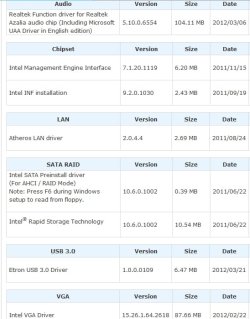
Have you installed the drivers, especially Chip set, from the Gigabyte web site: Gig H61M-USB3-B3

Gig H61M-USB3-B3 drivers.jpg
 

My Computer My Computer

Computer type
PC/Desktop
Computer Manufacturer/Model Number
Lenovo IdeaCenter 450
OS
Windows 10 Pro X64
CPU
Intel Quad Core i7-4770 @ 3.4Ghz
Memory
16.0GB PC3-12800 DDR3 SDRAM 1600 MHz
Graphics Card(s)
Intel Integrated HD Graphics
Sound Card
Realtek HD Audio
Monitor(s) Displays
HP 22" LCD
Screen Resolution
1680 x 1050
Hard Drives
250GB Samsung EVO SATA-3 SSD
2TB Seagate ST2000DM001 SATA-2
1.5TB Seagate ST3150041AS SATA
Keyboard
Dell USB
Mouse
Lenovo USB
Internet Speed
Cable via Road Runner 3MB Upload, 30MB Download
Antivirus
Windows Defender, MBAM Pro, MBAE
Browser
Seamonkey
Other Info
UEFI/GPT
PLDS DVD-RW DH16AERSH
What is the make and model number of the computer? As mentioned before, are the latest available drivers installed?
Are you current with Windows Updates?

Also, XP Mode does not require Virtualization support in BIOS, so try disabling it and see if that makes a difference.
 

My Computer My Computer

Computer type
PC/Desktop
Computer Manufacturer/Model Number
Lenovo IdeaCenter 450
OS
Windows 10 Pro X64
CPU
Intel Quad Core i7-4770 @ 3.4Ghz
Memory
16.0GB PC3-12800 DDR3 SDRAM 1600 MHz
Graphics Card(s)
Intel Integrated HD Graphics
Sound Card
Realtek HD Audio
Monitor(s) Displays
HP 22" LCD
Screen Resolution
1680 x 1050
Hard Drives
250GB Samsung EVO SATA-3 SSD
2TB Seagate ST2000DM001 SATA-2
1.5TB Seagate ST3150041AS SATA
Keyboard
Dell USB
Mouse
Lenovo USB
Internet Speed
Cable via Road Runner 3MB Upload, 30MB Download
Antivirus
Windows Defender, MBAM Pro, MBAE
Browser
Seamonkey
Other Info
UEFI/GPT
PLDS DVD-RW DH16AERSH
Back
Top