win 7 default Picture Viewer

unlockteam

New member
Member
Local time
12:04 AM
Messages
61
hey can anyone tell me how to set win7 default Windows Picture Viewer to open *gif files please i have tryed looking around for it but no luck hope someone can help as i use nero to open the rest but it don't animate so hope someone can help cheers
 

My Computer

Computer Manufacturer/Model Number
custom build
OS
windows 7 32BIT SP1
CPU
intel pentuim d 3.00ghz @ 3.50ghz
Motherboard
gigabyte p43
Memory
8gb ddr2 800mhz
Graphics Card(s)
ati hd pro 1gb
Monitor(s) Displays
42" lg full hd led tv
Screen Resolution
1920x1080p
Hard Drives
300gd 10000rpm WD main drive and 3x 2tb storage drives
PSU
750w
Case
custom build with windows in orange and black
Cooling
air cooled
Internet Speed
8mb down and 1.1 up
I have same problem, when I try to open .gif it opens in Paint.. :(
 

My Computer

Computer type
Laptop
Computer Manufacturer/Model Number
Lenovo IdeaPad Y580
OS
Windows 7 Professional x64
CPU
Intel Core i5 3210 Ivy Bridge
Memory
8GB
Graphics Card(s)
NVIDIA GeForce GTX660M 2GB
Screen Resolution
15.6 "LED 1920x1080

My Computer

Computer Manufacturer/Model Number
custom build
OS
windows 7 32BIT SP1
CPU
intel pentuim d 3.00ghz @ 3.50ghz
Motherboard
gigabyte p43
Memory
8gb ddr2 800mhz
Graphics Card(s)
ati hd pro 1gb
Monitor(s) Displays
42" lg full hd led tv
Screen Resolution
1920x1080p
Hard Drives
300gd 10000rpm WD main drive and 3x 2tb storage drives
PSU
750w
Case
custom build with windows in orange and black
Cooling
air cooled
Internet Speed
8mb down and 1.1 up
Control Panel > Default Programs > Set Default Programs > Associate a file type or protocol with a program
and scroll down to .gif and double click the entry and select the program you wish to use.
 
Last edited:

My Computer

Computer Manufacturer/Model Number
Home Built
OS
Windows 7 x64
CPU
Intel Core 2 Quad Q6700 @ 3.2 GHz
Motherboard
Gigabyte GA-965P-DQ6
Memory
4 Gig
Graphics Card(s)
ATI Radeon HD 4870
Sound Card
Creative X-Fi XtremeMusic
Monitor(s) Displays
Samsung SyncMaster 226BW
Screen Resolution
1680 x 1050
PSU
Antec TruePower TP-550
Case
Antec P180
Cooling
Zalman CNPS9700, 3 Antec TriCool 120mm
Keyboard
Logitech G15
Control Panel > Default Programs > Set Default Programs > Associate a file type or protocol with a program
and scroll down to .gif and double click the entry and select the program you wish to use.
thanks but windows pic viewer is not ther is ther anyother way to do it ?
 

My Computer

Computer Manufacturer/Model Number
custom build
OS
windows 7 32BIT SP1
CPU
intel pentuim d 3.00ghz @ 3.50ghz
Motherboard
gigabyte p43
Memory
8gb ddr2 800mhz
Graphics Card(s)
ati hd pro 1gb
Monitor(s) Displays
42" lg full hd led tv
Screen Resolution
1920x1080p
Hard Drives
300gd 10000rpm WD main drive and 3x 2tb storage drives
PSU
750w
Case
custom build with windows in orange and black
Cooling
air cooled
Internet Speed
8mb down and 1.1 up
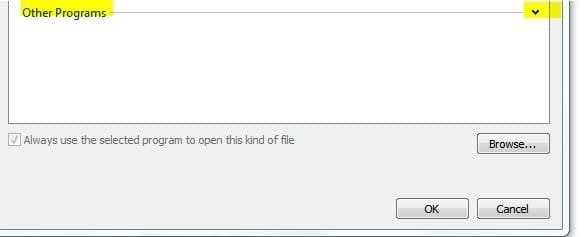
Scroll down and expand the other Program field. See it there?
 

Attachments

  • gif.JPG
    gif.JPG
    15.2 KB · Views: 73

My Computer

Computer Manufacturer/Model Number
Home Built
OS
Windows 7 x64
CPU
Intel Core 2 Quad Q6700 @ 3.2 GHz
Motherboard
Gigabyte GA-965P-DQ6
Memory
4 Gig
Graphics Card(s)
ATI Radeon HD 4870
Sound Card
Creative X-Fi XtremeMusic
Monitor(s) Displays
Samsung SyncMaster 226BW
Screen Resolution
1680 x 1050
PSU
Antec TruePower TP-550
Case
Antec P180
Cooling
Zalman CNPS9700, 3 Antec TriCool 120mm
Keyboard
Logitech G15
Back
Top