
Win 7 Does not DETECT a working Net connection!!!

Monty521

New member
Local time
11:00 PM
Messages
2
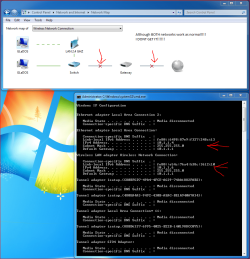
I have done a Upgrade install to freshen up my OS but before that my network was not working properly, even though RIGHT NOW i am able to connect to the internet
check the attached images for some Explanation, ALL the networks WORK, just windows doesn't detect the right, OMG PLEASE HELP, im so desperate to find a solution......
 

Attachments
  • Capture.PNG
    Capture.PNG
    105.2 KB · Views: 34
  • Cap 2.png
    Cap 2.png
    13 KB · Views: 9

My Computer

Computer Manufacturer/Model Number
ASUS, GIGABYTE, SAMSUNG, PIONEER, GW, COOLERMASTER, NZXT
OS
Win 7 x64
CPU
intel i7 950 3.06 GHZ @ 4237MHZ
Motherboard
GIGABYTE X58A-UD5 (rev 2.0)
Memory
6 GB Patriot Sector 7 RAM 3x2GB @1600 MHZ
Graphics Card(s)
GIGABYTE GTX 460 Super OC Dual SLI @ 915 MHZ
Sound Card
Nvidia Onboard GPU Sound to Logitech Z-5500 5.1
Monitor(s) Displays
SynchMaster BX2240 (main), LG-42LB9DF-AD (secondary)
Screen Resolution
Both 1920 X 1080 - 1080p
Hard Drives
2x Western Digital 1.0TB Caviar
PSU
GW-760SEL (760 Watt)
Case
Cooler Master Storm Scout
Cooling
CM V6GT CPU Cooler, NZXT Sentry 2 5 fan controller + 3 fans
Keyboard
Logitech G19
Mouse
Logitech G500 custom Weighted Mouse
Internet Speed
ADSL2+ @ 5.5 MB/S
It's difficult for something as simple as how the W7 maps networks for it to be 100% accurate. The fact it works should be good enough.

And do you have something else that manages your wireless, like software from either your ISP or the wireless router manufacturer? That'd easily explain why Windows is confused on the second one.
 

My Computer

Computer Manufacturer/Model Number
HP 6000 Pro Micro Tower
OS
W7 Professional x64
CPU
Core 2 Duo 2.93
Memory
2 GB
Graphics Card(s)
ATI Radeon 4695
Monitor(s) Displays
Two HP 17's
Hard Drives
150GB Sata Drive
Case
Tiny. Kinda cute.
Keyboard
HP Supplied. Surprisingly nice.
Mouse
Gateway Mouse from an E2610D
Internet Speed
45 mbps
no we dont have isp software or hardware (modems/routers) all custom hardware, no SOFTWARE for network connections, windows just doesnt detect it, and some games dont work properly wont DL data
 

My Computer

Computer Manufacturer/Model Number
ASUS, GIGABYTE, SAMSUNG, PIONEER, GW, COOLERMASTER, NZXT
OS
Win 7 x64
CPU
intel i7 950 3.06 GHZ @ 4237MHZ
Motherboard
GIGABYTE X58A-UD5 (rev 2.0)
Memory
6 GB Patriot Sector 7 RAM 3x2GB @1600 MHZ
Graphics Card(s)
GIGABYTE GTX 460 Super OC Dual SLI @ 915 MHZ
Sound Card
Nvidia Onboard GPU Sound to Logitech Z-5500 5.1
Monitor(s) Displays
SynchMaster BX2240 (main), LG-42LB9DF-AD (secondary)
Screen Resolution
Both 1920 X 1080 - 1080p
Hard Drives
2x Western Digital 1.0TB Caviar
PSU
GW-760SEL (760 Watt)
Case
Cooler Master Storm Scout
Cooling
CM V6GT CPU Cooler, NZXT Sentry 2 5 fan controller + 3 fans
Keyboard
Logitech G19
Mouse
Logitech G500 custom Weighted Mouse
Internet Speed
ADSL2+ @ 5.5 MB/S
Hi Monty521,

Lets start off with a Power Cycle.
eHow | How to Videos, Articles & More - Trusted Advice for the Curious Life | eHow.com

Test your connection after and if you can't still connect, pls remove your network security from the router, then see if you can connect. You may try a WEP security is you're still having an issue.

Pls. provide another ipconfig /all in a text file:
Click on Start => in run or search box type cmd, run as Admin press enter. Open up a command prompt then Copy and Paste these ipconfig /all >c:\ipconfig.txt . Please attach the .txt file to be found in your Local Disk 'C' on your next post.

An update will be nice.
 

My Computer

Computer Manufacturer/Model Number
Lenovo Desktop/Samsung Laptop
OS
Win7 & Win8 64bit
CPU
Intel i5
Internet Speed
Charter-20 Mbps
Antivirus
Avast
Browser
FF, IE9 and Chrome
Back
Top