Win 7 Explorer Not Show Network Drive

marklang

New member
Local time
5:34 AM
Messages
12
I am having a weird problem with networking in Windows 7 x64. I have a router based network that has my Internet connection, a Synology NAS device, a Thecus NAS device, and a Lexmark networked printer along with my computers. All of these devices except the computers stay on all the time (on UPS power). Normally, when I boot up my Win 7 computer, open Windows Explorer from the permanent icon, and select to expand the Network, I see all the devices by name. However, my computer was away for a week getting repaired, and when I booted up after its return Explorer only showed the computer and the Synology NAS (named DS211J). I tried rebooting, but the same thing happened. In particular, the Thecus device (named n7700pro) is no where to be found. After some trials, I discovered that, if I type the exact name of the Thecus NAS (\\n7700pro) in the top bar of Explorer, I get a logon screen, and the device now shows up under Network and its folders are showing in Explorer. However, this does not last. If I move around and do other things, when I come back to Explorer the n7700pro device is missing again until i manually enter it into the top bar. The only difference to my knowledge is that the Thecus has a fixed IP address and the Synology uses DNS from the router for its address. However, before I sent the computer away, they both showed up every time I login. I am at a loss for what to do. By the way, I have no problem finding the Lexmark networked printer. The Thecus does have Samba/CIFS service enabled.

Interestingly, when I go back to my old Win XP computer (I have been using it while the new one was being repaired), that version of Explorer has an option to show the entire network. I can then select Windows networking and it shows two domains (WORKGROUP - most devices and MYGROUP - N7700pro). Under those domains it shows the NAS drives, and I can access them there. With the Win7 Explorer, however, that option is not available. Explorer presumably automates the discovery of devices and shows all that it found. But when it does not find something, I cannot determine any way to manually show the network as with WIN XP.

I searched on this issue, and found some networking threads, but not this one. Some of the threads I found suggest changing administrative settings for local authentication (mine is undefined), but I don't want to do that unless I am absolutely sure it is the issue because it cannot be reversed. Any advice will be appreciated. Thanks.
 

My Computer

Computer Manufacturer/Model Number
Asus G51Jx Laptop
OS
Windows 7 Ultimate 64 bit
CPU
Intel Core i7 720QM
Motherboard
NA
Memory
8 GB
Graphics Card(s)
Nvidia Geforce 360M
Sound Card
Realtek chip
Hard Drives
500 GB 7200 SATA
Hi Mark,

I suspect the problem might be related to the credentials for automatic logon - I had a similar issue with my Thecus N2200.

What exactly was repaired on the computer? Are you logging onto your PC with the same name and password?

Regards,
Golden
 

My Computer

Computer type
PC/Desktop
Computer Manufacturer/Model Number
Golden Mk. I.4
OS
Windows 10 Pro x64 ; Xubuntu x64
CPU
Intel i7 860 @ 2.80 GHz O/C'ed to 4.0GHz
Motherboard
Gigabyte P55A-UD3R Rev.1. Award BIOS F13
Memory
16GB Corsair Vengance DDR3 @ 661 MHz Dual Channel (9-9-9-24)
Graphics Card(s)
EVGA NVidia GTX 560 1024MB
Sound Card
Realtek Integrated
Monitor(s) Displays
Dual Samsung SyncMaster 2494HS
Screen Resolution
1920*1080 and 1920*1080
Hard Drives
1*Samsung 840 EVO 120GB SSD;
1*OCZ Vertex 2 60GB SSD;
2*Samsung F3 SpinPoint 1TB in RAID0;
1*Samsung F1 SpinPoint 1TB;
2*Western Digital 1TB External USB 3.0
1*Western Digital 500GB External USB 3.0
1*Seagate 500GB External USB 2.0
PSU
Thermaltake ToughPower QFan 750W
Case
Thermaltake Element S VK60001W2Z
Cooling
Corsair H60 Water Cooling, 2*230mm and 2*80mm case fans
Keyboard
Logitech G110
Mouse
Logitech MX518
The computer was experiencing abnormal shutdowns apparently related to the video GPU. I was told all they did was repaste the heat transfer elements on the CPU and GPU, and then they could not make it fail. As far as I know, there were no software changes of any kind. I have no admin password set in Windows, so that is not different. When I manually enter the Thecus device name in Explorer, it immediately asks me to log on, and I use the same account name and password I have always used. Before, it would show the Thecus under Network even before I logged on. It just would ask me to log on if I tried to expand the folders.
 

My Computer

Computer Manufacturer/Model Number
Asus G51Jx Laptop
OS
Windows 7 Ultimate 64 bit
CPU
Intel Core i7 720QM
Motherboard
NA
Memory
8 GB
Graphics Card(s)
Nvidia Geforce 360M
Sound Card
Realtek chip
Hard Drives
500 GB 7200 SATA
Hi Mark,

The fact that you can connect to the NAS from Windows Explorer but not automatically at login suggests the credentials have gone haywire.

Can you try the following?

1. Click Start Orb, and in the search box type credentials
2. From the list, select Manage Windows Credentials

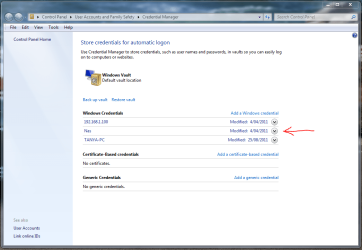
You should see a panel similar to the one shown below. Is your NAS listed on this panel?

Capture1.PNG

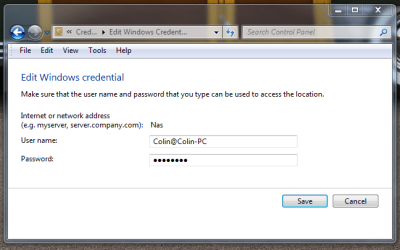
If it is, click the arrow to expand the NAS details. Click the Edit button, and you should see this panel:

Capture2.PNG

Ensure that the User name is shown as:

User@ComputerName

The password is the password of your NAS user, not your Windows logon password.

Can you confirm this is the case? If so, you can try deleting that credential and re-creating it again, then reboot the PC.

How did you originally map this NAS/drive in Windows Explorer? Which credentials did you use?

Regards,
Golden
 

My Computer

Computer type
PC/Desktop
Computer Manufacturer/Model Number
Golden Mk. I.4
OS
Windows 10 Pro x64 ; Xubuntu x64
CPU
Intel i7 860 @ 2.80 GHz O/C'ed to 4.0GHz
Motherboard
Gigabyte P55A-UD3R Rev.1. Award BIOS F13
Memory
16GB Corsair Vengance DDR3 @ 661 MHz Dual Channel (9-9-9-24)
Graphics Card(s)
EVGA NVidia GTX 560 1024MB
Sound Card
Realtek Integrated
Monitor(s) Displays
Dual Samsung SyncMaster 2494HS
Screen Resolution
1920*1080 and 1920*1080
Hard Drives
1*Samsung 840 EVO 120GB SSD;
1*OCZ Vertex 2 60GB SSD;
2*Samsung F3 SpinPoint 1TB in RAID0;
1*Samsung F1 SpinPoint 1TB;
2*Western Digital 1TB External USB 3.0
1*Western Digital 500GB External USB 3.0
1*Seagate 500GB External USB 2.0
PSU
Thermaltake ToughPower QFan 750W
Case
Thermaltake Element S VK60001W2Z
Cooling
Corsair H60 Water Cooling, 2*230mm and 2*80mm case fans
Keyboard
Logitech G110
Mouse
Logitech MX518
Thanks. That is a good idea. Actually, the computer started acting up again today, so I had to RMA it back to the manufacturer. Seems to have an intermittent hardware problem. I will try what you say when I get it back. I do not have that NAS drive mapped. Up to now, when I logged into Windows 7, and expanded Network in Explorer, it would show the Thecus and the Synology just as the device names. However, they were not logged on, and they did not show up with a drive letter as would a mapped device--just under Network. The first time I tried to expand the device to see the folders I would get a login screen. So Windows seemed to detect the presence and let me know even before authentication. However, there could still be some kind of authentication error. I will check that out. Thanks.
 

My Computer

Computer Manufacturer/Model Number
Asus G51Jx Laptop
OS
Windows 7 Ultimate 64 bit
CPU
Intel Core i7 720QM
Motherboard
NA
Memory
8 GB
Graphics Card(s)
Nvidia Geforce 360M
Sound Card
Realtek chip
Hard Drives
500 GB 7200 SATA
No worries - post back here when you get it back.
 

My Computer

Computer type
PC/Desktop
Computer Manufacturer/Model Number
Golden Mk. I.4
OS
Windows 10 Pro x64 ; Xubuntu x64
CPU
Intel i7 860 @ 2.80 GHz O/C'ed to 4.0GHz
Motherboard
Gigabyte P55A-UD3R Rev.1. Award BIOS F13
Memory
16GB Corsair Vengance DDR3 @ 661 MHz Dual Channel (9-9-9-24)
Graphics Card(s)
EVGA NVidia GTX 560 1024MB
Sound Card
Realtek Integrated
Monitor(s) Displays
Dual Samsung SyncMaster 2494HS
Screen Resolution
1920*1080 and 1920*1080
Hard Drives
1*Samsung 840 EVO 120GB SSD;
1*OCZ Vertex 2 60GB SSD;
2*Samsung F3 SpinPoint 1TB in RAID0;
1*Samsung F1 SpinPoint 1TB;
2*Western Digital 1TB External USB 3.0
1*Western Digital 500GB External USB 3.0
1*Seagate 500GB External USB 2.0
PSU
Thermaltake ToughPower QFan 750W
Case
Thermaltake Element S VK60001W2Z
Cooling
Corsair H60 Water Cooling, 2*230mm and 2*80mm case fans
Keyboard
Logitech G110
Mouse
Logitech MX518
I am now working with a new Windows 7 computer. As before, I cannot normally see any other devices on my network under Windows Explorer. At this point, I have reset my router and loaded the latest firmware (Dlink Dir-825), and I have made sure all devices on the network identify with Workgroup. However, when I logon and select to expand the network in Explorer, nothing is discovered. If I type the name of my NAS, for example \\n7700PRO in the search bar at the top of Explorer, it finds that NAS and gives me a logon screen immediately. However, the N770PRO still does not appear under Network. It stays in Explorer only until I navigate somewhere else. When I try mapping the network, no devices except my router and computer are indicated. (By the way, when the discovery starts working for no known reason, the map shows the other devices, but only as icons along the bottom saying it cannot place them in the map) I checked the credentials. There are no windows credentials set. I went into advanced option for Network and Sharing, and turned on discovery for all types of networks. I also set to allow 56 bit encryption, and I disabled Home Networks by saying to always use passwords with Home Networks. Finally, I went under Admin Tools, Services, and made sure that SSDP Discovery, TCP/IP NetBIOS Helper, Computer Browser, and Server are all automatic and started (all were started, but some were manual). If I use the network drives for a while (by manually entering their names), from time to time Explorer starts showing all the devices on the network (N7700PRO NAS, DS211J NAS, and two computers. It will continue to work through reboots. However, this goes away after a while or when I restart the next morning. As a final test, I downloaded the program Network Magic from Pure Networks/Cisco. When I run a map with this program, Network Magic seems to find my two networked printers, one of the NAS devices as an unknown device (nothing known about it, not even the name), and the other NSA as another printer. This all suggests to me that perhaps there is another service I am missing that is not turned on which helps to discover intelligent device like computers and NAS devices on a network. When that service gets started, it can keep track of the found devices until the service goes away. Alternately, perhaps Windows 7 cannot discover these names and types of devices by doing a general broadcast or scan of the network, and Explorer ignores any IP addresses it cannot determine that are not recognized as capable of file sharing. My trying to manually access (or use backup programs) somehow 'registers" the device names, and Windows looks for those names when it boots up for a at least a while. I hope someone can help me. I have had the Thecus N7700PRO and both computers since last May 2010. I don't recall issues finding these NAS drives until recently. The only change is that my 3 year old Iomega network drive died, and I replaced it with the DS211J unit. However, I don't want to say that his is related to the DS211J. I tired my network wiith that NAS powered off, and it did not change any of the symptoms. This is very frustrating. I nope someone has dome idea. thanks.
 

My Computer

Computer Manufacturer/Model Number
Asus G51Jx Laptop
OS
Windows 7 Ultimate 64 bit
CPU
Intel Core i7 720QM
Motherboard
NA
Memory
8 GB
Graphics Card(s)
Nvidia Geforce 360M
Sound Card
Realtek chip
Hard Drives
500 GB 7200 SATA

My Computer

Computer type
PC/Desktop
Computer Manufacturer/Model Number
Golden Mk. I.4
OS
Windows 10 Pro x64 ; Xubuntu x64
CPU
Intel i7 860 @ 2.80 GHz O/C'ed to 4.0GHz
Motherboard
Gigabyte P55A-UD3R Rev.1. Award BIOS F13
Memory
16GB Corsair Vengance DDR3 @ 661 MHz Dual Channel (9-9-9-24)
Graphics Card(s)
EVGA NVidia GTX 560 1024MB
Sound Card
Realtek Integrated
Monitor(s) Displays
Dual Samsung SyncMaster 2494HS
Screen Resolution
1920*1080 and 1920*1080
Hard Drives
1*Samsung 840 EVO 120GB SSD;
1*OCZ Vertex 2 60GB SSD;
2*Samsung F3 SpinPoint 1TB in RAID0;
1*Samsung F1 SpinPoint 1TB;
2*Western Digital 1TB External USB 3.0
1*Western Digital 500GB External USB 3.0
1*Seagate 500GB External USB 2.0
PSU
Thermaltake ToughPower QFan 750W
Case
Thermaltake Element S VK60001W2Z
Cooling
Corsair H60 Water Cooling, 2*230mm and 2*80mm case fans
Keyboard
Logitech G110
Mouse
Logitech MX518
Golden,
Thanks. That is the most direct and informative information I have seen. It shows why my Thecus and Synology devices do not show up on the network map. However, your example of the Linux computer suggests that a device can be discoverable, just not mapped properly. My Thecus and Synology devices do not normally show up on the map at all -- even at the bottom. It is as though they did not exist or where hidden until I address them specifically by name or IP address. As I noted, sometimes after I use one of them for a while after manually accessing them, they all start to show up (still at the bottom of the map). So there must be some sort of discovery besides LLTD that allows Win 7 to see a device but perhaps not get further detail on it. That should be fine for me because if it shows up under Network, I can click on it to log on. Did I get this wrong? Do you have any idea why the Thecus and Synology do not seem to be discoverable at all?

Not as good, but is there a work around? Perhaps defining the NAS drives to Windows so it will look for them whenever it encounters that network? I know that I used to see them under Networks, so I must have done something earlier perhaps by the installation assist programs provided to first install and configure each NAS device.

Thanks.
 

My Computer

Computer Manufacturer/Model Number
Asus G51Jx Laptop
OS
Windows 7 Ultimate 64 bit
CPU
Intel Core i7 720QM
Motherboard
NA
Memory
8 GB
Graphics Card(s)
Nvidia Geforce 360M
Sound Card
Realtek chip
Hard Drives
500 GB 7200 SATA
However, your example of the Linux computer suggests that a device can be discoverable, just not mapped properly. My Thecus and Synology devices do not normally show up on the map at all -- even at the bottom.

Yes, you are 100% correct - they can be discoverable despite not being LLTD compliant.

In fact, on my laptop running Windows 7 Home Premium x86 my Thecus shows at the bottom, yet on my desktop running Windows 7 Ultimate x64 it doesn't show at all - yet is used too! I don't worry about it too much since the drives are mapped as network drives....but still I don't know what changed.

I'll do some more digging and post back if I find something....I have a feeling its a setting in the NAS, but I need to check.

Check this out for more information on Network Discovery:

http://www.sevenforums.com/tutorials/185237-network-discovery-turn-off-windows-7-a.html

Regards,
Golden
 

My Computer

Computer type
PC/Desktop
Computer Manufacturer/Model Number
Golden Mk. I.4
OS
Windows 10 Pro x64 ; Xubuntu x64
CPU
Intel i7 860 @ 2.80 GHz O/C'ed to 4.0GHz
Motherboard
Gigabyte P55A-UD3R Rev.1. Award BIOS F13
Memory
16GB Corsair Vengance DDR3 @ 661 MHz Dual Channel (9-9-9-24)
Graphics Card(s)
EVGA NVidia GTX 560 1024MB
Sound Card
Realtek Integrated
Monitor(s) Displays
Dual Samsung SyncMaster 2494HS
Screen Resolution
1920*1080 and 1920*1080
Hard Drives
1*Samsung 840 EVO 120GB SSD;
1*OCZ Vertex 2 60GB SSD;
2*Samsung F3 SpinPoint 1TB in RAID0;
1*Samsung F1 SpinPoint 1TB;
2*Western Digital 1TB External USB 3.0
1*Western Digital 500GB External USB 3.0
1*Seagate 500GB External USB 2.0
PSU
Thermaltake ToughPower QFan 750W
Case
Thermaltake Element S VK60001W2Z
Cooling
Corsair H60 Water Cooling, 2*230mm and 2*80mm case fans
Keyboard
Logitech G110
Mouse
Logitech MX518
Mark, I had a bit of a win. I went and played around in the Thecus Utility, and when I turned on uPnP, my NAS appeared in the Network Map and also in Network in Windows Explorer. Not sure if this helps or not.
 

Attachments

  • Capture.JPG
    Capture.JPG
    89.9 KB · Views: 246
Last edited:

My Computer

Computer type
PC/Desktop
Computer Manufacturer/Model Number
Golden Mk. I.4
OS
Windows 10 Pro x64 ; Xubuntu x64
CPU
Intel i7 860 @ 2.80 GHz O/C'ed to 4.0GHz
Motherboard
Gigabyte P55A-UD3R Rev.1. Award BIOS F13
Memory
16GB Corsair Vengance DDR3 @ 661 MHz Dual Channel (9-9-9-24)
Graphics Card(s)
EVGA NVidia GTX 560 1024MB
Sound Card
Realtek Integrated
Monitor(s) Displays
Dual Samsung SyncMaster 2494HS
Screen Resolution
1920*1080 and 1920*1080
Hard Drives
1*Samsung 840 EVO 120GB SSD;
1*OCZ Vertex 2 60GB SSD;
2*Samsung F3 SpinPoint 1TB in RAID0;
1*Samsung F1 SpinPoint 1TB;
2*Western Digital 1TB External USB 3.0
1*Western Digital 500GB External USB 3.0
1*Seagate 500GB External USB 2.0
PSU
Thermaltake ToughPower QFan 750W
Case
Thermaltake Element S VK60001W2Z
Cooling
Corsair H60 Water Cooling, 2*230mm and 2*80mm case fans
Keyboard
Logitech G110
Mouse
Logitech MX518
Great idea. I was not sure if uPnP affects things like network drives. I also engaged uPnP on the Thecus. However, it did not make any difference for me. I still don't see the Thecus in the network map anywhere or in Windows Explorer. I am still running an older firmware 3.04, waiting to get some things stabilized before I upgrade. Maybe that has some affect. Or maybe your router handles things differently somehow. Still trying to figure this out.
 

My Computer

Computer Manufacturer/Model Number
Asus G51Jx Laptop
OS
Windows 7 Ultimate 64 bit
CPU
Intel Core i7 720QM
Motherboard
NA
Memory
8 GB
Graphics Card(s)
Nvidia Geforce 360M
Sound Card
Realtek chip
Hard Drives
500 GB 7200 SATA
After checking all my network carefully, and even upgrading my router to a Cisco small business series, I still have the problem -- but I have the symptoms more defined. Basically, when the Win 7 computer initially scans the network, it finds only my computer (and that because I set its broadcast service to be automatic). So I expand the network in Windows Explorer, and I see only this computer. However, I typed an invalid name into the search bar, and all of a sudden both of my NAS drives appeared under Network in Explorer. This strongly suggests to me that whatever network scanning service or protocol Win 7 uses by default does not find these devices on my unmanaged office network. However, when Explorer is asked to locate a device by name, it apparently starts an additional service or protocol that finds the devices. Perhaps Win 7 only uses the LLTD discovery protocol by default,and my NAS drives do not support that. But it engages some additional protocol or service when searching for a specific device that LLTD does not discover. If I could just understand what Win 7 does differently when searching for a specific named device, I could try to enable it all the time. Anyone have any ideas? Thanks.
 

My Computer

Computer Manufacturer/Model Number
Asus G51Jx Laptop
OS
Windows 7 Ultimate 64 bit
CPU
Intel Core i7 720QM
Motherboard
NA
Memory
8 GB
Graphics Card(s)
Nvidia Geforce 360M
Sound Card
Realtek chip
Hard Drives
500 GB 7200 SATA
Which of your devices is serving as your Master Browser? Maybe there is competition somewhere. At least, I had problems on my network til I relegated the task to a single 24/7 NAS device.
 

My Computer

Computer type
Laptop
Computer Manufacturer/Model Number
Dell Latitude E6540 Laptop
OS
Windows 7 Professional 64bit
CPU
Intel Core i7 4600M @ 2.90GHz
Motherboard
Dell Inc. 0CYT5F (SOCKET 0)
Memory
16.0GB Dual-Channel DDR3 @ 797MHz (11-11-11-28)
Graphics Card(s)
Intel HD Graphics 4600 (Dell) 2048MB ATI AMD Radeon HD 8790M
Sound Card
Realtek High Definition Audio
Monitor(s) Displays
HP ZR30w (2560x1600@60Hz)
Hard Drives
256GB LITEONIT LMT-256M6M-41 mm SATA (SSD)
1TB Samsung SSD 860 EVO mSATA SATA (SSD)
2TB USB 3.0 USB Device
115GB SanDisk Ultra Fit USB
Other Info
Multiple Dell E-Port Plus II Port Replicator/Docking Stations 0Y72NH USB 3.0 + 130W AC Adapters
I am not sure what you mean by master browser. As far as I know, there are no devices in control of my network which just consists of up to four computers, 2 NAS drives, and two networked printers behind a Cisco router.
 

My Computer

Computer Manufacturer/Model Number
Asus G51Jx Laptop
OS
Windows 7 Ultimate 64 bit
CPU
Intel Core i7 720QM
Motherboard
NA
Memory
8 GB
Graphics Card(s)
Nvidia Geforce 360M
Sound Card
Realtek chip
Hard Drives
500 GB 7200 SATA
I have more information on this issue, but no resolution. After some research, I found that the NAS drives do not respond to LLTD discovery as preferred by Windows 7. So that means discovery must be by the old way of NetBIOS. Apparently, since I turn my computer off each night, but leave the NAS drives and other network components running, the Thecus establishes itself as the "master browser" or index for NetBIOS response. This can be verified with the nbtstat command. However, since the Thecus is a Linux system, it does not respond as Win 7 expects. It seems that Win 7 sees the master browser, asks for network devices, but does not get the proper response. If I reboot the Thecus with the computer on, or start the computer with the Thecus off, then the Win 7 computer takes over as master browser and finds all the drives with no issues. The problem is I have found no way to get the Thecus to not take the master browser role when it is left on the network.

This is much more about networking than I care to understand. If anyone has any suggestions for how to deal with this problem, please share them. Thecus said the N7700PRO should not be the master browser on a Windows network because it is Linux based. However, they had no suggestions how to prevent this. They suggested mapping both NAS drives so Windows will attempt to connect them at bootup, which I prefer not to do.

Thanks.
 

My Computer

Computer Manufacturer/Model Number
Asus G51Jx Laptop
OS
Windows 7 Ultimate 64 bit
CPU
Intel Core i7 720QM
Motherboard
NA
Memory
8 GB
Graphics Card(s)
Nvidia Geforce 360M
Sound Card
Realtek chip
Hard Drives
500 GB 7200 SATA
This is much more about networking than I care to understand. If anyone has any suggestions for how to deal with this problem, please share them. Thecus said the N7700PRO should not be the master browser on a Windows network because it is Linux based. However, they had no suggestions how to prevent this. They suggested mapping both NAS drives so Windows will attempt to connect them at bootup, which I prefer not to do.
Sorry, Mark, I'm in over-my-head too with this one. All I can tell you is that I have a rather ancient Linux-based NAS serviing as my Master Browser, and the "Computer Browser" service turned-off in all my PCs (both W7 and XP) and everything sees everything else in "My Network", though no, W7's "Network Map" feature does not work. But I can share folders from any computer to any other computer, and print to network printers no problem.

This NAS I'm speaking of runs Linux 2.4 on some PPC called a Motorola PMC8241 and I'm surprised that it works so well, but it does...
 

My Computer

Computer type
Laptop
Computer Manufacturer/Model Number
Dell Latitude E6540 Laptop
OS
Windows 7 Professional 64bit
CPU
Intel Core i7 4600M @ 2.90GHz
Motherboard
Dell Inc. 0CYT5F (SOCKET 0)
Memory
16.0GB Dual-Channel DDR3 @ 797MHz (11-11-11-28)
Graphics Card(s)
Intel HD Graphics 4600 (Dell) 2048MB ATI AMD Radeon HD 8790M
Sound Card
Realtek High Definition Audio
Monitor(s) Displays
HP ZR30w (2560x1600@60Hz)
Hard Drives
256GB LITEONIT LMT-256M6M-41 mm SATA (SSD)
1TB Samsung SSD 860 EVO mSATA SATA (SSD)
2TB USB 3.0 USB Device
115GB SanDisk Ultra Fit USB
Other Info
Multiple Dell E-Port Plus II Port Replicator/Docking Stations 0Y72NH USB 3.0 + 130W AC Adapters
They suggested mapping both NAS drives so Windows will attempt to connect them at bootup, which I prefer not to do.

Thats how I set mine up - mapped the drives via Windows. Perhaps thats why I don't thave the same issue with my Thecus?

Looks like you might be stuck with that as the only solution, for now at least.

Regards,
Golden
 

My Computer

Computer type
PC/Desktop
Computer Manufacturer/Model Number
Golden Mk. I.4
OS
Windows 10 Pro x64 ; Xubuntu x64
CPU
Intel i7 860 @ 2.80 GHz O/C'ed to 4.0GHz
Motherboard
Gigabyte P55A-UD3R Rev.1. Award BIOS F13
Memory
16GB Corsair Vengance DDR3 @ 661 MHz Dual Channel (9-9-9-24)
Graphics Card(s)
EVGA NVidia GTX 560 1024MB
Sound Card
Realtek Integrated
Monitor(s) Displays
Dual Samsung SyncMaster 2494HS
Screen Resolution
1920*1080 and 1920*1080
Hard Drives
1*Samsung 840 EVO 120GB SSD;
1*OCZ Vertex 2 60GB SSD;
2*Samsung F3 SpinPoint 1TB in RAID0;
1*Samsung F1 SpinPoint 1TB;
2*Western Digital 1TB External USB 3.0
1*Western Digital 500GB External USB 3.0
1*Seagate 500GB External USB 2.0
PSU
Thermaltake ToughPower QFan 750W
Case
Thermaltake Element S VK60001W2Z
Cooling
Corsair H60 Water Cooling, 2*230mm and 2*80mm case fans
Keyboard
Logitech G110
Mouse
Logitech MX518
Thanks for the input. Thecus provides the NAS operating system, which they say is based on Linux but I have no idea what version. There must be something in the way Thecus has implemented their system or the version of Linux they are using that does not work well with Windows 7 in this regard at least. I don't remember having this problem with my earlier Windows XP computer, and I don't remember it either before I added the second NAS drive, a Synology DS211j. There must be something in the way all those devices interact that gets in the way. I guess mapping the drives or searching for them when I need them are the only alternatives.
 

My Computer

Computer Manufacturer/Model Number
Asus G51Jx Laptop
OS
Windows 7 Ultimate 64 bit
CPU
Intel Core i7 720QM
Motherboard
NA
Memory
8 GB
Graphics Card(s)
Nvidia Geforce 360M
Sound Card
Realtek chip
Hard Drives
500 GB 7200 SATA
My limited experience with the "election process" (and I don't even want to pretend that I know how it works) is that it doesn't work very well when, as in a typical home environment, you have computers being turned on & off on an irregular basis. Further, it seems that if one device is the current "master" and a new election is needed, then it can be quite some time before a new master is "agreed upon" and the PCs can see each other again.

So whenever I have a problem of "can't see a PC" I check who is the MB and usually that's the problem i.e. I had to reboot my NAS recently to get this working again. And then the PCs didn't see each other right away either--took many minutes for everything to work again.

In any case that's why I've turned-off Computer Browser service in all PCs and try to leave one as Master 24/7.
 

My Computer

Computer type
Laptop
Computer Manufacturer/Model Number
Dell Latitude E6540 Laptop
OS
Windows 7 Professional 64bit
CPU
Intel Core i7 4600M @ 2.90GHz
Motherboard
Dell Inc. 0CYT5F (SOCKET 0)
Memory
16.0GB Dual-Channel DDR3 @ 797MHz (11-11-11-28)
Graphics Card(s)
Intel HD Graphics 4600 (Dell) 2048MB ATI AMD Radeon HD 8790M
Sound Card
Realtek High Definition Audio
Monitor(s) Displays
HP ZR30w (2560x1600@60Hz)
Hard Drives
256GB LITEONIT LMT-256M6M-41 mm SATA (SSD)
1TB Samsung SSD 860 EVO mSATA SATA (SSD)
2TB USB 3.0 USB Device
115GB SanDisk Ultra Fit USB
Other Info
Multiple Dell E-Port Plus II Port Replicator/Docking Stations 0Y72NH USB 3.0 + 130W AC Adapters
Back
Top